
Introduction
Thank you for choosing the LYNCAST OptiBarrel 500 Mini Projector. This compact and versatile projector is designed to provide an immersive viewing experience with its advanced features, including built-in Android 11, WiFi 6, Bluetooth 5.4, and automatic keystone correction. This manual will guide you through the setup, operation, and maintenance of your new projector.
Package Contents
Please ensure all items are present in your package:
- LYNCAST OptiBarrel 500 Mini Projector
- Power Adapter
- HDMI Cable
- Remote Control
- User Manual
- Cleaning Kit

Image: LYNCAST OptiBarrel 500 Projector and its included accessories.
Product Overview

Image: The LYNCAST OptiBarrel 500 Mini Projector displaying its Android TV interface with streaming apps.
The LYNCAST OptiBarrel 500 features a sleek design with intuitive controls and multiple connectivity options. Familiarize yourself with the projector's components:
- Projection Lens: Located at the front, for displaying images.
- Manual Focus Wheel: Located near the lens, for fine-tuning image clarity.
- 180° Rotatable Stand: Integrated into the base for flexible projection angles.
- Input/Output Ports: Located at the rear, including HDMI, USB, and Audio Out.
- Power Button: To turn the projector on/off.

Image: Rear view of the projector highlighting its various input and output ports.
Setup
1. Power Connection
Connect the provided power adapter to the DC input port on the projector and then plug it into a power outlet. The power indicator light will illuminate.
2. Initial Placement and Rotation
Place the projector on a stable surface. Utilize the 180° rotatable stand to adjust the projection angle to your desired position (e.g., wall, ceiling, floor).
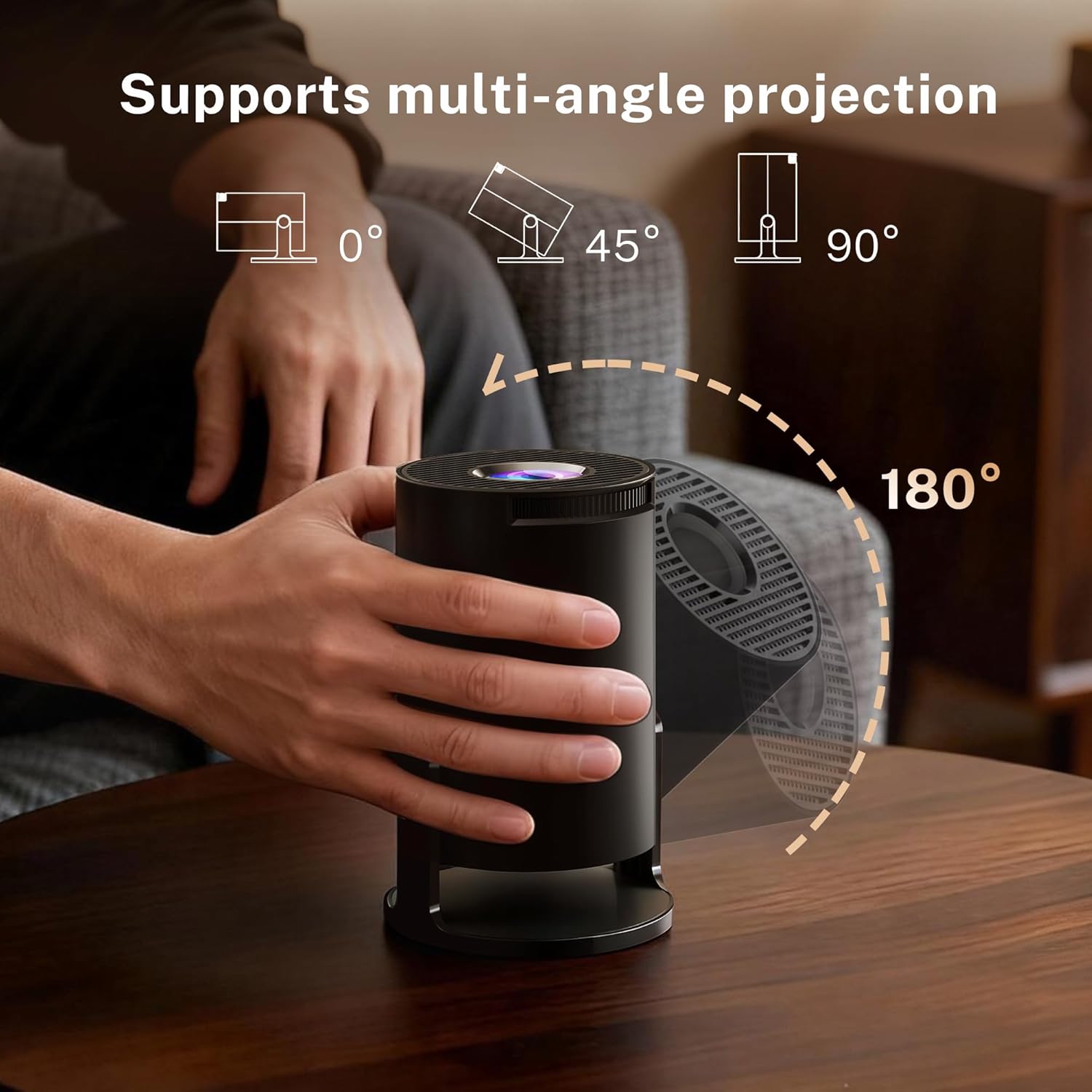
Image: Demonstrating the 180° rotation capability of the projector's stand.
3. Focus Adjustment
Turn the manual focus wheel near the projection lens until the image appears sharp and clear on the screen.
4. Automatic Keystone Correction
The projector features automatic vertical keystone correction. It will automatically adjust the image to be rectangular even if the projector is placed at an angle. For fine adjustments, refer to the 'Projection Settings' in the Operating Instructions section.

Image: Visual representation of the projector's auto vertical keystone correction and manual focus features.
Video: This video demonstrates the projector's power-on sequence, manual focus adjustment, phone linking via WiFi 6/Bluetooth 5.4, and the 180° rotation feature.
Operating Instructions
1. Smart Android 11 System
The projector comes with a built-in Android 11 operating system, allowing direct access to popular streaming applications like YouTube, Prime Video, and Netflix. Navigate the interface using the remote control.
Video: This video showcases the projector's Android 11 interface, demonstrating direct access to Netflix and other applications.
2. Connectivity
- WiFi 6: Connect to your wireless network for high-speed streaming and low-latency performance.
- Bluetooth 5.4: Pair with external Bluetooth speakers or headphones for enhanced audio, or connect your smartphone for screen mirroring.
- HDMI: Connect external devices such as gaming consoles, laptops, or TV boxes.
- USB: Play media files directly from a USB drive.

Image: The projector connected via WiFi 6 for a seamless gaming experience.
3. Screen Mirroring
Mirror content from your smartphone or tablet using the built-in screen mirroring function. Ensure your device and the projector are connected to the same WiFi network for optimal performance.
4. Projection Size and Distance
The projector supports screen sizes from 30 inches to 150 inches. With a 0.8:1 throw ratio, you can achieve a 100-inch screen from approximately 6 feet away. Adjust the zoom function without moving the projector to achieve your desired screen size.

Image: Guide for optimal projection distances and screen sizes.
Maintenance
1. Cleaning
Use the provided cleaning kit to gently clean the projection lens and the exterior of the projector. Avoid using abrasive cleaners or solvents.
2. Eye Protection
The projector is equipped with three optical glass lenses designed to filter harmful blue light, protecting your eyes during extended viewing. While this feature enhances comfort, it is recommended to take breaks during long viewing sessions.
Troubleshooting
- No Power: Ensure the power adapter is securely connected to both the projector and a working power outlet.
- Blurry Image: Adjust the manual focus wheel until the image is clear. If the image is distorted, check the automatic keystone correction settings.
- No Sound: Verify that the volume is not muted on the projector or any connected external audio devices. Check Bluetooth connections if using external speakers.
- Connectivity Issues: For WiFi or Bluetooth, ensure the projector is within range of the network/device and that the correct passwords/pairing steps are followed. For HDMI/USB, ensure cables are securely connected and the correct input source is selected.
- Apps Freezing/Slow Performance: Ensure the projector's software is up to date. Restart the projector if an app becomes unresponsive.
Specifications
| Brand | LYNCAST |
| Model Name | OptiBarrel 500 |
| Item Model Number | X1BQ |
| Display Technology | LCD |
| Native Resolution | 1280 x 720 Pixels |
| Supported Resolution | 1080P, 4K |
| Image Brightness | 2000 lm |
| Image Contrast Ratio | 10000:1 |
| Aspect Ratio | 16:9, 4:3 |
| Connectivity Technology | Bluetooth 5.4, HDMI, USB, Wi-Fi 6 |
| Special Features | Portable Mini Size, Built-In Speakers (5W), Auto Keystone, 180° Rotatable Stand, Android 11 OS, Eye Protection |
| Product Dimensions | 8.4 x 8.4 x 15.6 cm; 361 g |
| Noise Level | 30 Decibels |
Warranty and Support
The LYNCAST OptiBarrel 500 Mini Projector comes with a 1-year warranty. Additionally, a full refund is available within 30 days of purchase for any quality issues. For further assistance or technical support, please contact LYNCAST customer service.


