
1. Introduction
The FIREBAT F1 Mini Gaming PC is a compact and powerful desktop computer designed for a variety of tasks, including gaming, business, education, and entertainment. It features an AMD Ryzen 7640HS processor, integrated Radeon 760M graphics, and versatile connectivity options to support multiple high-resolution displays.

Figure 1: FIREBAT F1 Mini Gaming PC, showcasing its compact design and various ports.
2. Package Contents
Verify that all items are present in the package:
- 1 x FIREBAT F1 AMD 7640HS Mini PC
- 1 x User Manual
- 1 x 19V/6.32A 120W US Power Adapter
- 1 x HDMI Cable
- 1 x VESA Mount

Figure 2: Visual representation of the FIREBAT F1 Mini PC package contents.
3. Setup Instructions
Follow these steps to set up your FIREBAT F1 Mini PC:
- Connect to a Display: Use the provided HDMI cable to connect the Mini PC to your monitor or TV. Alternatively, use a DisplayPort (DP) cable or a USB4 (Type-C) cable for compatible displays.
- Connect Peripherals: Plug in your keyboard and mouse to the available USB-A ports.
- Power Connection: Connect the 19V/6.32A 120W power adapter to the DC port on the Mini PC and then to a power outlet.
- Power On: Press the power button located on the front of the Mini PC.
- Initial Windows Setup: Follow the on-screen instructions to complete the Windows operating system setup. This includes selecting your language, region, and setting up user accounts.
3.1. VESA Mount Installation
The FIREBAT F1 Mini PC can be mounted behind a monitor or on a wall using the included VESA mount for a clutter-free workspace.
- Attach the VESA mount bracket to the back of your monitor using compatible screws.
- Slide the Mini PC onto the VESA mount until it clicks securely into place.
3.2. Windows Activation Steps
The following video demonstrates the Windows activation process, including steps for offline activation if necessary.
Video 1: PELADN Mini PC Online activation steps. This video provides a general guide for Windows activation on mini PCs.
4. Operating Instructions
4.1. Basic Operation
- Power On/Off: Press the power button on the front panel.
- Restart: Use the Windows Start menu to select Restart.
- Sleep Mode: Use the Windows Start menu to select Sleep.
4.2. Display Configuration
The FIREBAT F1 supports simultaneous triple 4K@60Hz displays via HDMI 2.1, DisplayPort 1.4, and USB4 (Type-C).
- Connect up to three monitors using the available video output ports.
- Adjust display settings (resolution, orientation, multiple displays) through Windows Display Settings.
4.3. Connectivity
The Mini PC offers extensive connectivity options:
- Wired Network: Connect to a network using the 2.5Gbps LAN port for high-speed internet.
- Wireless Network: Utilize built-in WiFi 6 for fast wireless internet access.
- Bluetooth: Connect wireless peripherals (keyboard, mouse, headphones) via Bluetooth 5.2.
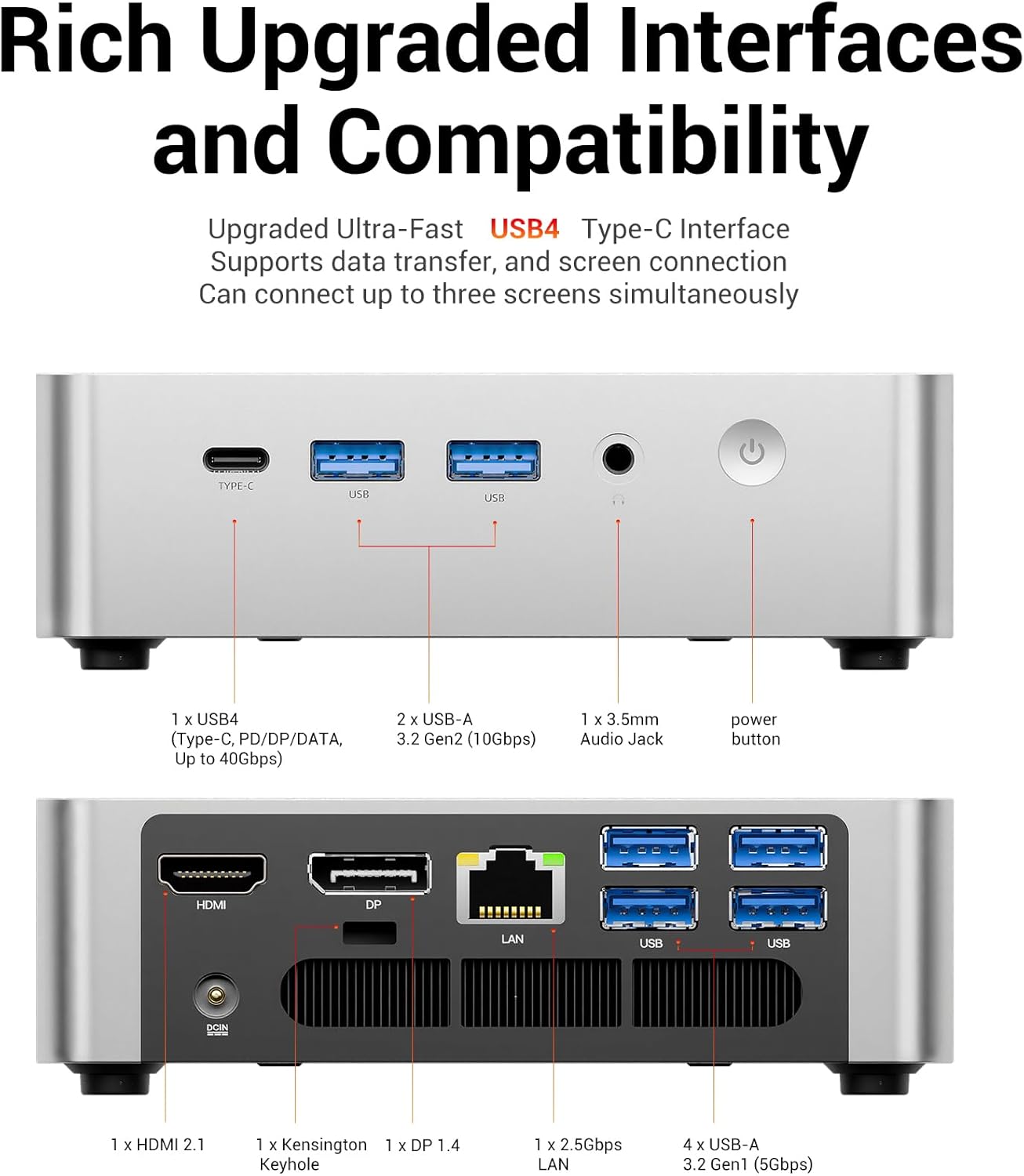
Figure 3: Detailed view of the FIREBAT F1 Mini PC's front and rear connectivity ports.
The following videos demonstrate the features and connectivity of similar mini PCs with the same processor:
Video 2: Bosgame Ryzen 5 7640HS Mini PC overview, highlighting its design and port options.
Video 3: GMKtec Gaming Mini PC M6 Ultra Ryzen 5 7640HS overview, demonstrating its features and capabilities.
Video 4: Nucbox M6 Ultra Easy to Setup and Use, showing the ease of initial setup and general use.
5. Performance and Features
The FIREBAT F1 Mini PC is equipped with advanced components for robust performance:
- Processor: AMD Ryzen 5 7640HS (6-core/12-thread) with Zen 4 architecture, boosting up to 5.0GHz.
- Graphics: Integrated AMD Radeon 760M (RDNA3 architecture, 8CU, 2600MHz core clock).
- Memory: 16GB DDR5 5600MHz RAM (expandable up to 64GB).
- Storage: 512GB PCIe 3.0 SSD (with 2x M.2 2280 PCIe 4.0 SSD slots for expansion).

Figure 4: Overview of the FIREBAT F1's core components and features.
5.1. Cooling System
The Mini PC features an efficient cooling system with a single fan and dual heat pipes, ensuring chassis temperatures remain below 40°C (104°F) and noise levels below 45dB during full 54W power operation.

Figure 5: Internal view highlighting the cooling fan and dual heat pipes.

Figure 6: Noise level comparison demonstrating the quiet operation of the Mini PC.
6. Expansion and Upgrades
The FIREBAT F1 offers flexible expansion options:
- RAM: Supports dual DDR5 5600MHz SO-DIMM slots, allowing for a maximum of 64GB (32GB x 2).
- SSD: Features two M.2 2280 PCIe 4.0 SSD slots, supporting up to 4TB (2TB x 2) of storage.
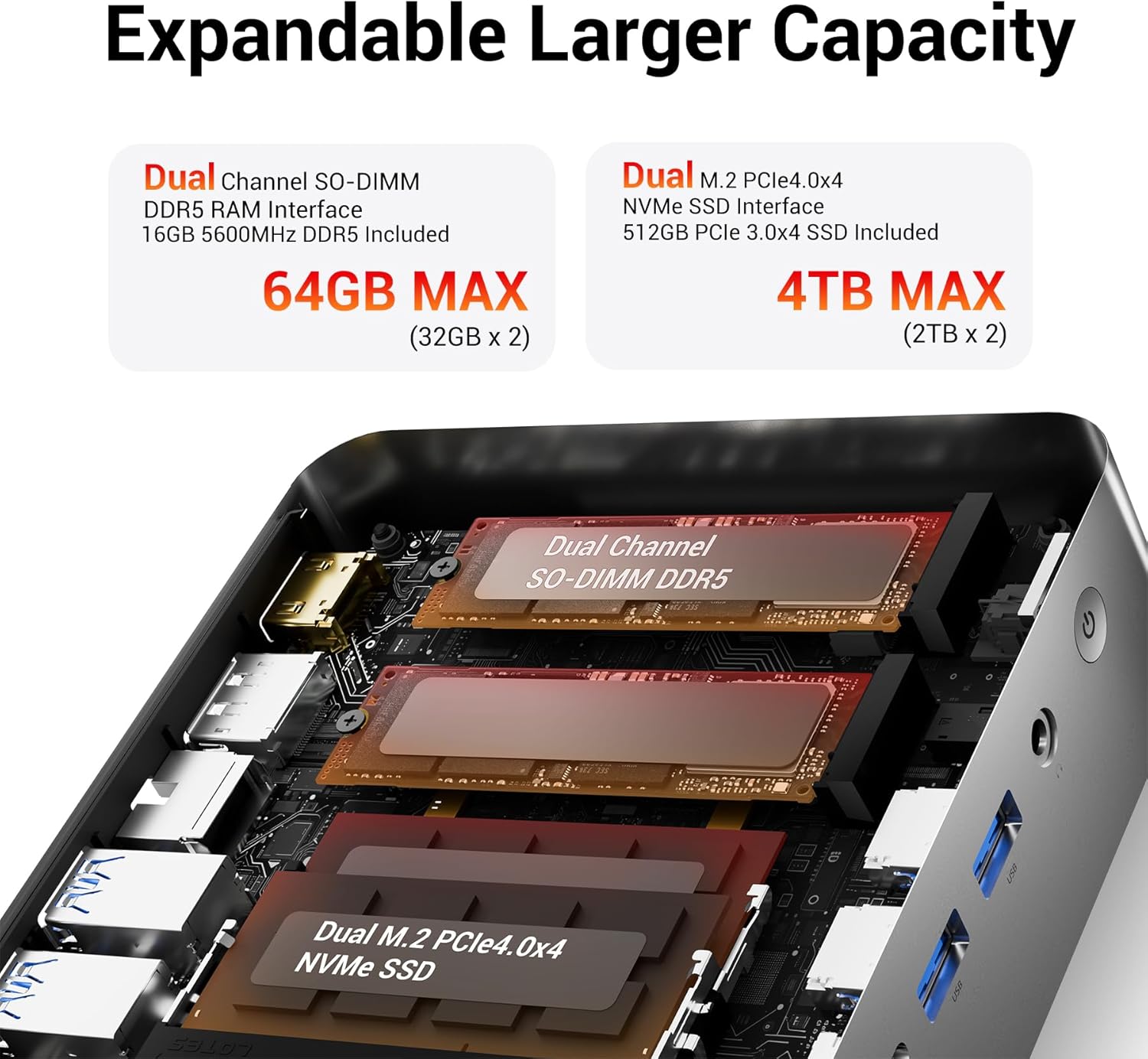
Figure 7: Internal view illustrating the dual SO-DIMM DDR5 RAM and M.2 PCIe 4.0 NVMe SSD slots.
7. Maintenance
To ensure optimal performance and longevity of your FIREBAT F1 Mini PC, regular maintenance is recommended:
- Keep Vents Clear: Ensure the ventilation openings are free from dust and obstructions to maintain proper airflow.
- Dust Cleaning: Periodically clean the exterior of the device with a soft, dry cloth. For internal cleaning, consult a professional or refer to advanced maintenance guides.
- Software Updates: Regularly update your Windows operating system and drivers to ensure system stability and security.
- Safe Shutdown: Always shut down the Mini PC properly through the operating system to prevent data corruption.
8. Troubleshooting
If you encounter issues with your FIREBAT F1 Mini PC, try the following troubleshooting steps:
- No Power: Verify that the power adapter is securely connected to both the Mini PC and a working power outlet.
- No Display: Ensure the display cable (HDMI, DP, or USB4) is firmly connected to both the Mini PC and the monitor. Try a different cable or monitor if available.
- Peripheral Issues: If a keyboard, mouse, or other peripheral is not responding, try connecting it to a different USB port or restarting the Mini PC. For wireless devices, check battery levels and Bluetooth pairing.
- Slow Performance: Check for background applications consuming excessive resources. Ensure sufficient free storage space and update drivers.
- Network Connectivity: For wired connections, check the Ethernet cable and router status. For Wi-Fi, ensure the Wi-Fi adapter is enabled and connected to the correct network.
9. Specifications
| Feature | Specification |
|---|---|
| Model | F1 |
| Processor | AMD Ryzen 5 7640HS (6-core/12-thread, up to 5.0GHz) |
| Graphics | Integrated AMD Radeon 760M (RDNA3, 8CU, 2600MHz) |
| RAM | 16GB DDR5 5600MHz (2x SO-DIMM slots, max 64GB) |
| Storage | 512GB PCIe 3.0 SSD (2x M.2 2280 PCIe 4.0 slots) |
| Max Screen Resolution | 8K@60Hz Pixels |
| Display Output | 1x HDMI 2.1, 1x DP 1.4, 1x USB4 (Type-C, DisplayPort 1.4) |
| USB Ports | 1x USB4 (40Gbps, Type-C), 2x USB-A 3.2 (10Gbps), 2x USB-A 3.2 (5Gbps) |
| Network | 1x 2.5Gbps LAN, WiFi 6 (802.11ax), Bluetooth 5.2 |
| Audio | 1x 2-in-1 audio combo jack |
| Dimensions (LxWxH) | 5 x 5 x 1.5 inches (approx. 12.7 x 12.7 x 3.8 cm) |
| Weight | 1.1 pounds (approx. 0.5 kg) |
| Operating System | Windows 11 Pro (Default) |
10. Warranty and Support
FIREBAT is committed to product quality and performance. For any inquiries or support needs, please contact:
- Email: support@firebatpc.com
- Website: www.firebatpc.com
Please refer to the official website or contact support for detailed warranty information.


