
Introduction
The NEARITY 120 Max is a 4K video conference camera designed for hybrid meeting environments. It integrates an 8MP CMOS sensor, a 120-degree wide-angle lens, 5X digital zoom, and AI-driven auto-framing. The device also features a 4-microphone array with noise cancellation and an integrated full-duplex speaker, with support for external microphones to extend audio pickup range. This manual provides instructions for proper setup, operation, maintenance, and troubleshooting of your device.
What's in the Box
- 1x NEARITY 120 Max Webcam
- 1x Remote Control
- 1x USB Microphone (External)
- 1x USB Cable
- 1x User Manual

Image: Components included with the NEARITY 120 Max.
Setup Guide
1. Physical Connection
- Connect the power adapter to the NEARITY 120 Max and plug it into a power outlet.
- Connect the USB cable from the NEARITY 120 Max to your computer (PC/Laptop) or smartboard.
- If using the external USB microphone, connect it to an available USB port on the NEARITY 120 Max or your computer.
2. Wireless Connection (Optional)
For wireless operation, a separate WiFi adapter (dongle) is required. Insert the WiFi adapter into a compatible USB port on your display or computer. The NEARITY 120 Max will then connect wirelessly, reducing cable clutter.

Image: Wireless setup option for the NEARITY 120 Max.
3. Placement
Position the NEARITY 120 Max in a central location within your meeting space to ensure optimal camera coverage and microphone pickup. It can be placed directly on a desktop, mounted on a tripod, or used with a desk stand.

Image: Flexible placement options for the camera.
4. Software Recognition
Once connected, your computer or smartboard should automatically recognize the NEARITY 120 Max as a webcam, microphone, and speaker. Select 'NEARITY 120 Max' as your preferred audio and video device in your video conferencing application settings.
Video: An overview of the NEARITY 120 Max 4K Video Conference Camera, demonstrating its features and ease of setup for hybrid meetings.
Operation
1. Camera Features
- 4K Ultra HD Video: The 8MP CMOS sensor captures video in 4K resolution, providing clear and detailed images.
- 120° Wide-Angle Lens: The distortion-free lens ensures all participants are visible within the frame, suitable for small to medium-sized rooms.
- 5X Digital Zoom: Use the remote control to zoom in on specific speakers or presentation areas for enhanced focus.
- AI Auto-Framing: The camera automatically detects and frames participants, adjusting the view to keep everyone optimally centered without manual intervention.

Image: Demonstrating 4K Ultra HD video quality.
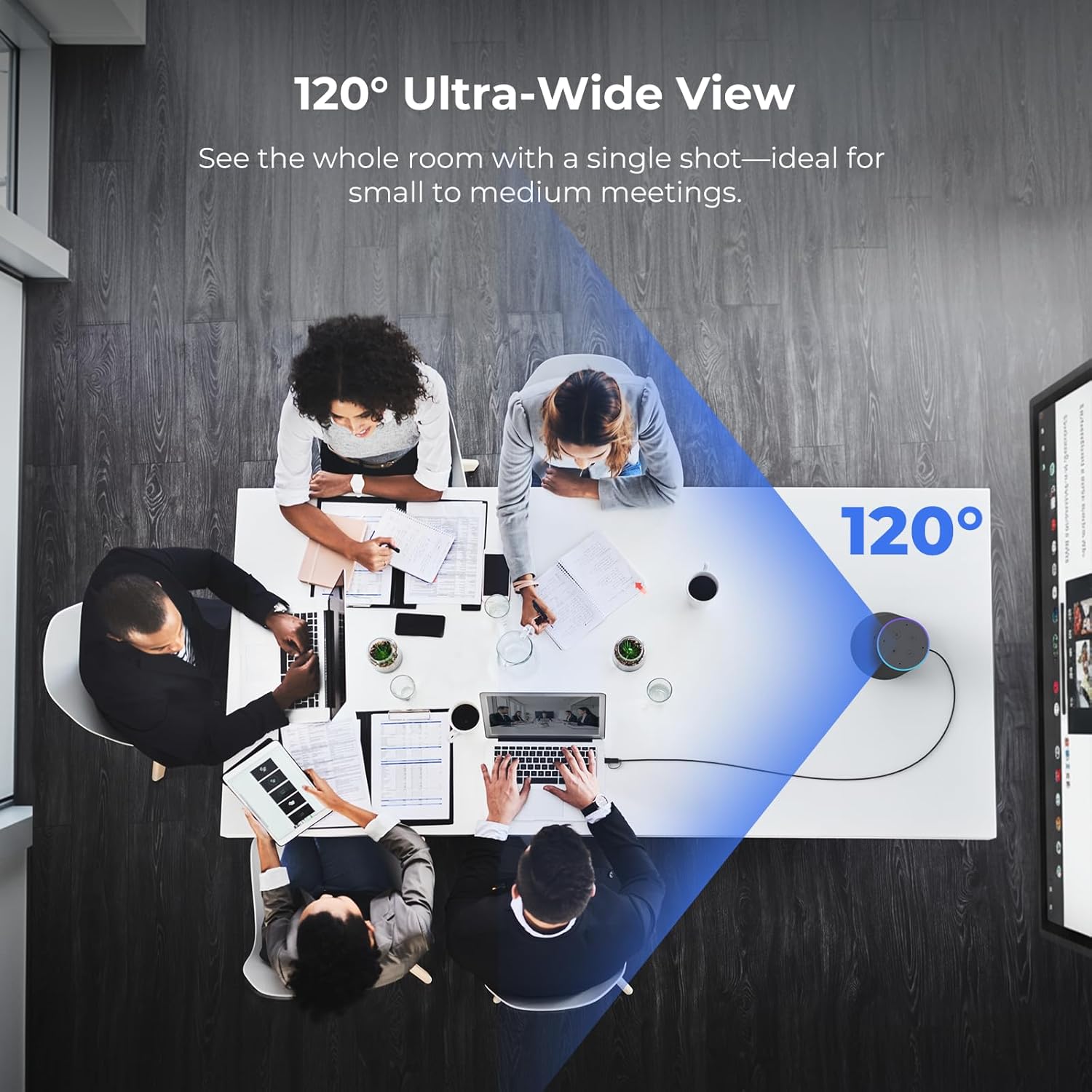
Image: Illustrating the 120-degree ultra-wide view.

Image: Demonstrating 5X digital zoom with remote control.

Image: AI-powered auto-framing in action.
2. Audio Features
- 4-Microphone Array: Integrated microphones capture voices clearly within a 5-meter radius.
- AI Noise Cancellation: Advanced AI suppresses background noise such as keyboard clicks and air conditioning, ensuring clear dialogue.
- External Mic Support: For larger rooms, connect the included external microphone to expand the voice pickup range up to 16 meters (52 feet).
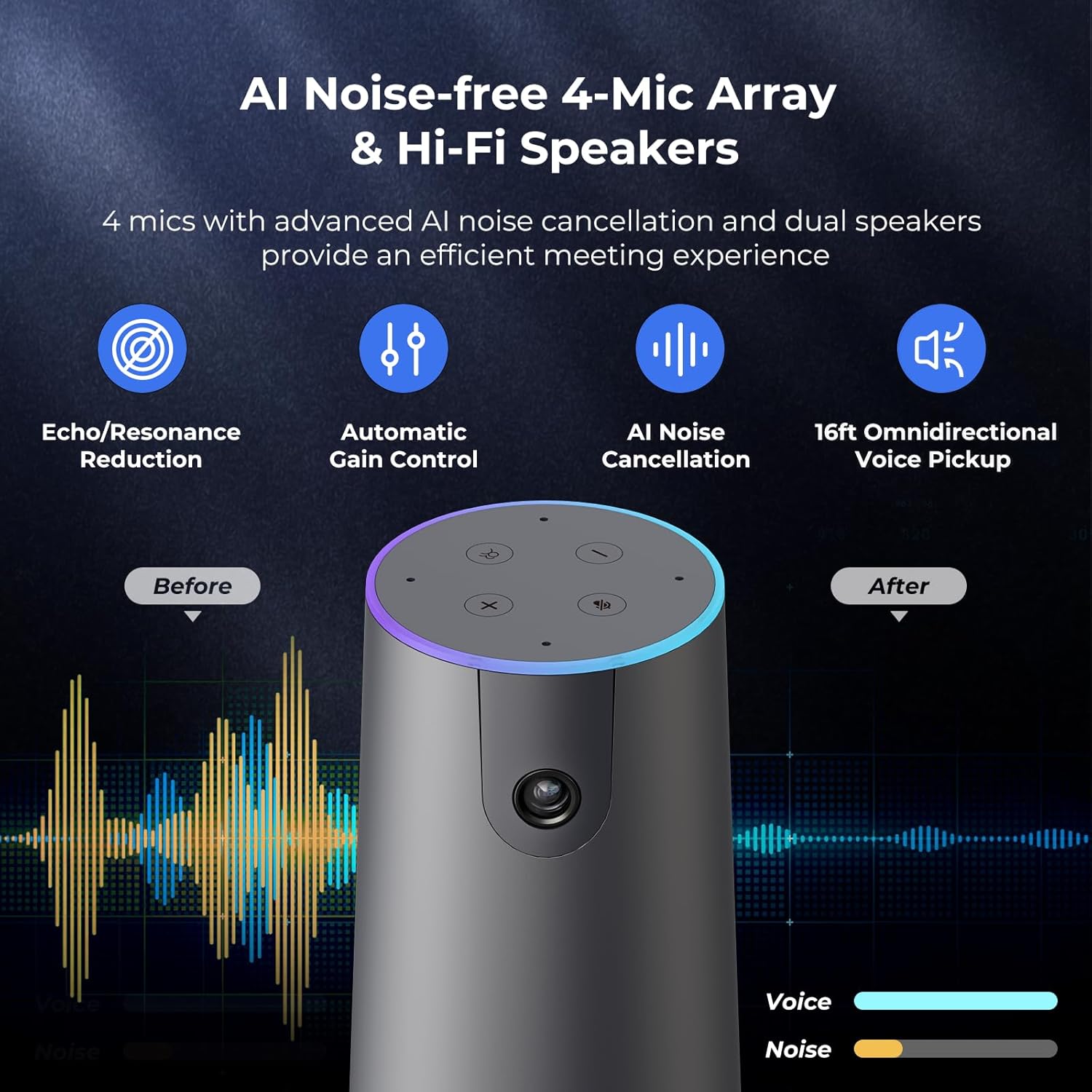
Image: AI Noise-free 4-Mic Array and Hi-Fi Speakers.

Image: Enhanced audio coverage with external microphones.
3. Remote Control Functions
The included remote control allows for convenient adjustment of camera and audio settings. Functions include:
- Mute/Unmute Microphone
- Turn Camera Image On/Off
- Volume Increase/Decrease
- Activate/Deactivate Auto-Framing
- Switch to Panorama Mode
- 5X Digital Zoom In/Out
- Access Menu (for advanced settings)

Image: Remote control layout and functions.
4. Universal Compatibility
The NEARITY 120 Max is compatible with major video conferencing platforms and operating systems, ensuring seamless integration into your existing workflow. Supported platforms include Zoom, Microsoft Teams, Google Meet, Webex, and Skype. It works across Windows, macOS, ChromeOS, and Linux.

Image: Broad compatibility with various platforms.
Maintenance
To ensure the longevity and optimal performance of your NEARITY 120 Max, follow these maintenance guidelines:
- Cleaning: Use a soft, dry cloth to clean the exterior of the device. Do not use liquid cleaners or aerosols directly on the camera or speaker grille.
- Lens Care: For the camera lens, use a lens cleaning cloth specifically designed for optical surfaces. Avoid touching the lens with your fingers.
- Storage: When not in use for extended periods, store the device in a cool, dry place away from direct sunlight and extreme temperatures.
- Firmware Updates: Periodically check the NEARITY official website for any available firmware updates to ensure your device has the latest features and performance enhancements.
Troubleshooting
If you encounter issues with your NEARITY 120 Max, refer to the following common troubleshooting steps:
- No Video/Audio: Ensure all cables (USB, power) are securely connected. Verify that the NEARITY 120 Max is selected as the primary camera, microphone, and speaker in your conferencing software settings.
- Poor Video Quality: Check your internet connection speed. Ensure the camera lens is clean and free from obstructions. Confirm that your conferencing software is set to use 4K resolution if supported.
- Poor Audio Quality/Echo: Ensure the device is placed centrally and not too close to walls or reflective surfaces. Check for any other active microphones or speakers in the room that might cause interference. Adjust volume levels.
- Auto-Framing Not Working: Ensure the auto-framing feature is enabled via the remote control or device settings. Ensure participants are within the camera's field of view.
- Remote Control Not Responding: Check the batteries in the remote control and replace them if necessary. Ensure there are no obstructions between the remote and the camera.
- Device Not Recognized: Try connecting the device to a different USB port or a different computer. Restart your computer.
If problems persist, please contact NEARITY customer support for further assistance.
Specifications
| Feature | Detail |
|---|---|
| Brand | NEARITY |
| Model Number | AW-C46S-1 |
| Video Capture Resolution | 4K |
| Photo Sensor Technology | CMOS |
| Photo Sensor Size | 1/2.8-inch |
| Viewing Angle | 120 Degrees |
| Optical Zoom | 5x (Digital) |
| Focus Type | Auto Focus |
| Special Features | 4K Webcam, 5X Digital Zoom, 8MP CMOS Sensor, Remote Control, Auto Framing, 4 Noise Cancelling Mics |
| Connectivity Technology | Dongle, USB |
| Compatible Devices | Laptop, Personal Computer |
| Item Weight | 2.9 Pounds |
Warranty Information
The NEARITY 120 Max 4K Video Conference Camera comes with a 1 Year Warranty from the date of purchase. This warranty covers manufacturing defects and malfunctions under normal use. Please retain your proof of purchase for warranty claims. For detailed terms and conditions, refer to the warranty card included in your product packaging or visit the official NEARITY website.
Support
For technical support, product inquiries, or assistance with troubleshooting beyond the scope of this manual, please contact NEARITY customer service. You can typically find contact information, including email and phone numbers, on the official NEARITY website or through the retailer where you purchased the product. Please have your model number (AW-C46S-1) and purchase date ready when contacting support.