
1. Product Overview
The FJFJOPK 5K Video Camera Camcorder HDV265K is designed for high-resolution video recording and photography. It features 5K (30fps) video resolution, 48.0 MP image resolution, and a 10X optical zoom lens. The camera includes a 270-degree rotatable 3.0-inch IPS touch screen for flexible viewing and control. Integrated Wi-Fi connectivity, a 2.4G remote control, and webcam functionality enhance its versatility. For stable and clear recordings, it comes with a handheld stabilizer and an external stereo microphone.

Image: The FJFJOPK 5K Video Camera Camcorder with its external microphone and stabilizer attached, showcasing the rotatable screen.
2. What's in the Box
Please check the package contents upon unboxing to ensure all items are present:
- 1x FJFJOPK Video Camera Camcorder
- 1x Camera Bag
- 1x External Microphone
- 1x Handheld Stabilizer
- 2x Rechargeable Batteries (Nonstandard Battery type)
- 1x Remote Control
- 1x Microphone Cable
- 1x HDMI Cable
- 1x USB Cable
- 1x User Manual
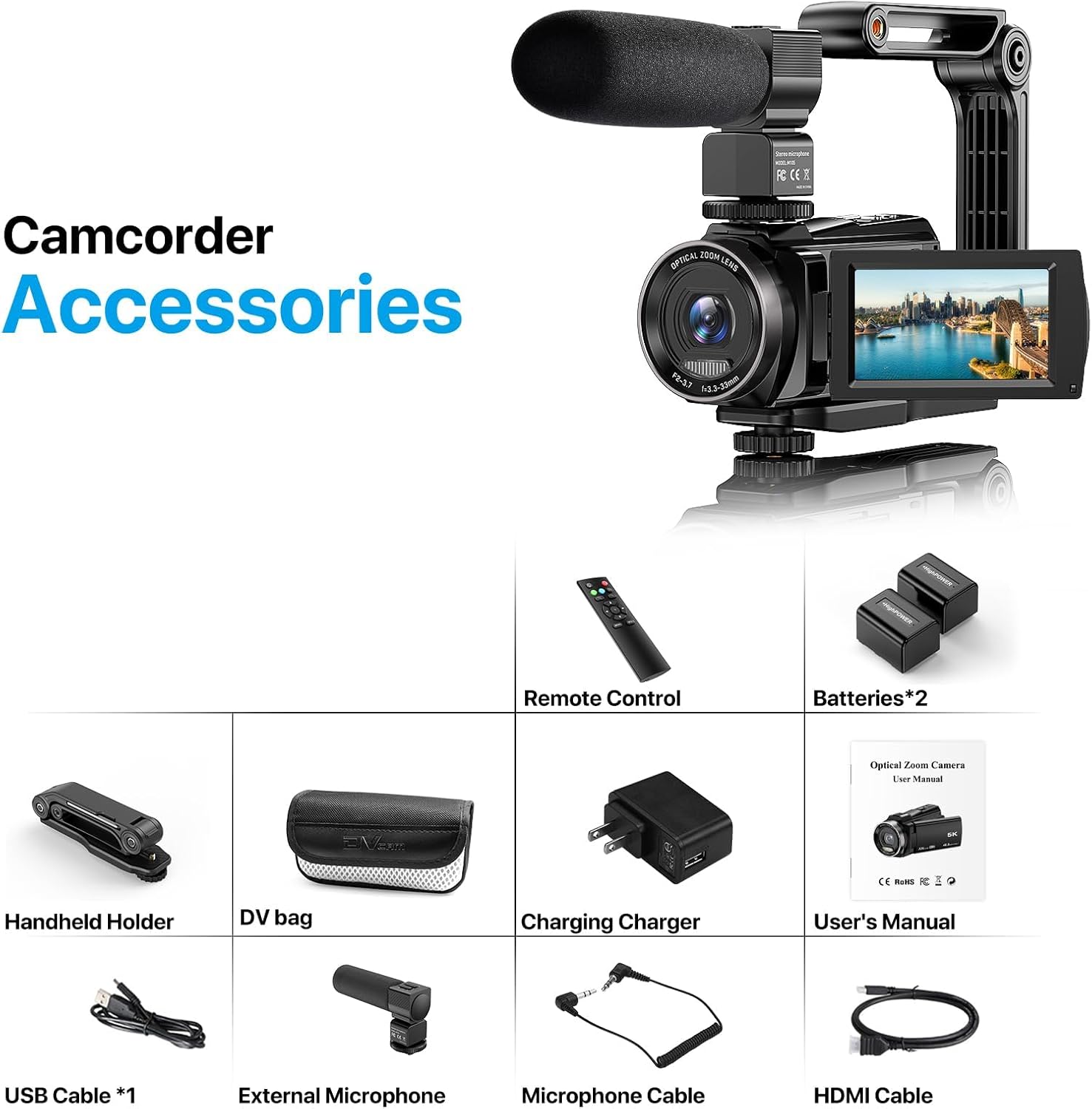
Image: A visual representation of all included accessories and the camcorder, laid out clearly.
3. Setup Guide
3.1. Battery Installation
- Locate the battery compartment on the camcorder.
- Open the compartment cover.
- Insert the two rechargeable batteries, ensuring correct polarity.
- Close the battery compartment cover securely.
3.2. SD Card Installation
The camcorder supports SDXC C10 U1 level and above SD cards, up to a maximum of 256GB. An SD card is not included and must be purchased separately.
- Locate the SD card slot on the camcorder.
- Insert the SD card with the metal contacts facing the front of the camera until it clicks into place.
- To remove, gently press the card until it springs out.
3.3. Attaching Accessories
External Microphone: Slide the external microphone onto the hot shoe mount located on top of the camcorder. Connect the microphone cable to the designated microphone input port.
Handheld Stabilizer: Attach the camcorder to the handheld stabilizer using the standard tripod screw mount at the bottom of the camera. Adjust the stabilizer for comfortable grip and balance.

Image: The camcorder mounted on the foldable handheld stabilizer, demonstrating its ergonomic design.
4. Operating Instructions
4.1. Power On/Off
Press and hold the power button for a few seconds to turn the camcorder on or off.
4.2. Recording Video
To start recording, press the Record button. Press it again to stop recording. The camcorder supports 5K 30FPS, 4K 30FPS, 2.7K 30FPS, 1080P 60FPS, 1080P 30FPS, 720P 60FPS, and 720P 30FPS video resolutions.
4.3. Taking Photos
Switch to photo mode using the mode button. Press the Shutter button to capture a 48MP still image.
4.4. Optical Zoom
Utilize the zoom lever to adjust the 10X optical zoom. This allows for clear magnification of distant subjects without loss of image quality.

Image: Visual demonstration of the 10X optical zoom capability, showing different magnification levels.
4.5. 270° Rotation Screen & Touchscreen
The 3.0-inch IPS screen can be rotated 270 degrees for various shooting angles, including self-recording. The touchscreen interface allows for intuitive navigation and setting adjustments.
4.6. Wi-Fi Connectivity
Download the dedicated app on your smartphone. Enable Wi-Fi on the camcorder and connect your smartphone to the camera's Wi-Fi network. This enables remote control and instant sharing of photos and videos.

Image: The camcorder in use, demonstrating Wi-Fi connection to a smartphone for remote operation and sharing.
4.7. Webcam Function
Connect the camcorder to your computer via the Type-C USB cable. Select 'Webcam Mode' on the camera's screen. The camcorder will then function as a webcam for video calls and live streaming.

Image: The camcorder with its external stereo microphone, illustrating its use as a webcam for live streaming or video calls.
4.8. Remote Control
Use the included 2.4G remote control to operate the camcorder from a distance, allowing for convenient control of recording, zooming, and other functions.
4.9. Anti-Shake Function
The camcorder features an anti-shake function to minimize blur caused by camera movement, ensuring smoother video footage.
4.10. Additional Functions
The camcorder includes various functions such as pause, continuous shooting, slow motion, fill light, time-lapse, HDMI output, Selfie mode, and motion detection. Refer to the on-screen menu for specific settings and activation of these features.

Image: A collage illustrating the camcorder's multi-functional capabilities such as anti-shake, time-lapse, slow motion, and selfie mode.
5. Maintenance
5.1. Cleaning the Camcorder
- Use a soft, lint-free cloth to clean the camera body.
- For the lens and screen, use a specialized lens cleaning cloth and solution to avoid scratches.
- Do not use harsh chemicals or abrasive materials.
5.2. Battery Care
- Charge batteries fully before first use.
- Store batteries in a cool, dry place when not in use.
- Avoid extreme temperatures.
5.3. Storage
When not in use, store the camcorder in its camera bag in a dry, dust-free environment away from direct sunlight.
6. Troubleshooting
If you encounter issues with your FJFJOPK 5K Video Camera Camcorder, please refer to the following common solutions:
- Camera not powering on: Ensure batteries are fully charged and correctly inserted.
- Recording issues: Check if the SD card is properly inserted and has sufficient free space. Ensure the card meets the recommended specifications (SDXC C10 U1 or higher).
- Poor audio quality: Verify the external microphone is securely connected and functioning correctly. Check microphone settings in the camera menu.
- Wi-Fi connection problems: Ensure Wi-Fi is enabled on both the camera and your smartphone. Restart both devices and try connecting again.
- Image blur: Activate the anti-shake function. Ensure adequate lighting for your shooting environment.
For more detailed troubleshooting or persistent issues, please consult the full user manual or contact customer support.
7. Specifications
| Brand | FJFJOPK |
| Model Number | HDV265K |
| Video Capture Resolution | 5K 30FPS, 4K 30FPS, 2.7K 30FPS, 1080P 60FPS, 1080P 30FPS, 720P 60FPS, 720P 30FPS |
| Effective Still Resolution | 48 MP |
| Optical Zoom | 10 x |
| Digital Zoom | 3 x |
| Screen Size | 3 Inches (270° Rotation IPS Touchscreen) |
| Photo Sensor Technology | CMOS |
| Connectivity Technology | Wi-Fi, Webcam |
| Flash Memory Type | Micro SD (Supports SDXC C10 U1 and above, max 256GB) |
| Image Stabilization | Optical |
| Item Weight | 0.87 Kilograms |
| Operating System Compatibility | Chrome OS 29.0.1547+, Linux 10.04+, Mac OS 10.2/10.6+, Windows XP/7/8/10+ |
8. Warranty and Support
This FJFJOPK product is covered by a standard manufacturer's warranty. Please refer to the warranty card included in your package for specific terms and conditions. For technical support, troubleshooting assistance, or warranty claims, please contact the seller or FJFJOPK customer service directly. Contact information can typically be found on the product packaging or the official FJFJOPK website.
9. Product Video
Video: An overview of the FJFJOPK 5K Video Camera Camcorder, demonstrating its features and accessories.