
1. Introduction
The Wattive ZHB600-4KW Variable Frequency Drive (VFD) is a high-performance motor speed controller designed for industrial applications. It converts single-phase 220V input power into three-phase 380V output, enabling precise speed regulation for asynchronous motors. This VFD is suitable for a wide range of equipment, including fans, pumps, conveyors, and textile machinery, offering stable performance and energy efficiency.

Image 1.1: Front view of the WATTIVE ZHB600-4KW Variable Frequency Drive, highlighting its display and control panel. This device is designed for single-phase 220V input and three-phase 380V output, providing 4KW of power.

Image 1.2: Illustration showing the wide range of applications for the VFD, including textile, mechanical engineering, automation, food processing, chemical, woodworking, and metallurgical industries, as well as various types of fans and pumps.
2. Safety Information
Please read all safety instructions carefully before installation, operation, or maintenance of the VFD. Failure to comply with these instructions may result in electric shock, fire, or serious injury.
- Electrical Safety: Ensure all power is disconnected before wiring or performing any maintenance. Only qualified personnel should perform electrical connections.
- Grounding: The VFD must be properly grounded to prevent electric shock.
- Voltage Compatibility: Verify that the input voltage matches the VFD's specifications (single-phase 220V). The output is three-phase 380V.
- Motor Compatibility: This VFD is compatible only with asynchronous motors. Do not use with other motor types.
- Current Limits: Ensure the motor's current does not exceed the VFD's rated output current (6.5A). For heavier motor loads, select a VFD with higher power capacity.
- Environment: Install the VFD in a clean, dry, and well-ventilated area, away from direct sunlight, corrosive gases, and excessive vibration.
- Discharge Time: After disconnecting power, wait at least 10 minutes for the internal capacitors to discharge before touching any terminals. A warning label on the device indicates this.
3. Package Contents
Upon unpacking, please verify that all items listed below are present and undamaged:
- 1 x Wattive ZHB600-4KW Variable Frequency Drive
- 1 x 2-meter Extension Cable (for detachable control panel)
- 1 x Instruction Manual (English)
If any items are missing or damaged, please contact your supplier immediately.
4. Product Features
- Stable Performance: Equipped with high-end internal modules, this VFD offers enhanced load capacity, high power, torque, and precision across a wide speed regulation range, ensuring overall stability and reduced voltage fluctuations.
- Intuitive Display & Detachable Control Panel: The VFD features an intuitive display and control buttons for easy parameter adjustment and clear data display. The removable control panel includes a 2-meter extension cable for remote operation, providing convenience and flexibility.
- Efficient Heat Dissipation: An integrated high-performance DC heat sink and intelligent fan control ensure effective heat reduction and quiet operation, contributing to the equipment's long-term stable performance.
- Multiple Protections: Designed for diverse operating conditions, the VFD incorporates multiple protective functions to safeguard circuit outputs, including short-circuit protection, motor short-circuit protection, overvoltage protection, overcurrent protection, earthing fault protection, phase loss protection, overheating protection, and overload protection.
- Durable and Compact Design: Constructed from process-grade flame-retardant ABS plastic, the VFD offers high impact resistance, strong flame retardancy, and reliability. Its compact size and removable panel make it easy to install.
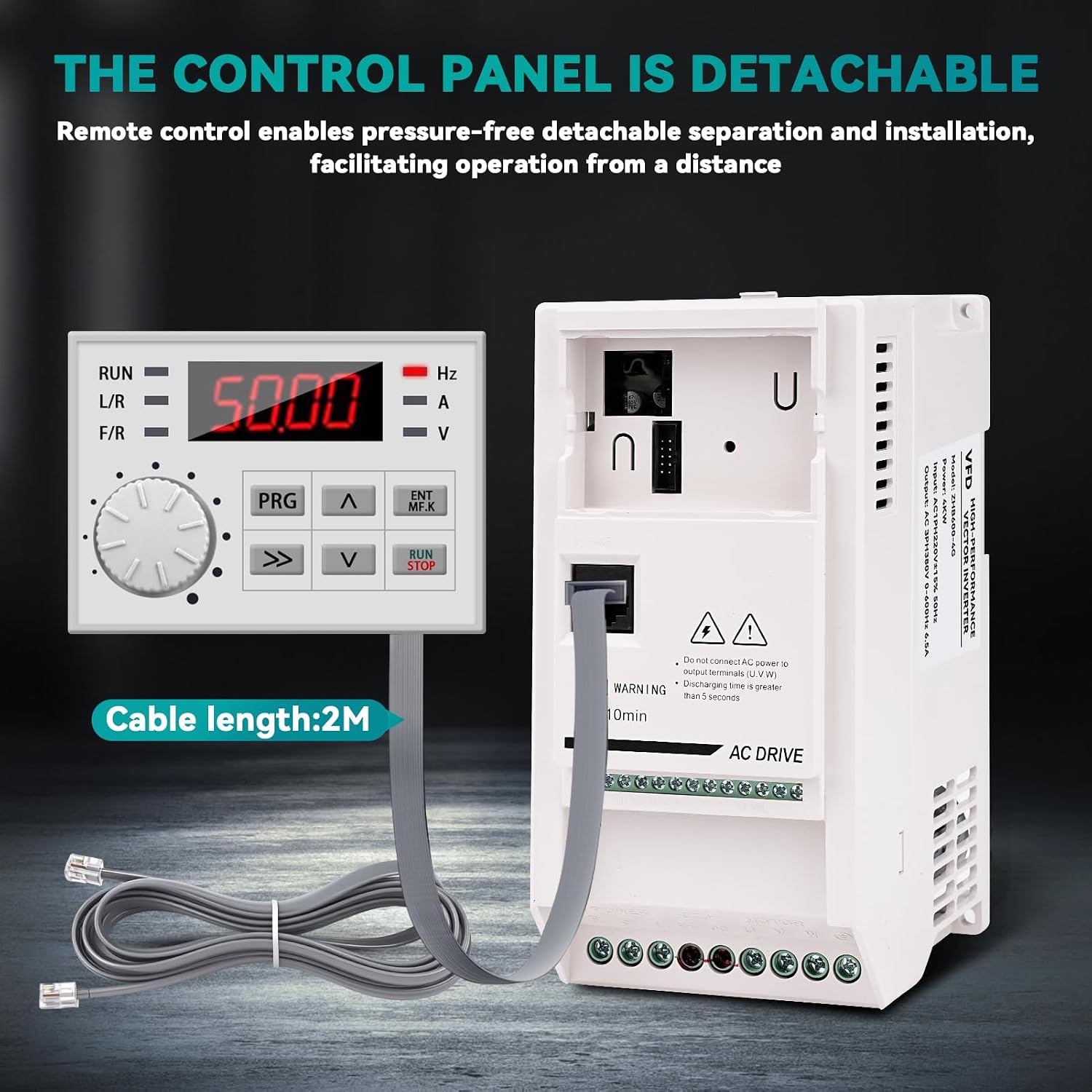
Image 4.1: The detachable control panel connected to the main unit via a 2-meter extension cable, allowing for remote operation and flexible installation.

Image 4.2: Internal view highlighting the high-speed cooling fan for efficient heat dissipation and the use of ABS flame-retardant material for enhanced safety and durability. The compact size of the inverter is also shown.

Image 4.3: A visual representation of the multiple protection features integrated into the VFD, including short-circuit, motor short-circuit, overvoltage, overcurrent, earthing fault, phase loss, overheating, and overload protection.
5. Setup and Installation
5.1 Mounting
The VFD can be installed using a wall-mounted method or within a cabinet. Ensure adequate space for ventilation, especially around the cooling fan. The recommended cooling method is air cooling with fan control.
5.2 Wiring Diagram
Refer to the wiring diagram below for proper connection of the VFD. Ensure all connections are secure and correctly polarized. Important: Do not connect AC power to the output terminals (U, V, W).

Image 5.1: Wiring diagram for the 380V VFD. It illustrates connecting a single-phase 220V power supply to the input terminals (L, N), a 380V three-phase motor to the output terminals (U, V, W), and the ground wire to the designated terminal.
- Input Power (L, N): Connect the single-phase 220V power supply to the 'POWER' input terminals.
- Motor Output (U, V, W): Connect the three-phase 380V asynchronous motor to the 'MOTOR' output terminals.
- Ground Wire: Connect the ground wire to the designated ground terminal for safety.
- Control Panel: The detachable control panel can be connected directly or via the provided 2-meter extension cable for remote access.
6. Operating Instructions
6.1 Control Panel Overview
The VFD features an intuitive control panel for easy operation and parameter settings. Familiarize yourself with the keys and their functions:

Image 6.1: Detailed view of the VFD control panel and a table explaining the function of each key: PRG (Programming key), ENT/MFK (Confirm/Multifunction key), Increment key, Decrement key, RUN/STOP key, and Shift key.
| Key | Name | Function |
|---|---|---|
| PRG | Programming key | Level 1 Menu Entry or Exit |
| ENT/MFK | Confirm/Multifunction key | In menu mode, used to navigate sequentially through menu screens, set parameters, and confirm selections; in display mode, selects function switching based on P7-01 settings. |
| ^ | Increment key | Increment data or function codes |
| v | Decrement key | Decrement data or function codes |
| RUN/STOP | Run/Stop key | In keyboard operation mode, used for running and stopping operations |
| >> | Shift key | In both stop display and run display interfaces, cyclically select parameters for display; when modifying parameters, select the bit to be altered |
6.2 Basic Operation
- Power On: After ensuring all wiring is correct and secure, apply single-phase 220V power to the VFD. The display will light up.
- Set Frequency: Use the Increment (^) and Decrement (v) keys to adjust the desired output frequency (0-600Hz). The display shows the current frequency.
- Start Motor: Press the RUN/STOP key to start the motor. The VFD will ramp up to the set frequency.
- Stop Motor: Press the RUN/STOP key again to stop the motor. The VFD will ramp down and stop.
- Parameter Adjustment: For advanced settings, such as forward/reverse rotation (which may require an external universal rotation switch), enter the programming menu using the PRG key and adjust parameters as needed. Refer to the full instruction manual for detailed parameter settings.
7. Maintenance
Regular maintenance ensures the longevity and optimal performance of your VFD.
- Cleaning: Keep the VFD clean and free from dust and debris. Use a soft, dry cloth for cleaning. Do not use liquid cleaners.
- Fan Inspection: Periodically check the cooling fan for obstructions or excessive noise. Ensure proper airflow for efficient heat dissipation.
- Terminal Check: Regularly inspect all wiring terminals for tightness and corrosion. Loose connections can lead to overheating or malfunction.
- Environmental Conditions: Ensure the operating environment remains within specified temperature and humidity ranges.
8. Troubleshooting
If you encounter issues with your VFD, refer to the following general troubleshooting steps. For specific error codes and advanced diagnostics, consult the comprehensive instruction manual.
- No Power: Check the input power supply, circuit breaker, and all power connections.
- Motor Not Running: Verify that the RUN/STOP key has been pressed, the frequency is set, and the motor wiring is correct. Check for any error codes on the display.
- Overload/Overcurrent: If an overload or overcurrent error occurs, check the motor load, ensure the motor current does not exceed the VFD's rating, and inspect for any mechanical issues with the motor or driven equipment.
- Overheating: Ensure the VFD's cooling fan is operating correctly and that there is adequate ventilation around the unit. Clean any dust from the heat sink.
- Incorrect Speed: Verify the frequency setting and any relevant speed control parameters.
If the problem persists after attempting these steps, contact customer support.
9. Specifications
Detailed technical specifications for the Wattive ZHB600-4KW Variable Frequency Drive:

Image 9.1: Product information panel showing key specifications such as product name, material, rated input/output voltage, rated power, output current, and output frequency, along with the physical dimensions of the VFD.
| Parameter | Value |
|---|---|
| Brand | Wattive |
| Model Name | ZHB600 |
| Model Number | ZHB600-4KW |
| Rated Input Voltage | Single-phase 220V (AC) |
| Rated Output Voltage | Three-phase 380V (AC) |
| Rated Power | 4 KW |
| Output Current | 6.5A |
| Input Frequency | 50 Hz |
| Output Frequency Range | 0 - 600 Hz |
| Material | Flame-retardant ABS Plastic |
| Product Dimensions (L x W x H) | 18.2 x 13 x 8.7 cm |
| Installation Method | Wall-mounted, Cabinet |
| Cooling Method | Air cooling, with fan control |
| Recommended Product Uses | Industrial |
| Energy Specifications Met | CE |
| Country of Origin | China |
10. Warranty and Support
For warranty information, technical support, or service inquiries, please refer to the contact details provided with your purchase documentation or visit the official Wattive website. Keep your purchase receipt as proof of purchase.