
1. Important Safety Information
Before operating your AONIU M4 Electric Scooter, please read this manual thoroughly to ensure safe usage and optimal performance. Failure to follow these instructions may result in serious injury or damage to the scooter.
- Always wear a helmet and appropriate safety gear (knee pads, elbow pads) when riding.
- Ensure all bolts and quick-release mechanisms are securely tightened before each ride.
- Check tire pressure and brake functionality before every use.
- Do not ride in heavy rain, on icy surfaces, or through deep puddles.
- Observe all local traffic laws and regulations.
- This scooter is recommended for users aged 16 and above.
- The maximum load capacity is 330 lbs (150 kg). Do not exceed this limit.
For your safety, familiarize yourself with the scooter's controls and features in a safe, open area before riding in traffic or challenging environments.
2. Product Overview
The AONIU M4 Electric Scooter is designed for adults, offering a powerful motor, long range, and a foldable design for convenient commuting and off-road use. It features a robust aluminum alloy frame and 10-inch pneumatic tires for various terrains.

Figure 2.1: The AONIU M4 Electric Scooter in use, showcasing its design and portability.
Key Features:
- Powerful Motor: Equipped with an 800W peak brushless motor, capable of reaching speeds up to 28 mph.
- Extended Range: A 15Ah high-capacity battery provides a maximum range of 40 miles on a single charge.
- Durable Construction: High-strength aluminum alloy unibody frame supports riders up to 330 lbs.
- All-Terrain Capability: 10-inch pneumatic tires and a 7-shock absorption system ensure a smooth ride across various surfaces, from city streets to dirt paths.
- Enhanced Safety: Features a bright headlight, warning taillight, and dual braking system for safe riding, especially at night.
- Versatile Riding Modes: Offers both sit and stand riding options with a removable seat.
- Portable Design: One-click folding mechanism for easy transport and storage.
- Intuitive Display: LCD display shows current speed, speed mode, and battery level.
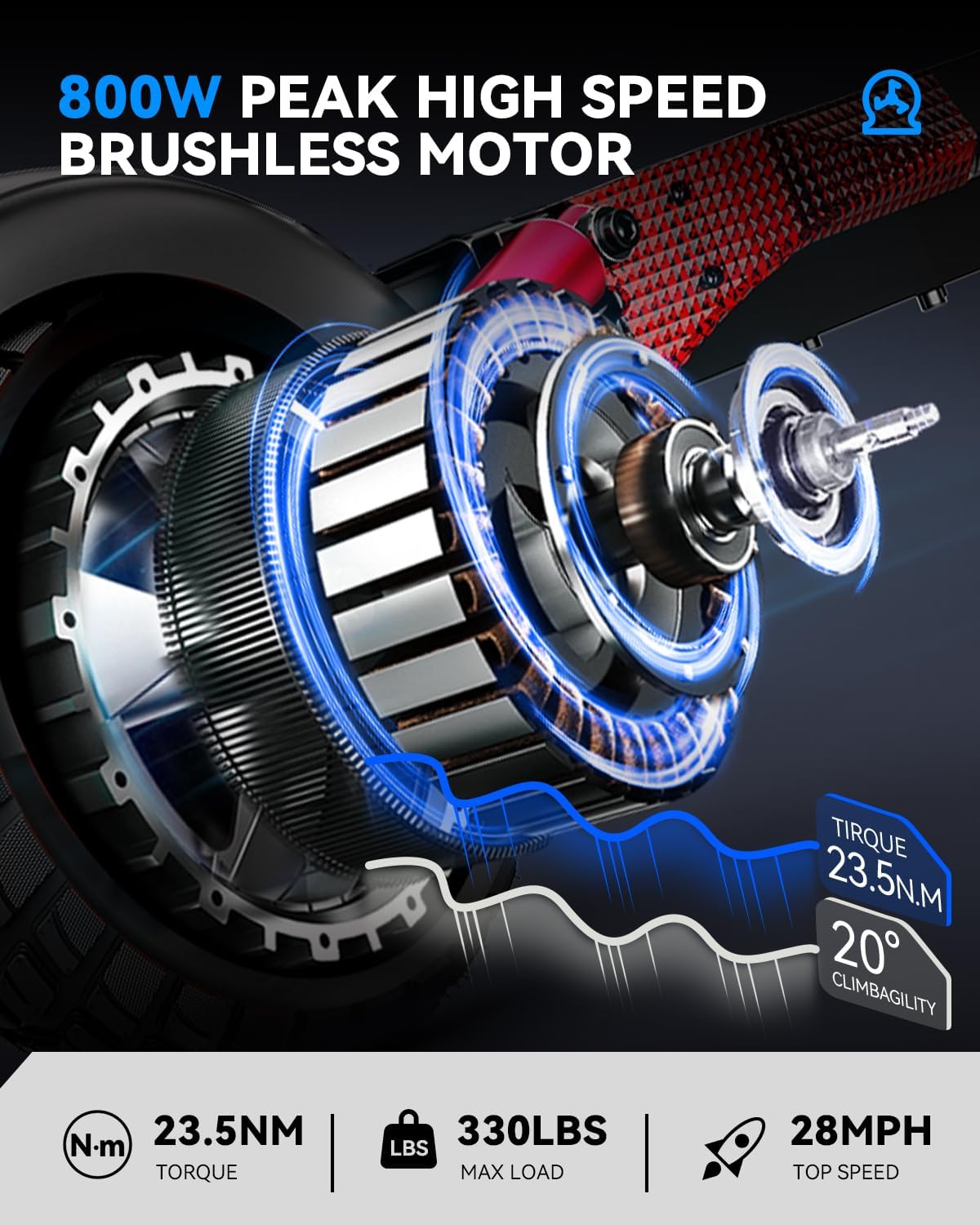
Figure 2.2: Detailed view of the 800W peak brushless motor, highlighting its power and design.

Figure 2.3: The 15Ah automotive power battery cell, providing extended range and quick charging.

Figure 2.4: The integrated headlight and taillight system, crucial for visibility and safety during night rides.
3. Setup and Assembly
Your AONIU M4 Electric Scooter requires minimal assembly. Follow these steps to get your scooter ready for its first ride.
3.1 Unboxing and Initial Inspection
- Carefully remove all components from the packaging.
- Check for any visible damage during transit. Contact customer support immediately if you find any issues.
- Ensure all parts listed in the packing list are present.
3.2 Handlebar and Seat Installation
- Unfold the scooter frame until it locks into place.
- Attach the handlebars to the stem, ensuring all cables are clear and not pinched. Secure with the provided screws and tools.
- If using the seat, attach it to the designated post and adjust its height for comfortable riding.
- Adjust the meter and brake levers to your preferred angle and position, then tighten all screws securely.
Video 3.1: Detailed guide on unboxing and initial assembly of the AONIU M4 Electric Scooter.
Video 3.2: Quick and easy assembly steps for the AONIU M4 Electric Scooter.
3.3 Initial Charging
Before your first ride, fully charge the scooter's battery. Connect the charger to the charging port and then to a power outlet. The charging indicator will show the charging status. A full charge typically takes 4-5 hours.
4. Operating Instructions
Familiarize yourself with the controls and riding modes before operating the scooter.
4.1 Powering On/Off and Display
- To power on, press and hold the power button on the LCD display.
- The LCD display will show your current speed, battery level, and selected speed mode.
- Use the mode button to cycle through different speed settings (e.g., Eco, Standard, Sport).
- To power off, press and hold the power button again.

Figure 4.1: The AONIU M4 Electric Scooter supports both standing and sitting riding modes for user comfort and versatility.
4.2 Riding Modes (Sit/Stand)
The AONIU M4 offers flexibility with two riding modes:
- Stand Mode: For dynamic riding and quick maneuvers.
- Sit Mode: For longer commutes or when you prefer a more relaxed posture. The seat can be easily attached or removed as needed.
4.3 Acceleration and Braking
- To accelerate, gently press the throttle lever. Increase pressure for more speed.
- To brake, squeeze the brake levers on the handlebars. The dual disc braking system provides responsive stopping power.
- Always brake gradually and avoid sudden stops, especially at high speeds or on slippery surfaces.
Video 4.2: Demonstrates the AONIU M4 Electric Scooter in a smooth city commute, highlighting its handling and speed.
Video 4.3: A quick urban ride showcasing the scooter's agility and performance in city environments.
4.4 Folding the Scooter
To fold the scooter for transport or storage:
- Ensure the scooter is powered off.
- Locate the folding mechanism (usually a lever or clasp near the base of the steering column).
- Engage the mechanism to release the steering column, then fold it down towards the deck until it locks into place.
- Ensure the folding mechanism is securely latched before carrying.

Figure 4.4: The scooter's folding design allows for easy storage and transport, as shown with a person placing it into a car trunk.
5. Maintenance
Regular maintenance ensures the longevity and safe operation of your AONIU M4 Electric Scooter.
5.1 Battery Care
- Charge the battery fully after each use, especially if it will be stored for an extended period.
- Avoid completely draining the battery, as this can reduce its lifespan.
- Store the scooter in a cool, dry place away from direct sunlight and extreme temperatures.
- If storing for a long time, charge the battery to about 50-70% every 1-2 months.
5.2 Tire Maintenance
- Regularly check the tire pressure of the 10-inch pneumatic tires. Maintain the recommended pressure (refer to the tire sidewall for specifics).
- Inspect tires for wear, punctures, or damage before each ride. Replace worn or damaged tires promptly.

Figure 5.1: The durable rubber tire texture designed for various terrains, emphasizing the importance of tire inspection.
5.3 Brake System
- Regularly inspect the dual disc brakes for wear on the pads and proper function.
- Ensure brake levers are responsive and provide adequate stopping power. Adjust if necessary.
- If you notice reduced braking performance, have the brakes inspected and serviced by a qualified technician.
5.4 General Cleaning
- Wipe down the scooter with a damp cloth after use to remove dirt and debris.
- Avoid using high-pressure water jets or harsh chemicals, as these can damage electronic components.
- Keep the charging port clean and dry.
6. Troubleshooting
This section addresses common issues you might encounter with your AONIU M4 Electric Scooter.
| Problem | Possible Cause | Solution |
|---|---|---|
| Scooter does not power on | Low battery; loose connections; power button issue | Charge the battery fully. Check all cable connections. Contact support if issue persists. |
| Reduced range or power | Undercharged battery; worn battery; riding conditions (hills, heavy load) | Ensure battery is fully charged. Check tire pressure. Reduce load or avoid steep inclines. |
| Loose handlebars | Mounting screws are loose | Tighten all handlebar mounting screws securely. Regularly check for tightness. |
| Brakes feel weak or unresponsive | Worn brake pads; misaligned calipers; air in hydraulic system (if applicable) | Inspect brake pads for wear and replace if necessary. Adjust brake calipers. If issues persist, seek professional service. |
| Tire goes flat frequently | Puncture; valve stem issue; improper tire pressure | Inspect tire for punctures and repair/replace inner tube. Ensure valve stem is secure. Maintain correct tire pressure. |
If you encounter a problem not listed here or cannot resolve an issue, please contact AONIU customer support for assistance.
7. Specifications
Detailed technical specifications for the AONIU M4 Electric Scooter.
| Feature | Specification |
|---|---|
| Brand | AONIU |
| Model Name | M4R+ |
| Motor Power | 800W Peak Brushless |
| Max Speed | Up to 28 mph |
| Battery | 48V 15Ah (Automotive Power Cell) |
| Max Range | Up to 40 miles (under specific conditions) |
| Charging Time | 4-5 hours |
| Max Load Capacity | 330 lbs (150 kg) |
| Tire Type | 10-inch Pneumatic |
| Brake Style | Dual Disc |
| Frame Material | High-strength Aluminum Alloy |
| Product Dimensions (L x W x H) | 47.04" x 10.23" x 19.7" |
| Number of Wheels | 2 |
| Special Features | Foldable, Removable Seat, 7 Shock Absorption System, LCD Display, Headlight, Taillight |
| Recommended Age | 16+ |
8. Warranty and Support
AONIU is committed to providing high-quality products and customer satisfaction.
8.1 Warranty Information
The AONIU M4 Electric Scooter comes with a 12-month or 180-day service period for different parts. Please refer to your purchase documentation for specific warranty terms and conditions.
8.2 Customer Support
If you have any questions, concerns, or require technical assistance, please contact AONIU customer support. We aim to respond to all inquiries within 24 hours.
For the most up-to-date contact information, please visit the official AONIU store page on Amazon or refer to the contact details provided with your purchase.
