
1. Introduction
Thank you for purchasing the RORRY MagSafe Charger with Cooling Fan. This device combines high-speed wireless charging with advanced cooling technology to ensure optimal performance and battery longevity for your smartphone. This manual provides essential information for safe and efficient use of your charger.
Please read this manual thoroughly before use and keep it for future reference.
2. Product Features
- Qi2.2 Official Certification & 25W Ultra-Fast Charging: Achieves approximately 5 times faster charging speeds compared to conventional wireless chargers. For example, an iPhone 17 Pro can charge from 0% to 55% in 30 minutes.
- Dual Cooling System: Features a semiconductor Peltier element and a high-speed cooling fan to effectively dissipate heat during charging, maintaining stable charging efficiency and protecting your device's battery.
- Three Charging Modes: Easily switch between modes with a single button press to suit various scenarios, including standard, gaming, and silent modes.
- Ultra-Quiet Operation: Equipped with a newly developed ultra-quiet motor, reducing fan noise by up to 20% compared to traditional cooling fans, ensuring a peaceful environment.
- 10-Fold Safety Protection: Incorporates comprehensive safety measures including overcurrent, overcharge, overdischarge, overpower, overvoltage, temperature protection, electromagnetic field protection, short-circuit protection, foreign object detection, and flame-retardant materials.
- Strong Magnetic Alignment (Qi2 Magnetic Power Profile): Ensures instant and precise alignment of your device with the charging pad, preventing charging interruptions due to misalignment.
- Wide Compatibility: Supports various iPhone models (12-17 series), Google Pixel 10 series, and other Qi-compatible devices, including AirPods Pro (2nd/3rd Gen).
3. Package Contents
Please check that all items are present and in good condition.
- RORRY Qi2 Wireless Charger (Model Z110) x 1
- USB-C Charging Cable x 1
- User Manual x 1
4. Setup and Installation
- Power Adapter Connection: Connect the provided USB-C charging cable to the RORRY MagSafe Charger. Connect the other end of the USB-C cable to a power adapter (not included). A power adapter of 40W or higher is recommended for optimal performance.
- Placement: Place the charger on a flat, stable surface.
- Device Attachment: Align your MagSafe-compatible smartphone with the charging surface of the RORRY charger. The strong magnets will automatically snap your device into the correct charging position.

Image: The RORRY MagSafe Charger magnetically attached to the back of a smartphone, illustrating the charging connection and cooling fan.
5. Operating Instructions
The RORRY MagSafe Charger features multiple operating modes to optimize charging and cooling based on your needs.
5.1 Charging Modes
Press the button on the charger to cycle through the following modes:
- Standard Mode: Activates Qi2.2 25W charging and the cooling system. Ideal for live streaming or video recording to prevent overheating.
- Noise Level: <35dB
- Charging Power: 25W
- Temperature: <25°C
- Gaming Mode: Initiates smartphone heat countermeasure and cooling system. Designed for lag-free and comfortable gaming.
- Noise Level: <35dB
- Charging Power: 0W (Charging paused to prioritize cooling)
- Temperature: <16°C
- Silent Mode: Provides complete silence for undisturbed sleep.
- Noise Level: 0dB
- Charging Power: 7.5W (Safe charging)
- Temperature: <25°C

Image: Standard Mode in use, showing a user live streaming with the charger attached.

Image: Gaming Mode in use, showing a user playing a mobile game with the charger attached.

Image: Silent Mode, showing the charger on a bedside table for overnight charging.
6. Compatibility
The RORRY MagSafe Charger is compatible with a wide range of devices:
- MagSafe Compatible Devices:
- iPhone 17/16/15/14/13/12 series (including Pro, Pro Max, Plus, mini, Air models)
- Google Pixel 10 series (Pixel 10 Pro XL, Pixel 10, Pixel 10 Pro, Pixel 10 Pro Fold)
- Qi Standard Compatible Devices:
- AirPods Pro (2nd Generation, 3rd Generation, all generations)
- AirPods (2nd Generation, 3rd Generation)
- Other Qi-enabled smartphones and devices (charging speed may vary)
Note: Charging speeds may vary depending on the device and environmental conditions.
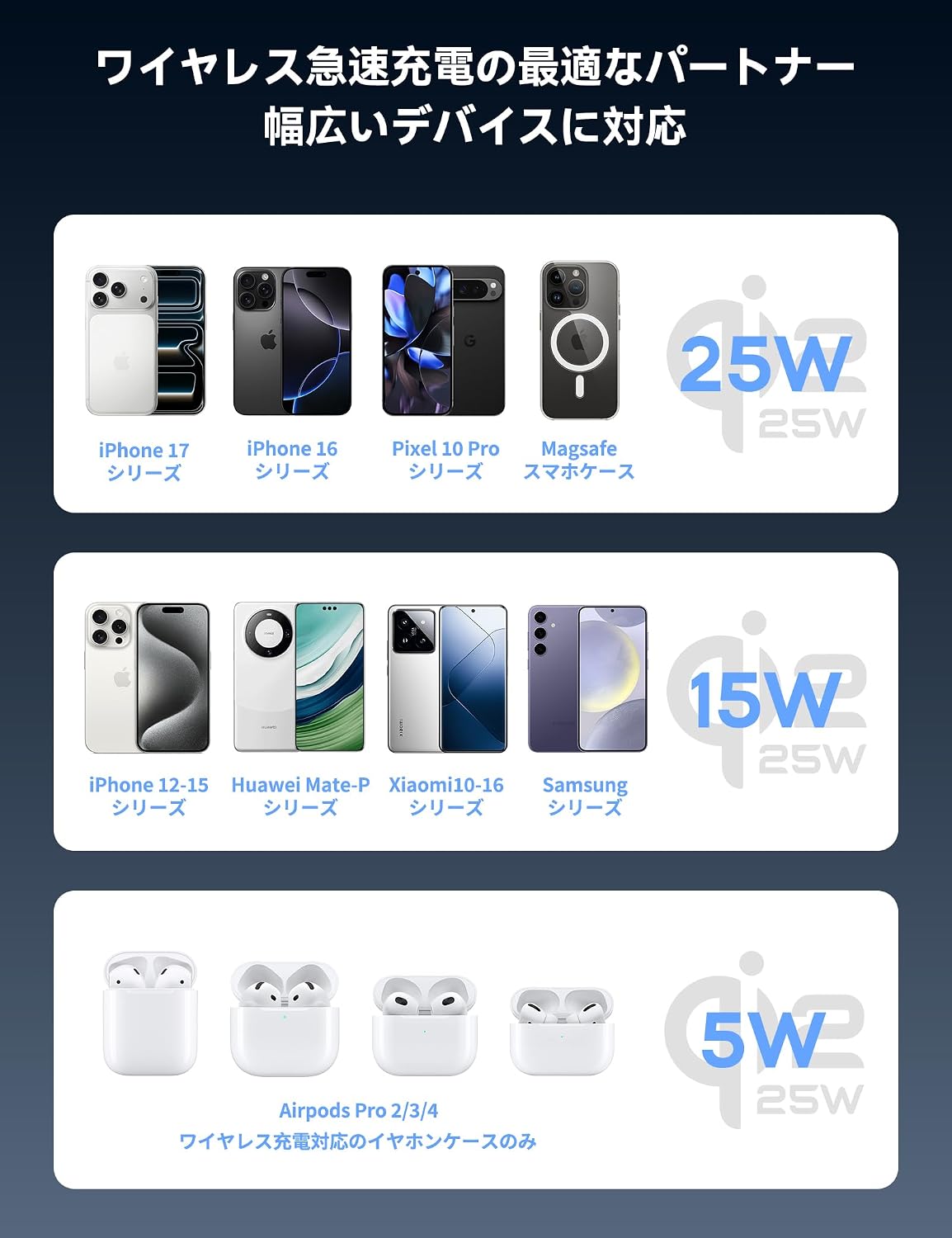
Image: A visual guide to device compatibility, showing different smartphone and earbud models supported by the charger.
7. Safety Precautions
To ensure safe operation and prevent damage to the device or injury, please observe the following safety guidelines:
- Use only a power adapter of 40W or higher for optimal and safe charging. Using lower wattage adapters may result in reduced performance or improper operation.
- Do not expose the charger to water, moisture, or extreme temperatures.
- Avoid dropping or subjecting the charger to strong impacts.
- Do not disassemble, modify, or attempt to repair the charger yourself. Contact customer support if service is required.
- Keep metallic objects, credit cards, or other magnetic-sensitive items away from the charging surface to prevent interference or damage.
- Ensure proper ventilation around the charger during operation. Do not cover the cooling fan.
- If the charger emits smoke, unusual odors, or makes abnormal noises, immediately disconnect it from the power source and cease use.

Image: An infographic detailing the 10 safety protection mechanisms integrated into the charger.
8. Maintenance
- Clean the charger regularly with a soft, dry cloth. Do not use liquid cleaners or aerosols.
- Ensure the cooling fan vents are free from dust and debris to maintain optimal cooling performance.
- Store the charger in a cool, dry place when not in use.
9. Troubleshooting
| Problem | Possible Cause | Solution |
|---|---|---|
| Device not charging. |
|
|
| Slow charging. |
|
|
| Cooling fan is noisy. |
|
|
| Charger feels hot. |
|
|
10. Specifications
| Feature | Detail |
|---|---|
| Brand | RORRY |
| Model Number | Z110 |
| Connectivity | USB Type-C |
| Input Voltage | 9 Volts |
| Input Amperage | 3 Amperes |
| Output Voltage | 5 Volts |
| Output Amperage | 3 Amperes |
| Max Output Wattage | 25 Watts |
| Number of USB Ports | 1 |
| Color | Black |
| Material | ABS |
| Item Weight | 105 grams |
| Special Features | MagSafe Compatible, Travel-friendly, Wireless Charging, Fast Charging |
11. Warranty and Support
This RORRY product comes with a 1-year manufacturer's warranty from the date of purchase.
The warranty covers defects in materials and workmanship under normal use. It does not cover damage caused by misuse, accidents, unauthorized modifications, or external causes.
For warranty claims, technical support, or any inquiries regarding your RORRY MagSafe Charger, please contact RORRY-JP Official Store customer service through your purchase platform.
Contact Information: Please refer to your purchase receipt or the RORRY official store page on Amazon for the most up-to-date contact details.
