
Introduction
Thank you for choosing the KITPLUS Self-Cleaning Litter Box. This automatic litter box is designed to provide a clean and odor-free environment for your cats with minimal effort. It features automatic waste removal, app control, and multiple safety mechanisms. Please read this manual thoroughly before use to ensure proper operation and maintenance.

Image: The KITPLUS Self-Cleaning Litter Box in a home setting, showing its open-top design and a cat resting nearby.
Safety Information
To prevent injury or damage, always follow these safety precautions:
- Do not allow children to play with or operate the litter box.
- Keep the litter box away from water or damp environments to prevent electrical hazards.
- Ensure the power cord is not damaged or pinched.
- Do not attempt to disassemble or repair the unit yourself. Contact customer support for assistance.
- Only use clumping cat litter as specified in this manual. Non-clumping litter may cause malfunction.
- The litter box is equipped with weight sensors and an induction motor for safety. Do not interfere with these sensors during operation.
- Ensure the litter box is placed on a stable, level surface.

Image: An internal diagram highlighting the four weight sensors located at the base of the litter box, crucial for safety detection.
Package Contents
Verify that all items are present in the package:
- KITPLUS Self-Cleaning Litter Box Main Unit
- Removable Washable Liner Pad
- Waste Bin
- Solid State Aromatherapy Unit
- 20x Durable Trash Bags
- Cozy Litter Mat
- Cleaning Brush
- Instruction Booklet (this manual)
- Quick Start Guide
- Power Adapter

Image: A visual representation of the KITPLUS Self-Cleaning Litter Box and its accompanying accessories, including the liner pad, waste bin, trash bags, litter mat, cleaning brush, and manuals.
Product Overview
The KITPLUS Self-Cleaning Litter Box is an advanced pet care device. Key components include:
- Main Unit: Houses the motor, sensors, and control panel.
- Roller/Drum: The rotating part where litter is placed and waste is sifted.
- Waste Bin: Collects clumped waste for easy disposal.
- Control Panel: Buttons and indicators for manual operation and status.
- Weight Sensors: Detect cat presence for safe operation.
- Induction Motor: Powers the cleaning cycle.

Image: The KITPLUS Self-Cleaning Litter Box with key dimensions labeled, illustrating its large capacity suitable for kittens to adult cats.
Setup
Follow these steps for initial setup:
- Unpack: Carefully remove all components from the packaging.
- Placement: Place the main unit on a firm, level surface in a suitable location. Ensure there is enough space around the unit for proper ventilation and access.
- Install Liner Pad: Insert the removable washable liner pad into the roller/drum. Ensure it is securely fitted.
- Insert Waste Bin: Slide the waste bin into its designated slot at the bottom front of the main unit. Place a trash bag inside the waste bin.
- Add Litter: Pour clumping cat litter into the roller/drum. Ensure the litter level is between the MIN and MAX lines indicated inside the drum. The litter box is compatible with plant-based, bentonite, mineral, and mixed clumping litters.
- Connect Power: Plug the power adapter into the litter box and then into a wall outlet.
- Power On: Press the power button on the control panel to turn on the unit.
- App Connection (Optional): Download the KITPLUS app from your smartphone's app store. Follow the in-app instructions to connect your litter box to your home's 2.4G Wi-Fi network for remote control and monitoring.

Image: An illustration demonstrating the compatibility of the KITPLUS Self-Cleaning Litter Box with various types of clumping cat litter, including plant, bentonite, mineral, and mixed options.
Operating Instructions
The KITPLUS Self-Cleaning Litter Box offers automatic and manual operation modes.
Automatic Mode
In automatic mode, the litter box will detect when your cat uses the box and automatically initiate a cleaning cycle after a set delay (typically a few minutes after the cat exits). The roller will rotate, sifting clean litter and depositing waste into the waste bin.
- Ensure the unit is powered on.
- The default setting is automatic cleaning.
- The unit operates quietly, typically below 20dB, to avoid startling your cat.

Image: The KITPLUS Self-Cleaning Litter Box demonstrating its low noise operation (under 20dB), with a cat sleeping undisturbed nearby.
Manual Mode
You can initiate a cleaning cycle manually using the control panel buttons or the mobile app.
- Control Panel: Refer to the Quick Start Guide for specific button functions to start a manual clean or empty the waste bin.
- Mobile App: The app provides full control, allowing you to:
- Initiate cleaning cycles (Clean).
- Empty the waste bin (Empty).
- Reset the device.
- Monitor operation logs and status.
- Set delay clean times.
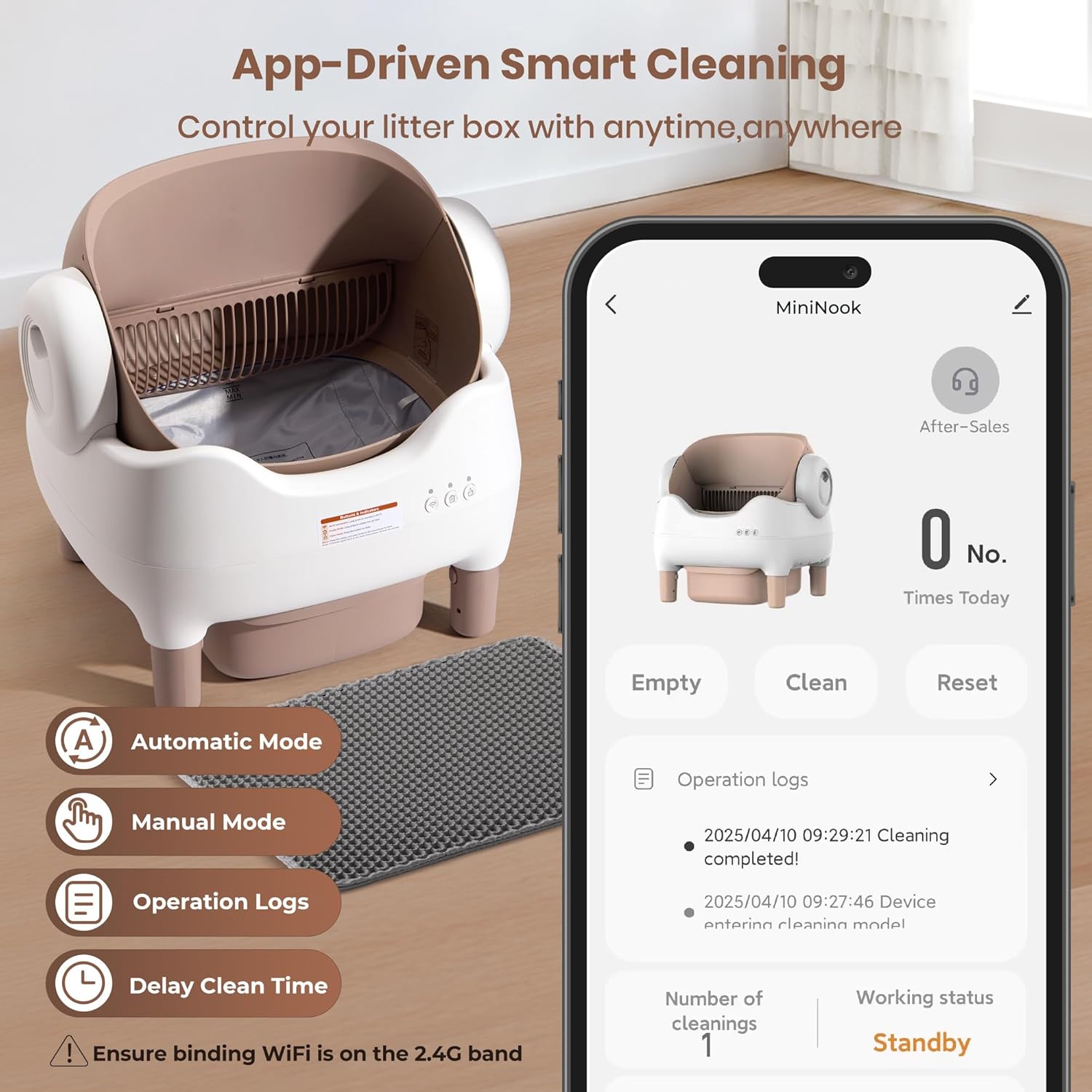
Image: A smartphone displaying the KITPLUS app interface, showing options for automatic mode, manual mode, operation logs, and delay clean time settings.
Maintenance
Regular maintenance ensures optimal performance and hygiene.
Emptying the Waste Bin
The large capacity waste bin can hold waste for up to 14 days for a single cat. The app will notify you when it's full.
- Pull out the waste bin from the front of the unit.
- Tie the drawstring of the trash bag securely.
- Dispose of the sealed trash bag.
- Replace with a new trash bag and slide the waste bin back into place.

Image: A hand demonstrating the process of lifting the drawstring of a trash bag from the waste bin for easy and clean disposal of clumped litter.
Cleaning the Unit
The drum, liner pad, and trash bin are designed for easy removal and cleaning.
- Power Off: Disconnect the power before cleaning.
- Remove Components:
- Remove the roller/drum by rotating and lifting it.
- Remove the washable liner pad from the drum.
- Remove the waste bin.
- Washable Parts: The liner pad and waste bin can be washed with mild soap and water. Rinse thoroughly and allow to air dry completely before reassembly.
- Main Unit: Wipe the main unit with a damp cloth. Do not submerse the main unit in water or expose it to excessive moisture. Use the included cleaning brush to sweep away any litter residue.
- Reassemble: Once all parts are dry, reassemble the unit in reverse order of disassembly.

Image: A visual guide to the removable and washable components of the KITPLUS Self-Cleaning Litter Box, including the roller, liner pad, and waste bin, along with a cleaning brush and shower head for washing.
Troubleshooting
If you encounter issues, refer to the following common problems and solutions:
| Problem | Possible Cause | Solution |
|---|---|---|
| Unit not powering on | Power cord disconnected; power outlet issue | Check power connections; try a different outlet. |
| Cleaning cycle not starting automatically | Cat still in box; sensors obstructed; litter level incorrect | Ensure cat has exited; clean sensors; adjust litter level. |
| Odor persists | Waste bin full; unit needs cleaning; litter type issue | Empty waste bin; perform thorough cleaning; ensure use of high-quality clumping litter. |
| App connection failure | Incorrect Wi-Fi band; weak signal; incorrect password | Ensure 2.4G Wi-Fi; move unit closer to router; re-enter password. |
| Roller stuck or making unusual noise | Obstruction; too much litter; mechanical issue | Power off and check for obstructions; reduce litter amount; contact support if issue persists. |
Specifications
| Model Number | MINI-B |
| Brand | KITPLUS |
| Product Dimensions | 55L x 51W x 53H Centimetres (21.5 x 20.1 x 20.9 inches) |
| Item Weight | 10.7 kg (23.6 lbs) |
| Material | Acrylonitrile Butadiene Styrene (ABS) |
| Waste Bin Capacity | Approximately 13 Liters |
| Noise Level | <20dB |
| Connectivity | 2.4G Wi-Fi for App Control |
| Suitable for Cat Weight | 2 lbs to 34 lbs |
Warranty and Support
For warranty information, technical support, or service inquiries, please contact KITPLUS customer service. Refer to the contact information provided on the product packaging or the official KITPLUS website.
Please have your model number (MINI-B) and purchase date available when contacting support.