
1. Introduction
Thank you for choosing the OffiGo 63-Inch L-Shaped Electric Standing Desk with Hutch. This manual provides essential information for the safe assembly, operation, and maintenance of your new desk. Please read these instructions thoroughly before assembly and retain them for future reference.
2. Safety Information
- Ensure all parts are present and undamaged before assembly. Do not use if any parts are missing or damaged.
- Keep children and pets away from the assembly area. Small parts may pose a choking hazard.
- Assemble the desk on a soft, clean surface to prevent scratches.
- Do not overload the desk. The maximum weight recommendation is 154 pounds.
- Keep hands and fingers clear of moving parts during height adjustment to prevent injury.
- Ensure all electrical connections are secure and follow local electrical safety guidelines.
- Before adjusting the desk height, ensure all items on the hutch and desk surface are stable and secure to prevent falling.
3. Package Contents
Verify that all components listed below are included in your package. If any parts are missing or damaged, please contact customer support.
- Main Desk Panels
- Sub-Panel (L-shaped extension)
- Hutch Components
- Electric Lifting Mechanism (Legs and Motor)
- Control Panel with Memory Presets
- All necessary hardware (screws, bolts, tools)
- Instruction Manual
4. Assembly Instructions (Setup)
Follow the detailed step-by-step instructions provided in the included assembly guide. All parts are clearly labeled to facilitate the process. Assembly typically takes 60-90 minutes for one person, or 45-60 minutes with two people.
4.1 Reversible L-Shaped Design
The L-shaped sub-panel can be installed on either the left or right side of the main desk to best fit your room layout and workflow preferences. Decide on your preferred orientation before beginning assembly.
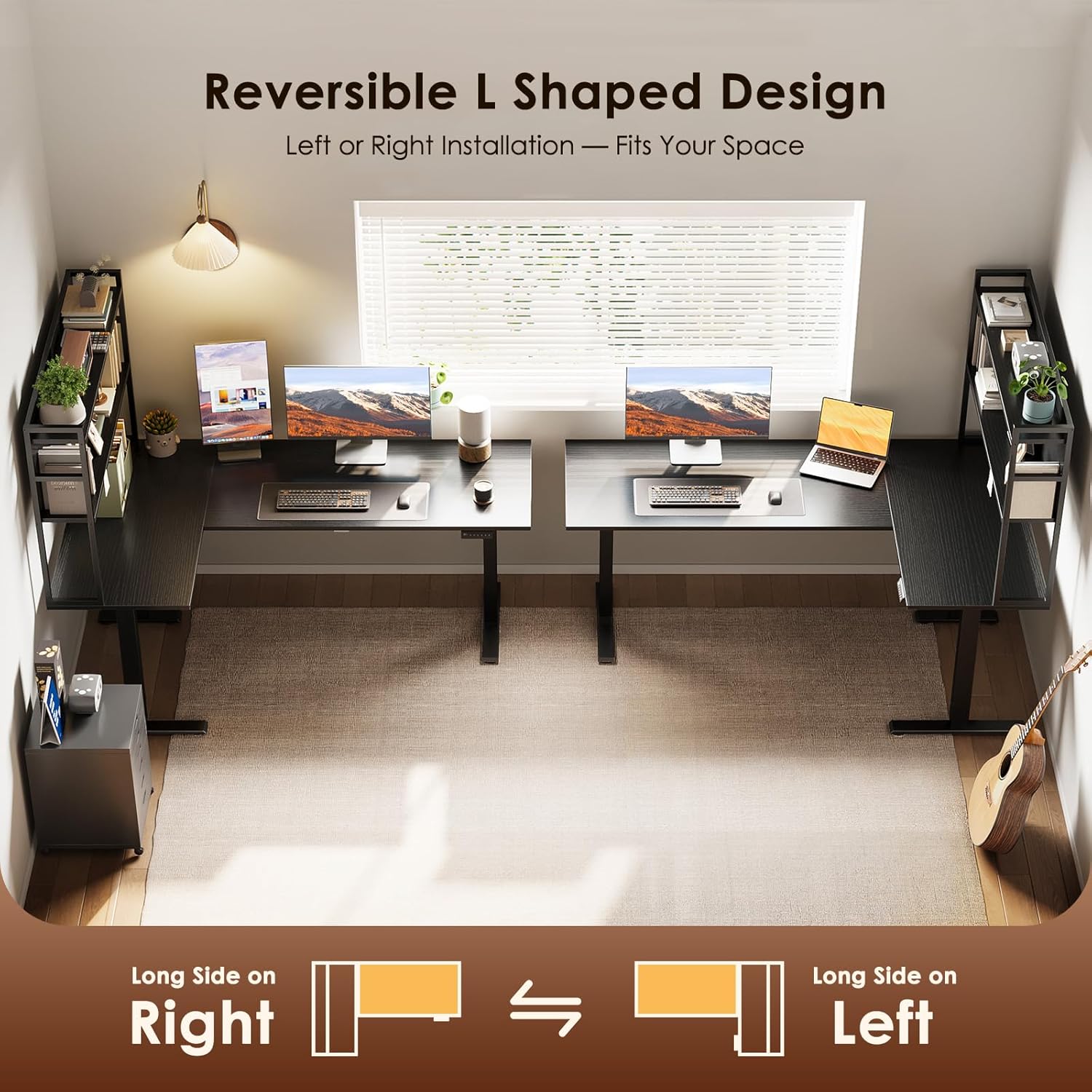
A diagram demonstrating the reversible L-shaped design, showing how the sub-panel can be installed on either the left or right side to adapt to different room layouts.
4.2 General Assembly Steps
- Unpack all components and verify against the parts list.
- Attach the electric lifting legs to the main desk panel according to the instructions.
- Connect the sub-panel to the main desk, choosing either the left or right orientation.
- Assemble the hutch structure and securely attach it to the desk.
- Connect the control panel and power cables to the motor and power supply.
- Ensure all screws and connections are tightened before use.

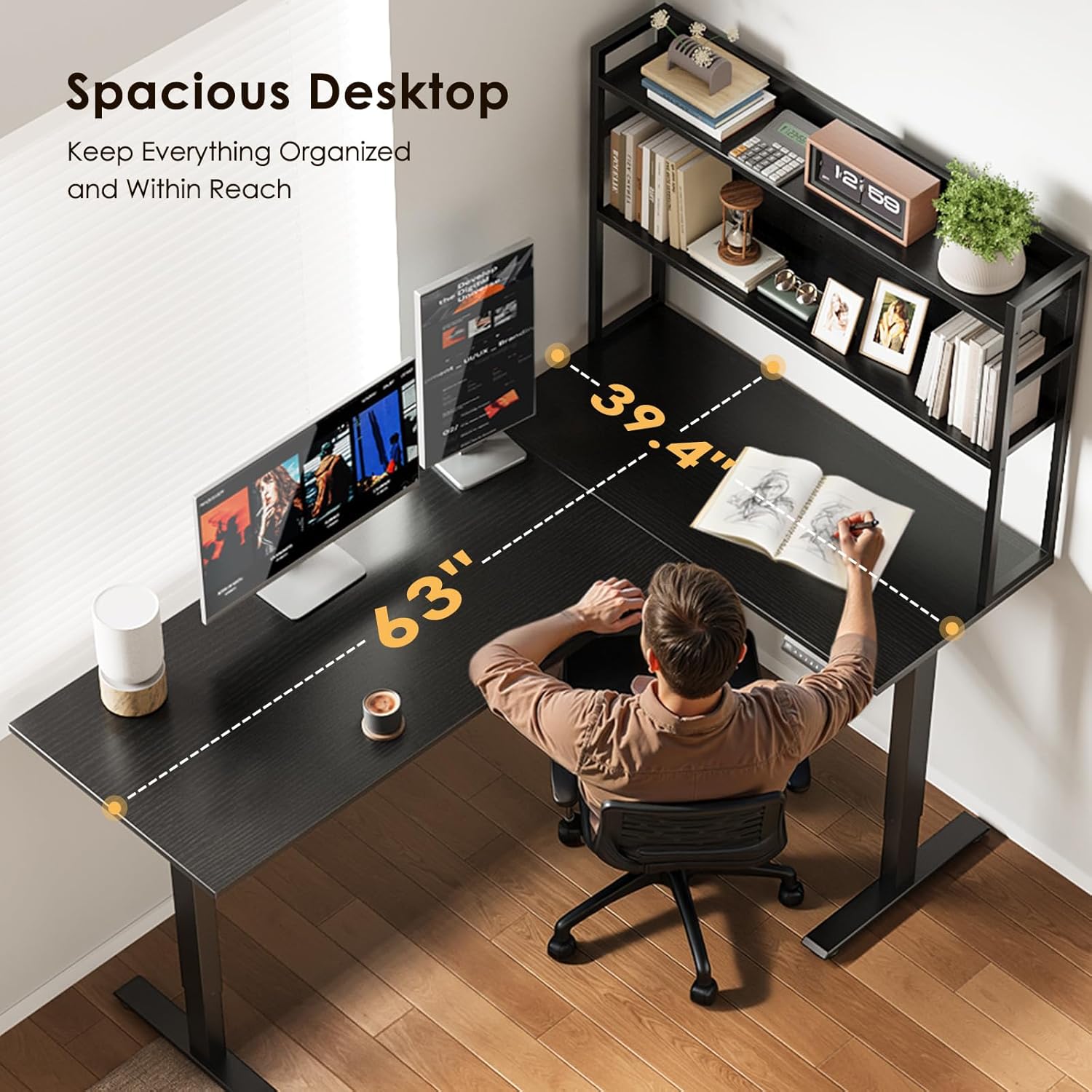
An overhead view of the assembled OffiGo L-shaped electric standing desk, showcasing its spacious design and integrated hutch with a user comfortably seated.
5. Operating Instructions
5.1 Electric Height Adjustment
The desk features an electric lifting mechanism allowing you to adjust the main desk height from 28.4 inches to 46.1 inches. With the hutch installed, the total structure's height ranges from 57.5 inches to 75.2 inches.
- Up/Down Buttons: Use the arrow buttons on the control panel to manually raise or lower the desk to your desired height.
- Memory Presets: The control panel includes 3 preset buttons. To save a height, adjust the desk to the desired position, then press and hold one of the memory buttons (1, 2, or 3) until you hear a beep or see a confirmation on the display. To recall a saved height, simply press the corresponding memory button.
Important: Before adjusting the desk height, ensure all items on the hutch and desk surface are placed securely and will not fall or be damaged during movement.
An image showing a user operating the electric height adjustment feature of the L-shaped desk. The main desk height is shown adjusting from 28.4 inches (seated position) to 46.1 inches (standing position), with the total height including the hutch ranging from 57.5 inches to 75.2 inches.
5.2 Integrated Storage Shelf (Hutch)
The dedicated 2-layer upper storage shelf is designed for organizing daily items, books, or displaying decor. It helps maintain a clean and personalized workspace.
- Avoid placing items taller than 3.94 inches on the top shelf if they might interfere with the desk's movement or stability.
- Do not place fragile or easily slipping items on the top shelf, especially before adjusting desk height.

A close-up view of the desk's integrated 3-tier hutch, displaying books, decor, and a laptop. Caution symbols indicate not to place items over 3.94 inches high, slipping items, or fragile items on the top shelf.
6. Maintenance
- Cleaning: Wipe the desk surfaces with a soft, damp cloth. Avoid harsh chemicals or abrasive cleaners that could damage the finish.
- Inspections: Periodically check all screws and connections to ensure they remain tight. Retighten if necessary.
- Motor Care: Keep the motor and electrical components free from dust and moisture. Do not attempt to disassemble the motor unit.
7. Troubleshooting
- Desk Not Moving:
- Check if the power cord is securely plugged into both the desk and a working wall outlet.
- Ensure all cables connecting the control panel to the motor are properly seated.
- Try resetting the desk by unplugging it for 30 seconds and then plugging it back in.
- Uneven Movement:
- Ensure the desk is placed on a level surface.
- Check for any obstructions under the desk that might impede movement.
- Error Codes: If the control panel displays an error code, refer to the specific troubleshooting section in the detailed assembly guide or contact customer support.
8. Specifications

A detailed diagram illustrating the dimensions of the OffiGo L-shaped electric standing desk, including the main desk length (43.3 inches), sub-panel length (39.4 inches), depth (21.3 inches), hutch height (29.1 inches), and adjustable height range (28.4 to 46.1 inches for the main desk).
| Feature | Detail |
|---|---|
| Brand | OffiGo |
| Model Number | B0FWQ43633 |
| Shape | L-Shape |
| Desk Design | Standing Desk |
| Product Dimensions (D x W x H) | 39.4"D x 63"W x 57.5"H |
| Color | Black |
| Style | Modern |
| Base Material | Stainless Steel |
| Top Material Type | Engineered Wood |
| Finish Type | Polished |
| Special Feature | Adjustable Height, Electric, Hutch, Reversible |
| Item Weight | 87.7 pounds |
| Size | 63 Inch |
| Number Of Shelves | 2 (Hutch) |
| Minimum Height (Main Desk) | 28.4 inches |
| Maximum Height (Main Desk) | 46.1 inches |
| Total Height Range (with Hutch) | 57.5 inches to 75.2 inches |
| Number of Height Positions | 3 (Memory Presets) |
| Lifting Mechanism | Electric |
| Storage Options | Hutch |
| Maximum Weight Recommendation | 154 pounds |
| Included Components | Hutch |
9. Warranty Information
OffiGo products are manufactured to high-quality standards. For specific warranty details, please refer to the warranty card included with your product or visit the official OffiGo website. Please retain your proof of purchase for any warranty claims.
10. Customer Support
If you have any questions, require assistance with assembly, or encounter any issues with your OffiGo L-Shaped Electric Standing Desk, please contact our customer support team:
- Email: [Insert Customer Support Email Here]
- Phone: [Insert Customer Support Phone Number Here]
- Website: OffiGo Official Store on Amazon
Our support team is available to assist you during business hours.