
Introduction
Welcome to the user manual for your new Haier X Series 9 10 Kg front-load washing machine, model HW100-B14387U-IT. This appliance is designed to provide superior laundry care with advanced features and energy efficiency. Please read this manual carefully before using the washing machine to ensure safe and correct operation, and to achieve the best washing results.
Key features include:
- Direct Motion Motor: Reduces vibrations and noise for stable, precise, and powerful washing.
- A-30% Energy Class & AI Technology: 30% more efficient than standard Class A, with automatic optimization of washing parameters.
- Ultra Fresh Air: Keeps clothes fresh for up to 12 hours after the wash cycle.
- ABT (Anti-Bacterial Treatment) & Smart Dual Spray: Protects the gasket and detergent drawer from mold and bacteria, and cleans the drum and porthole.
- hOn App Connectivity & 6 Stains Treatment: Manage cycles remotely and effectively remove tough stains.

Image: Front view of the Haier X Series 9 Washing Machine, showcasing its modern design and control panel.
1. Setup and Installation
Proper installation is crucial for the performance and safety of your washing machine. Ensure the appliance is installed by a qualified technician.
1.1 Unpacking
- Remove all packaging materials, including the polystyrene base and any protective films.
- Remove the transport bolts from the rear of the machine. Keep them for future transport.
1.2 Positioning
- Place the washing machine on a firm, level floor.
- Ensure there is adequate space around the machine for ventilation and access.
- Dimensions: 62P x 60l x 85H cm (Depth x Width x Height).

Image: Diagram showing the dimensions of the Haier X Series 9 Washing Machine: 850mm height, 595mm width, and 593mm depth.
1.3 Leveling
- Adjust the feet of the washing machine to ensure it is perfectly level. This prevents vibrations and excessive noise during operation.
1.4 Water Connection
- Connect the water inlet hose (included) to a cold water tap. Ensure connections are tight to prevent leaks.
- The washing machine is supplied with a fill hose.
1.5 Drain Connection
- Position the drain hose correctly into a standpipe or over the edge of a sink, ensuring it is securely fixed to prevent displacement during draining.
1.6 Electrical Connection
- Plug the power cord into a grounded electrical outlet. Ensure the voltage and frequency match the specifications of the appliance.
2. Operating Instructions
Your Haier X Series 9 washing machine offers a range of programs and features for optimal laundry care.
2.1 Control Panel Overview
The washing machine features a touch control panel for easy program selection and setting adjustments.

Image: Overview of the Haier X Series 9 Washing Machine's control panel, highlighting features like Ultra Fresh Air, AI DBS, and 6 anti-stain functions.
2.2 Loading Laundry
- Open the door and load laundry into the drum. Do not overload the machine; the maximum capacity is 10 kg.
- The large 63L XL drum is designed for efficient washing of larger loads.
- The Pillow Drum XL design ensures extra care for delicate garments, preserving fabric quality.
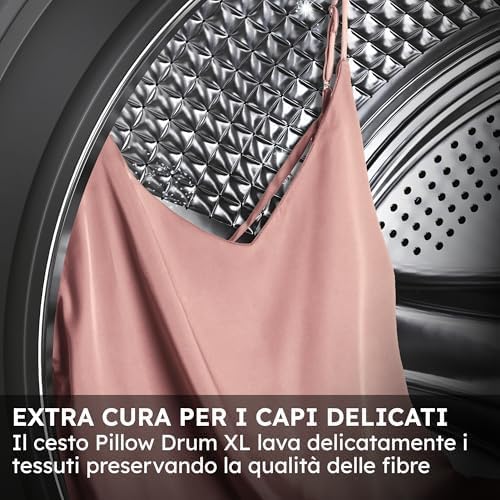
Image: Close-up of the Haier X Series 9 Washing Machine's Pillow Drum XL, showing a delicate garment inside, emphasizing gentle fabric care.
2.3 Adding Detergent and Softener
- Pull out the detergent drawer.
- Add appropriate amounts of detergent and softener to their respective compartments.
- The machine features an automatic dispenser option for convenience.
2.4 Program Selection
- Turn the program selector or use the touch controls to choose the desired wash program.
- Available cycle options include: Allergens, Active Steam, Delicates.
- The 6 Stains Treatment function helps remove difficult stains without pre-treatment.

Image: A person interacting with the washing machine's control panel, demonstrating the professional anti-stain cycles and pre-wash function for enhanced effectiveness.
2.5 Adjusting Settings
- Adjust temperature, spin speed (up to 1400 rpm), and other options as needed.
- AI Technology: Smart AI sensors automatically adapt each cycle for impeccable washing results.

Image: Inside the washing machine drum, showing clothes with an overlay of glowing dots and lines, representing AI sensors adapting the wash cycle for precision.
2.6 Starting a Cycle
- Press the Start/Pause button to begin the wash cycle.
2.7 Special Features
Ultra Fresh Air
This system activates at the end of the wash cycle, circulating clean air to keep garments fresh and odor-free for up to 12 hours, preventing creases and stagnation.

Image: Inside the washing machine drum, showing clothes being treated with a stream of micro-steam, illustrating the Ultra Fresh Air feature for freshness and wrinkle reduction.
Refresh Steam Cycle
Utilizes micro-steam technology to reduce creases and allergens, preserving the quality of delicate fabrics.
hOn App Connectivity
Connect your washing machine to the hOn App via Wi-Fi to manage cycles remotely, monitor energy consumption, and access over 60 dedicated programs.
Direct Motion Motor
The motor is directly connected to the drum, eliminating belts and intermediate components. This design reduces vibrations and noise (70 dB), ensuring stable, precise, and high-performance washing with superior energy efficiency and durability.

Image: Front view of the Haier X Series 9 Washing Machine with an AI circuit overlay on the drum, representing the AI DBS (Direct Motion System) for silent and precise washing.
Energy Efficiency
The washing machine is 30% more efficient than a standard Class A appliance, with optimized energy consumption (36 kWh/100 cycles).

Image: Graphic illustrating "Optimized Energy Efficiency" within a washing machine drum, highlighting that the appliance is 30% more efficient than a standard Class A.
3. Maintenance
Regular maintenance ensures the longevity and optimal performance of your washing machine.
3.1 Cleaning the Detergent Drawer
- Remove and clean the detergent drawer regularly to prevent residue buildup.
- The ABT (Anti-Bacterial Treatment) protects the detergent drawer from mold and bacteria.
3.2 Cleaning the Drum and Gasket
- Wipe the drum and door gasket after each wash to remove moisture and lint.
- The Smart Dual Spray system automatically cleans the drum and porthole after each wash, ensuring maximum hygiene.
- The ABT (Anti-Bacterial Treatment) also protects the door gasket from mold and bacteria.
3.3 Cleaning the Filter
- Locate and clean the drain pump filter periodically to remove any foreign objects or lint. Refer to the full user manual for specific instructions on accessing the filter.
3.4 Descaling
- Perform a descaling cycle periodically, especially in areas with hard water, using a suitable descaling agent.
4. Troubleshooting
Before contacting customer service, please refer to the following common issues and solutions.
| Problem | Possible Cause | Solution |
|---|---|---|
| Washing machine does not start | Power cord not plugged in; Door not closed properly; Program not selected; Start/Pause button not pressed. | Check power connection; Ensure door is securely closed; Select a program; Press Start/Pause. |
| No water filling | Water tap closed; Water inlet hose kinked or blocked; Water pressure too low. | Open water tap; Straighten hose; Check water supply. |
| Water not draining | Drain hose kinked or blocked; Drain pump filter clogged. | Straighten hose; Clean drain pump filter. |
| Excessive vibration or noise | Machine not level; Transport bolts not removed; Overloaded drum. | Adjust leveling feet; Remove transport bolts; Reduce laundry load. |
| Unpleasant odors | Residue buildup in drum or gasket; Infrequent use of hot cycles. | Clean drum and gasket; Run a maintenance wash with hot water and detergent. |
5. Specifications
Detailed technical specifications for the Haier X Series 9 Washing Machine, model HW100-B14387U-IT.
- Brand: Haier
- Model Name: Haier X Series 9 Washing Machine 10 Kg
- Model Number: HW100-B14387U-IT
- Product Dimensions (DxWxH): 62P x 60l x 85H cm (62 cm Depth x 60 cm Width x 85 cm Height)
- Capacity: 10 kg
- Installation Type: Free-standing
- Loading Position: Front Load
- Color: White
- Item Weight: 70 Kilograms
- Control Type: Touch
- Maximum Spin Speed: 1400 Revolutions per minute
- Noise Level: 70 Decibels
- Energy Efficiency: A-30% (30% more efficient than standard Class A)
- Drum Material: Stainless Steel
- Special Features: High efficiency, Smart connectivity, Temperature control, Automatic dose, Hygienic steam
- Included Components: Fill hose
- Country of Origin: China
6. Warranty Information
Your Haier X Series 9 Washing Machine, model HW100-B14387U-IT, comes with a 2-year product warranty from the date of purchase. This warranty covers manufacturing defects and material faults under normal use conditions.
Please retain your proof of purchase for any warranty claims. For detailed terms and conditions, refer to the official warranty document provided with your appliance or visit the Haier official website.
7. Support and Contact
For further assistance, technical support, or service requests, please contact Haier customer service.
- Official User Manual: A comprehensive user manual in PDF format is available for download here.
- Haier Store: Visit the official Haier Store for more products and information: Haier Store on Amazon.
- Customer Service: Refer to your local Haier contact information for service and support.


