
1. Introduction
Welcome to the Motorola Edge 70 user manual. This guide provides essential information to help you get started with your new smartphone, understand its features, and maintain its optimal performance. The Motorola Edge 70 combines an ultra-thin design with powerful features, including a triple 50MP camera system, Moto AI, and a vibrant 6.7-inch AMOLED display.
For additional support and information, please visit the official Motorola website.
2. What's in the Box
Your Motorola Edge 70 package includes the following items:
- Motorola Edge 70 Smartphone
- USB Cable
- Phone Case
- SIM Ejector Tool
3. Device Overview
The Motorola Edge 70 features a sleek, ultra-thin design and robust construction. Familiarize yourself with the key components of your device.

Figure 1: Front and Rear View of Motorola Edge 70. This image displays the phone's overall design, including the display, camera module, and the Motorola logo on the back.

Figure 2: Side Profile of Motorola Edge 70. This image highlights the phone's ultra-thin 5.99mm profile, showcasing its sleek construction.
4. Setup
4.1. Inserting the SIM Card
- Locate the SIM card tray on the side of your device.
- Insert the SIM ejector tool into the small hole next to the tray and press firmly until the tray pops out.
- Place your nano-SIM card(s) into the tray with the gold contacts facing down. Ensure the card is correctly oriented. The Motorola Edge 70 supports Dual SIM and eSIM.
- Carefully push the tray back into the slot until it is flush with the device.
4.2. Initial Power On and Setup
- Press and hold the Power button until the Motorola logo appears.
- Follow the on-screen prompts to select your language, connect to a Wi-Fi network, and set up your Google account.
- You can transfer data from an old device during this process or set up as a new device.
- Configure biometric identification (fingerprint recognition) for enhanced security.
4.3. Charging the Battery
Before first use, it is recommended to fully charge your device. The Motorola Edge 70 supports fast TurboPower 68W charging and 15W wireless charging.
- Connect the USB cable to the USB-C port on your phone and to a compatible power adapter.
- Plug the power adapter into a wall outlet.
- The battery icon on the screen will indicate charging status.

Figure 3: Battery Life Indication. This graphic illustrates the extended battery life of up to 50 hours on the Motorola Edge 70.
5. Operating Your Device
5.1. Navigation and Interface
The Motorola Edge 70 runs on Android 16 and features a responsive touchscreen interface. Navigate using gestures or on-screen buttons.
- Home Screen: Access your apps, widgets, and notifications.
- Notifications Panel: Swipe down from the top of the screen to view notifications and quick settings.
- App Drawer: Swipe up from the bottom of the screen to access all installed applications.
5.2. Moto AI Features
Moto AI enhances your daily interactions, making tasks simpler and more intuitive. Features include:
- Smart Photo Capture: AI-powered enhancements for optimal photo quality.
- Notification Organization: Intelligent management of your alerts.
- Personalized Experiences: Adapts to your usage patterns for a tailored experience.

Figure 4: Moto AI Interface. This image shows the phone's screen with various Moto AI features, including smart notifications and content suggestions.
6. Camera Features
The Motorola Edge 70 is equipped with a versatile triple 50MP rear camera system and a 50MP front camera, designed to capture stunning photos and videos.
6.1. Rear Camera System
- Main Camera: 50 MP sensor with flicker sensor, optimized for low-light conditions and optical image stabilization (OIS).
- Ultra-Wide/Macro Camera: Capture expansive landscapes or detailed close-ups.
- Depth Sensor: For enhanced portrait mode effects.

Figure 5: Triple 50MP Camera System. A detailed view of the rear camera setup, highlighting the three lenses.
6.2. Front Camera
- 50 MP Selfie Camera: High-resolution front camera for sharp selfies and video calls.
- Supports 4K video recording.
6.3. Camera Features and Modes
- Pantone Validated Technology: Ensures accurate colors and skin tones in your photos.
- Moto AI: Optimizes details, contrast, and sharpness for professional-looking photos.
- Automatic Shooting Mode: Simplifies photo capture for everyday use.
- Video Recording: Supports 1080p video capture at 120 fps.

Figure 6: Clarity with Every Detail. This image demonstrates the camera's ability to capture sharp and detailed images.
7. Display and Audio
Experience stunning visuals and immersive audio with your Motorola Edge 70.
7.1. Display
- Type: 6.7-inch AMOLED Extreme Display.
- Resolution: 2712 x 1220 pixels.
- Refresh Rate: 120Hz for smooth scrolling and gaming.
- Brightness: High peak brightness for excellent visibility even in direct sunlight.
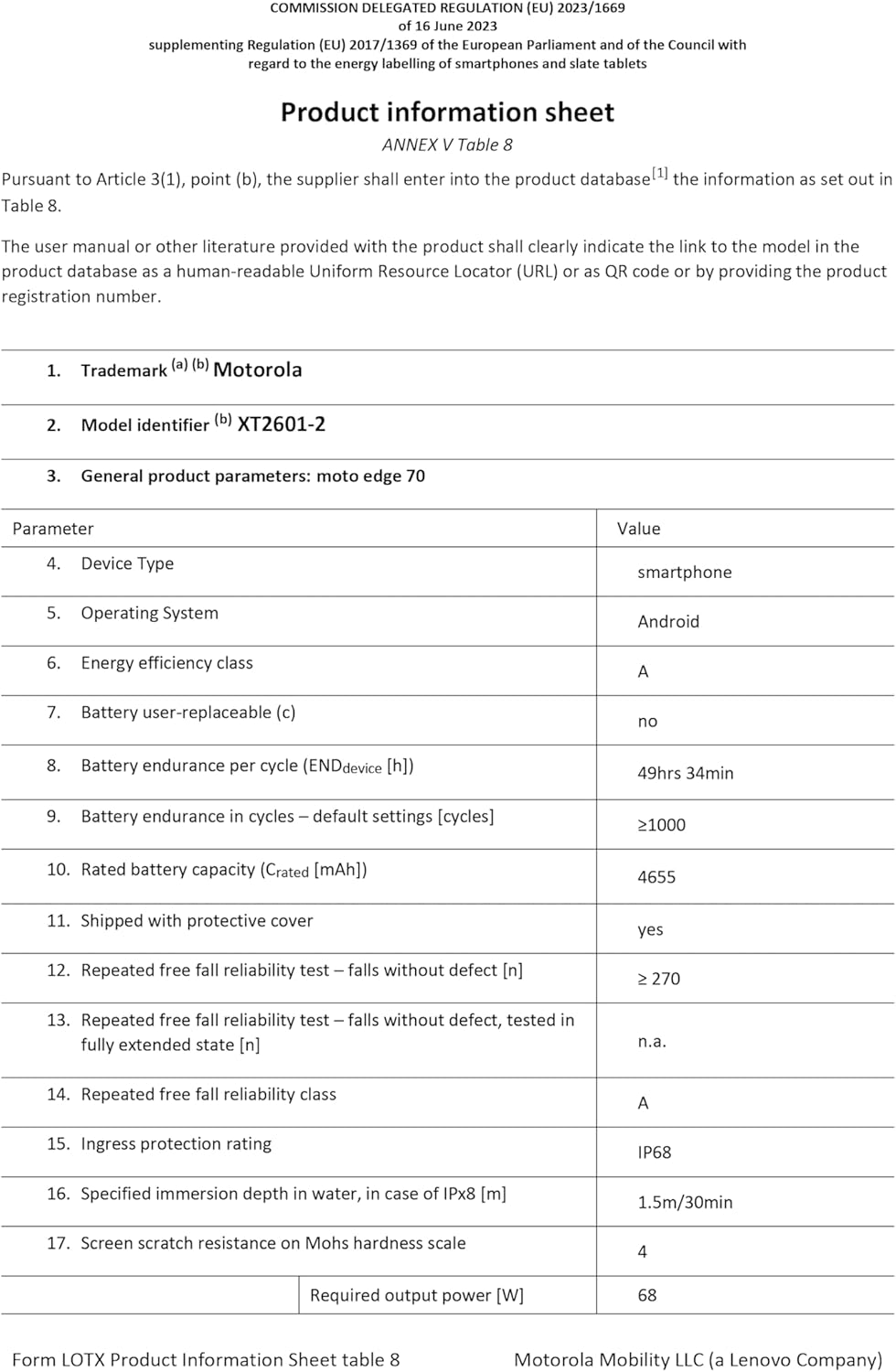
Figure 7: Vibrant Display. This image showcases the phone's display quality with vivid colors.
7.2. Audio
The device features enhanced audio capabilities for an immersive listening experience.
- Dolby Atmos support for rich, clear sound.
- Note: The Motorola Edge 70 does not include a 3.5mm headphone jack. Audio output is via USB-C or wireless connectivity.
8. Performance and Battery
The Motorola Edge 70 is designed for fast and efficient performance, powered by a robust processor and long-lasting battery.
8.1. Processor and Memory
- Processor: Snapdragon® 7 Gen 4 for quick and efficient operations.
- RAM: 12 GB (with RAM extension up to 24 GB).
- Internal Storage: 512 GB, providing ample space for apps, photos, and media.

Figure 8: Performance Overview. This graphic details the Snapdragon processor, RAM, and internal storage.
8.2. Battery Life and Charging
- Battery Capacity: 4800 mAh Silicon-Carbon battery.
- Charging: Supports TurboPower 68W fast charging and 15W wireless charging.
- Provides up to 50 hours of usage on a single charge.
9. Maintenance
9.1. Cleaning Your Device
- Use a soft, lint-free cloth to clean the screen and body of the phone.
- Avoid using harsh chemicals or abrasive materials.
- For stubborn smudges, lightly dampen the cloth with water.
9.2. Water and Dust Resistance
The Motorola Edge 70 is certified with IP68 and IP69 resistance, meaning it is protected against dust ingress and immersion in water up to 1.5 meters for 30 minutes. It is also resistant to high-pressure water jets.
- While resistant, avoid intentional submersion or exposure to saltwater.
- If the device gets wet, dry it thoroughly before charging or using ports.

Figure 9: Durability Features. This image highlights the phone's IP68/IP69 water resistance and Military Standard certification.
9.3. Software Updates
Regularly check for and install software updates to ensure your device has the latest features, security patches, and performance improvements. You can usually find this option in Settings > System > System updates.
10. Troubleshooting
If you encounter issues with your Motorola Edge 70, try the following common troubleshooting steps:
| Problem | Solution |
|---|---|
| Device not turning on | Ensure the battery is charged. Press and hold the Power button for at least 10-15 seconds to force a restart. |
| Apps crashing or freezing | Clear the app's cache (Settings > Apps > [App Name] > Storage > Clear cache). If the issue persists, uninstall and reinstall the app. |
| Poor battery life | Check battery usage in Settings to identify power-hungry apps. Reduce screen brightness, disable unnecessary features (GPS, Bluetooth, Wi-Fi when not in use). |
| Network connectivity issues | Toggle Airplane Mode on and off. Restart the device. Check SIM card insertion. Contact your wireless service provider if the issue persists. |
| Fingerprint sensor not working | Ensure your finger is clean and dry. Re-register your fingerprints in Settings > Security. |
If these steps do not resolve your issue, please refer to the Warranty and Support section for further assistance.
11. Specifications
Detailed technical specifications for the Motorola Edge 70 (Model: XT2601-2):
| Feature | Detail |
|---|---|
| Brand | Motorola |
| Model Name | Edge 70 (XT2601-2) |
| Operating System | Android 16 |
| Processor Speed | 2800 MHz |
| RAM Size | 12 GB (expandable) |
| Internal Storage | 512 GB |
| Screen Size | 6.67 Inches |
| Screen Type | AMOLED Extreme |
| Max Screen Resolution | 2712 x 1220 Pixels |
| Refresh Rate | 120 Hz |
| Rear Camera Resolution | 50 MP (Triple Camera System) |
| Front Camera Resolution | 50 MP |
| Video Capture Resolution | 1080p at 120 fps |
| Battery Capacity | 4800 mAh |
| Charging | 68W TurboPower (wired), 15W Wireless Charging |
| SIM Card Format | eSIM, Dual SIM |
| Connectivity Technology | 5G, GSM, LTE |
| Wireless Technology | GSM, LTE |
| Biometric Features | Fingerprint Recognition |
| Water Resistance Level | IP68, IP69 (Waterproof) |
| Headphone Jack | Absent |
| Charging Port Type | USB-C |
| Item Weight | 159 Grams |
| Item Dimensions | 15.9 x 7.4 x 0.6 cm |
| Model Year | 2025 |
| GTIN | 840493603360 |
| EPREL Link | View EPREL Product Information |
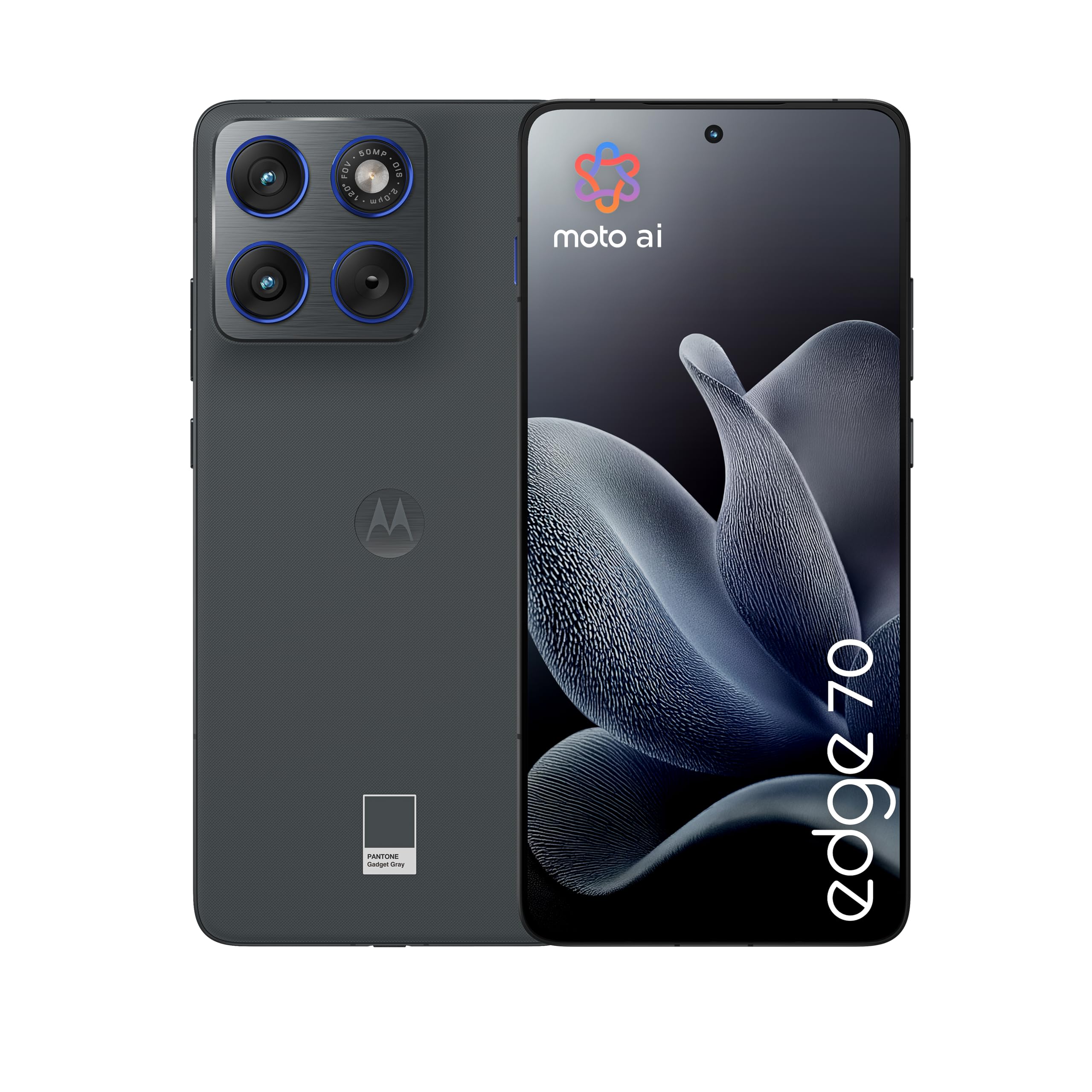
Figure 10: Energy Label and Product Information Sheet. This image displays the energy efficiency rating and key product data for the Motorola Edge 70.
12. Warranty and Support
12.1. Product Warranty
Your Motorola Edge 70 comes with a 2-year manufacturer's warranty. This warranty covers defects in materials and workmanship under normal use. Please retain your proof of purchase for warranty claims.
For detailed warranty terms and conditions, please refer to the documentation provided with your device or visit the official Motorola support website.
12.2. Customer Support
For technical assistance, troubleshooting, or service requests, please contact Motorola customer support. You can find contact information and additional resources on the official Motorola website:
You may also refer to the Data Transparency Declaration (PDF) for additional information.


