
Introduction
This manual provides essential information for the safe and efficient use of your Motorola Edge 70 smartphone. Please read it carefully before using your device. Keep this manual for future reference.
The Motorola Edge 70 is a high-performance smartphone featuring a 6.67-inch Super HD 120Hz AMOLED display, a triple 50MP camera system with flicker sensor, a 50MP selfie camera, a 4800mAh Silicon-Carbon battery with 68W TurboPower charging, and runs on Android 16 with Moto AI enhancements. It boasts a slim 5.99mm design, military-grade durability, and IP68/IP69 water and dust resistance.
What's in the Box
Verify that all items are present in your product packaging:
- Motorola Edge 70 Smartphone
- USB Cable (Type-C)
- Phone Case
- SIM Ejector Tool
Note: A power adapter is not always included and may need to be purchased separately. For optimal charging, use a 68W TurboPower charger.
Setup
1. Inserting the SIM Card
- Locate the SIM card tray on the side of your device.
- Insert the SIM ejector tool into the small hole next to the tray and press firmly until the tray pops out.
- Place your Nano-SIM card(s) into the tray with the gold contacts facing down. Ensure they are correctly seated. The Motorola Edge 70 supports Dual SIM.
- Carefully push the tray back into the slot until it is flush with the device.
2. Initial Power On and Configuration
- Press and hold the Power button (located on the side) until the Motorola logo appears.
- Follow the on-screen prompts to select your language, connect to a Wi-Fi network, and sign in with your Google account.
- You will be guided through setting up security features such as fingerprint recognition and a screen lock (PIN, pattern, or password).
- Transfer data from your old device if prompted, or set up as a new device.
Operating Instructions
Display and Navigation
The Motorola Edge 70 features a vibrant 6.67-inch AMOLED Extreme display with a 120Hz refresh rate, offering smooth visuals and incredible contrast. The display has a resolution of 2712 x 1220 pixels and a peak brightness of 4500 nits for excellent visibility even in bright sunlight.

A clear view of the Motorola Edge 70, highlighting its expansive 6.67-inch pOLED display with vivid colors and sharp details, ideal for an immersive visual experience.
Navigate your device using intuitive touchscreen gestures. Swipe up from the bottom to access the app drawer, swipe down from the top for notifications and quick settings, and use gestures or navigation buttons for home, back, and recent apps.
Camera Features
Capture stunning photos and videos with the Motorola Edge 70's advanced camera system. It includes a triple 50MP rear camera setup with a flicker sensor and a 50MP front-facing camera.
- Main Camera: 50MP sensor with Optical Image Stabilization (OIS) for clear shots, even in low light.
- Ultra-wide & Macro Vision: A versatile lens for capturing expansive landscapes or detailed close-ups.
- Front Camera: 50MP for high-resolution selfies and 4K video recording.

The image focuses on the Motorola Edge 70's advanced camera setup, featuring three 50MP lenses, Optical Image Stabilization (OIS) for the main sensor, 4K video recording for the front camera, and versatile ultra-wide and macro vision options.
The camera software includes Moto AI for enhanced photo optimization, improving details, contrast, and sharpness. It also supports HDR video recording for richer colors and dynamic range.
Battery and Charging
The device is equipped with a 4800mAh Silicon-Carbon battery, designed for extended usage. It supports 68W TurboPower fast charging, allowing for quick recharges. Additionally, 15W wireless charging is supported.

This visual representation details the Motorola Edge 70's battery capabilities, including an estimated 50 hours of usage, the 4800mAh Silicon-Carbon battery, and support for 68W TurboPower wired charging and 15W wireless charging.
To charge, connect the provided USB-C cable to the phone's charging port and to a compatible power adapter. For wireless charging, place the device on a compatible wireless charging pad.
Performance and Storage
Powered by the Snapdragon 7 Gen 4 processor, the Motorola Edge 70 delivers fast and efficient performance for all your tasks. It comes with 12GB of RAM and 512GB of internal storage, providing ample space for apps, photos, and videos.

This image provides an overview of the Motorola Edge 70's powerful internal hardware, including the Snapdragon 7 Gen 4 processor for efficient performance, and details on its 12GB RAM (expandable to 24GB) and 512GB of internal storage.
Moto AI Features
Moto AI integrates intelligent features to simplify daily tasks and enhance user experience. This includes smart photo organization, notification management, and generative AI capabilities for creative tasks.

This image illustrates the intuitive Moto AI features on the Motorola Edge 70, showcasing how it simplifies daily tasks such as organizing photos, managing notifications, and utilizing generative AI for creative purposes.
Maintenance
- Cleaning: Use a soft, lint-free cloth to clean the screen and body of the device. Avoid abrasive materials or harsh chemicals.
- Software Updates: Regularly check for and install software updates to ensure optimal performance, security, and access to new features. Go to Settings > System > System updates.
- Battery Care: To prolong battery life, avoid extreme temperatures and do not leave the device fully charged or fully discharged for extended periods.
- Water Resistance: The device is IP68/IP69 rated for water and dust resistance. This means it can withstand immersion in up to 1.5 meters of fresh water for up to 30 minutes. However, it is not waterproof. Avoid exposing it to saltwater, chlorinated water, or other liquids. If the device gets wet, dry it thoroughly before charging or using ports.

The image highlights the Motorola Edge 70's slim profile, its military-grade certification for robustness, and its IP68/IP69 rating for water and dust resistance, demonstrating its durable construction.
Troubleshooting
- Device Unresponsive: If your device is frozen or unresponsive, press and hold the Power button for about 10-15 seconds to force a restart.
- Battery Draining Quickly: Check background app usage, reduce screen brightness, disable unnecessary features like GPS or Bluetooth when not in use, and ensure your software is up to date.
- Network Connectivity Issues: Try restarting your device. Check if Airplane Mode is off. Verify your SIM card is correctly inserted. Contact your service provider if issues persist.
- App Crashing: Clear the app's cache and data (Settings > Apps > [App Name] > Storage & cache). If the issue continues, uninstall and reinstall the app.
- Factory Reset: As a last resort for persistent software issues, you can perform a factory reset. This will erase all data on your device, so ensure you back up important information first. Go to Settings > System > Reset options > Erase all data (factory reset).
Specifications
Detailed technical specifications for the Motorola Edge 70:
| Feature | Specification |
|---|---|
| Brand | Motorola |
| Model Name | Edge 70 |
| Operating System | Android 16 |
| RAM Memory Size | 12 GB |
| CPU Speed | 2.5 GHz |
| Storage Capacity | 512 GB |
| Screen Size | 6.67 Inches |
| Resolution | 2712 x 1220 pixels |
| Refresh Rate | 120 Hz |
| Display Type | OLED |
| Pixel Density | 393 PPI |
| Rear Camera Resolution | 50 MP (Triple Camera) |
| Front Camera Resolution | 50 MP |
| Video Capture Resolution | 1080p |
| Battery Capacity | 4800 mAh |
| Charging | 68W TurboPower, 15W Wireless |
| SIM Card Slots | Dual SIM (Nano) |
| Connectivity Technology | 5G, CDMA, GSM, LTE |
| Biometric Identification | Fingerprint Recognition |
| Water Resistance Level | IP68/IP69 |
| Dimensions | 15.9 x 7.4 x 0.6 cm |
| Weight | 159 Grams |
| Year Model | 2025 |
| UPC | 840493608020 |
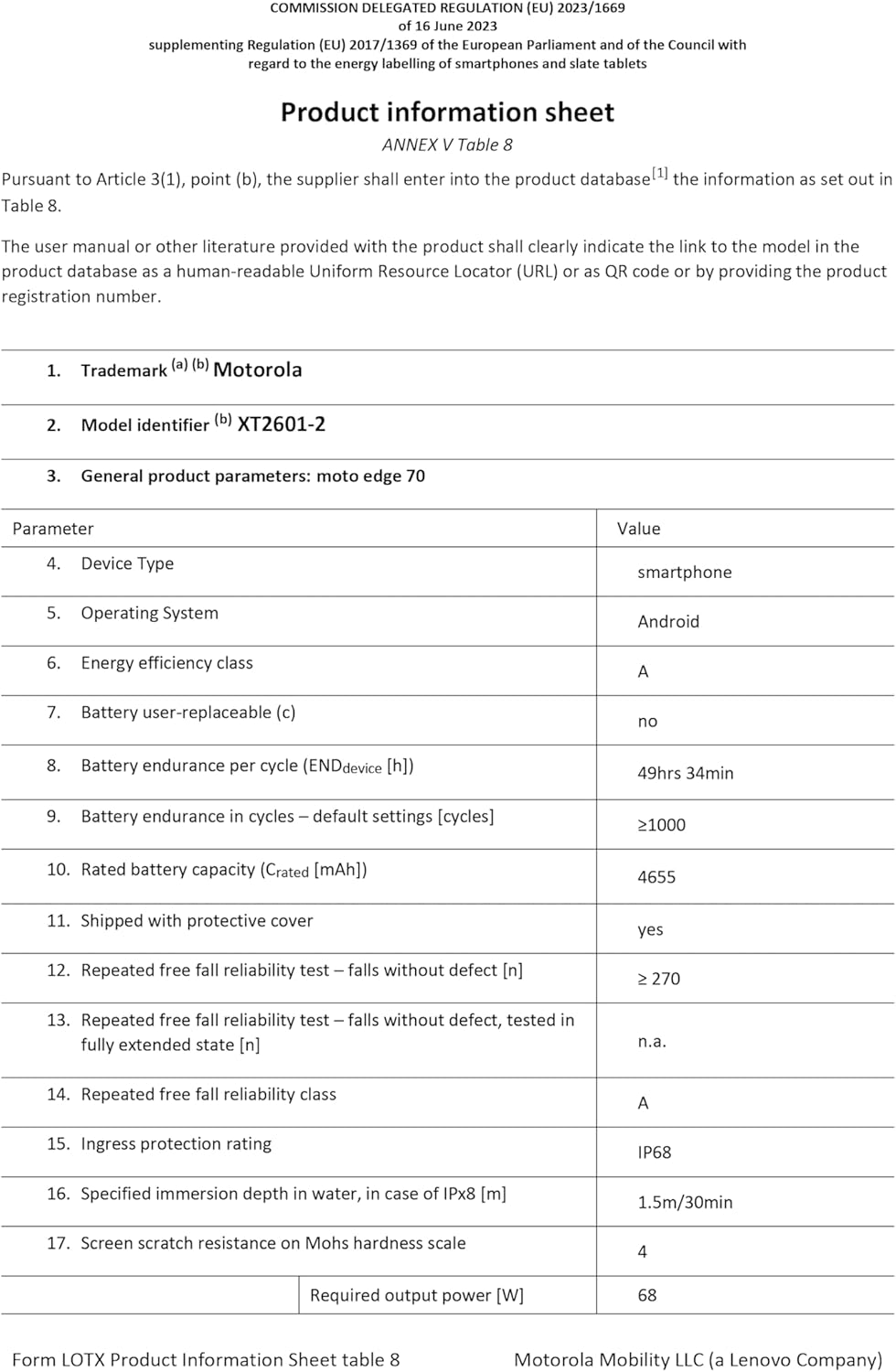
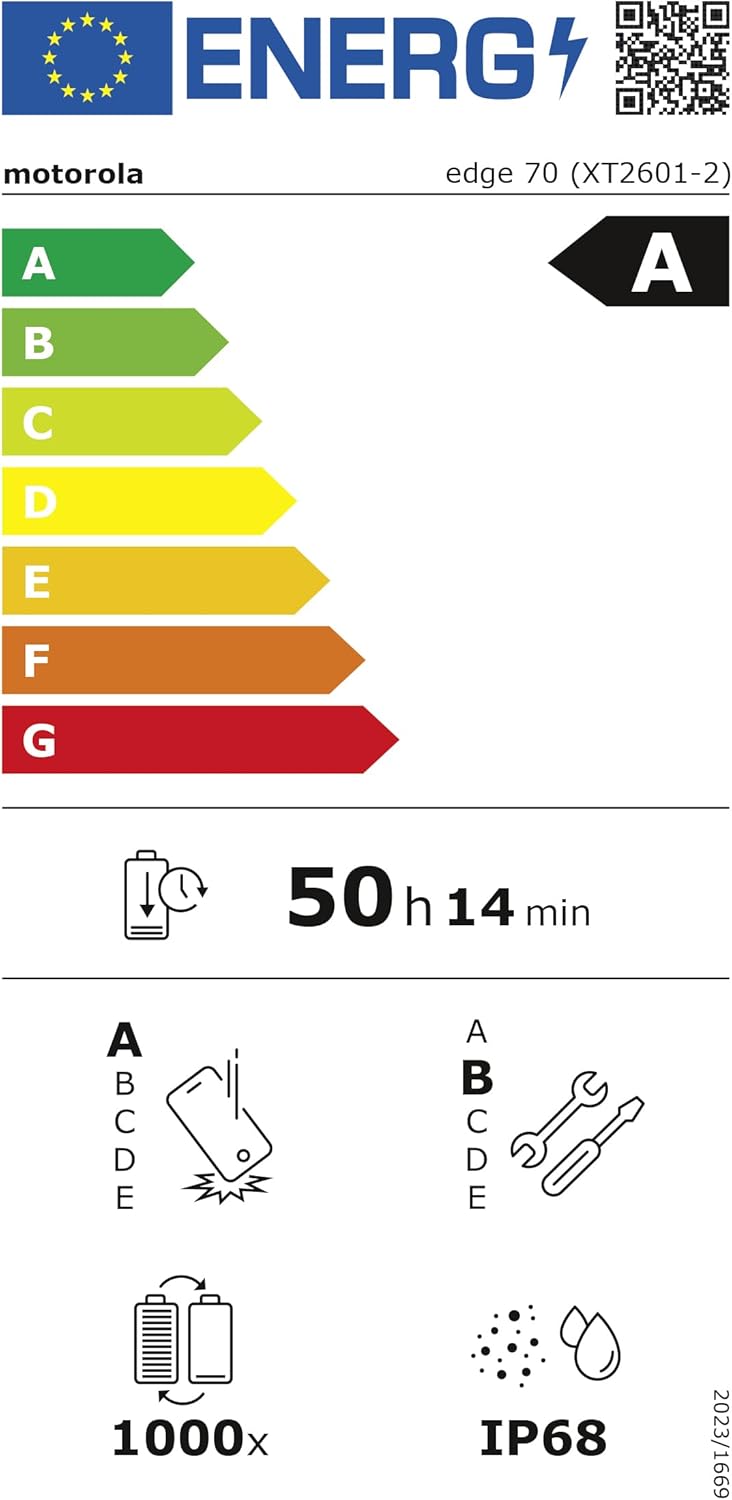
The EU Energy Label for the Motorola Edge 70, indicating its 'A' energy efficiency rating and an estimated battery endurance of 50 hours. More details can be found on the EPREL database.
Warranty and Support
Your Motorola Edge 70 comes with a 2-year manufacturer's warranty from the date of purchase. This warranty covers defects in materials and workmanship under normal use.
For warranty claims, technical support, or further assistance, please visit the official Motorola support website or contact their customer service. Keep your proof of purchase for warranty validation.
Official Motorola Support: www.motorola.com/support


