1. Introduction
Thank you for choosing the KIPMAX X20 Cordless Vacuum Cleaner. This manual provides essential information for the safe and efficient operation, maintenance, and troubleshooting of your new vacuum cleaner. Please read it thoroughly before first use and retain it for future reference.
The KIPMAX X20 is designed for versatile cleaning across various surfaces, featuring powerful suction, a long-lasting battery, and an innovative aromatherapy function to enhance your cleaning experience.
2. Important Safety Instructions
When using an electrical appliance, basic precautions should always be followed, including the following:
- Read all instructions before using this appliance.
- Do not use outdoors or on wet surfaces.
- Do not allow to be used as a toy. Close attention is necessary when used by or near children.
- Use only as described in this manual. Use only manufacturer's recommended attachments.
- Do not use with damaged cord or plug. If appliance is not working as it should, has been dropped, damaged, left outdoors, or dropped into water, return it to a service center.
- Do not pull or carry by cord, use cord as a handle, close a door on cord, or pull cord around sharp edges or corners. Do not run appliance over cord. Keep cord away from heated surfaces.
- Do not unplug by pulling on cord. To unplug, grasp the plug, not the cord.
- Do not handle plug or appliance with wet hands.
- Do not put any object into openings. Do not use with any opening blocked; keep free of dust, lint, hair, and anything that may reduce airflow.
- Keep hair, loose clothing, fingers, and all parts of body away from openings and moving parts.
- Do not pick up anything that is burning or smoking, such as cigarettes, matches, or hot ashes.
- Do not use to pick up flammable or combustible liquids, such as gasoline, or use in areas where they may be present.
- Do not pick up toxic material, such as chlorine bleach, ammonia, or drain cleaner.
- Do not use without dust cup and/or filters in place.
- Turn off all controls before unplugging.
- Use extra care when cleaning on stairs.
- Do not use to pick up hard or sharp objects such as glass, nails, screws, coins, etc.
- Store the appliance indoors. Put away after use to prevent accidents.
- Use only the charger supplied by the manufacturer to recharge.
- Do not incinerate the appliance even if it is severely damaged. The batteries can explode in a fire.
3. Package Contents
Please check the package contents against the list below. If any items are missing or damaged, contact customer support.

- Main Body
- Motorized Brush
- Adjustable Tube
- Battery (Rechargeable Lithium-Ion)
- Crevice Tool
- Combination Brush (2-in-1)
- Wall Mount
- Wall Mount Installation Kit
- Power Adapter
- Sponge & HEPA Filter *2
- Rose-scented Tablet
- Lavender-scented Tablet
- User Manual
- Quick Start Guide
4. Setup
4.1 Assembly
Assemble the main components of your KIPMAX X20 vacuum cleaner by following these steps:
- Connect the adjustable tube to the main body until it clicks into place.
- Attach the motorized brush head to the other end of the adjustable tube. Ensure it is securely fastened.
- For handheld use, attach desired accessories (crevice tool or combination brush) directly to the main body.

4.2 Charging the Battery
Before first use, fully charge the battery. The battery can be charged in three ways:
- Directly on the Unit: Connect the power adapter to the main body's charging port.
- Detached Battery: Remove the battery from the main body and connect the power adapter directly to the battery.
- Via Wall Mount: Install the wall mount (see 4.3 Wall Mount Installation) and place the vacuum cleaner on it. Connect the power adapter to the wall mount.
A full charge takes approximately 4 hours. The LED display will indicate the charging status and battery level.


4.3 Wall Mount Installation
The included wall mount provides a convenient storage and charging solution. Choose a suitable location near a power outlet and follow the installation instructions provided with the wall mount kit.

5. Operation
5.1 Power On/Off and Mode Selection
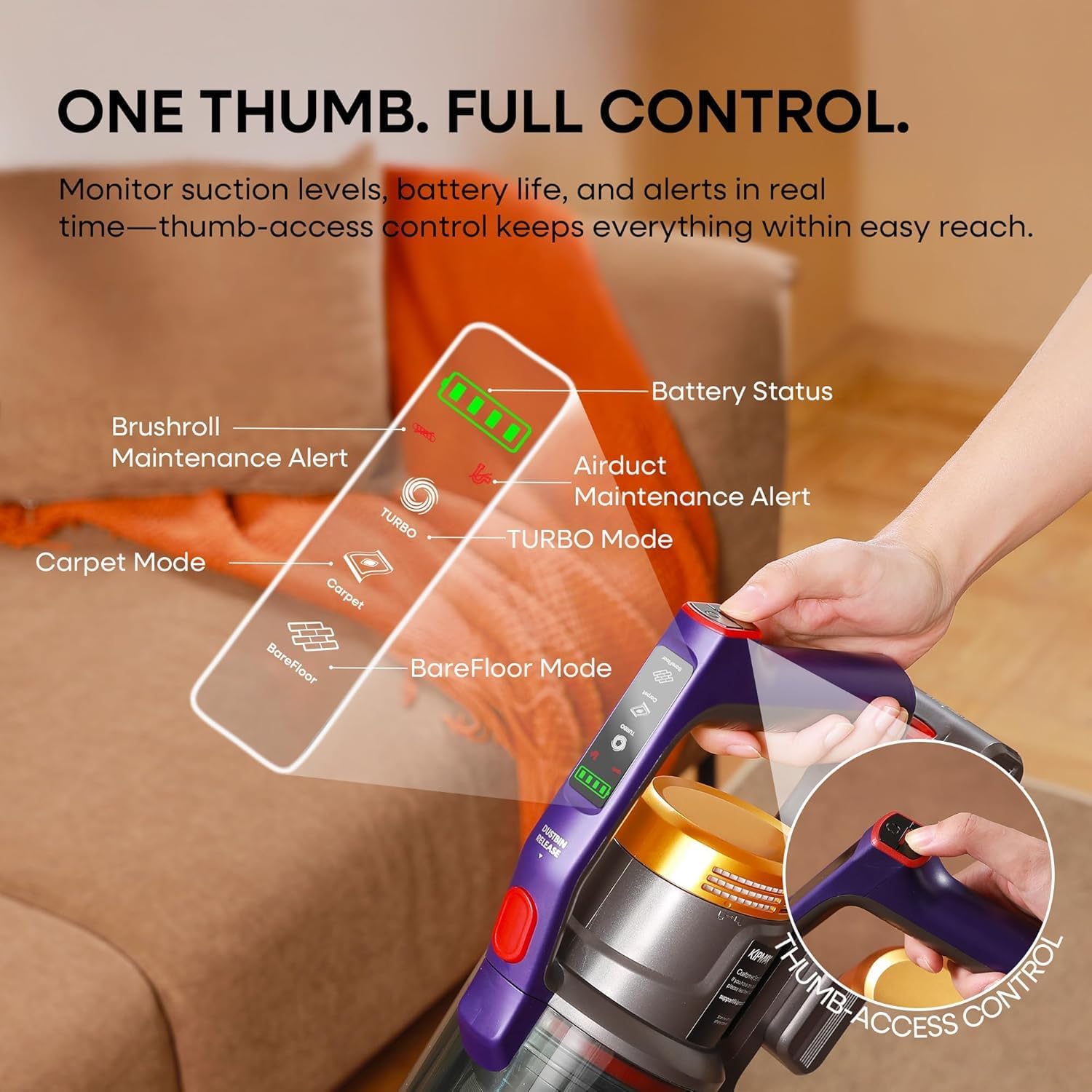
The KIPMAX X20 features thumb-access controls for easy operation.
- Power On/Off: Press the power button located on the handle to turn the vacuum on or off.
- Mode Selection: Press the mode switch button to cycle through the three cleaning modes:
- BareFloor Mode: For daily cleaning on hard floors.
- Carpet Mode: For deep cleaning carpets.
- TURBO Mode: For heavy-duty cleaning and maximum suction.
The LED display provides real-time information on the selected mode, battery status, and maintenance alerts.


5.2 Aromatherapy Function
The KIPMAX X20 includes a built-in fragrance slot to release a refreshing scent during cleaning.
- Locate the fragrance slot on the main body (refer to the diagram in the "Fragrance and Clean and in One Go" image).
- Insert one of the complimentary scented pads (Lavender or Rose) into the slot.
- As you vacuum, the airflow will naturally release the scent, leaving your home smelling fresh.

5.3 Using Attachments and Features
The KIPMAX X20 comes with various attachments and features for comprehensive cleaning:
- Motorized Brush: Ideal for floors and carpets. Features a FlatTurbo Anti-Tangle Brushroll with green search lights to illuminate dust. The brush head offers 150° adjustable angle and 180° lie-flat design for cleaning under furniture.
- Crevice Tool: Perfect for narrow gaps, corners, baseboards, and window tracks.
- Combination Brush: Use the brush mode for delicate surfaces like upholstery, curtains, or car interiors, and the wide nozzle for larger debris.
- Adjustable Tube: Extend or retract the tube to reach high areas like ceilings or cabinet tops, or to clean under furniture without bending.
- Self-Standing Feature: The vacuum can stand upright on its own, allowing you to pause cleaning without leaning it against walls.


6. Maintenance
Regular maintenance ensures optimal performance and extends the lifespan of your KIPMAX X20 vacuum cleaner.
6.1 Emptying the Dust Cup
The 1.5L dust cup should be emptied regularly, especially when the MAX fill line is reached.
- Ensure the vacuum is turned off.
- Press the one-touch release button on the dust cup to open the bottom flap and empty contents into a trash bin.
- Close the dust cup flap securely.

6.2 Cleaning Filters
The KIPMAX X20 features a 7-layer filtration system, including washable HEPA filters. Clean filters regularly to maintain suction power and air quality.
- Ensure the vacuum is turned off and unplugged.
- Remove the dust cup and separate the filter components (Metal Filter Mesh, Filter Cyclone, Multi-Cyclone Filter, Washable HEPA, Filter Sponge, Air Outlet HEPA).
- Rinse the washable components under running water until clean. Do not use detergents.
- Allow all filter components to air dry completely for at least 24 hours before reassembling. Do not use heat to dry.
- Reassemble the filters and dust cup, ensuring all parts are correctly seated.


6.3 Cleaning the Brushroll
The FlatTurbo Anti-Tangle Brushroll is designed to minimize hair tangles, but occasional cleaning may be necessary.
- Ensure the vacuum is turned off and the brush head is detached.
- Use a coin or flat tool to unlock the brushroll cover.
- Remove the brushroll. Carefully cut away any tangled hair or debris using scissors.
- Clean the brushroll and its housing. Reinsert the brushroll and secure the cover.

7. Troubleshooting
If you encounter issues with your KIPMAX X20, refer to the following common problems and solutions:
| Problem | Possible Cause | Solution |
|---|---|---|
| Vacuum does not turn on. | Battery is not charged or not properly installed. | Ensure battery is fully charged and correctly inserted. |
| Low suction power. | Dust cup is full, filters are clogged, or brushroll is tangled. | Empty dust cup, clean filters, and remove any tangles from the brushroll. Check for blockages in the tube. |
| Brushroll stops spinning. | Obstruction in the brushroll or brushroll needs cleaning. | Turn off the vacuum, remove the brushroll, and clear any obstructions or tangles. |
| Vacuum makes unusual noise. | Blockage in the air duct or foreign object in the brush head. | Check for and remove any blockages in the tube, dust cup, or brush head. |
| Battery runtime is short. | Battery not fully charged or operating in TURBO mode constantly. | Ensure battery is fully charged. Use lower power modes for longer runtime. Battery life naturally decreases over time. |
If the problem persists, please contact KIPMAX customer support.
8. Specifications
| Feature | Detail |
|---|---|
| Brand | KIPMAX |
| Model Name | X20 |
| Suction Power | 50KPa |
| Motor Wattage | 550W Brushless Motor |
| Motor RPM | 80000 RPM |
| Battery Type | 8x 2200mAh Lithium-Ion (Detachable) |
| Max Runtime | Up to 70 minutes |
| Charging Time | Approx. 4 hours |
| Dust Cup Capacity | 1.5 Liters |
| Filtration System | 7-Layer, including Washable HEPA Filter |
| Special Features | Aromatherapy Design, FlatTurbo Anti-Tangle Brushroll, Green Search Light, LED Display, Self-Standing, 180° Lie-Flat Design, Adjustable Tube |
| Noise Level | 62 Decibels |
| Item Weight | 5.51 pounds |
| Product Dimensions | 25.99"L x 16"W x 10.9"H |
| Surface Recommendation | Hard Floor, Low-Pile Carpet, Hardwood Floor, Laminate, Luxury Vinyl, Tile |
9. Warranty and Customer Support
KIPMAX provides a comprehensive warranty and dedicated customer support for your product.
- Warranty: Your KIPMAX X20 Cordless Vacuum Cleaner is covered by a 2-Year Worry-Free Warranty from the date of purchase. This warranty covers manufacturing defects and malfunctions under normal use.
- Customer Service: For any questions, issues, or warranty claims, please contact KIPMAX customer support. We offer 24/7 Real Human Customer Service to provide timely and reliable assistance.
- Return and Exchange Policy: A 30-Day Return and Exchange Policy is available for eligible purchases.
- Contact Information: Please refer to the contact details provided in your Quick Start Guide or visit the official KIPMAX website for support.


10. Product Videos
Watch these official product videos for visual guidance on assembly, operation, and features.


