
1. Important Safety Information
Always read and understand all safety warnings and instructions before operating the ARCCAPTAIN iControl CUT60 Pro Plasma Cutter. Failure to follow these instructions may result in electric shock, fire, serious injury, or death. Keep this manual for future reference.
- Personal Protective Equipment (PPE): Always wear appropriate PPE, including welding helmets with proper shade, flame-resistant clothing, welding gloves, and safety shoes.
- Electrical Safety: Ensure the machine is properly grounded. Do not operate in wet conditions. Inspect power cords and cables for damage before each use.
- Fire Prevention: Plasma cutting produces sparks and hot metal. Keep flammable materials away from the work area. Have a fire extinguisher readily available.
- Fume Ventilation: Ensure adequate ventilation to remove fumes and gases produced during cutting. Use a fume extractor if necessary.
- Compressed Air: Use clean, dry, oil-free compressed air. Ensure air pressure is within the recommended range to prevent damage to the machine and ensure proper cutting.
- Children and Bystanders: Keep children and unauthorized persons away from the operating area.
2. Product Overview
The ARCCAPTAIN iControl CUT60 Pro is a 60 Amp plasma cutter designed for efficient and precise metal cutting. It features a 3rd-Gen MCU for enhanced performance, APP control for remote operation, and specialized modes for expanded metal and rust removal. It supports both 120V and 240V input power.

Figure 2.1: Overview of the ARCCAPTAIN CUT60 Pro Plasma Cutter and its main features, including 1/4 NPT fitting, MCU 3.0, 2T/4T mode, PA/PT time adjustment, APP control, rust removal, expanded metal cutting, 13FT torch cable, and air pressure detection.
3. Setup Instructions
3.1 Unpacking and Inspection
Carefully remove the plasma cutter and all accessories from the packaging. Inspect for any shipping damage. If any components are missing or damaged, contact ARCCAPTAIN customer support immediately.
3.2 Connecting the Air Supply
The CUT60 Pro requires a clean, dry, oil-free compressed air supply. Connect your air compressor to the 1/4" NPT fitting on the plasma cutter. Ensure all connections are secure to prevent air leaks.

Figure 3.1: The 1/4" NPT ready regulator for connecting the air supply, ensuring safer operation without additional installation.
3.3 Power Connection
Connect the plasma cutter to a suitable power source (120V or 240V) using the provided power adapter. Ensure the power outlet matches the machine's voltage requirements and is properly grounded. The machine automatically detects the input voltage.
3.4 Torch and Earth Clamp Connection
Connect the 13FT AG60 cutting torch to the designated port on the front panel. Securely attach the earth clamp to the workpiece, ensuring good electrical contact. A poor connection can affect cutting performance and safety.
3.5 Included Components
The package includes the following items:
- 1x ARCCAPTAIN Plasma Cutter (CUT60 Pro)
- 1x 13FT AG60 Cutting Torch
- 1x 10FT Earth Clamp
- 1x 10FT Air Hose
- 1x 120/240V Power Adapter
- 1x Set of Cutting Consumables
- 1x User Manual
- 1x Dust Cover
- 1x Shoulder Strap

Figure 3.2: The complete set of accessories provided with the CUT60 Pro Plasma Cutter.
4. Operating Instructions
4.1 Powering On and Initial Settings
Turn on the plasma cutter. The LED display will show current settings. Adjust the cutting amperage using the control knob. Monitor the air pressure display to ensure it is within the recommended range (0.3–0.55 MPa or 55–75 PSI).

Figure 4.1: The intelligent air pressure monitoring system displays real-time pressure, alerting users to unstable levels.
4.2 Cutting Capacity and Performance
The CUT60 Pro offers robust cutting capabilities across various materials.
- 120V Operation: Supports a cutting range of 10–16 mm (3/8" clean cut, 9/16" max cut) with air pressure above 55 PSI.
- 240V Operation: Achieves 16–26 mm (5/8" clean cut, up to 15/16" max cut) with recommended air pressure of 55–75 PSI.
The arc remains stable on stainless steel, carbon steel, aluminum, and copper, producing smooth edges with minimal slag.

Figure 4.2: Visual representation of cutting capabilities, showing clean and maximum cut thicknesses for 120V and 240V operations.

Figure 4.3: Examples of excellent cutting performance on different material thicknesses, demonstrating neat and smooth cuts.
4.3 APP Control
The ARCCAPTAIN iControl CUT60 Pro features APP control, allowing remote management of settings from your smartphone (up to 10 meters distance).
- Adjust Settings: Modify cutting current, operation mode, post-flow time, and pilot arc time.
- Monitor Data: View live operational data.
- Save Presets: Store preferred settings for different cutting tasks.
- Troubleshooting: Access FAQs and support directly through the app.
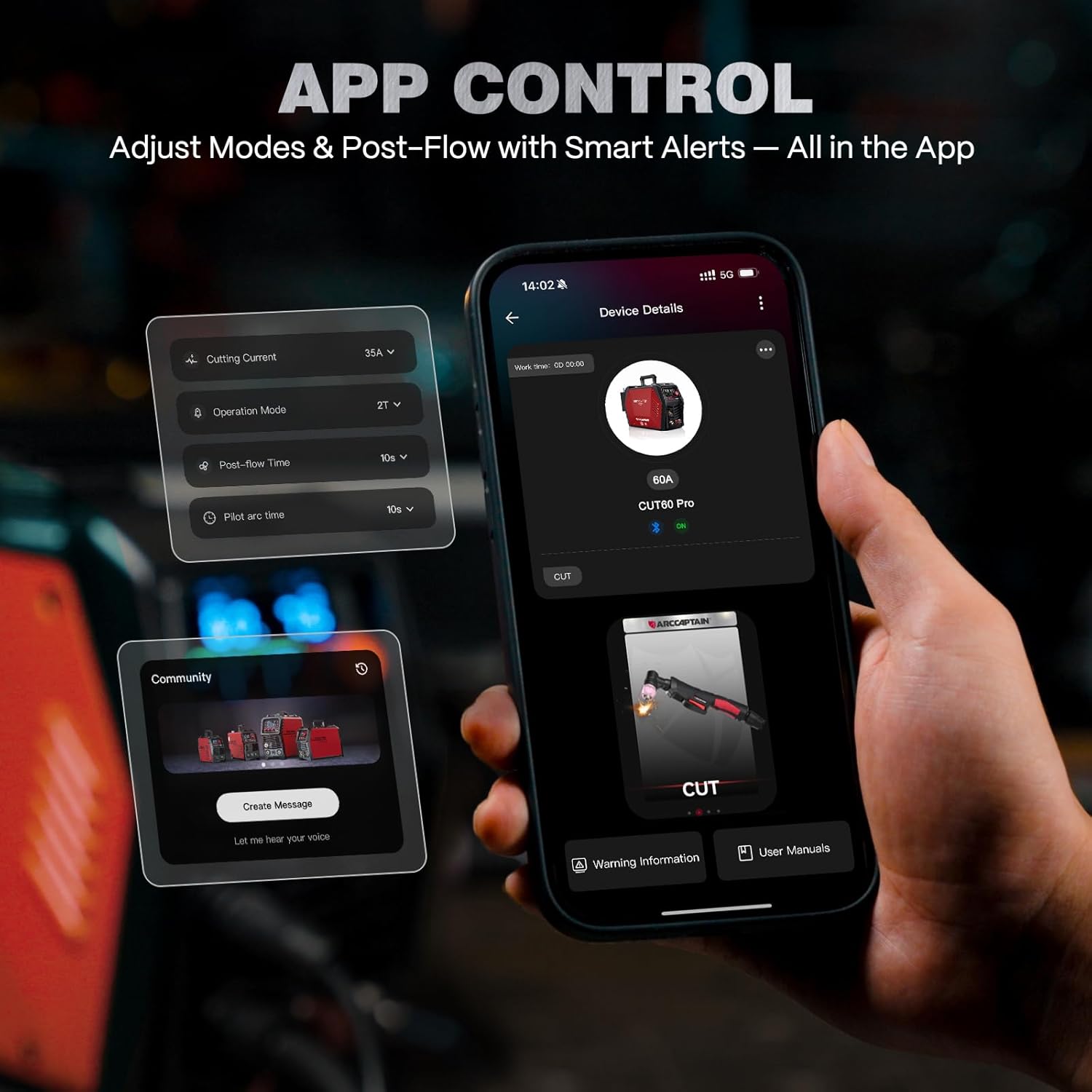
Figure 4.4: The mobile application interface for controlling and monitoring the plasma cutter remotely.
4.4 Specialized Cutting Modes
- Expanded Metal Mode: This mode is designed for precise cutting of mesh and patterned metals, maintaining a stable plasma flow even over gaps.

Figure 4.5: The plasma cutter demonstrating stable arc performance when cutting expanded metal surfaces.
- Rust Removal Mode: The pilot arc rust-cleaning mode effectively removes oxidation from metal surfaces without damaging the base material, reducing preparation time. Ensure the correct mode is selected before use.

Figure 4.6: The plasma cutter's rust removal capability, restoring metal surfaces with precision.
4.5 Advanced Pilot Arc & Torch Controls
- Adjustable Pilot Arc Duration: Customize the pilot arc time. Extend it for mesh cutting or shorten it to conserve consumables.
- Post-Flow Time: Set the post-flow time (5–15 seconds) to cool the torch and extend its lifespan.
- 2T/4T Modes: Choose 2T for short, quick cuts or 4T for reduced fatigue during longer cutting passes.
4.6 Cutting Chart
Refer to the following chart for optimal cutting parameters based on material type and thickness.

Figure 4.7: Detailed cutting parameters for various materials and thicknesses, including torch-to-work distance and optimum cut speed.
5. Maintenance
Regular maintenance ensures optimal performance and extends the lifespan of your plasma cutter.
- Consumables: Regularly inspect and replace torch consumables (electrodes, nozzles, swirl rings, shield cups) as they wear out to maintain cut quality.
- Air Filter: Check and drain the moisture trap on the air filter regularly. Replace the filter element if it becomes clogged or dirty to ensure a clean air supply.
- Cleaning: Keep the machine and torch clean from dust and debris. Use a dry cloth to wipe down surfaces. Ensure cooling vents are unobstructed.
- Cables and Connections: Periodically inspect all cables and connections for wear, damage, or loose fittings.
6. Troubleshooting
The ARCCAPTAIN iControl CUT60 Pro features an intelligent error code display to assist with troubleshooting.
| Error Code | Description | Possible Cause / Solution |
|---|---|---|
| E10 | Over Current Protection | Reduce cutting amperage or check for short circuits. |
| E60 | Over Heating Protection | Allow the machine to cool down. Ensure proper ventilation and clear any obstructions from cooling fans. |
| E31 | Under Voltage Protection | Check input power supply. Ensure voltage is stable and within specified limits. |
| E34 | Low IGBT Drive Voltage IGBT | Contact customer support. |
| E80 | Air Pressure < 0.2MPa (30PSI) | Increase air pressure to the recommended range (0.3-0.55 MPa). Check air hose for leaks or kinks. |
| E81 | Air Pressure > 0.55MPa (80PSI) | Reduce air pressure to the recommended range. Adjust the air regulator. |
Note: Do not power on until the screen turns off and the fan stops working after an error or shutdown.

Figure 6.1: The plasma cutter's display indicating different error codes for quick diagnosis.
7. Specifications
Detailed technical specifications for the ARCCAPTAIN iControl CUT60 Pro Plasma Cutter.
| Specification | Value |
|---|---|
| Model Number | CUT60 Pro |
| Manufacturer | ARCCAPTAIN |
| Item Weight | 23.2 pounds |
| Package Dimensions | 20.1 x 13.1 x 11.3 inches |
| Power Source | DC (120V/240V input) |
| Material | Iron |
| Cutting Capacity (120V) | 10–16 mm (Clean Cut: 3/8", Max Cut: 9/16") |
| Cutting Capacity (240V) | 16–26 mm (Clean Cut: 5/8", Max Cut: 15/16") |
| Recommended Air Pressure | 0.3–0.55 MPa (55–75 PSI) |
| Torch Cable Length | 13 FT |

Figure 7.1: The product label detailing electrical input, output, and other technical specifications.
8. Warranty and Support
8.1 Warranty Information
The ARCCAPTAIN iControl CUT60 Pro Plasma Cutter comes with a 3-YEAR warranty. Please retain your proof of purchase for warranty claims.
8.2 Customer Support
For technical assistance, warranty service, or to purchase replacement parts and consumables, please visit the official ARCCAPTAIN store or contact their customer service department. You can find more information at the ARCCAPTAIN Store on Amazon.


