
Introduction
This instruction manual provides detailed guidance for the installation, operation, and maintenance of your Yakry Y76 Backup Camera. The Y76 camera is designed to be compatible with Yakry Y27 and Y28 monitor systems, offering a reliable solution for enhanced vehicle safety. Please read this manual thoroughly before use to ensure proper functionality and longevity of your device.
Safety Information
- Ensure all connections are secure before operating the vehicle.
- Do not attempt to disassemble or modify the camera, as this will void the warranty and may cause damage.
- Always follow local regulations regarding vehicle camera installation and use.
- While the camera assists in reversing, always check your surroundings visually.
Package Contents
Verify that all items are present in the package:
- 1 x Yakry Y76 Backup Camera
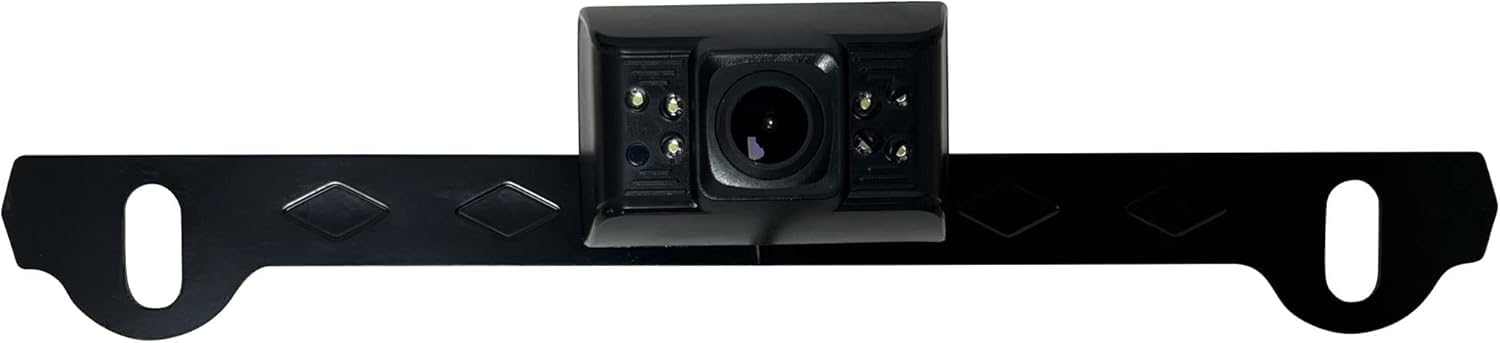
Image: The Yakry Y76 Backup Camera, a compact device designed for vehicle rear view assistance.
Setup and Installation
Pairing Process
The Yakry Y76 camera uses the same pairing procedure as your original Yakry kit. Follow these steps to establish a connection with your Y27 or Y28 monitor:
- Select Channel: On your monitor, press the CH- button to select an available channel.
- Enter Pairing Menu: Access the monitor's menu interface and navigate to the "Pairing" icon.
- Start Pairing: Touch OK to initiate the pairing process.
- Power Cycle Camera: Power off and then power on the Y76 camera. The connection should be established automatically within a few seconds.
Stable Connection Guidance
For optimal performance and a seamless pairing experience, consider the following recommendations:
- Initial Setup Location: Perform the initial pairing in an open area, away from potential signal interference sources such as gas stations or power transformers.
- Proximity for Pairing: Pair the camera and monitor in close proximity first.
- Vehicle Installation: After successful pairing, proceed with the physical installation of the camera on your vehicle for stable long-term performance.
Physical Installation
The Y76 camera is typically mounted near the license plate or at the rear of the vehicle. Ensure the camera has a clear line of sight and is securely fastened. Connect the camera to a 12-volt power source, usually the vehicle's reverse light circuit, for automatic activation when reversing. Consult a professional if you are unsure about the wiring process.
Operating Instructions
Once the Yakry Y76 camera is successfully paired and installed, its operation is integrated with your Yakry Y27 or Y28 monitor system. The camera will automatically transmit video to the monitor when powered on, typically when the vehicle is put into reverse gear.
Key Functionality
- Automatic Activation: The camera activates automatically when the vehicle is in reverse, displaying the rear view on the connected monitor.
- Image Quality: The Y76 camera provides 1080p video capture resolution for a clear view.
- Wide Angle View: With a 150-degree field of view, the camera offers broad coverage of the area behind your vehicle.
Maintenance
- Cleaning the Lens: Regularly clean the camera lens with a soft, damp cloth to ensure a clear image. Avoid abrasive cleaners.
- Checking Connections: Periodically inspect all wiring and connections for signs of wear or corrosion, especially after extreme weather conditions.
- Secure Mounting: Ensure the camera remains securely mounted to prevent vibrations or dislodgement.
Troubleshooting
Common Issues and Solutions
- No Image on Monitor:
- Check if the camera is properly powered.
- Ensure the camera is correctly paired with the monitor (refer to "Pairing Process").
- Verify that the monitor is set to the correct channel.
- Unstable Connection/Flickering Image:
- Re-pair the camera and monitor, ensuring they are initially close together.
- Check for strong signal interference sources near the vehicle.
- Ensure all power connections are stable and free from corrosion.
- Poor Image Quality:
- Clean the camera lens.
- Ensure there are no obstructions blocking the camera's view.
Specifications
| Feature | Specification |
|---|---|
| Brand | Yakry |
| Model Number | Y76 |
| Compatible Devices | Yakry Y27/Y28 Monitors |
| Installation Type | Wireless |
| Voltage | 12 Volts |
| Optical Sensor Technology | CMOS |
| Real Angle of View | 150 Degrees |
| Video Capture Resolution | 1080p |
| Item Weight | 0.5 Pounds |
| Product Dimensions (L x W x H) | 6.3" x 4" x 3.2" |
Warranty Information
The Yakry Y76 Backup Camera comes with a 2 Year Manufacturer Warranty. This warranty covers defects in materials and workmanship under normal use. Please retain your proof of purchase for warranty claims. For detailed terms and conditions, refer to the official Yakry website or contact customer support.
Customer Support
If you encounter any issues or have questions regarding your Yakry Y76 Backup Camera, please contact Yakry customer support. You can typically find contact information on the official Yakry website or through your purchase platform.
Visit the Yakry Store on Amazon for more products and support resources.