
Important Safety Information
Always unplug the vanity when not in use. Be cautious of sharp edges and heavy weight during assembly and usage. Keep the vanity away from heat sources and moisture to prevent damage to electrical components.
Product Overview
The Garvee Corner Vanity Desk and Bench is designed to maximize space and provide a functional area for beauty routines. This unit features a unique corner layout, a tri-fold mirror with integrated LED lighting, a convenient charging station, and ample storage with five drawers and open shelves.

Image: The Garvee Corner Vanity Desk and Bench, showcasing its compact corner design, tri-fold mirror, and accompanying stool. The desk includes multiple drawers for storage.
Key Features:
- Space-Saving Corner Design: Optimizes room space with its unique corner configuration.
- Tri-fold Mirror with LED Lighting: Features 10 LED bulbs with 3 lighting modes (Natural, Warm, Cold) and adjustable brightness for optimal illumination.
- Integrated Charging Station: Includes 2 standard outlets and 2 USB ports for convenient device charging.
- Ample Storage: Equipped with 5 large drawers and 2 open shelves for organizing cosmetics, tools, and accessories.
- Sturdy Construction: Made from engineered wood for durability, accompanied by a cushioned stool for comfort.
Package Contents
Please verify that all components are present before beginning assembly:
- Corner Vanity Desk Components
- Tri-fold Mirror with LED Bulbs
- Vanity Stool Components
- Hardware Pack (screws, connectors, tools)
- Assembly Instruction Manual
- Power Adapter for Lights and Charging Station
Setup and Assembly
The Garvee Corner Vanity Desk and Bench requires assembly. Detailed instructions are included in the package. Please follow the step-by-step guide provided to ensure correct and safe assembly.
General Assembly Steps:
- Unpack all components and verify against the package contents list.
- Identify all hardware and tools required for assembly.
- Assemble the main desk frame according to the diagrams.
- Install the drawers into their respective compartments.
- Attach the tri-fold mirror unit to the desk.
- Connect the LED lighting and charging station wiring as instructed.
- Assemble the vanity stool.
- Place the vanity in its desired corner location.
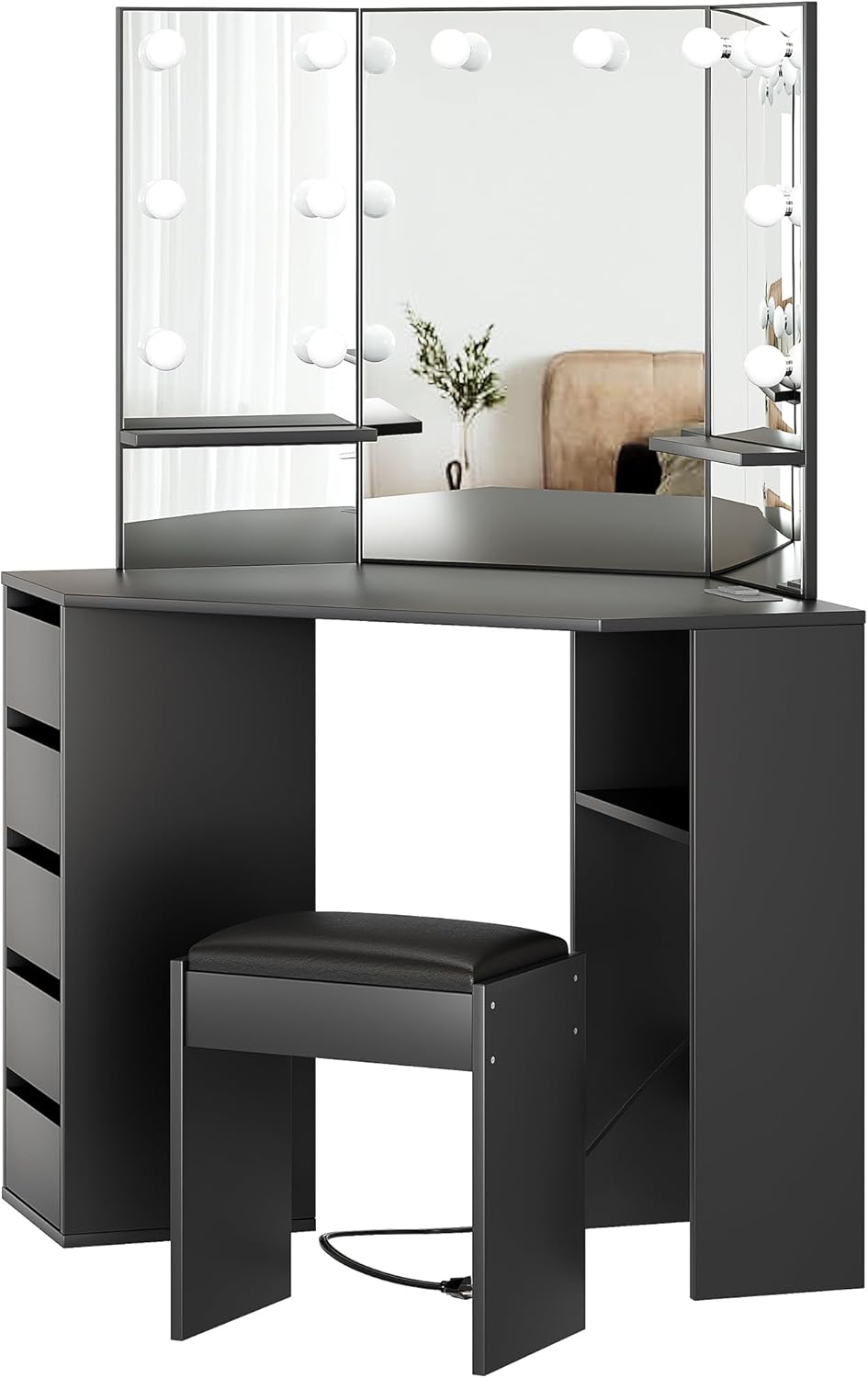
Image: An assembled view of the Garvee Corner Vanity Desk and Bench, illustrating its structure and the placement of the stool.
It is recommended to have two people for assembly to ensure stability and ease of handling larger components.
Operating Instructions
Tri-fold Mirror and LED Lighting:
The tri-fold mirror features 10 LED bulbs with adjustable settings. Ensure the vanity is plugged into a power outlet.
- Power On/Off: Press the main power button on the mirror frame to turn the lights on or off.
- Change Lighting Mode: Repeatedly press the 'M' button to cycle through the three lighting modes: Natural Light, Warm Light, and Cool Light.
- Adjust Brightness: Use the '+' and '-' buttons to increase or decrease the brightness level. There are 6 brightness settings available.
- Adjust Mirror Angle: The side panels of the tri-fold mirror can be adjusted inwards or outwards to achieve desired viewing angles.

Image: The tri-fold mirror demonstrating the three available light modes: Warm Light, Daylight, and Cool Light, and a user applying makeup under the lighting.
Charging Station:
The integrated charging station provides convenient power access for your devices.
- Standard Outlets: Plug in hair dryers, curling irons, or other beauty appliances into the 2 standard plug sockets.
- USB Ports: Use the 2 USB ports to charge mobile phones, tablets, or other USB-powered devices.
Ensure the vanity is connected to a live power source for the charging station to function.
Drawers and Storage:
The vanity includes 5 rotating drawers and 2 open shelves for organizing your items.
- Drawer Use: Pull drawers out gently to access contents. The rotating design allows for flexible positioning.
- Shelf Use: Utilize the open shelves for frequently used items or decorative displays.
Maintenance
Proper care will extend the life and appearance of your vanity desk.
- Cleaning Surfaces: Wipe all surfaces with a soft, damp cloth. Avoid abrasive cleaners or harsh chemicals that may damage the finish.
- Mirror Cleaning: Use a glass cleaner specifically designed for mirrors and a lint-free cloth. Spray cleaner onto the cloth, not directly onto the mirror, to prevent liquid from seeping into the edges.
- Electrical Components: Ensure the vanity is unplugged before cleaning near electrical outlets or wiring. Do not spray liquids directly onto the charging station or light bulbs.
- Drawer Care: Periodically check drawer slides for smooth operation. Clean out any dust or debris.
- Tighten Hardware: Occasionally check and tighten any loose screws or fasteners to maintain structural integrity.
Troubleshooting
If you encounter issues with your vanity, refer to the following common problems and solutions:
- LED Lights Not Working:
- Ensure the vanity is properly plugged into a functional power outlet.
- Check if the power button on the mirror is pressed.
- Verify that the power adapter is securely connected to both the vanity and the wall outlet.
- If individual bulbs are replaceable, check for any loose or burnt-out bulbs.
- Charging Station Not Functioning:
- Confirm the vanity is plugged in and receiving power.
- Test the outlets/USB ports with a different device to rule out device issues.
- Check for any tripped circuit breakers in your home.
- Drawers Sticking or Not Sliding Smoothly:
- Ensure drawers are not overloaded.
- Check for any obstructions in the drawer slides.
- Verify that the drawer slides were installed correctly during assembly.
- Vanity Feels Unstable:
- Re-check all assembly hardware and tighten any loose screws.
- Ensure the vanity is placed on a flat, level surface.
Specifications
| Model Number | CORVANBK82E |
| Brand | Garvee |
| Dimensions (L x W x H) | 43 inches x 21 inches x 57 inches |
| Item Weight | 99.3 pounds |
| Material | Engineered Wood |
| Frame Material | Engineered Wood |
| Color | Black |
| Assembly Required | Yes |
| Lighting | 10 LED bulbs, 3 modes (Natural, Warm, Cool), 6 brightness settings |
| Charging Station | 2 Standard Outlets, 2 USB Ports |
| Storage | 5 Rotating Drawers, 2 Open Shelves |
Warranty Information
This product is covered by a limited manufacturer's warranty. Please refer to the warranty card included in your package or contact Garvee customer support for specific details regarding warranty coverage, terms, and conditions.
Customer Support
For any questions, assistance with assembly, or troubleshooting not covered in this manual, please contact Garvee customer support. You can typically find contact information on the manufacturer's website or through your purchase platform.
When contacting support, please have your model number (CORVANBK82E) and purchase information readily available.