
1. Introduction
This manual provides detailed instructions for the safe installation, operation, and maintenance of your new addlon 24-inch Low Profile Fandelier Ceiling Fan. This fan is designed to provide efficient air circulation and adjustable lighting for various indoor spaces. It features a low-profile design, dimmable LED lighting with three color temperatures, remote and app control, a reversible DC motor for year-round comfort, and six fan speeds.

Figure 1: Airflow and Lighting Coverage
2. Safety Information
Please read all safety warnings and instructions carefully before beginning installation. Failure to follow these instructions may result in electric shock, fire, or personal injury.
- Always turn off power at the circuit breaker or fuse box before installation or servicing.
- All electrical wiring must comply with local and national electrical codes (NEC) and ANSI/NFPA 70. If you are unfamiliar with wiring, consult a qualified electrician.
- Ensure the mounting structure can support the weight of the fan.
- Do not use with dimmer switches. This fan is designed for use with a conventional ON/OFF wall switch only. Using a dimmer switch may damage the fan's motor or electronics.
- Both the fan and light are powered by a controller and DC motor. It is not possible to control the light or fan independently with multiple wall switches. If you have more than one live wire, connect one and insulate the other.
Video 1: Important wiring considerations for the addlon 24-inch ceiling fan, highlighting compatible switch types.
3. What's in the Box
Verify that all components are present before beginning installation:
- Ceiling Fan Unit (includes integrated LED panel and fan blades)
- Remote Control
- Mounting Hardware (screws, wire nuts, etc.)
- Instruction Manual
4. Setup and Installation
Follow these steps for proper installation. It is recommended to have two people for installation.
- Prepare for Installation: Turn off power at the circuit breaker. Ensure the mounting location is secure and can support the fan's weight.
- Install Mounting Bracket: Secure the mounting bracket to the ceiling junction box using the provided screws.
- Assemble Fan Components: Attach the fan blades and any decorative elements as shown in the diagram. The innovative modular design makes assembly easy and less time-consuming.
- Wiring: Connect the fan's electrical wires to the household wiring according to local codes. Ensure all connections are secure. Refer to the safety section for important wiring warnings.
- Mount the Fan: Carefully lift the fan unit and attach it to the mounting bracket. Ensure all connections are secure and the fan is stable.
- Restore Power: Once installation is complete, restore power at the circuit breaker.
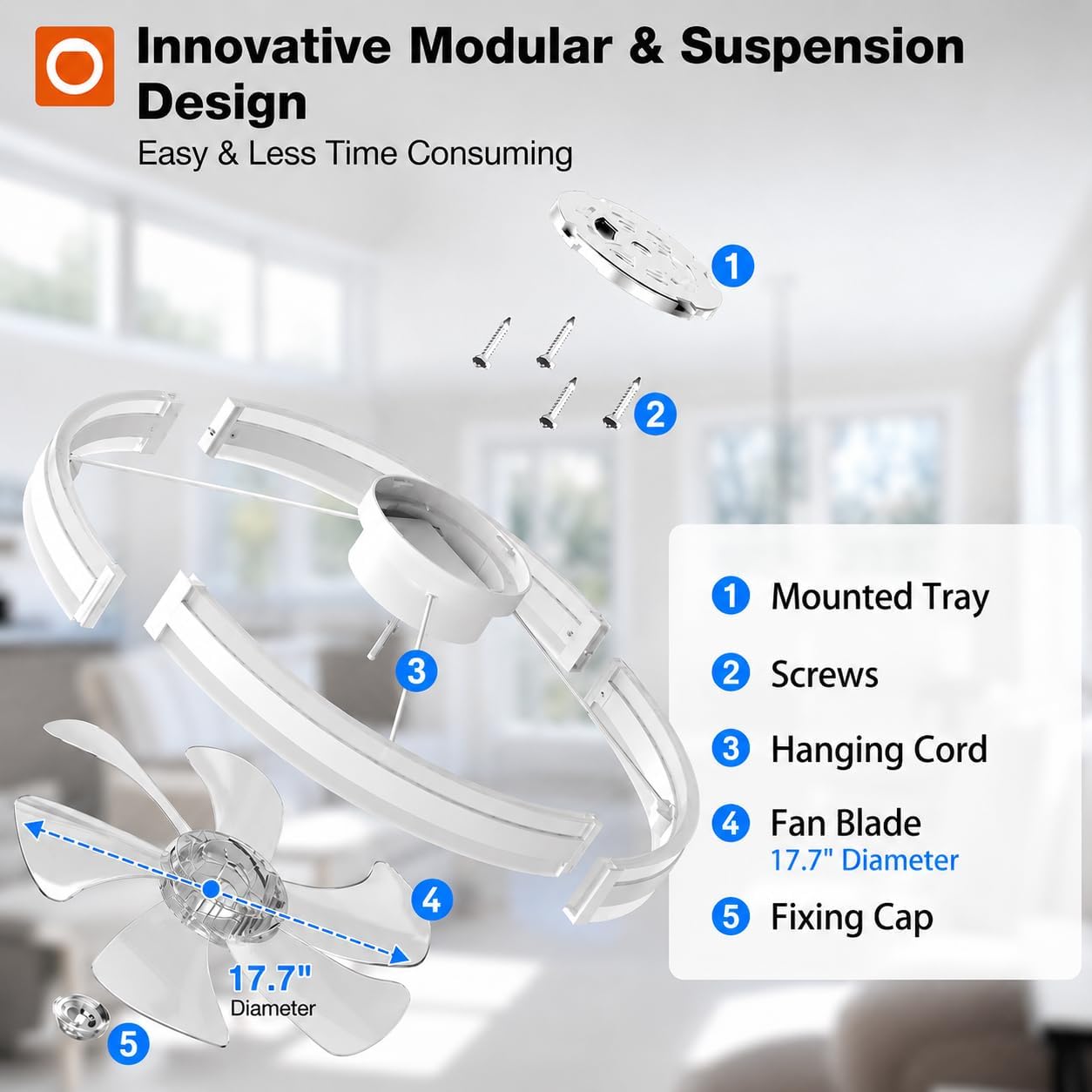
Figure 2: Innovative Modular Design for Easy Assembly
Video 2: Step-by-step installation guide for the addlon 24-inch ceiling fan.
5. Operating Instructions
Your addlon ceiling fan can be controlled via the included remote control or a mobile application.
5.1 Remote Control
The remote control allows you to adjust fan speed, light settings, and activate the timer function. Ensure batteries are correctly inserted.
- Power Button: Turns the fan and light ON/OFF.
- Fan Speed (1-6): Select from 6 fan speeds.
- Light Brightness: Adjust light intensity from 10% to 100%.
- Color Temperature: Cycle through 3000K (warm white), 4500K (natural white), and 6000K (cool white).
- Forward/Reverse: Changes fan direction for summer (downdraft) or winter (updraft) modes.
- Timer (1H/2H): Sets the fan to turn off automatically after 1 or 2 hours.
- Natural Wind: Activates a mode that simulates natural breeze by varying fan speed.
5.2 App Control
Download the 'ApplicanceSmart' app from your mobile device's app store to control the fan via your smartphone. The app offers all remote control functions and more.
- Download App: Search for 'ApplicanceSmart' in your app store and install.
- Register/Login: Create an account or log in.
- Add Device: Follow in-app instructions to add your ceiling fan. Ensure your phone's Bluetooth and Wi-Fi are enabled.
- Pairing: Turn the fan's power ON. Within 5 seconds, open the app and initiate the pairing process.

Figure 3: Remote Control and Mobile App Interface
Video 3: Guide for downloading and setting up the 'ApplicanceSmart' app for fan control.
5.3 Light Functions
The integrated LED light offers versatility for various moods and tasks.
- Dimmable: Adjust brightness from 10% to 100%.
- Color Temperatures: Choose between 3000K (warm white), 4500K (natural white), and 6000K (cool white).
- Memory Function: The fan remembers your last-used light setting. When using the wall switch, turn the power off for more than 5 seconds to activate the memory function. No waiting time is required when using the remote.

Figure 4: Dimmable LED with 3 Color Temperatures
5.4 Fan Functions
Control the airflow to suit your comfort needs.
- 6 Fan Speeds: Select from gentle breeze (1-2 speeds) for relaxation, daily comfort (3-4 speeds), or powerful cooling (5-6 speeds) for summer.
- Reversible DC Motor: Switch between downdraft mode (summer) to push cool air down and updraft mode (winter) to circulate warm air evenly.

Figure 5: 6 Fan Speed Levels

Figure 6: Reversible Motor for All Seasons
5.5 Quiet Operation
The energy-efficient DC motor ensures quiet operation, making it suitable for bedrooms and other quiet spaces.

Figure 7: Quiet Operation Experience
6. Maintenance
Regular maintenance helps ensure the longevity and optimal performance of your ceiling fan.
- Cleaning: Use a soft, damp cloth to clean the fan's exterior. Do not use abrasive cleaners or solvents.
- Blade Cleaning: Periodically wipe the fan blades to remove dust buildup, which can affect airflow and balance.
- Check Connections: Annually, check all electrical connections and mounting screws to ensure they are secure.
7. Troubleshooting
If you encounter issues with your fan, refer to the following common problems and solutions:
| Problem | Possible Cause | Solution |
|---|---|---|
| Fan does not turn on | No power, loose wiring, remote battery dead | Check circuit breaker, ensure wiring is secure, replace remote batteries. |
| Light does not work | No power, loose wiring, LED panel issue | Check circuit breaker, ensure wiring is secure. Contact customer support if LED panel is faulty. |
| Fan makes noise | Loose screws, unbalanced blades, motor issue | Check all mounting screws, ensure blades are clean and balanced. |
| Remote/App not responding | Remote batteries dead, pairing issue, interference | Replace remote batteries, re-pair remote/app with the fan. Ensure no strong interference sources nearby. |
| Memory function not working with wall switch | Power off duration too short | When using the wall switch, turn the power off for more than 5 seconds to activate the memory function. |
8. Specifications
| Feature | Detail |
|---|---|
| Brand | addlon |
| Model Number | NFM024113-2 |
| Size | 24 Inch |
| Color | White |
| Material | Plastic |
| Power Source | DC |
| Voltage | 120 volts |
| Wattage | 45 watts |
| Light Source | LED |
| Light Color | Adjustable White (3000K, 4500K, 6000K) |
| Control Method | App, Remote |
| Mounting Type | Flush Mount |
| Item Weight | 4 pounds |
| Included Components | Remote Control |

Figure 8: Durable Steel Core for Stability
9. Warranty and Customer Support
addlon is committed to providing high-quality products and excellent customer service.
- Motor Warranty: Enjoy a 10-year warranty on the motor. If the motor malfunctions within this period, it will be replaced free of charge.
- Parts Warranty: A 2-year warranty covers all other parts of the fan.
- Customer Support: Our 24-hour customer support team is ready to assist you with any installation questions, operational issues, or warranty claims.
- Logistics Damage: In case of damage caused by logistics factors, please contact us for compensation or a satisfactory solution.


Figure 9: Warranty Information and Customer Support