
1. Product Overview
The Gemilai G3028A Espresso Machine is a professional-grade coffee maker designed for home baristas. It features an integrated 550ml brew boiler, a hybrid group head, and an upgraded Dual PID Temperature system for precise control over brewing and steaming temperatures. The machine also includes an adjustable OPV pressure control system and a one-touch automatic milk frothing system with an NTC temperature sensor.
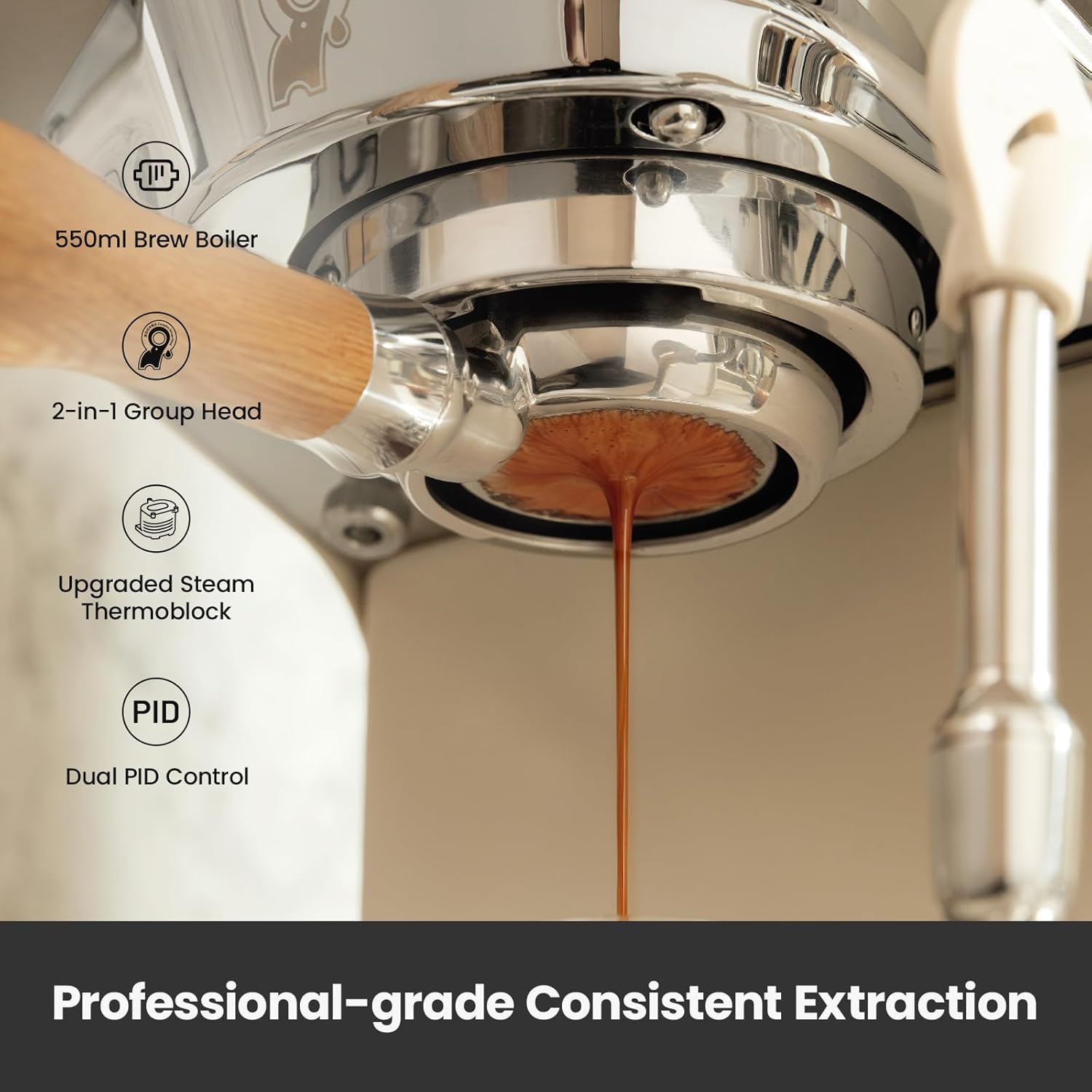
Figure 1: Professional-grade Consistent Extraction. This image shows the machine's group head with an espresso shot being extracted, highlighting the 550ml brew boiler, 2-in-1 Group Head, Upgraded Steam Thermoblock, and Dual PID Control for consistent extraction.
The intuitive double touchscreen allows for versatile customization of brewing and steam temperatures, brew time, and pre-infusion settings. For safety and ease of maintenance, the G3028A includes automatic pressure release, a large 57oz removable water tank, and smart descaling reminders.

Figure 2: Intelligent Touch Control Panel. The touch display shows various adjustable parameters including extraction temperature, steam temperature, milk frothing temperature, automatic brewing time, pre-wetting time, and pre-infusion time.
2. Setup
2.1 Unboxing and Components
Carefully unbox your Gemilai G3028A Espresso Machine. Ensure all components are present and undamaged. The package typically includes:
- G3028A Espresso Machine (Ivory White)
- White Oak Portafilter (Double Cup)
- White Oak Portafilter (Bottomless)
- White Oak Tamper
- 58mm Filter Basket (Single Cup)
- Cleaning Disc
- Cleaning Brush
- Screwdriver
- Instruction Manual
- User Guide

Figure 3: Accessories Include. This image displays the espresso machine along with its various accessories, including portafilters, tamper, filter baskets, cleaning tools, and documentation.
2.2 Initial Preparation
- Water Tank: Remove the 57oz removable water tank from the top of the machine. Fill it with clean, softened water up to the MAX level. Ensure the water tank is properly seated back into the machine.
- Power Connection: Plug the machine into a suitable power outlet.
- Preheating: Turn on the power switch. The machine will begin preheating. Wait until the touch screen displays the desired temperature (e.g., 199°F) indicating it has finished heating.

Figure 4: 57oz Removable Water Tank. The water tank is easily accessible from the top for refilling and cleaning.
3. Operating Instructions
3.1 Espresso Extraction
- Grind Coffee: Grind fresh coffee beans to the appropriate fineness. For espresso, a fine grind similar to table salt is recommended.
- Dose and Tamp: Add 9-12g of coffee powder for a single espresso or 17-20g for a double espresso into the filter basket. Flatten the coffee powder with a distributor (sold separately) and then press it firmly with the tamper. The amount of powder should be around the groove line of the filter basket.
- Warm Up Group Head: Press the manual coffee making button to drain some water and warm up the group head. Press it again to turn off the water.
- Insert Portafilter: Align the handle of the portafilter with the left 45-degree triangle mark on the group head. Tighten it from left to right to securely install it.
- Brew Espresso: Press the coffee making button (single or double shot) to start extraction. The machine will automatically stop when the set brew time is reached.
3.2 Adjustable OPV Pressure Control
The G3028A features an adjustable dual-mode OPV (Over Pressure Valve) system, allowing you to control the maximum pressure during extraction (6–11 bar). This helps achieve desired coffee flavors for different roasts.

Figure 5: Adjustable OPV Pressure Control. The image shows how to adjust the OPV by turning a knob. Turning clockwise decreases pressure, and counterclockwise increases pressure. Recommended pressure settings for light, medium, and dark roasts are displayed.
To adjust the OPV: Turn the OPV clockwise to decrease pressure or counterclockwise to increase pressure. Stop once the desired pressure is reached, as indicated by the pressure gauge.
Video 1: Gemilai G3028A OPV Usage Tutorial. This video demonstrates how to use and adjust the OPV (Over Pressure Valve) on the Gemilai G3028A Espresso Machine for optimal extraction pressure.
3.3 Automatic Milk Frothing
The machine features a built-in automatic frothing system with an NTC temperature sensor for precise control (104°F-194°F).
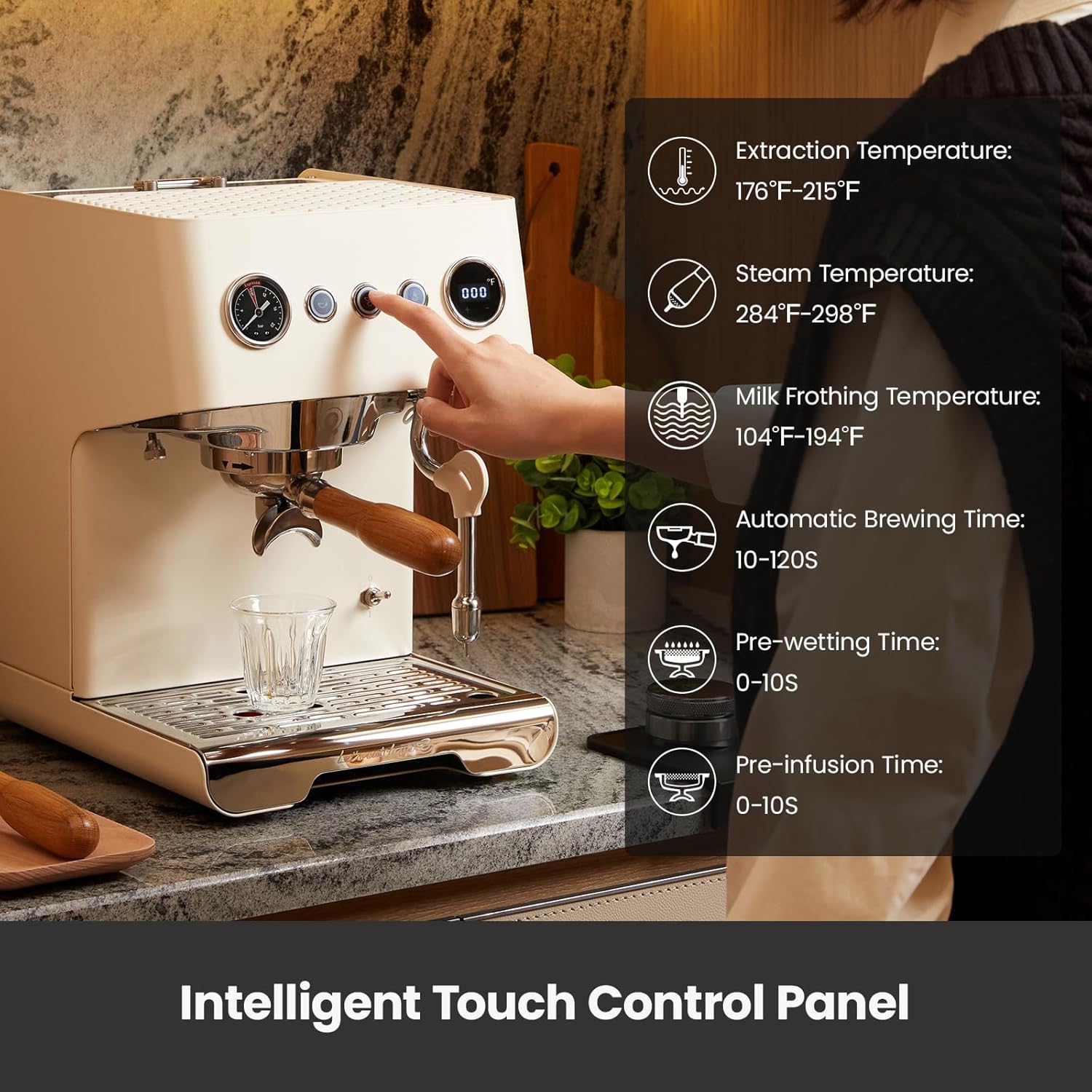
Figure 6: Automatic Temperature Milk Frothing. The image shows the steam wand frothing milk in a pitcher, with the NTC Steam Probe ensuring precise milk frothing temperature.
- Prepare Milk: Pour an appropriate amount of refrigerated whole milk or fresh milk into the milk frothing pitcher.
- Release Steam: Press the steam button to release any condensed water from the steam wand first, then let it dry.
- Froth Milk: Place the steam nozzle at the three o'clock position of the pitcher, just below the milk surface. Start milk frothing. Adjust the steam intake angle as needed to create a vortex.
- Clean Steam Wand: After turning off the steam, wipe the steam wand clean with a clean, damp cloth to prevent milk residue buildup.
Video 2: Gemilai Operation Videos for G3028A Espresso Machine. This video provides a comprehensive guide on unboxing, overview, extraction, and milk frothing for the G3028A Espresso Machine.
3.4 Parameter Settings
The machine allows customization of various parameters for optimal coffee preparation.
Video 3: Gemilai G3028A Parameter Settings. This video guides you through adjusting brewing time, brewing temperature, frothing temperature, pre-wetting time, pre-infusion time, and steam mode settings.
- Brewing Time Settings: Press and hold the automatic coffee making button for 3 seconds to enter the setting. The indicator light will flash, and the machine will begin timing (Adjustable range: 10-120 seconds, default: 25 seconds). Press the automatic coffee making button again to save and exit.
- Brewing Temperature Settings: Under standby mode, press and hold the "+" button for 3 seconds to enter the setting. The touch screen will show H-1. Press "+/-" to adjust the coffee temperature (Adjustable range: 176-215°F, default: 199°F). After setting, the display will flash for 3 seconds and automatically save.
- Frothing Temperature Setting: Under standby mode, press and hold the "+" button for 3 seconds to enter the setting. Press "+/-" to switch to H-3. When the temperature value starts flashing, press "+/-" to adjust the milk frothing temperature (Adjustable range: 104-194°F, default: 140°F). After setting, the display will flash for 3 seconds and automatically save.
- Pre-wetting Time Setting: Under standby mode, press and hold the "+" button for 3 seconds to enter the setting. Press "+/-" to switch to P-1. When the value starts flashing, press "+/-" to adjust the time of water flowing to the coffee bed (Adjustable range: 0-10 seconds, default: 2 seconds). After setting, the display will flash for 3 seconds and automatically save.
- Pre-infusion Time Setting: Under standby mode, press and hold the "+" button for 3 seconds to enter the setting. Press "+/-" to switch to P-2. When the value starts flashing, press "+/-" to adjust the time of soaking (Adjustable range: 0-10 seconds, default: 2 seconds). After setting, the display will flash for 3 seconds and automatically save.
- Steam Mode Setting: Under standby mode, short press the "+/-" button on the touch screen display to switch the steam modes (S-0/S-1). S-0 is manual steam mode, S-1 is automatic steam mode. In S-1, steam will automatically stop when the milk frothing reaches the set temperature ("Froth Temp" part).
- Restore Default Settings: Under standby mode, press and hold the automatic coffee making button and manual coffee making button for about 3 seconds. The button indicator light and touch screen display will flash "888" three times, indicating that the default settings are restored.
4. Maintenance
4.1 Descaling
Regular descaling is crucial for maintaining optimal performance and coffee taste. The machine will enter descaling reminder mode after making coffee a total of 500 times, displaying "CLn" on the touch screen.
Video 4: Gemilai G3028A Descaling Tutorial. This video provides a step-by-step guide on how to descale the steam pipeline, group head, brew boiler, and individual parts of the espresso machine.
- Steam Pipeline Descaling: Add water and descaler (4:1 ratio) to the water tank. Turn on the power. After preheating, press and hold the steam button for 3 seconds to enter descaling mode. The steam wand will release hot water/steam for 1 minute, then automatically exit.
- Group Head Backflush: Place a cleaning disc with coffee machine descaler in the portafilter and insert it into the group head. Press and hold the manual coffee making button for 3 seconds to enter CLn mode. The group head will dispense water for 8 seconds and stop for 4 seconds, repeating for 1 minute. Remove the cleaning disc and rinse for 120 seconds by pressing the manual coffee making button.
- Brew Boiler Descaling: Press the automatic coffee making button 5-10 times to make hot water. Allow the descaler to stay in the boiler for at least 15 minutes. Then press the manual coffee making button to rinse for 120 seconds.
- Parts Descaling: Add descaler to a cup. Rotate counterclockwise to remove the steam nozzle. Use a Phillips screwdriver to unscrew the shower screen from the group head clockwise. Place the removed steam nozzle and shower screen into the cup. Add hot water and soak for one hour.
- Clean the Descaler: After descaling, clean the water tank and refill it with clean, softened water up to the MAX level (without descaler). Press and hold the steam button for 3 seconds to enter steam pipeline descaling mode and start rinsing. Press the automatic coffee making button 5-10 times to rinse, repeating until the water is fully drained and no residual taste remains.
4.2 General Cleaning
- Drip Tray: The detachable drip tray should be emptied and cleaned regularly.
- Cup Warming Zone: The top surface of the machine serves as a cup warming zone. Keep it clean and dry.

Figure 7: Cup Warming Zone. The top of the machine provides a convenient area to warm espresso cups.
5. Troubleshooting
The machine provides smart reminders and error codes to assist with troubleshooting.
Video 5: Gemilai G3028A Smart Reminder Guide. This video explains the ECO Energy Saving Mode, F-3 Water Shortage Reminder, CLn Descaling Reminder, E-1 Brew Boiler NTC Error, E-3 Steam Thermocouple Error, and E-4 Steam Thermoblock NTC Error.
- ECO Energy Saving Mode: When the machine is not in operation, it will enter ECO mode after about 28 minutes. Press any button to wake it up.
- F-3 Water Shortage Reminder: When the touch display shows "F-3", it means the water tank lacks water. Refill it with filtered water (between the maximum and minimum level marks).
- CLn Descaling Reminder: After making coffee a total of 500 times, the machine will enter the descaling reminder mode, and the touch screen display will show "CLn". Complete the descaling process as described in Section 4.1.
- E-1 Brew Boiler NTC Error: When the touch display shows "E-1", it means that the brew boiler NTC is open or short-circuited, or the temperature is below 32°F / 0°C. Ensure the machine is used in an environment above 32°F / 0°C. If the issue persists, contact customer service.
- E-3 Steam Thermocouple Error: When the touch display shows "E-3", it means that the steam thermocouple is open or short-circuited. Please contact customer service or a maintenance specialist for assistance.
- E-4 Steam Thermoblock NTC Error: When the touch display shows "E-4", it means that the steam thermoblock NTC is open or short-circuited, or the temperature is below 32°F / 0°C. Ensure the machine is used in an environment above 32°F / 0°C. If the issue persists, contact customer service.
6. Specifications
| Feature | Specification |
|---|---|
| Brand | Gemilai |
| Model Name | G3028A |
| Capacity | 3.6 Pounds (57oz Water Tank) |
| Color | White |
| Product Dimensions (D x W x H) | 10.43"D x 14.8"W x 13.18"H |
| Special Features | Adjustable OPV, Automatic Milk Frothing System, Integrated Boiler, Milk Frother, Portable |
| Coffee Maker Type | Espresso Machine |
| Operation Mode | Semi-Automatic |
| Wattage | 1450 watts |
| Voltage | 120 Volts |
| Display Type | Touch Screen |
| Coffee Input Type | Ground |
| Material | Stainless Steel |
7. Warranty and Support
For any issues, questions, or assistance with your Gemilai G3028A Espresso Machine, please contact Gemilai Official customer service or a certified maintenance specialist. Refer to your purchase documentation for specific warranty details.


