
Introduction
This manual provides detailed instructions for the installation, operation, and maintenance of your addlon 24" Low Profile Fandelier Ceiling Fan with Lights and Remote. Please read this manual thoroughly before installation and use to ensure safe and efficient operation. Keep this manual for future reference.
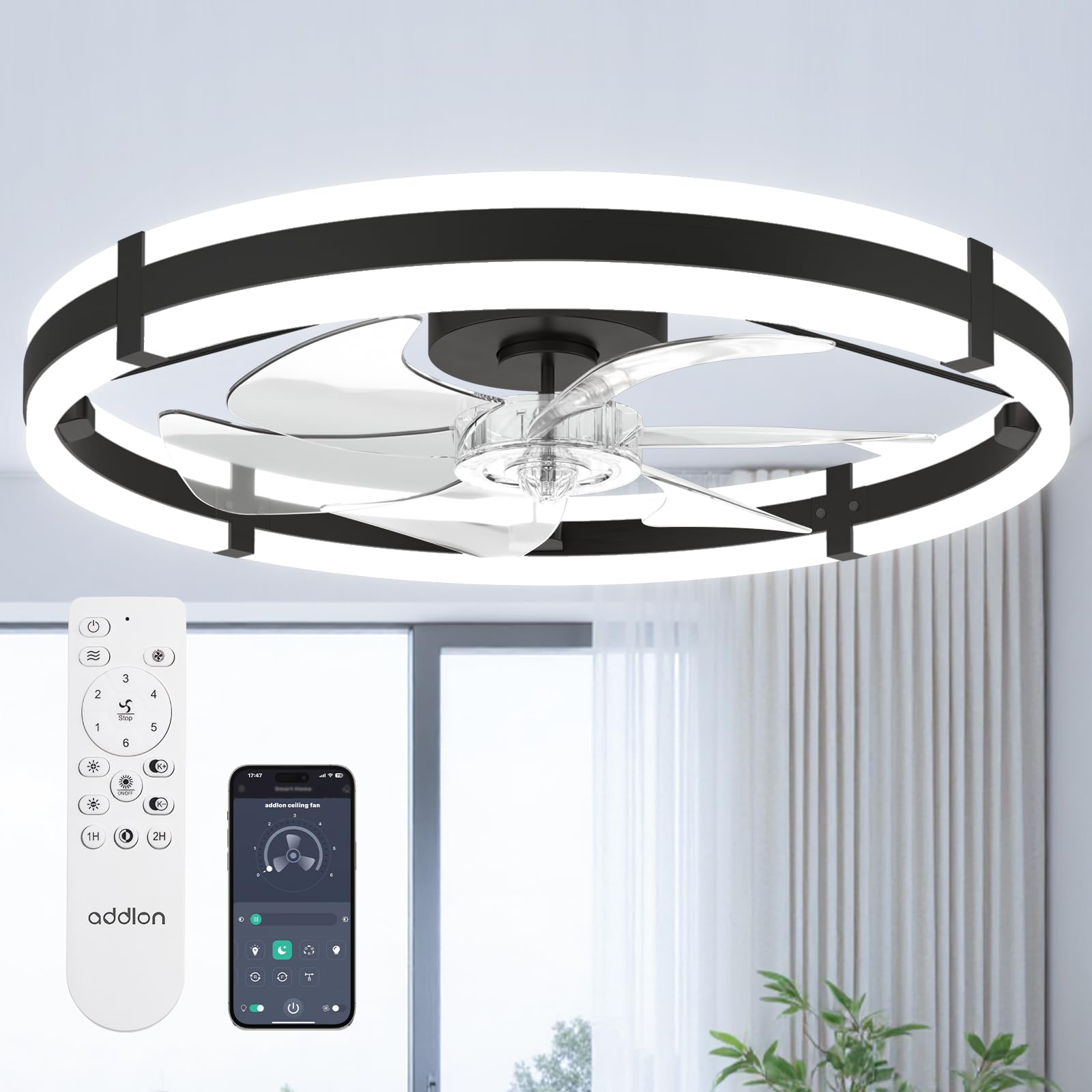
Image: The addlon 24-inch Low Profile Fandelier Ceiling Fan with integrated lights and remote control, in black finish.
Safety Information
WARNING: To reduce the risk of fire, electric shock, or personal injury, always follow these basic precautions:
- Always turn off power at the main circuit breaker before installation or servicing.
- All wiring must be in accordance with local and National Electric Code (N.E.C.) standards and ANSI/NFPA 70. If you are unfamiliar with wiring or in doubt, consult a qualified electrician.
- Ensure the installation site can support the weight of the fan.
- Do not use with dimmer switches. This fan is designed for use with a conventional on/off wall switch.
- Keep hands, tools, and other objects away from the fan blades when the fan is operating.
- Do not attempt to repair or modify the fan yourself. Contact customer support for assistance.
Package Contents
Verify that all components are present before beginning installation. The package includes:
- Ceiling Fan Unit (Motor, Light, Blades)
- Remote Control
- Mounting Hardware (Screws, Wire Nuts, etc.)
- Instruction Manual
Setup and Installation
Follow these steps carefully for proper installation. It is recommended to have two people for installation.
Step 1: Prepare the Mounting Location
Ensure the power is OFF at the circuit breaker. Securely attach the mounting bracket to the ceiling junction box. The junction box must be capable of supporting the fan's weight.
Step 2: Assemble the Fan Blades and Unit
Attach the fan blades to the motor housing. Ensure they are securely fastened. Pay attention to the orientation of the blades (up/down side) for optimal performance. Then, assemble the main fan unit components as shown in the diagram.

Image: A visual representation of the fan's modular design, detailing the components: Mounted Tray, Screws, Hanging Cord, Fan Blade, and Fixing Cap, emphasizing ease of assembly.
Step 3: Wiring the Fan
Connect the fan's electrical wires to the household wiring according to local electrical codes. This fan operates on 120V. Use wire nuts to secure connections. Ensure all connections are tight and insulated.
Important: This fan is designed to be controlled by the included remote or mobile app. It is not compatible with dimmer switches or multiple wall switches for independent light/fan control. Use a conventional on/off wall switch only.
Video: A step-by-step guide for installing the addlon 24" Ceiling Fan, demonstrating the wiring process and highlighting compatible wall switches.
Step 4: Secure the Fan Unit
Carefully lift the fan unit and attach it to the mounting bracket. Ensure all screws are tightened to prevent wobbling. The reinforced steel core provides maximum stability.
Operating Instructions
Your addlon ceiling fan can be controlled using the included remote control or a mobile application.
Remote Control and App Functions
The remote control and mobile app allow you to manage all fan and light settings:
- Power On/Off: Turns the fan and light on or off.
- Fan Speed: Select from 6 fan speeds. Levels 1-2 are for relaxation, 3-4 for daily comfort, and 5-6 for stronger cooling.
- Light Brightness: Adjust light intensity from 10% to 100%.
- Color Temperature: Cycle through 3000K (warm white), 4500K (natural white), and 6000K (cool white).
- Timer: Set the fan to turn off automatically after 1 or 2 hours.
- Forward/Reverse: Change the fan's rotation direction for summer (downdraft) or winter (updraft) mode to optimize air circulation.

Image: Overview of the fan's control features, including the remote and app, highlighting 6 wind speeds, reversible motor, timer, low noise operation, infinite dimming, and memory function.

Image: Visual guide to the 6 fan speed levels, suggesting appropriate uses for each range: 1-2 for relaxation, 3-4 for daily comfort, and 5-6 for cooling during summer.

Image: Illustration of the reversible DC motor function, demonstrating 'Summer Mode' (pushing cool air down) and 'Winter Mode' (circulating warm air evenly).
Light Settings
The integrated LED panel provides versatile lighting options:
- Dimmable: Adjust brightness from 10% to 100%.
- 3 Color Temperatures:
- 3000K Warm White
- 4500K Natural White
- 6000K Cool White

Image: Demonstration of the three light modes (Cold, Natural, Warm) and the dimmable feature, showing the adjustable color temperature from 6000K to 3000K and brightness from 300LM to 2300LM.
Memory Function
The fan features a built-in memory function that restores your last-used light setting. When using a wall switch, turn the power off for more than 5 seconds to activate the memory function. No waiting time is required when using the remote or app.
Quiet Operation
The energy-efficient DC motor ensures quiet operation, making it suitable for bedrooms and other quiet spaces.

Image: A visual comparison of the fan's low noise output (labeled 'addlon Fan') against common sound levels like a library (20 dB), chat (40 dB), and meeting (60 dB), emphasizing a quiet experience.
Maintenance
Regular maintenance ensures optimal performance and longevity of your ceiling fan.
- Cleaning: Wipe the fan and light fixture with a soft, damp cloth. Do not use abrasive cleaners or solvents.
- Blade Inspection: Periodically check that all blade screws are tight. Loose blades can cause wobbling and noise.
- Dust Removal: Use a soft brush or vacuum cleaner with a brush attachment to remove dust from the fan blades and motor housing.
Troubleshooting
If you encounter issues with your fan, refer to the following common problems and solutions:
| Problem | Possible Cause | Solution |
|---|---|---|
| Fan does not start | No power, loose wiring, remote battery dead. | Check circuit breaker. Ensure all wiring connections are secure. Replace remote batteries. |
| Light does not work | No power, loose wiring, LED panel issue. | Check power. Verify wiring. If LED panel is faulty, contact customer support. |
| Fan wobbles | Loose mounting screws, unbalanced blades. | Ensure mounting bracket and fan unit are securely fastened. Check blade screws. |
| Remote not working | Dead batteries, remote not paired. | Replace remote batteries. Refer to pairing instructions (if applicable, not provided in data). |
| Noise during operation | Loose screws, internal component issue. | Check all screws. If noise persists, contact customer support. |
Specifications
| Feature | Detail |
|---|---|
| Brand | addlon |
| Model Number | NFM024113-1 |
| Size | 24 Inch |
| Color | Black |
| Material | Plastic |
| Power Source | AC input, DC motor |
| Voltage | 120 volts |
| Wattage | 75 watts |
| Light Source | LED |
| Light Color Temperatures | 3000K (warm white), 4500K (natural white), 6000K (cool white) |
| Control Method | App, Remote |
| Special Features | App Operable, Low Noise, Reversible, Timer, Memory Function |
| Mounting Type | Flush Mount |
| Item Weight | 4 pounds |
| Dimensions (L x W x H) | 24"L x 24"W x 24"H |
Warranty and Customer Support
addlon provides the following warranty for this product:
- Motor: 10-year warranty
- Other Parts: 2-year warranty
For any installation questions, operational issues, or warranty claims, please contact addlon customer support. Our team is available 24 hours to assist you.
If your remote control is damaged or lost, please contact us for assistance.