
1. Important Safety Information
Before operating the RC ERA C138-PRO Bell-206 RC Helicopter, please read and understand all safety instructions. Failure to follow these instructions may result in injury or damage to the product.
- Age Recommendation: This product is intended for users aged 15 years or older.
- Flight Environment: Operate the helicopter in open areas, away from people, animals, buildings, and power lines. Avoid flying in strong winds or adverse weather conditions.
- Battery Safety: Use only the provided charger and battery. Do not overcharge or puncture the battery. Discontinue use if the battery shows signs of damage or swelling.
- Rotor Blades: Keep hands, face, and loose clothing away from rotating blades. Blades can cause serious injury.
- Supervision: Beginners should operate the helicopter under the supervision of an experienced pilot.
- Pre-Flight Check: Always perform a pre-flight check to ensure all components are securely attached and functioning correctly.
2. Product Overview
The RC ERA C138-PRO Bell-206 is a high-performance 6-channel RC helicopter featuring a brushless main motor, 6-axis gyroscope, and optical flow sensor for stable and precise flight. It offers both 6G (stable) and 3D (acrobatic) flight modes, including one-key inverted flight.
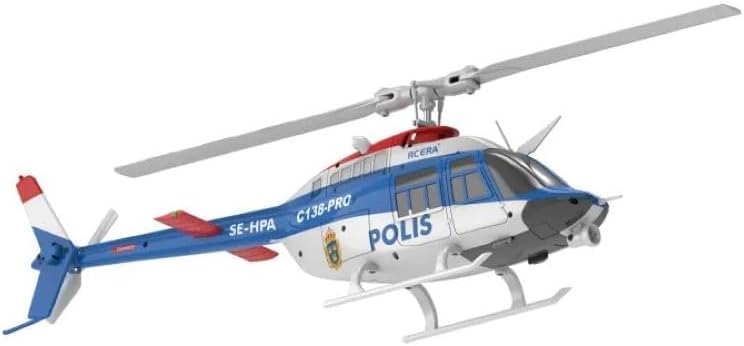
Figure 2.1: Angled view of the RC ERA C138-PRO Bell-206 RC Helicopter.
Package Contents:
- RC ERA C138-PRO Bell-206 Helicopter (1)
- 2.4G Remote Controller (Upgraded version) (1)
- USB Charger (1)
- Main Rotor Blades (2)
- Tail Rotor Blades (1)
- Lithium Battery (7.4V 350mAh) (1)
- Screwdriver (1)
- Hex Wrench (1)
- User Manual (1)
3. Setup
3.1 Battery Charging
- Connect the provided USB charger to a suitable USB power source (e.g., computer USB port, USB wall adapter).
- Connect the helicopter's lithium battery to the USB charger. Ensure correct polarity.
- The charger's indicator light will show the charging status. Refer to the charger's specific instructions for light indications (typically red for charging, green for fully charged).
- Charging time is approximately 60 minutes. Do not leave the battery unattended during charging.
3.2 Transmitter Preparation
- Open the battery compartment on the back of the remote controller.
- Insert four (4) 1.5V AA batteries (not included), ensuring correct polarity.
- Close the battery compartment securely.

Figure 3.1: The 2.4G Remote Controller for the C138-PRO helicopter.
3.3 Helicopter Preparation
- Ensure the main rotor blades and tail rotor blades are securely attached. Use the provided screwdriver or hex wrench if adjustments are needed.
- Insert the fully charged lithium battery into the helicopter's battery compartment. Ensure it clicks into place.
- Place the helicopter on a flat, level surface for initial power-on.
4. Operating Instructions
4.1 Power On and Binding
- Turn on the helicopter's power switch. The LED lights on the helicopter will begin to flash.
- Turn on the remote controller. The controller's indicator light will flash.
- Push the throttle stick (left stick) all the way up, then all the way down. The helicopter and controller will bind, and their indicator lights will become solid.
4.2 Basic Flight Controls
- Throttle (Left Stick Up/Down): Controls ascending and descending.
- Rudder (Left Stick Left/Right): Controls left and right rotation (yaw).
- Elevator (Right Stick Up/Down): Controls forward and backward flight.
- Aileron (Right Stick Left/Right): Controls left-side and right-side flight.
4.3 One-Key Takeoff and Landing
- One-Key Takeoff: Press the 'TAKE OFF' button on the transmitter. The helicopter will automatically lift off and hover at a stable altitude.
- One-Key Landing: Press the 'LANDING' button on the transmitter. The helicopter will automatically descend and land gently.
4.4 Flight Modes (6G and 3D)
- 6G Mode (6-Axis Gyro): This mode provides ultra-stable flight, ideal for beginners. The 6-axis gyro ensures self-stabilization and easier control.
- 3D Mode: For experienced pilots, this mode allows for advanced maneuvers, including inverted flight. Press the '3D' button on the transmitter to switch to 3D mode.
- One-Key 3D Inverted Flight: In 3D mode, a dedicated button allows for easy execution of inverted flight.
4.5 Advanced Features
- Optical Flow Sensor: Provides intelligent positioning, enhancing stability and hover precision, especially in indoor environments.
- Barometer Altitude Hold: Maintains a consistent altitude, reducing the need for constant throttle adjustments.
- Waypoint Flight: Refer to the transmitter manual for instructions on setting up waypoint flight paths.
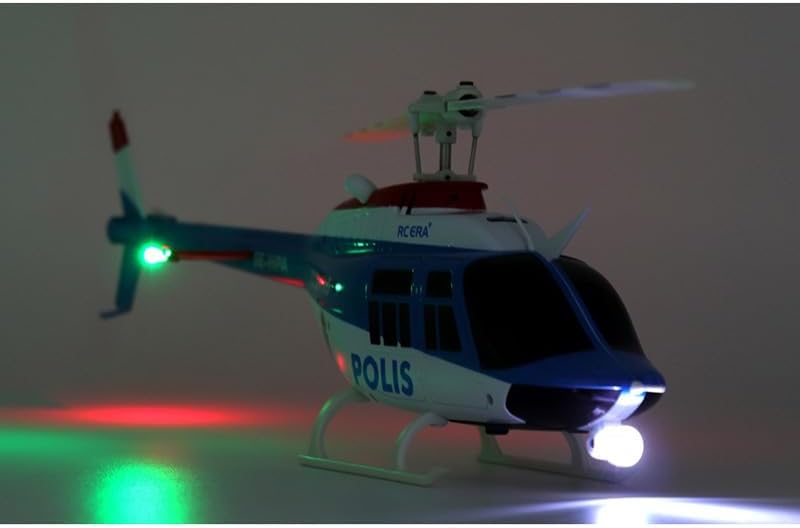
Figure 4.1: The C138-PRO helicopter illuminated by its integrated LED lights.
5. Maintenance
Regular maintenance ensures the longevity and optimal performance of your RC ERA C138-PRO helicopter.
- Cleaning: After each flight, gently wipe down the helicopter with a soft, dry cloth to remove dust and debris. Avoid using water or solvents.
- Blade Inspection: Regularly inspect main and tail rotor blades for cracks, chips, or damage. Replace damaged blades immediately using the spare blades provided.
- Motor Care: Keep the brushless main motor and coreless tail motor free from obstructions. Avoid prolonged operation in dusty or sandy environments.
- Battery Storage: Store the lithium battery in a cool, dry place, away from direct sunlight and extreme temperatures. Do not store fully charged or fully discharged for extended periods. Charge to approximately 50% for long-term storage.
- Screw Tightness: Periodically check all screws and fasteners to ensure they are tight. Do not overtighten.
6. Troubleshooting
This section addresses common issues you might encounter with your RC ERA C138-PRO helicopter.
| Problem | Possible Cause | Solution |
|---|---|---|
| Helicopter does not respond to transmitter. | Not bound, low battery (helicopter or transmitter), power switch off. | Ensure both are powered on. Re-bind helicopter and transmitter. Charge or replace batteries. |
| Helicopter flies erratically or is unstable. | Damaged blades, incorrect trim settings, strong wind, gyroscope calibration issue. | Inspect and replace damaged blades. Adjust trim on transmitter. Fly in calm conditions. Re-calibrate gyroscope (refer to transmitter manual). |
| Short flight time. | Battery not fully charged, aging battery. | Ensure battery is fully charged. Consider replacing the battery if it's old or damaged. |
| Motor does not spin. | Motor lock protection activated, connection issue. | Check for obstructions around the motor. Power cycle the helicopter and transmitter. Ensure all connections are secure. |
| Low voltage alarm. | Helicopter battery is low. | Land the helicopter immediately and charge the battery. |
7. Specifications
- Model: C138-PRO Bell-206
- Rotor Diameter: 306mm
- Body Length: 312mm
- Height: 101mm
- Flight Weight: 110g
- Flight Time: Approximately 10-12 minutes
- Charging Time: Approximately 60 minutes
- Remote Range: 80-100 meters
- Main Motor: Brushless
- Tail Motor: Coreless (Brushed)
- Battery: 7.4V 350mAh Lithium
- Transmitter Batteries: 4*1.5AA (not included)
- Channels: 6CH
- Gyroscope: 6-Axis Electronic Gyro
- Additional Sensors: Optical Flow Sensor, Barometer
8. Warranty and Support
For warranty information, please refer to the documentation provided at the point of purchase or contact your retailer. Specific warranty terms may vary.
For technical support or further assistance, please contact the manufacturer, RC ERA, or your authorized dealer. Keep your purchase receipt as proof of purchase.


