
Introduction
Thank you for choosing the GALAXHERO 2-Drawer Mobile Filing Cabinet. This versatile unit is designed to enhance your home or office organization by providing efficient storage for files, a convenient printer stand, and additional surface space. Its mobile design allows for flexible placement and easy relocation. Please read this manual carefully before assembly and use to ensure proper setup and long-lasting performance.
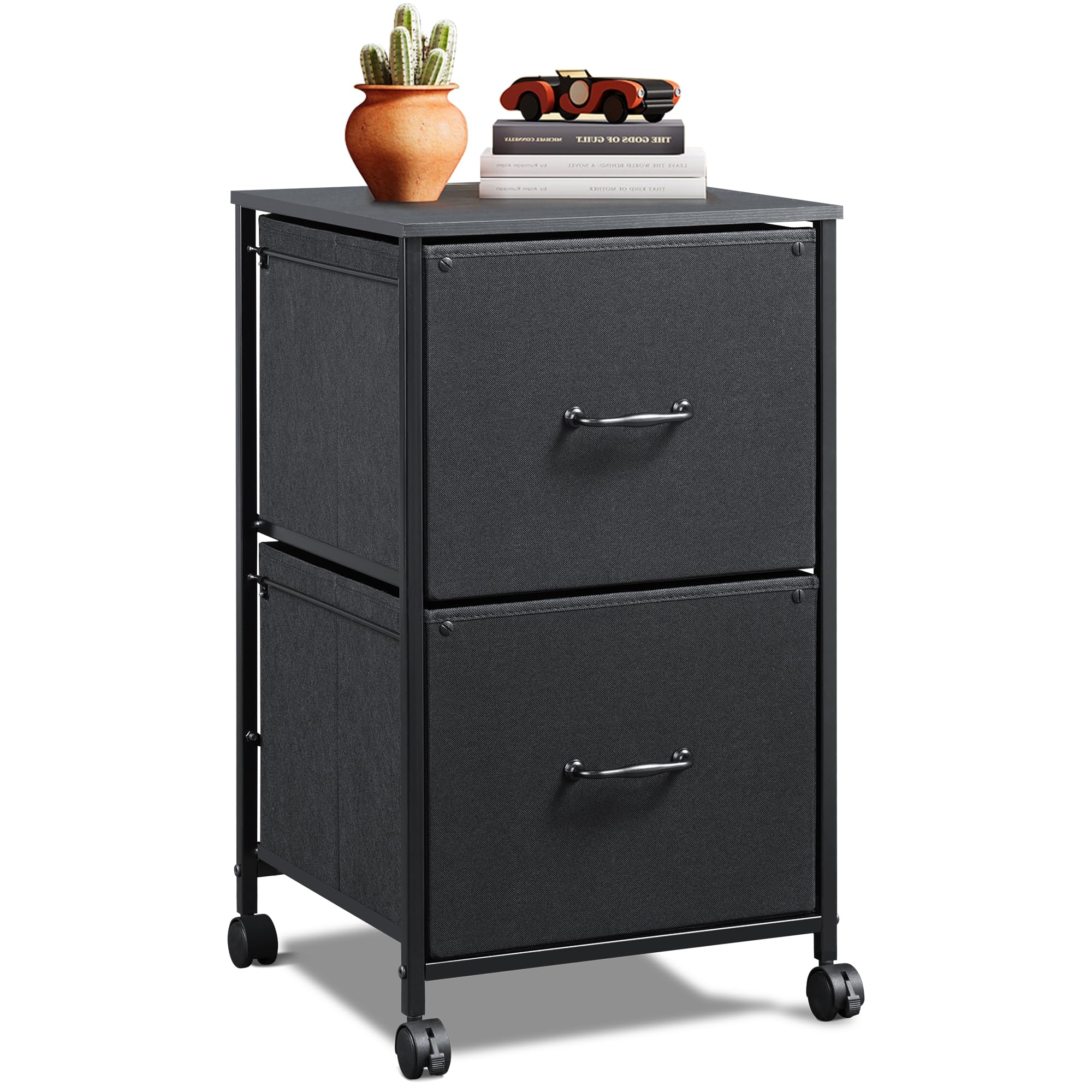
Image: The GALAXHERO 2-Drawer Mobile Filing Cabinet, shown in a home office environment, serving as a printer stand with two fabric drawers below.
Safety Information
- Always assemble the product on a soft, clean surface to prevent scratches.
- Ensure all screws and fasteners are securely tightened before use. Periodically check and re-tighten if necessary.
- Do not overload the drawers or the top surface. Refer to specifications for weight limits.
- Keep small parts and packaging materials away from children and pets.
- Use the locking casters to secure the cabinet in place when not moving it.
- Avoid placing hot items directly on the wooden top surface without protection.
Setup and Assembly
Assembly of your GALAXHERO filing cabinet is straightforward. All necessary tools and hardware are included. Please follow these steps carefully:
Package Contents
Before you begin, verify that all parts are present. Refer to the included parts list in your packaging.
Assembly Steps
- Attach Casters: Carefully attach the four swivel casters to the bottom of the steel frame. Ensure the two lockable casters are positioned at the front for easy access. Tighten securely.
- Assemble Frame: Connect the vertical and horizontal steel frame components according to the diagrams in your instruction booklet. Use the provided screws and Allen wrench. Do not overtighten initially.
- Install Top Board: Place the wooden top board onto the assembled steel frame. Secure it using the designated screws.
- Prepare Fabric Drawers: Unfold the fabric drawers and insert the bottom support panels to create a rigid structure.
- Insert Drawers: Slide the assembled fabric drawers into their respective slots in the frame. Ensure they slide smoothly.
- Attach Anti-Drop Buckles: For added safety and stability, attach the anti-drop buckles to the rear of the drawers as indicated in the manual. This prevents drawers from accidentally pulling out completely.
- Final Tightening: Once all components are in place, go back and securely tighten all screws.

Image: Detail of a 360° swivel caster with a locking mechanism, demonstrating how to engage and disengage the lock.

Image: A detailed view of the high-grade fabric used for the drawers, highlighting the internal wooden board for structural integrity.

Image: An illustration demonstrating the function and placement of the anti-drop buckle, designed to prevent drawers from falling out.
Operating Instructions
Using the Drawers
The two fabric drawers are designed to hold A4 or letter-size hanging file folders. Simply place your files into the drawers. The anti-drop buckle system ensures drawers remain securely in place during normal use.

Image: The GALAXHERO filing cabinet with both fabric drawers open, illustrating the ample storage space for documents and other items.
Mobile Functionality
To move the cabinet, unlock the two front casters by flipping their levers. Gently push or pull the cabinet to its desired location. Once positioned, engage the caster locks to prevent unintended movement.
Using as a Printer Stand
The sturdy wooden top surface can support most standard home office printers. Ensure the printer's weight does not exceed the cabinet's maximum weight capacity (refer to Specifications). This allows for efficient use of space, keeping your printer accessible and organized.

Image: The GALAXHERO filing cabinet positioned under a desk, effectively functioning as a mobile printer stand with a printer placed on its top surface.
Maintenance
- Cleaning the Frame and Top: Wipe the steel frame and wooden top with a soft, damp cloth. Avoid abrasive cleaners or harsh chemicals that could damage the finish.
- Cleaning Fabric Drawers: For light cleaning, use a lint roller or a soft brush to remove dust and debris. For spills, gently blot with a clean, damp cloth and mild soap, then air dry. Do not machine wash the fabric drawers.
- Caster Care: Periodically check the casters for any accumulated hair or debris that might hinder smooth movement. Clean as needed.
- Hardware Check: Every few months, inspect all screws and connections to ensure they remain tight. Re-tighten if any looseness is detected.
Troubleshooting
| Problem | Possible Cause | Solution |
|---|---|---|
| Drawers do not slide smoothly. | Drawer bottom panel not fully inserted; drawer overloaded; obstruction. | Ensure the bottom panel is flat and fully inserted. Reduce drawer contents. Check for any items blocking the drawer's path. |
| Cabinet wobbles after assembly. | Screws not fully tightened; uneven floor. | Re-tighten all assembly screws. Move the cabinet to a level surface or use shims if necessary. |
| Casters do not lock or roll freely. | Locking mechanism not fully engaged/disengaged; debris in caster. | Ensure the lock lever is fully pushed down (to lock) or up (to unlock). Clean any debris from the caster wheels. |
| Anti-drop buckle not functioning. | Buckle not properly installed or damaged. | Verify the anti-drop buckle is correctly attached as per assembly instructions. If damaged, contact customer support for a replacement. |
Specifications
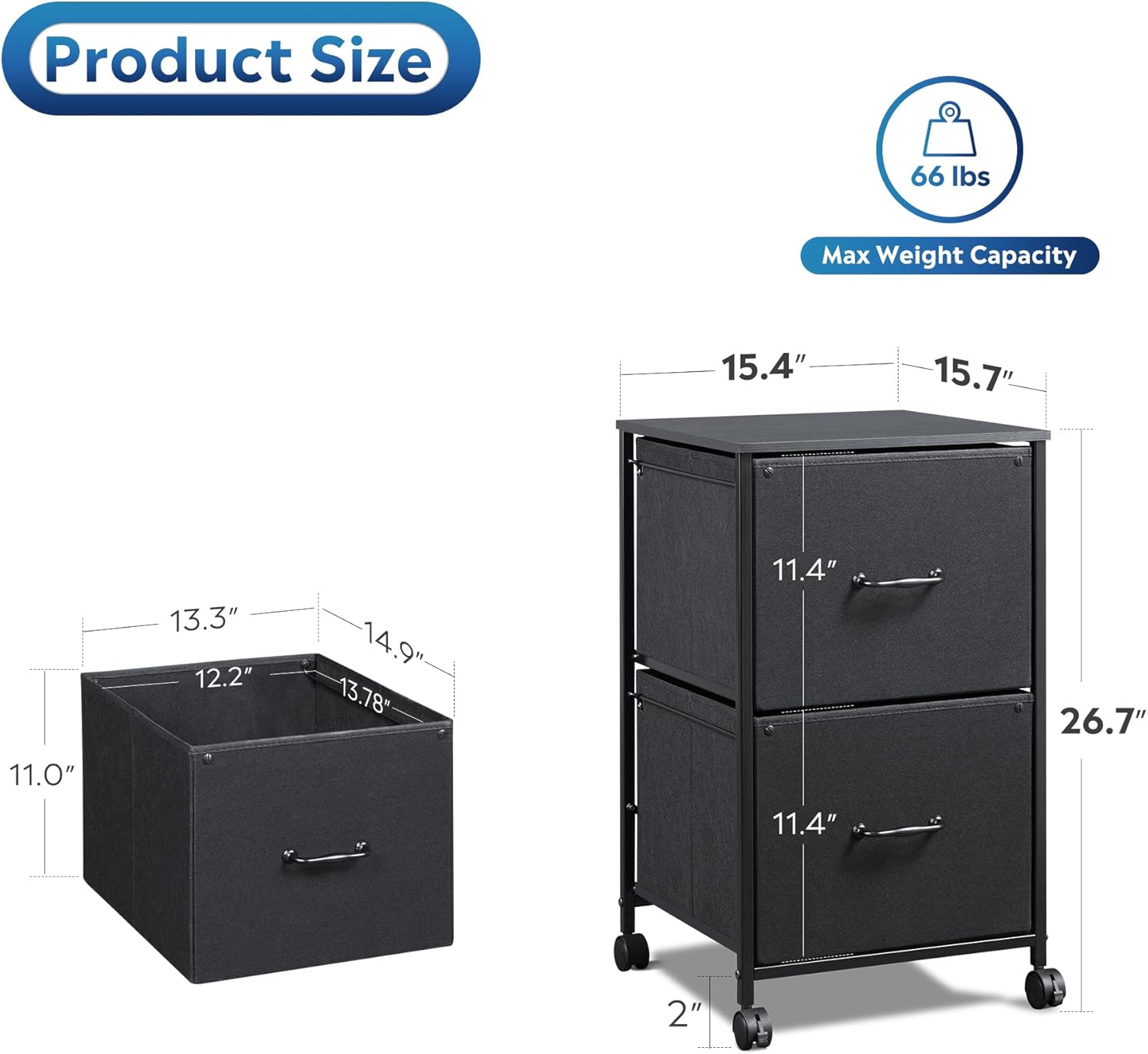
Image: A detailed diagram illustrating the overall dimensions of the filing cabinet and the internal dimensions of its fabric drawers.
| Feature | Detail |
|---|---|
| Brand | GALAXHERO |
| Model Number | B0FWCLHM3M |
| Product Dimensions (Overall) | Based on product image:
|
| Drawer Dimensions (Internal) | 13.3"W x 12.2"D x 11.0"H (for A4/Letter files) |
| Max Weight Capacity (Top Surface) | 66 lbs |
| Material | Steel frame, Wood top, Fabric drawers |
| Assembly Required | Yes |
| Special Features | Mobile (Lockable Casters), 2 Fabric Drawers, Printer Stand Function, Anti-drop Buckle |
Warranty Information
GALAXHERO products are manufactured to high-quality standards. For specific warranty details regarding your 2-Drawer Mobile Filing Cabinet, please refer to the warranty card included in your product packaging or visit the official GALAXHERO website. Keep your purchase receipt as proof of purchase for any warranty claims.
Customer Support
If you have any questions, require assistance with assembly, or need to report a missing/damaged part, please do not hesitate to contact GALAXHERO customer support.
- Online: Visit the official GALAXHERO store on Amazon: GALAXHERO Store
- Email: Refer to your product packaging for direct email support.
- Phone: Refer to your product packaging for direct phone support.
Please have your model number (B0FWCLHM3M) and purchase date ready when contacting support.