
MERACH NovaRow Q3
MERACH NovaRow Q3 Smart Magnetic Rowing Machine User Manual
Model: NovaRow Q3
1. Introduction
This manual provides essential information for the safe and effective use of your MERACH NovaRow Q3 Smart Magnetic Rowing Machine. Please read this manual thoroughly before assembly or operation and retain it for future reference. The MERACH NovaRow Q3 is designed for home fitness, offering a comprehensive full-body workout with smart features and adjustable magnetic resistance.
2. Safety Information
Before using this equipment, consult with a physician. It is important to understand your current health condition. Improper or excessive training can result in health injury. Always follow these safety guidelines:
- Ensure all parts are correctly assembled and tightened before each use.
- Keep children and pets away from the machine during operation.
- Place the rowing machine on a flat, stable surface with adequate clearance around it.
- Wear appropriate athletic footwear and clothing.
- Do not exceed the maximum user weight of 400 pounds (181 kg).
- Stop exercising immediately if you feel faint, dizzy, or experience pain.
- Regularly inspect the machine for wear and tear, especially the strap, seat rollers, and foot straps.
- Keep hands and feet clear of moving parts.
3. Package Contents
Verify that all components are present before beginning assembly:
- Rowing machine x 1 (main unit, disassembled)
- Tool set x 1 (for assembly)
- User manual x 1 (this document)
4. Product Overview
The MERACH NovaRow Q3 is a smart magnetic rowing machine featuring a 21.5-inch HD color screen and a robust design for effective home workouts. Key components include the main console with screen, magnetic resistance flywheel, wooden track rails, ergonomic seat, and foot pedals.

Image 4.1: MERACH NovaRow Q3 Smart Magnetic Rowing Machine. This image displays the complete rowing machine with a user demonstrating its use, highlighting the large display screen and wooden track design.
Key Features:
- Double Magnetic Resistance: Offers up to 130 LBS of resistance for varied intensity workouts.
- 21.5" Full HD Rotating Screen: Provides a clear display for workout data and interactive courses, with 180° horizontal and 60° vertical tilt.
- Smart Resistance Adjustment: Resistance can automatically adjust during app-guided courses.
- Quiet Operation: Designed with silent tension rope and mobile rollers for minimal noise.
- MERACH App Integration: Access to over 1000 interactive rowing classes and games.
- Ergonomic Design: 11.4-inch seat height and PU foam seat cushion for comfort, 49.2-inch ultra-long sliding distance accommodates users up to 6' 4.8".
- Durable Construction: Alloy steel and solid wood frame.
5. Setup and Assembly
Assembly of the MERACH NovaRow Q3 requires careful attention to detail. Please follow the included assembly instructions step-by-step. A tool set is provided for convenience.
Assembly Tips:
- Unpack all components and verify against the package contents list.
- Lay out all bolts and hardware, matching them to the assembly diagram. Some users have noted that the bolt packaging can be difficult to read once opened; identifying bolts by size and type before starting can be helpful.
- Pay close attention to the installation of the display cable. Ensure it is not pinched or twisted when fitting it into the housing of the display stand and rower. A loose or damaged connection can cause the display to malfunction.
- The bolt securing the long rod for the foot pedals, located on the bottom of the machine between the foot pedals, should be snugged against the rod but may not tighten flush with the wooden rails.
- It is recommended to charge the internal battery via the USB-C port after initial setup, especially if the machine has been idle for a period.
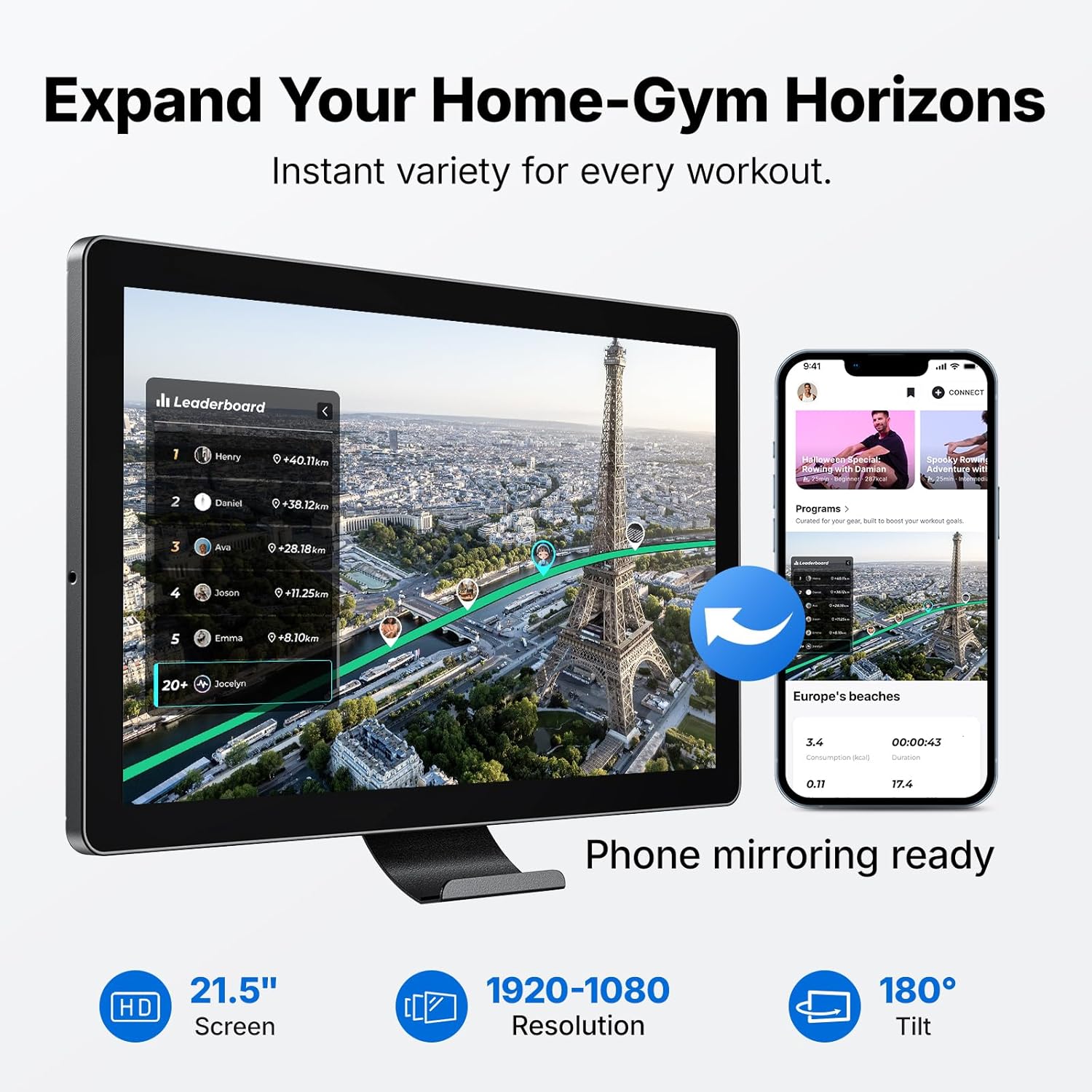
Image 5.1: The MERACH NovaRow Q3 in its upright storage position. This image illustrates the machine's ability to be stored vertically, minimizing its footprint when not in use.
6. Operating Instructions
6.1 Waking Up the Machine and Bluetooth Connection
To activate the rowing machine and connect it to the MERACH App:
- Pull the rowing machine handle to wake up the display.
- Observe the display for the Bluetooth symbol to light up.
- Give the handle two quick pulls. You should hear two beeps, indicating the machine is ready for connection.
- Open the MERACH App on your mobile device.
- Navigate to the "My Equipment" section within the app.
- Select "Search for a new device" and then "Bind" the detected MERACH Rower (e.g., MRK-R21-3311).
- Once connected, the app will display "Connection successful" and the rower icon will show "Connected".
- You can now select a training program or free training mode to begin your workout.
Video 6.1: Bluetooth Connection Tutorial for MERACH R21B2 Rowing Machine. This video demonstrates the step-by-step process of connecting your MERACH rowing machine to the MERACH mobile application via Bluetooth, including waking up the machine and binding it within the app.
6.2 Resistance Adjustment
The NovaRow Q3 features a double magnetic resistance system, offering up to 130 LBS of resistance. Resistance can be adjusted in two ways:
- Manual Adjustment: Use the controls on the handle to manually increase or decrease resistance during your workout.
- Smart Resistance: When following a course in the MERACH App, the resistance can automatically adjust to match the program's requirements, allowing for a more immersive and focused training experience.

Image 6.2: MERACH NovaRow Q3 showcasing its 130 lbs Pro-Grade Resistance. This image emphasizes the high resistance capability of the machine, comparing it to gym-quality workouts.

Image 6.3: MERACH NovaRow Q3 with auto-adjust resistance feature. This image illustrates how the machine's resistance automatically changes during app-guided workouts to optimize fat burning.
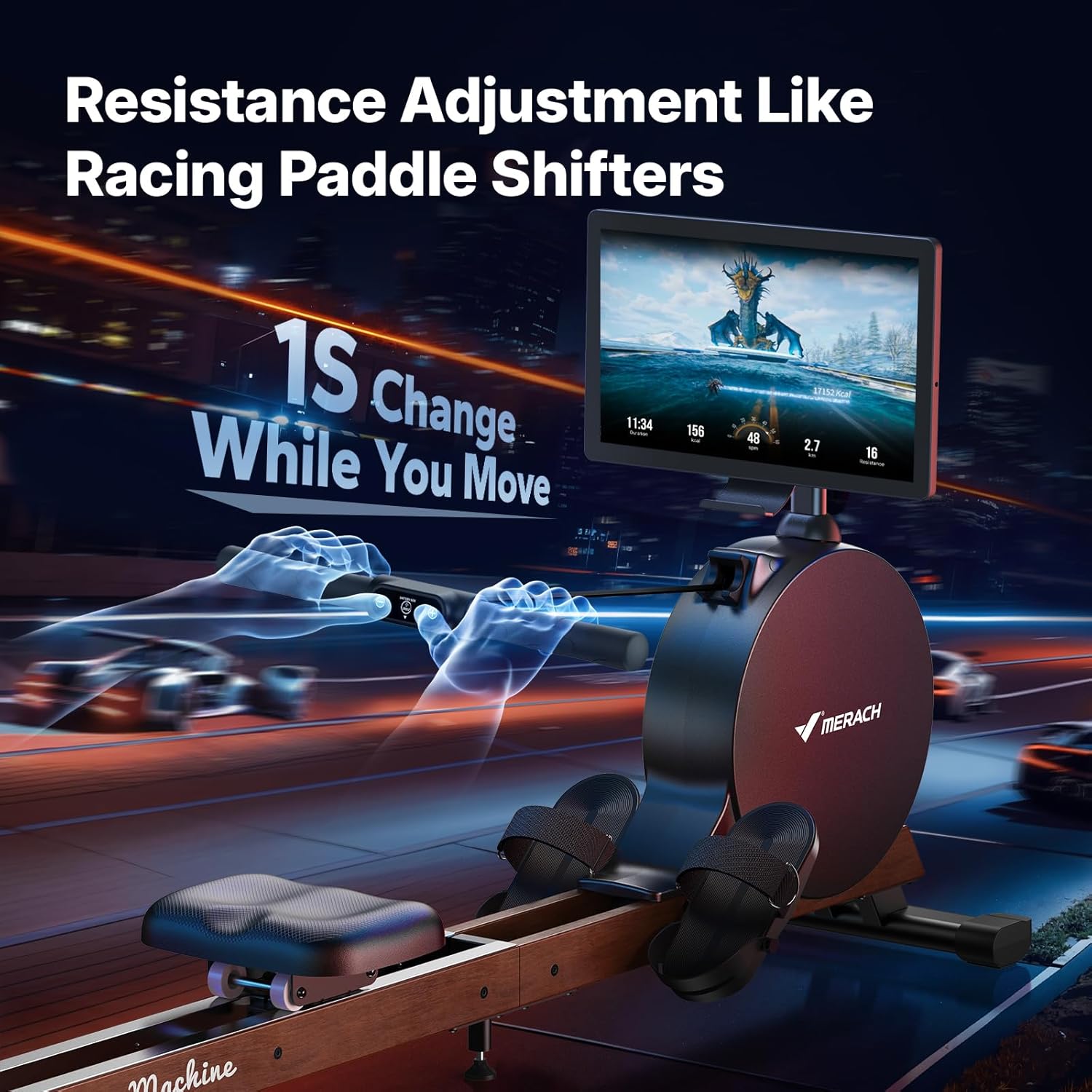
Image 6.4: MERACH NovaRow Q3 with resistance adjustment on the handle. This image highlights the convenience of changing resistance levels directly from the rowing handle, similar to racing paddle shifters.
6.3 Using the 21.5" HD Color Screen
The integrated 21.5-inch full HD screen provides a dynamic interface for your workouts:
- Display: Shows real-time workout data such as calories burned, distance, speed, and time.
- Adjustability: The screen supports 180° horizontal tilt and 60° vertical tilt for optimal viewing angles.
- Mirror Projection: Utilize the mirror screen projection function to synchronize course data from your mobile device, enhancing the interactive experience.

Image 6.5: MERACH NovaRow Q3 screen showing the MERACH App interface. This image demonstrates the large 21.5-inch HD screen displaying interactive workout content, including a leaderboard and various course options, with phone mirroring capability.
6.4 MERACH App and Interactive Training
Connect to the MERACH App to unlock a wide range of professional rowing courses and games. The app provides an immersive training experience, helping to keep workouts engaging. The app also allows for setting daily goals and tracking achievements.
Note: The display on the rowing machine shows metrics in kilometers. To convert to miles, multiply the kilometer value by 0.621371.
7. Maintenance
Regular maintenance ensures the longevity and optimal performance of your MERACH NovaRow Q3.
- Cleaning: Wipe down the machine with a damp cloth after each use to remove sweat and dust. Avoid abrasive cleaners.
- Track Rails: Keep the wooden track rails clean and free of debris to ensure smooth seat movement.
- Inspections: Periodically check all bolts and connections to ensure they are secure. Inspect the rowing strap for any signs of fraying or wear.
- Storage: When not in use, the rowing machine can be stored upright to save space. Ensure it is stable in the upright position.

Image 7.1: Detailed view of MERACH NovaRow Q3 components. This image highlights the quality materials and design elements such as FSC-certified wood, silent cords, smooth wheels, a wide stable base, and the comfortable PU cushion, all contributing to durability and user experience.
8. Troubleshooting
If you encounter issues with your MERACH NovaRow Q3, refer to the following common solutions:
| Problem | Possible Cause | Solution |
|---|---|---|
| Display not turning on or flickering. | Loose display cable connection or low internal battery. | Check the display cable connection, ensuring it is securely seated and not pinched. Charge the internal battery via the USB-C port. |
| Bluetooth connection issues with the MERACH App. | Machine not awake, app not searching, or interference. | Ensure the machine is awake (pull handle twice). Restart the MERACH App and try searching again. Ensure Bluetooth is enabled on your device. |
| Seat movement is not smooth. | Debris on track rails or worn rollers. | Clean the wooden track rails thoroughly. Inspect seat rollers for damage; contact support if worn. |
| Resistance feels inconsistent or too low/high. | Magnetic resistance system issue or incorrect setting. | Verify resistance settings in the app or via manual controls. If the issue persists, contact customer support. Note that a detailed resistance chart per level is not provided by the manufacturer. |
| Workout metrics displayed in kilometers instead of miles. | The machine's display defaults to metric units. | The machine's display does not offer an option to change units to imperial. For conversion, 1 mile = 1.60934 kilometers. The MERACH App may offer unit preferences. |
9. Specifications
| Feature | Detail |
|---|---|
| Brand | MERACH |
| Model Name | NovaRow Q3 |
| Special Feature | 21.5" HD Color Screen |
| Color | Black |
| Resistance Mechanism | Magnetic |
| Product Dimensions (LxWxH) | 73.9"D x 36.54"W x 17.8"H (187.7 cm x 92.8 cm x 45.2 cm) |
| Maximum Weight Recommendation | 400 Pounds (181 kg) |
| Metrics Measured | Calories Burned, Distance, Speed, Time |
| Frame Material | Alloy Steel & Solid Wood |
| Item Weight | 76 Pounds (34.5 kg) |
| Seat Height | 11.4 inches (29 cm) |
| Seat Travel Distance | 49.2 inches (125 cm) |
10. Warranty
The MERACH NovaRow Q3 Smart Magnetic Rowing Machine comes with a 12-month warranty. Please retain your proof of purchase for warranty claims. For specific terms and conditions, refer to the warranty documentation included with your product or contact MERACH customer support.
11. Support
For technical assistance, troubleshooting beyond this manual, or warranty inquiries, please contact MERACH customer support. MERACH provides lifetime technical support for a superior customer experience.
You can typically find contact information on the MERACH official website or through the retailer where the product was purchased.
Ask a question about this manual
Ask about setup, troubleshooting, compatibility, parts, safety, or missing instructions. Manuals+ will review the question and use this page’s manual context to help answer it.