1. Introduction
The ANDELI MIG135 is a versatile 3-in-1 multiprocess welding machine designed for various welding tasks. It supports MIG (Gas/Gasless), Lift TIG, and MMA (Stick) welding modes, making it suitable for both home DIY projects and general maintenance work. This manual provides essential information for the safe and effective operation of your welder.
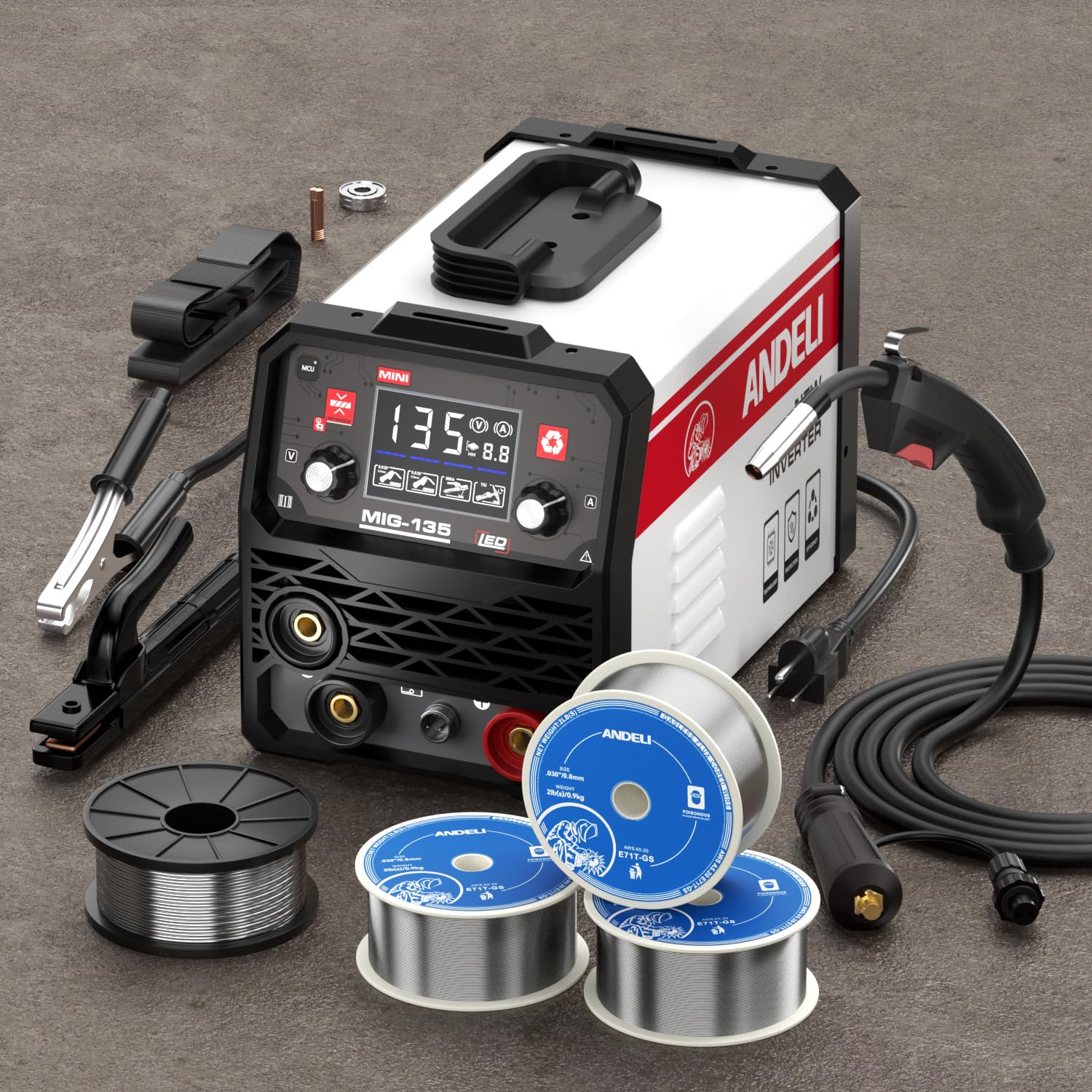
Front view of the ANDELI MIG135 Multiprocess Welder, showing the control panel and output terminals.
2. Safety Instructions
Always prioritize safety when operating welding equipment. Failure to follow safety guidelines can result in serious injury or damage to the equipment.
- Ensure proper ventilation in the work area to avoid inhaling welding fumes.
- Wear appropriate personal protective equipment (PPE), including a welding helmet with suitable shade, welding gloves, protective clothing, and safety shoes.
- Never operate the welder in wet conditions or near flammable materials.
- Ensure the machine is properly grounded.
- Disconnect power before performing any maintenance or changing accessories.
- The machine features automatic protection functions for over-current, over-voltage, and over-heating. If these protections activate, allow the machine to cool down before resuming operation.
- Keep children and unauthorized personnel away from the welding area.
3. Package Contents
Upon unpacking, verify that all components are present and undamaged. The package typically includes:
- ANDELI MIG135 Multiprocess Welder Unit
- MIG Welding Torch
- Ground Clamp
- Electrode Holder (for MMA welding)
- Flux-cored welding wire (0.030 inch / 1kg spool)
- User Manual
Note: Specific accessories may vary. Refer to your product packaging for a complete and accurate list of included items.
4. Product Features
- Multifunctionality: Supports MIG (Gas/Gasless), Lift TIG, and MMA (Stick) welding modes, offering versatility for various applications.
- User-Friendly Operation: Features a simple control panel with unified adjustment mode for easy setup and operation. Adjustable welding voltage and current.
- Efficient Cooling System: Unique air channel design enhances heat dissipation for power devices and control circuits, minimizing dust absorption and improving longevity.
- Wide Application: Suitable for welding ordinary thin steel and iron. Compatible with 0.030 inch (1kg) flux-cored welding wire. Ideal for home DIY and general maintenance.
- Integrated Safety: Equipped with automatic protection functions against over-current, over-voltage, and over-heating for enhanced user safety and equipment reliability.
5. Setup
5.1 Power Connection
- Ensure the welder is connected to a stable 110V AC power source.
- Verify that the power outlet and circuit breaker can handle the welder's power requirements.
5.2 Ground Clamp Connection
- Connect the ground clamp cable to the appropriate terminal on the welder.
- Attach the ground clamp securely to the workpiece or welding table, ensuring good electrical contact.
5.3 Wire Installation (MIG Mode)
- Open the wire feed compartment.
- Place the 1kg spool of 0.030 inch flux-cored wire onto the spindle.
- Thread the wire through the guide tube and into the drive roller mechanism.
- Close the drive roller tension arm and adjust the tension appropriately.
- Feed the wire through the MIG torch liner until it exits the contact tip.
5.4 Gas Connection (for Gas MIG, if applicable)
- If performing Gas MIG welding, connect the gas hose from your shielding gas cylinder (e.g., Argon/CO2 mix) to the gas inlet on the welder.
- Ensure all connections are secure and leak-free.
6. Operating Modes
6.1 MIG Welding (Gas/Gasless)
MIG welding is suitable for various metals and thicknesses. The MIG135 supports both gas-shielded and gasless (flux-cored) welding.
- Mode Selection: Select the MIG mode on the control panel.
- Wire Feed Speed & Voltage: Adjust the wire feed speed and voltage according to the material thickness and wire type. Start with recommended settings and fine-tune as needed.
- Gasless (Flux-Cored): No external shielding gas is required as the flux within the wire produces the necessary shielding.
- Gas-Shielded: Ensure the gas cylinder is open and the flow rate is set correctly (typically 10-15 L/min).
- Welding Technique: Maintain a consistent travel speed and torch angle.
6.2 Lift TIG Welding
Lift TIG provides precise control for welding thinner materials and achieving high-quality welds. This machine uses a Lift TIG start, which minimizes tungsten contamination.
- Mode Selection: Select the TIG mode on the control panel.
- TIG Torch Setup: Connect a TIG torch (not included) and install a tungsten electrode.
- Gas Connection: Connect an Argon gas cylinder and set the flow rate.
- Lift Start: Gently touch the tungsten electrode to the workpiece, then lift it slightly to initiate the arc.
- Current Adjustment: Adjust the welding current based on material type and thickness.
6.3 MMA (Stick) Welding
MMA welding is robust and suitable for outdoor use and thicker materials.
- Mode Selection: Select the MMA mode on the control panel.
- Electrode Holder: Connect the electrode holder cable to the appropriate terminal.
- Electrode Selection: Choose an electrode suitable for your material and application. Clamp the electrode securely in the holder.
- Current Adjustment: Set the welding current according to the electrode diameter and material thickness.
- Arc Striking: Strike the arc by lightly scratching or tapping the electrode on the workpiece.
7. Maintenance
Regular maintenance ensures the longevity and optimal performance of your welder.
- Cleaning: Periodically clean the welder's exterior and internal components (if accessible) using compressed air to remove dust and debris. Ensure the power is disconnected.
- MIG Torch: Inspect the MIG torch nozzle, contact tip, and diffuser regularly. Replace worn or spatter-clogged parts.
- Wire Feed System: Check the drive rollers for wear and ensure they are clean. Adjust wire tension as needed.
- Cables and Connections: Inspect all cables for damage and ensure connections are tight.
- Storage: Store the welder in a clean, dry environment when not in use.
8. Troubleshooting
This section addresses common issues you might encounter during operation.
| Problem | Possible Cause | Solution |
|---|---|---|
| No power to the welder | Power cable disconnected, circuit breaker tripped, faulty power switch. | Check power connections, reset circuit breaker, ensure switch is ON. |
| Poor weld quality (e.g., porosity, weak penetration) | Incorrect settings (voltage/current/wire speed), improper gas flow (MIG), contaminated workpiece, worn contact tip. | Adjust settings, check gas supply/flow, clean workpiece, replace contact tip. |
| Wire feed issues (MIG) | Incorrect drive roller tension, clogged liner, wrong size contact tip, wire tangled. | Adjust tension, clean/replace liner, use correct contact tip, untangle wire. |
| Overheat protection activated | Exceeded duty cycle, insufficient ventilation. | Allow the machine to cool down, ensure adequate ventilation. |
If you encounter issues not listed here or if problems persist, contact customer support.
9. Specifications
| Specification | Value |
|---|---|
| Model Number | MIG-135MINI |
| Power Source | 110V AC |
| Welding Modes | MIG (Gas/Gasless), Lift TIG, MMA |
| Item Weight | 18.85 pounds |
| Package Dimensions | 19.7 x 14.6 x 13.4 inches |
| Manufacturer | XINGYI |
10. Warranty and Support
Specific warranty details for the ANDELI MIG135 Multiprocess Welder are not provided within this manual. For warranty information, please refer to the documentation included with your product packaging or visit the official ANDELI website.
For technical support, troubleshooting assistance beyond this manual, or inquiries regarding parts and service, please contact ANDELI customer service through their official channels.