
1. Important Safety Instructions
Read all instructions carefully before operating the machine. Failure to follow these instructions may result in serious injury or property damage. Keep this manual for future reference.
- Always wear appropriate personal protective equipment, including safety glasses, hearing protection, and heavy-duty gloves.
- Ensure the work area is clear of bystanders, children, and pets.
- Do not operate the chipper in wet conditions or on slippery surfaces.
- Never place hands or feet into the feeding chutes or discharge opening.
- Disconnect power before performing any maintenance, cleaning, or clearing jams.
- Only use the chipper for its intended purpose: chipping and shredding wood and organic debris.
2. Setup and Assembly
The Deli Steelite AZDG590 Electric Wood Chipper Shredder requires minimal assembly. Ensure all components are present and undamaged before proceeding.
2.1 Unpacking
Carefully remove all contents from the packaging. Verify that all parts listed in the packing list are included. Dispose of packaging materials responsibly.
2.2 Component Identification
Familiarize yourself with the main parts of the chipper:
- Main Housing
- Feeding Chutes (Main and Secondary)
- Collection Bin (50L)
- Wheels and Axle
- Pusher Tool
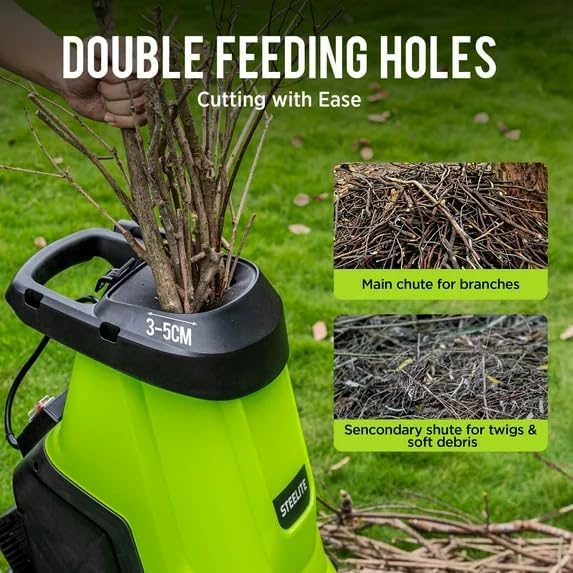
Image: The Deli Steelite Wood Chipper showing its main body and the two distinct feeding holes for different types of debris. The larger opening is for branches, and the smaller one is for twigs and soft debris.
2.3 Attaching the Collection Bin
Slide the 50L collection bin into the designated slot at the bottom of the chipper until it clicks securely into place. Ensure it is firmly seated to prevent material from escaping.
2.4 Power Connection
Connect the chipper to a standard 120V, 15-Amp grounded electrical outlet. Use an outdoor-rated extension cord if necessary, ensuring it is of appropriate gauge for the distance and current draw.
3. Operating Instructions
Follow these steps for safe and effective operation of your wood chipper shredder.
3.1 Starting the Machine
Ensure the collection bin is correctly installed and the power cord is securely connected. Press the 'ON' button. The motor will start and reach full operating speed (up to 4000 RPM) within a few seconds.

Image: An internal view illustrating the powerful 15-Amp motor capable of reaching up to 4000 RPM, providing efficient chipping and shredding performance.
3.2 Feeding Material
The chipper features a 1.75-inch cutting diameter for branches. Use the main chute for branches and the secondary chute for softer debris like leaves and twigs.
- Branches: Feed branches one at a time into the main chute. Do not force material. Allow the machine to pull the branch in. Use the pusher tool for shorter pieces if necessary.
- Leaves and Twigs: Feed smaller, softer materials into the secondary chute. Avoid overloading the machine.

Image: A close-up view of the chipper's feeding mechanism, demonstrating the maximum cutting diameter of 1.75 inches for branches. A branch is shown being inserted into the chute.
3.3 Stopping the Machine
To stop the chipper, press the 'OFF' button. Wait for all moving parts to come to a complete stop before approaching the machine or performing any tasks.
4. Maintenance
Regular maintenance ensures optimal performance and extends the life of your chipper shredder. Always disconnect power before maintenance.
4.1 Cleaning
- After each use, clear any debris from the feeding chutes and discharge area.
- Wipe down the exterior with a damp cloth. Do not use harsh chemicals or abrasive cleaners.
- Empty the collection bin regularly to prevent buildup.
4.2 Blade Inspection
Periodically inspect the cutting blades for sharpness and damage. Dull or damaged blades can reduce performance and strain the motor. Refer to the service section for blade replacement instructions or contact customer support.
4.3 Storage
Store the chipper in a dry, secure location, away from direct sunlight and extreme temperatures. Ensure the power cord is neatly coiled and secured.
5. Troubleshooting
This section addresses common issues you might encounter with your chipper shredder.
| Problem | Possible Cause | Solution |
|---|---|---|
| Machine does not start | No power supply Collection bin not properly installed Overload protection activated | Check power connection and outlet Ensure collection bin is securely in place Reset the circuit breaker or wait for motor to cool |
| Material not chipping effectively | Dull blades Overfeeding Material too large or wet | Inspect and replace blades if necessary Feed material slowly, one piece at a time Ensure material is within specified diameter and relatively dry |
| Machine clogs frequently | Overfeeding Wet or green material Discharge chute blocked | Reduce feeding rate Allow material to dry slightly before chipping Disconnect power and clear the blockage using the pusher tool |
6. Specifications
Detailed technical specifications for the Deli Steelite AZDG590 Electric Wood Chipper Shredder.
| Feature | Specification |
|---|---|
| Brand | deli |
| Model Number | AZDG590 |
| Power Source | AC (Corded Electric) |
| Motor | 15-Amp |
| Max Motor Speed | 4000 RPM |
| Cutting Diameter | 1.75 Inches |
| Collection Bin Capacity | 50 Liters |
| Item Weight | 22 Pounds |
| Product Dimensions (D x W x H) | 1"D x 1"W x 1"H |
| Material | Plastic |
7. Warranty and Support
For warranty information, technical support, or to purchase replacement parts, please contact the manufacturer or authorized service center. Keep your purchase receipt as proof of purchase.
Manufacturer: steelite
ASIN: B0FWBXKH8R
Additional protection plans may be available for purchase through your retailer. Please refer to the terms and conditions of any extended warranty or protection plan for details.


