
1. Introduction
This manual provides essential instructions for the safe and efficient operation, installation, and maintenance of your LG DF375HVS freestanding dishwasher. Please read this manual thoroughly before using your appliance and retain it for future reference.
2. Safety Information
Always follow basic safety precautions when using electrical appliances to reduce the risk of fire, electric shock, or injury. This dishwasher is intended for household use only. Do not attempt to repair or replace any part of your dishwasher unless specifically recommended in this manual. Refer all servicing to qualified personnel.
- Ensure the dishwasher is properly grounded.
- Do not operate the dishwasher if it is damaged or malfunctioning.
- Keep children away from the dishwasher, especially when it is operating.
- Use only detergents and rinse aids specifically designed for automatic dishwashers.
- Avoid touching the heating element during or immediately after a wash cycle.
3. Setup and Installation
3.1 Unpacking
Carefully remove all packaging materials. Inspect the dishwasher for any damage incurred during transit. Keep packaging materials out of reach of children.
3.2 Placement and Dimensions
Position the dishwasher on a level, stable surface. Ensure adequate space for door opening and connections. The appliance dimensions are 60 cm (width) x 60 cm (depth) x 85 cm (height).

Image: Dishwasher dimensions (Width: 600mm, Depth: 600mm, Height: 850mm).
3.3 Water and Drain Connections
Connect the water inlet hose to a cold water supply with a minimum pressure of 0.04 MPa and a maximum of 1.0 MPa. Securely attach the drain hose to a suitable drain pipe, ensuring it is not kinked or obstructed. The drain hose is included with the appliance.

Image: Rear view of the dishwasher with the drain hose.
3.4 Electrical Connection
Plug the dishwasher into a dedicated, grounded 120 Volt electrical outlet. Do not use extension cords or adapters.
4. Operating Instructions
4.1 Control Panel Overview
The control panel features touch controls and an external LED display for cycle information and status. Refer to the detailed diagram in your quick start guide for specific button functions.

Image: Front view of the dishwasher with the control panel visible.
4.2 Loading the Dishwasher
The LG DF375HVS features an EasyRack Plus system with three baskets, allowing flexible loading for up to 14 place settings. Adjust the height of the middle basket and utilize the third basket for cutlery and small items.

Image: Interior view showing the three adjustable racks.

Image: Close-up of the customizable third basket.
4.3 Adding Detergent and Rinse Aid
Fill the detergent dispenser with the recommended amount of dishwasher detergent. Add rinse aid to the rinse aid dispenser to improve drying performance and prevent water spots.
4.4 Selecting a Wash Cycle
Choose from various wash cycles based on your load's soil level. The QuadWash system utilizes four multi-directional spray arms for thorough cleaning, while TrueSteam technology uses multiple steam jets to sanitize dishes, loosen stubborn dirt, and enhance glass shine.

Image: QuadWash system with multi-directional spray arms.

Image: TrueSteam technology in action inside the dishwasher.
4.5 Starting a Cycle
Close the dishwasher door firmly and press the 'Start' button. The external LED display will show the remaining cycle time.
4.6 Wi-Fi Connectivity with ThinQ
Manage your dishwasher remotely using the LG ThinQ app on your smartphone. Download new programs, receive usage tips, and control wash options from anywhere.

Image: Controlling the dishwasher via the LG ThinQ app.
4.7 Automatic Door Opening
At the end of the wash cycle, the dishwasher door will automatically open to facilitate improved drying efficiency and reduce condensation.
5. Maintenance
5.1 Cleaning Filters
Regularly clean the filter system located at the bottom of the dishwasher tub to ensure optimal performance and prevent odors. Refer to the detailed instructions in your full user manual for removal and cleaning procedures.
5.2 Cleaning Spray Arms
Periodically check the spray arm nozzles for blockages and clean them if necessary to maintain effective water distribution.
5.3 Exterior Cleaning
Wipe the exterior surfaces of the dishwasher with a soft, damp cloth. Avoid abrasive cleaners or solvents.
6. Troubleshooting
Before contacting service, review the following common issues and their solutions:
| Problem | Possible Cause | Solution |
|---|---|---|
| Dishwasher does not start | Power supply issue, door not closed properly, cycle not selected. | Check power connection, ensure door is latched, select a wash cycle. |
| Poor cleaning results | Improper loading, clogged spray arms/filters, insufficient detergent. | Load dishes correctly, clean filters/spray arms, use appropriate detergent. |
| Water not draining | Clogged drain hose or filter, air gap blockage. | Check and clear drain hose/filter, ensure air gap is clear. |
| Excessive noise | Dishes interfering with spray arms, foreign object in pump. | Rearrange dishes, inspect for foreign objects. |
7. Specifications
| Feature | Specification |
|---|---|
| Model Number | DF375HVS |
| Dimensions (W x D x H) | 60 x 60 x 85 cm |
| Weight | 48 kg |
| Capacity | 14 Place Settings |
| Noise Level | 43 dB |
| Controls | Touch |
| Voltage | 120 Volt |
| Included Components | Drain Hose |
| Energy Efficiency Class | A |
For detailed energy information, please refer to the official EU Energy Label:
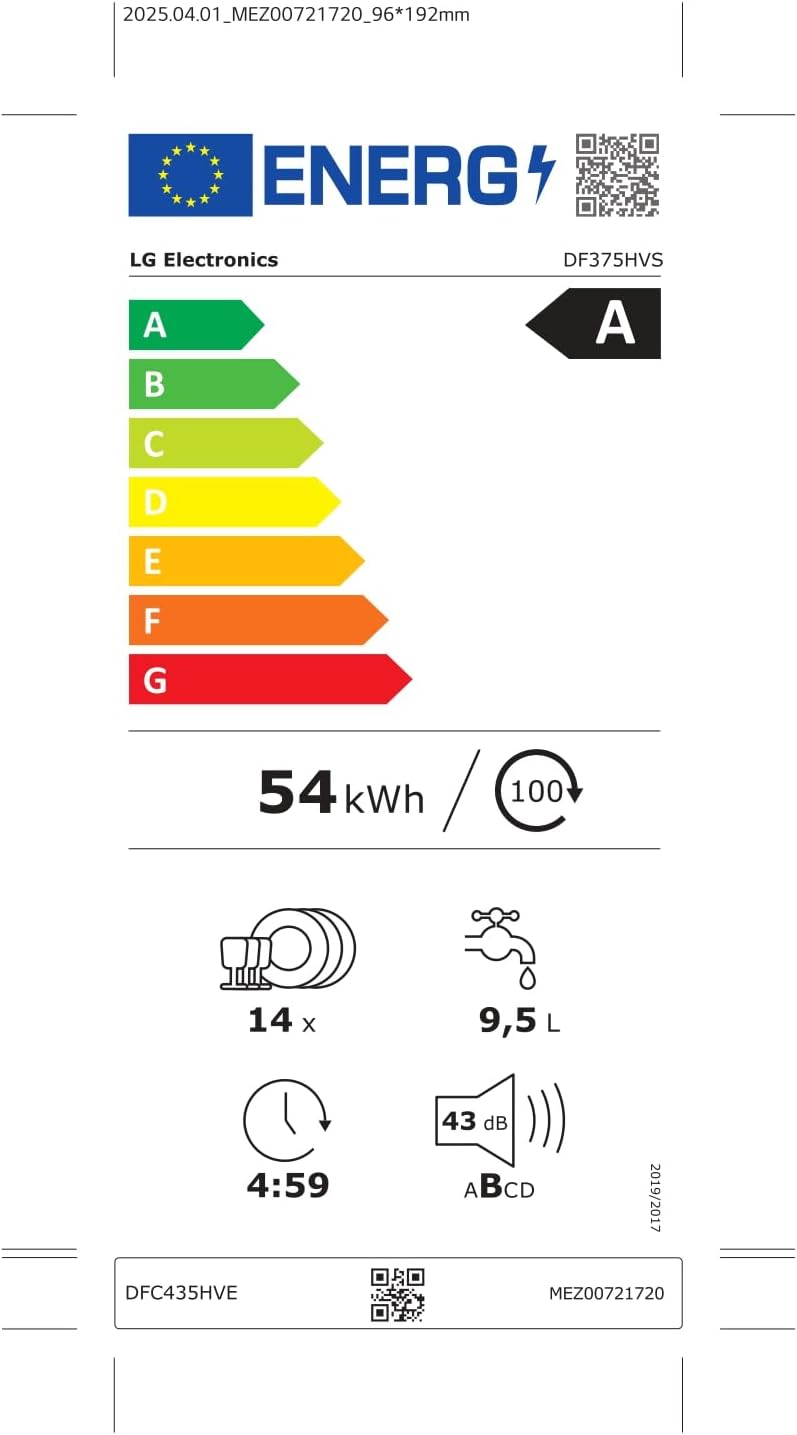
Image: EU Energy Label for LG DF375HVS.
Further details available at: EPREL Product Database
8. Warranty and Support
8.1 Warranty Information
The Inverter Direct Drive motor in your LG DF375HVS dishwasher is covered by a 10-year warranty. For other components, please refer to the specific warranty terms provided at the time of purchase.
8.2 Product Support
For technical assistance, spare parts, or further information, please contact LG Customer Service. You can find contact details on the official LG website or in the warranty card included with your appliance.