Introduction
Welcome to the truke ResonanceX Open Ear Wireless Earbuds user manual. This guide provides detailed instructions to help you set up, operate, maintain, and troubleshoot your new earbuds. Please read this manual carefully before use to ensure optimal performance and longevity of your device.

Image: truke ResonanceX Open Ear Wireless Earbuds and their charging case. The earbuds feature an open-ear design, and the case is compact and oval-shaped.
Package Contents
Ensure all items are present in your package:
- truke ResonanceX Open Ear Wireless Earbuds (Left and Right)
- Wireless Charging Case
- USB Charging Cable (Type-C)
- User Manual
Setup Guide
1. Initial Charging
- Place both earbuds into the charging case.
- Connect the USB charging cable to the charging port on the case and to a power source.
- Allow the earbuds and case to fully charge before first use. The charging indicator lights will provide status.

Image: truke ResonanceX earbuds inside their charging case, illustrating the fast charging capability. The image highlights "70Hrs Total Music Playback" and "10Min Charging = 10Hrs Playback".
2. Pairing with Your Device
- Open the charging case. The earbuds will automatically enter pairing mode.
- On your smartphone or Bluetooth-enabled device, go to Bluetooth settings.
- Search for "truke ResonanceX" in the list of available devices and select it to connect.
- Once connected, a voice prompt will confirm successful pairing.
3. Dual Device Pairing
The ResonanceX supports connecting to two devices simultaneously:
- Pair the earbuds with the first device as described above.
- Disconnect the earbuds from the first device's Bluetooth settings. The earbuds will re-enter pairing mode.
- Pair the earbuds with the second device.
- Reconnect the earbuds to the first device from its Bluetooth settings. The earbuds should now be connected to both devices.

Image: truke ResonanceX earbuds placed next to a smartphone displaying a call screen and a laptop, illustrating the dual device pairing feature.
4. Wearing the Earbuds
The Open Ear design ensures comfort and situational awareness:
- Gently place the earbud over your ear, ensuring the speaker rests near your ear canal without entering it.
- Adjust the ear hook for a secure and comfortable fit.

Image: A truke ResonanceX open-ear earbud positioned on a human ear, demonstrating its comfortable and secure fit. The image highlights "Enhanced Air Circulation", "Skin-Friendly Earhooks", and "Less Earwax Buildup".
Operating Instructions
Touch Controls
The truke ResonanceX earbuds feature intuitive touch controls:
- Play/Pause: Single tap on either earbud.
- Next Track: Double tap on the right earbud.
- Previous Track: Double tap on the left earbud.
- Answer/End Call: Single tap on either earbud.
- Reject Call: Long press on either earbud for 2 seconds.
- Activate Voice Assistant: Triple tap on either earbud.
- Volume Up: Long press on the right earbud.
- Volume Down: Long press on the left earbud.
Gaming Mode (Low Latency)
Activate Gaming Mode for a synchronized audio-visual experience during gaming:
- Activate: Quadruple tap on either earbud. A voice prompt will confirm "Gaming Mode On".
- Deactivate: Quadruple tap on either earbud again. A voice prompt will confirm "Gaming Mode Off".
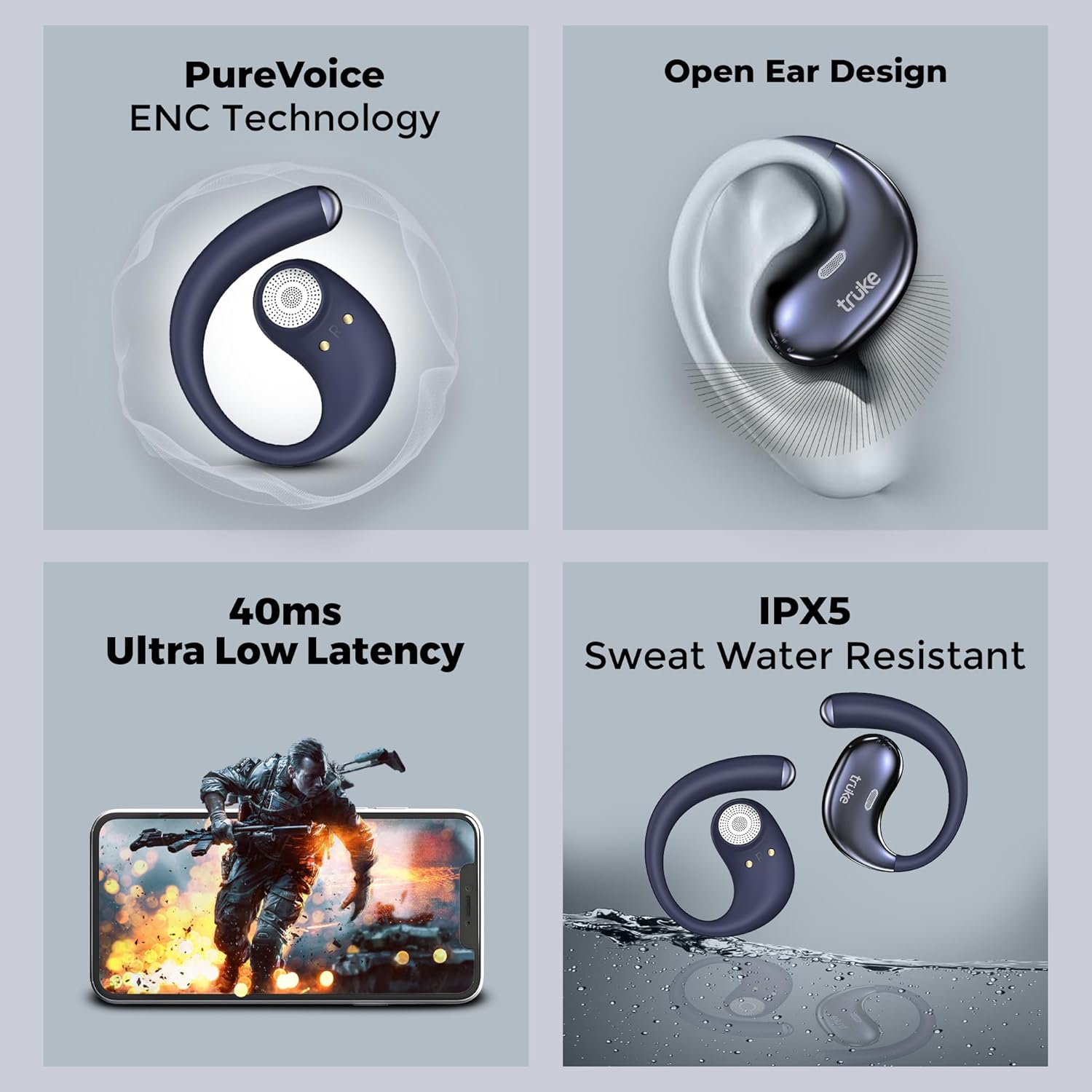
Image: A multi-panel image showcasing key features of the truke ResonanceX earbuds: PureVoice ENC Technology, Open Ear Design, 40ms Ultra Low Latency (with a gaming scene), and IPX5 Sweat Water Resistant (earbuds in water).
Maintenance and Care
To ensure the longevity and optimal performance of your truke ResonanceX earbuds, follow these care instructions:
- Cleaning: Use a soft, dry, lint-free cloth to clean the earbuds and charging case. Do not use harsh chemicals or abrasive materials.
- Water Resistance: The earbuds are IPX5 sweat and water resistant. Avoid submerging them in water or exposing them to heavy rain. Dry them thoroughly if they get wet.
- Storage: When not in use, store the earbuds in their charging case to protect them and keep them charged.
- Battery Care: Avoid fully discharging the battery frequently. Charge the earbuds regularly, even if not used for extended periods, to maintain battery health.
- Temperature: Do not expose the earbuds or case to extreme temperatures (hot or cold).
Troubleshooting
If you encounter issues with your truke ResonanceX earbuds, refer to the following solutions:
- Earbuds not pairing:
- Ensure the earbuds are charged.
- Turn off and on your device's Bluetooth.
- Forget "truke ResonanceX" from your device's Bluetooth list and try pairing again.
- Place earbuds back in the case, close the lid, wait a few seconds, then open to re-enter pairing mode.
- No sound from one earbud:
- Ensure both earbuds are charged.
- Try resetting the earbuds (refer to the "Resetting Earbuds" section below).
- Charging issues:
- Check if the charging cable is securely connected to both the case and the power source.
- Ensure the charging contacts on the earbuds and inside the case are clean and free of debris.
- Try a different charging cable or power adapter.
- Poor call quality:
- Ensure the microphones are not obstructed.
- Move to an area with less background noise.
- Check your device's network signal strength.
Resetting Earbuds
If issues persist, a factory reset may resolve them:
- Place both earbuds into the charging case and ensure they are charging.
- Press and hold the reset button (if available, otherwise refer to specific model instructions or contact support) on the charging case for approximately 10-15 seconds until the indicator lights flash.
- Remove the earbuds from the case and attempt to re-pair them with your device.
Product Specifications
| Feature | Detail |
|---|---|
| Model Name | ResonanceX OWS (OS11) |
| Connectivity | Wireless (Bluetooth 5.4) |
| Audio Technology | 24-bit Spatial Sound |
| Drivers | 16mm Titanium Drivers |
| Total Playtime | Up to 70 hours (with charging case) |
| Fast Charging | 10 minutes charge for 10 hours playback |
| Latency | 40ms (Gaming Mode) |
| Microphones | Quad Mic ENC (Environmental Noise Cancellation) |
| Water Resistance | IPX5 (Sweat and Water Resistant) |
| Dual Pairing | Supported |
| Earbud Type | Open Ear (OWS) |
| Item Weight | 57.4 grams |
| Battery Type | Lithium Polymer |
| Country of Origin | India |

Image: An exploded view of the truke ResonanceX earbud, highlighting the internal 16mm Titanium Drivers and other components, emphasizing "Bigger Drivers. Better Sound. 16mm Titanium Precision" and "HiFi DSP Sound".
Warranty and Support
For warranty information, technical support, or any other inquiries, please refer to the official truke website or contact their customer service. Details can typically be found on the product packaging or the official brand website.
Manufacturer: Optiemus Electronics Limited


