
Retevis L71
Retevis L71 4G POC Radio Instruction Manual
Model: L71
1. Introduction
The Retevis L71 is a 4G Push-to-Talk Over Cellular (POC) radio designed for reliable and extended-range communication. It integrates 4G and Wi-Fi connectivity, offering versatile communication options for various professional and recreational uses. This manual provides essential information for setting up, operating, maintaining, and troubleshooting your L71 radio.
2. Package Contents
Verify that all items are present in your package:
- Retevis L71 4G Network Radio (2 units)
- Belt Clip (2 units)
- Hand Strap (2 units)
- USB Charging Cable (2 units)
- Battery (2 units)
- Charging Dock (2 units)
- User Manual (2 units)
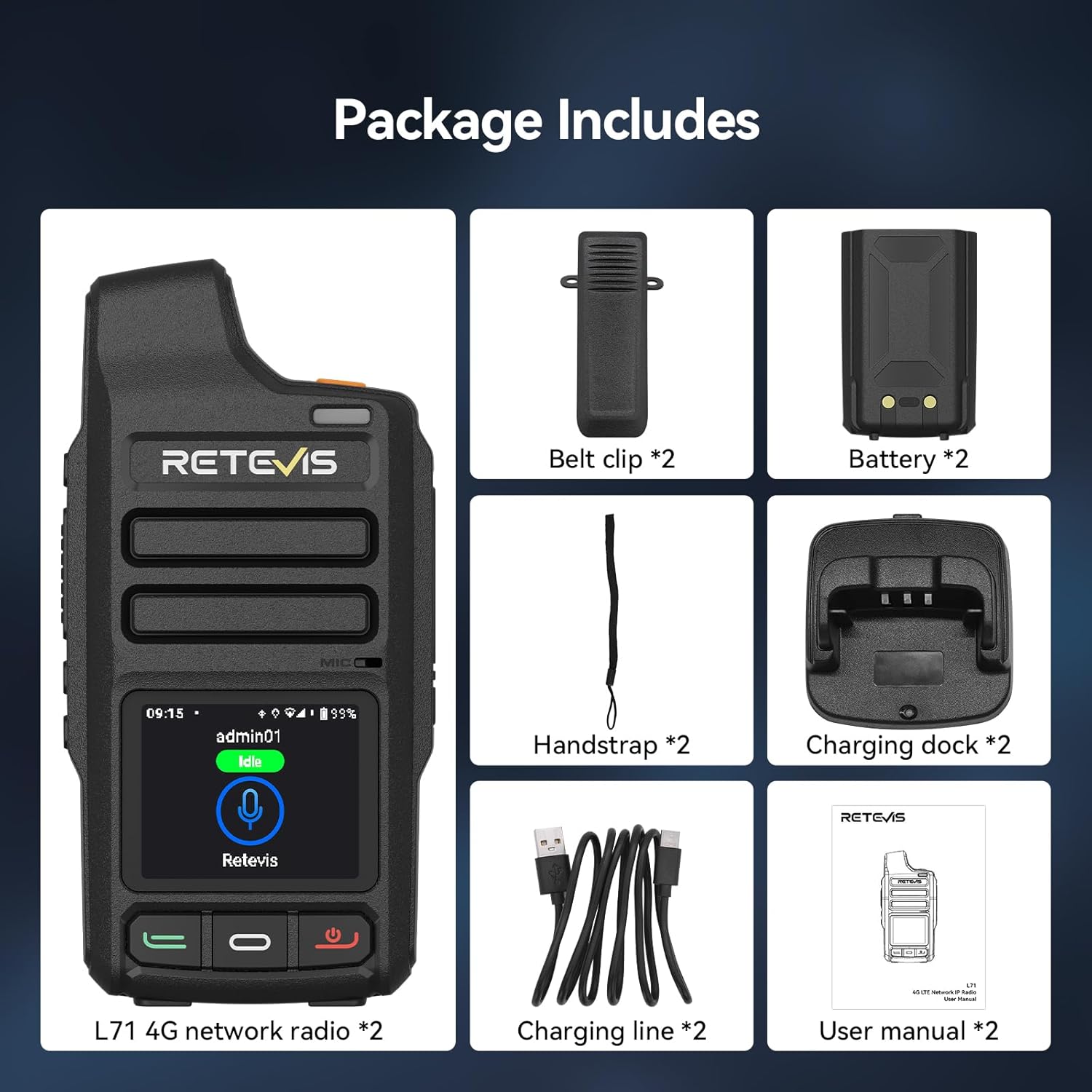
Figure 2.1: Included components in the Retevis L71 package.
3. Setup
3.1. Battery Installation and Charging
- Ensure the radio is powered off.
- Open the battery compartment cover on the back of the radio.
- Insert the 4000 mAh Lithium-ion battery, ensuring the contacts align correctly.
- Close the battery compartment cover securely.
- Place the radio in the charging dock or connect the Type-C USB cable directly to the radio for fast charging. The charging indicator will show the charging status.

Figure 3.1: Connecting the Type-C fast charging cable to the Retevis L71 radio.
3.2. SIM Card Installation
The L71 supports dual SIM cards for enhanced network reliability.
- Power off the radio and remove the battery.
- Locate the SIM card slots within the battery compartment.
- Insert your 4G SIM cards into the designated slots, ensuring correct orientation.
- Reinstall the battery and close the cover.

Figure 3.2: Dual SIM card slots for stable communication.
3.3. Initial Power On and Network Connection
- Press and hold the power button to turn on the radio.
- The radio will automatically attempt to connect to the 4G network.
- To connect to Wi-Fi, navigate to the 'Settings' menu on the 1.77-inch color display, select 'Wi-Fi', and choose your desired network.

Figure 3.3: The 1.77-inch color display provides key information at a glance.
4. Operating Instructions
4.1. Making Calls (Zello Platform)
The Retevis L71 comes with the Zello application pre-installed and optimized for smooth operation on its Android 10 system.
- Access the Zello application from the radio's main menu.
- Select your desired contact, group, or friend for communication.
- Press and hold the Push-to-Talk (PTT) button on the side of the radio to transmit your voice. Release to listen.

Figure 4.1: The L71 radio supports the Zello platform for cross-platform interoperability.
4.2. Call Modes
The L71 supports three distinct call modes:
- Individual Call: Direct communication with a single contact.
- Group Call: Broadcast communication to a predefined group of users.
- Friend Call: Communication with specific friends or a small, informal group.

Figure 4.2: The L71 offers single, group, and friend call capabilities.
4.3. Message Replay
The radio allows you to replay the last 199 messages. Briefly press the designated side key (Side Key 1) to access and listen to previous communications. This feature is useful for reviewing instructions or missed information.

Figure 4.3: Voice playback function for reviewing past messages.
4.4. SOS Alarm
The L71 features a dedicated SOS button for emergency situations. Pressing this button activates an emergency alarm, which can include a 'man down' alert, notifying designated contacts or dispatch systems of your situation.

Figure 4.4: Dedicated SOS button for emergency alerts.
5. Key Features
- Unlimited Range 4G POC Communication: Communicate freely regardless of terrain or distance, ideal for team coordination.
- Wi-Fi Connectivity: Seamless network access and secure wireless audio for clear communication in noisy environments.
- Android 10 System: Ensures smooth operation and cross-platform interoperability, especially with the pre-installed Zello app.
- 4000 mAh Battery & Type-C Fast Charging: Provides up to 28 hours of continuous use and 72 hours of standby, with quick 5-hour charging.
- Real-Time GPS Tracking: Monitor team members' locations for enhanced efficiency and safety.
- Durable Design: ABS casing and IP54 splash-resistant protection ensure reliable performance in challenging outdoor conditions.
- Dual SIM, Dual Standby: Supports fluid switching between networks for a reliable signal, especially in remote areas.
- Wireless Device Connection: Supports connection to wireless headsets/microphones for hands-free operation.

Figure 5.1: Wireless device connection for hands-free use.

Figure 5.2: Lightweight and portable design for easy transport.
6. Maintenance
- Cleaning: Use a soft, damp cloth to clean the radio's exterior. Avoid harsh chemicals or abrasive materials.
- Battery Care: To prolong battery life, avoid fully discharging the battery frequently. Store the radio and battery in a cool, dry place when not in use.
- Software Updates: Regularly check for and install software updates to ensure optimal performance and security.
- Storage: When storing the radio for extended periods, remove the battery and store it separately.
7. Troubleshooting
| Problem | Possible Cause | Solution |
|---|---|---|
| Radio does not power on | Low or dead battery; improperly installed battery | Charge the battery; ensure battery is correctly installed. |
| Cannot connect to network | No SIM card; poor signal; incorrect Wi-Fi settings | Install SIM card; move to an area with better signal; verify Wi-Fi credentials. |
| Cannot transmit/receive audio | Incorrect group/contact selected; low volume; microphone/speaker issue | Verify selected contact/group; adjust volume; check for obstructions. |
| GPS not tracking | GPS disabled; poor satellite reception | Enable GPS in settings; move to an open area. |
8. Specifications
| Feature | Detail |
|---|---|
| Brand | Retevis |
| Model Number | L71 |
| Color | Black |
| Special Features | Group Call, Type-C Fast Charge, GPS |
| Compatible Devices | Smartphones with ZELLO app, other Retevis two-way radios |
| Battery Composition | Lithium-ion |
| Battery Capacity | 4000 mAh (2 Lithium metal batteries included) |
| Rechargeable Battery | Yes |
| Weight | 309.98 Grams |
| Number of Channels | 200 |
| Maximum Range | 1000 Kilometers (Network dependent) |
| Voltage | 3.7 Volts |
| Water Resistance Level | IP54 (Splash-resistant) |
| Country of Origin | China |
9. Warranty and Support
Retevis offers a 2-year warranty for the radio body and a 1-year warranty for accessories. A 30-day no-reason return policy is also provided. Beyond the warranty period, maintenance services are available, with buyers responsible for associated costs.
For further assistance, please refer to the contact information provided with your product or visit the official Retevis support channels.
Related documentsL71


Ask a question about this manual
Ask about setup, troubleshooting, compatibility, parts, safety, or missing instructions. Manuals+ will review the question and use this page’s manual context to help answer it.