
1. Introduction
Thank you for choosing the LEFANT M330 Pro Robot Vacuum Cleaner and Mop. This manual provides essential information for the safe operation, maintenance, and troubleshooting of your device. Please read it carefully before use and keep it for future reference.
Safety Information
- Ensure the robot is fully charged before first use.
- Do not use the robot in wet environments or near open flames.
- Keep loose cables, curtains, and other items that could entangle the robot out of its path.
- Supervise children and pets when the robot is operating.
- Only use original accessories and replacement parts.
- Do not attempt to repair the robot yourself. Contact customer support for assistance.
2. Product Overview
The LEFANT M330 Pro is a versatile 3-in-1 robot vacuum cleaner that sweeps, vacuums, and mops. It features advanced dToF navigation and PSD obstacle avoidance for efficient and thorough cleaning.

Image: LEFANT M330 Pro Robot Vacuum Cleaner and Mop, showcasing its sleek design and compatibility with mobile app and Apple Watch control.

Image: The LEFANT M330 Pro demonstrating its 3-in-1 cleaning power, sweeping, vacuuming, and mopping simultaneously.
Key Features:
- 3-in-1 Cleaning: Sweeping, Vacuuming, and Mopping functions.
- Powerful Suction: Up to 5000Pa for effective removal of dust and pet hair.
- dToF Navigation: 360° precise mapping for optimized cleaning paths.
- PSD Obstacle Avoidance: 190° detection to prevent collisions.
- Tangle-Free Design: Brushless suction port ideal for pet owners.
- Long Runtime: Up to 150 minutes on a single charge.
- Smart Control: Compatible with Lefant App, Alexa, Google Assistant, and Apple Watch.
- Multi-Level Mapping: Supports mapping for up to 3 floors.
- Customizable Cleaning: Set no-go zones and personalized routines.
3. Setup
3.1 Initial Charging
Place the charging base against a wall in an open area. Ensure there are no obstacles within 1 meter to the sides and 1.5 meters in front of the charging base. Connect the power adapter to the charging base and plug it into a power outlet. Place the robot on the charging base to fully charge before first use. The indicator light will show charging status.
3.2 Connecting to the Lefant App
The Lefant App allows you to control your robot, set schedules, view maps, and more.
- Press and hold the power button for 3 seconds to turn on the robot.
- Download the Lefant App from the App Store or Google Play Store. You can scan the QR code provided in the quick start guide or visit mobile.useerobot.com.
- Press and hold the power button for 6 seconds until the light starts flashing, indicating pairing mode.
- Open the Lefant App and add the M330 Pro robot vacuum cleaner.
- Connect to a 2.4 GHz / 5 GHz Wi-Fi network.
- Wait for the connection to be successfully established.

Image: Visual guide for connecting the LEFANT M330 Pro to the mobile application, showing the power button, QR code for app download, network configuration, and pairing process.
3.3 Connecting to Alexa
Integrate your LEFANT M330 Pro with Amazon Alexa for voice control.
- Open the Lefant App - Mine - Third-party voice services to access the service.
- Register your voice account and password.
- Open the Alexa App - More - Skills & Games.
- Search for "Smart Life".
- Click on "Enable to Use".
- Select your region - Enter the voice account and password from step 2.
- Wait for the connection to be successfully established.

Image: Step-by-step instructions for linking the LEFANT M330 Pro with Amazon Alexa through the Lefant and Alexa apps.
3.4 Controlling with Apple Watch
Control your LEFANT M330 Pro directly from your Apple Watch.
- Download the Lefant App and the Apple Watch App on your mobile phone.
- Pair your Apple Watch with your mobile phone.
- Select the Lefant App on your Apple Watch.
- Remember to click on the Lefant App on your phone and log in.
- Once logged in, connect your robot.
- Return to your Apple Watch, from which you can now control your robot.
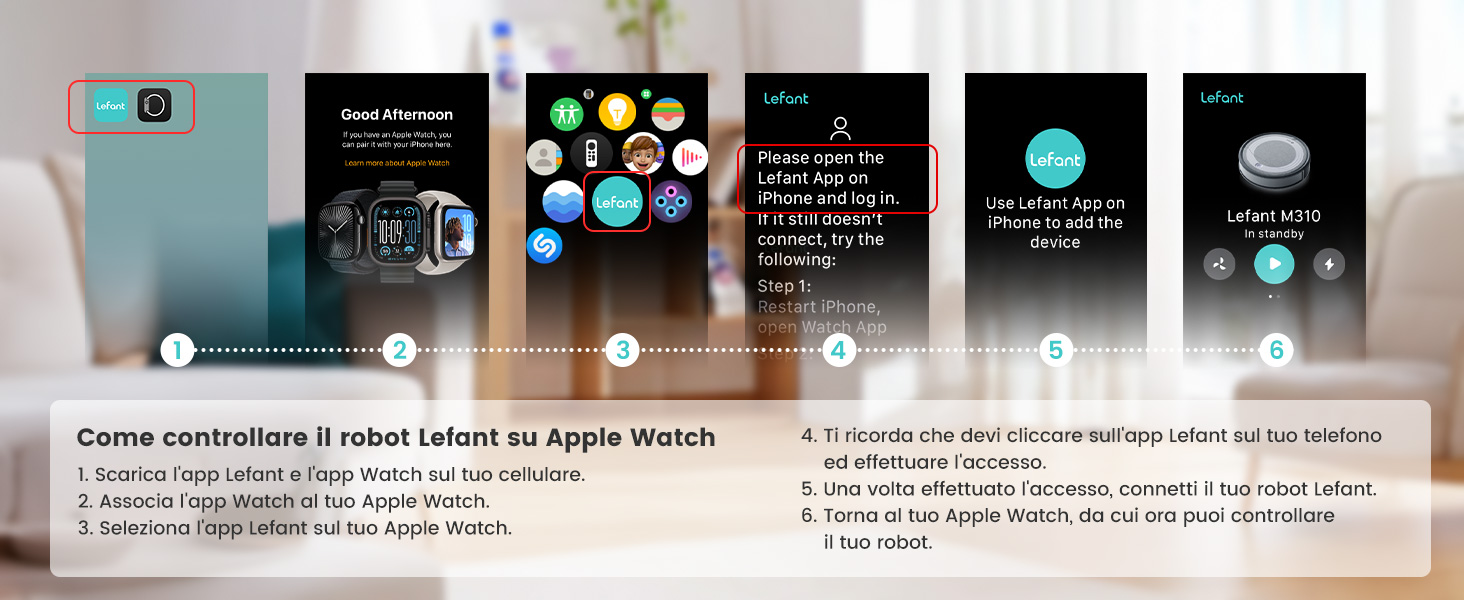
Image: Guide illustrating how to set up and control the LEFANT M330 Pro using an Apple Watch, including app download and pairing steps.
4. Operating Instructions
4.1 Cleaning Modes
The LEFANT M330 Pro offers various cleaning modes accessible via the Lefant App:
- Auto Cleaning: The robot intelligently navigates and cleans your entire home.
- Zone Cleaning: Define specific areas on the map for the robot to clean.
- Spot Cleaning: Direct the robot to clean a particular spot with concentrated effort.
- Manual Control: Use the app to manually steer the robot.

Image: The Lefant App interface displaying options for cleaning planning, custom routines, Do Not Disturb mode, no-go zones, zone cleaning, smart mapping, suction control, and one-touch cleaning.
4.2 Smart Navigation and Obstacle Avoidance
The robot uses dToF navigation to create precise maps of your home and PSD sensors for 190° obstacle detection, ensuring efficient cleaning and preventing collisions.

Image: The LEFANT M330 Pro robot vacuum cleaner actively detecting and avoiding obstacles like toys and pets, compared to other robots that might collide.
4.3 Carpet Boost and Mopping
The M330 Pro automatically detects carpets and boosts suction power for deeper cleaning. When the mopping module is attached, it will avoid carpets to prevent wetting them.

Image: The LEFANT M330 Pro robot vacuum cleaner adapting its suction power for carpets (Max mode) and standard floors, with automatic detection and no-go zone functionality when mopping.
4.4 Setting No-Go Zones and Schedules
Use the Lefant App to define virtual boundaries or no-go zones to prevent the robot from entering specific areas. You can also set custom cleaning schedules for different rooms or times.

Image: A visual representation of the LEFANT M330 Pro operating within defined no-go zones, protecting pet bowls and other sensitive areas.

Image: An illustration of smart personalized cleaning, showing the LEFANT M330 Pro cleaning different rooms at scheduled times (e.g., 8:00 PM for dining room, 5:00 PM for living room, 9:00 AM for bedroom).
5. Maintenance
Regular maintenance ensures optimal performance and extends the lifespan of your LEFANT M330 Pro.
5.1 Emptying the Dustbin
The M330 Pro features a 450ml transparent dustbin. It is recommended to empty the dustbin after each cleaning cycle, especially if you have pets.

Image: Comparison showing the LEFANT M330 Pro's transparent 450ml dustbin for visible dirt and less frequent emptying, next to a smaller 300ml dustbin from another model.
5.2 Cleaning the Water Tank and Mop Pad
The 200ml water tank and reusable mop pad should be cleaned after each mopping session to prevent odors and maintain cleaning efficiency.
- Remove the water tank from the robot.
- Empty any remaining water.
- Rinse the tank with clean water.
- Remove the mop pad and wash it by hand or machine. Allow it to air dry completely before reattaching.

Image: Close-up of the LEFANT M330 Pro's 200ml water tank, indicating its capacity for mopping functions.
5.3 Cleaning Sensors and Wheels
Wipe the dToF navigation sensor, PSD obstacle avoidance sensors, and charging contacts with a clean, dry cloth periodically. Check the wheels for any tangled hair or debris and clean as necessary.
6. Troubleshooting
If your LEFANT M330 Pro encounters an issue, refer to the following common problems and solutions:
| Problem | Possible Cause | Solution |
|---|---|---|
| Robot does not turn on. | Low battery or not charged. | Place the robot on the charging base and ensure it is charging. Allow it to charge fully. |
| Robot cannot find charging base. | Charging base is obstructed or out of range. | Ensure the charging base is in an open area with no obstacles. Manually place the robot on the base. |
| Robot gets stuck frequently. | Loose cables, small objects, or tight spaces. | Clear the cleaning area of obstacles. Use no-go zones in the app for problematic areas. |
| Poor cleaning performance. | Full dustbin, dirty filters, or worn brushes. | Empty the dustbin, clean or replace filters, and check side brushes for wear. |
| Mopping function not working. | Empty water tank or clogged water outlet. | Refill the water tank. Clean the water outlet and mop pad. |
| App connection issues. | Incorrect Wi-Fi password, wrong network band (2.4/5GHz), or app error. | Ensure you are connected to a 2.4GHz or 5GHz Wi-Fi network. Re-enter Wi-Fi password. Restart the robot and app. |
7. Specifications
| Feature | Detail |
|---|---|
| Brand | LEFANT |
| Model | M330 Pro |
| Color | Black |
| Package Dimensions | 39.2 x 34.29 x 13.7 cm |
| Dustbin Capacity | 450 ml |
| Water Tank Capacity | 200 ml |
| Voltage | 19 Volts |
| Material | Plastic |
| Compatible Devices | Smartphone (Lefant App), Amazon Alexa, Google Assistant, Apple Watch |
| Special Features | Mapping, 5000Pa Suction, dToF Laser Navigation, PSD Obstacle Avoidance, 150min Runtime, 2.4G/5G WiFi |
| Item Weight | 2.15 kg |
| Recommended Surfaces | Hard floor, Carpet, Parquet, Tiles |
8. Warranty and Support
LEFANT products come with a standard manufacturer's warranty. Please refer to the warranty card included in your product packaging or visit the official LEFANT website for detailed warranty terms and conditions.
For technical support, troubleshooting assistance, or to inquire about replacement parts, please contact LEFANT customer service through their official website or the contact information provided in your product documentation.
Official Website: www.lefant.com (Example, actual URL not provided in JSON)


