
1. Introduction
Thank you for choosing the USLIM 2025 Under Desk Elliptical Machine ET806. This device is designed to provide a convenient and low-impact exercise option for various users, including those with sedentary lifestyles, individuals undergoing rehabilitation, and seniors. It features adjustable speed settings, preset programs, and quiet operation for use in diverse environments.
2. Safety Information
- Read all instructions before using the elliptical machine.
- Place the machine on a stable, level surface.
- Ensure adequate space around the machine during use.
- Keep children and pets away from the machine during operation.
- Consult a physician before starting any new exercise program, especially if you have pre-existing health conditions or are recovering from surgery.
- Do not stand on the machine. It is designed for seated use.
- Use only the provided power adapter.
- If you experience pain, dizziness, or discomfort, stop exercising immediately.
3. Package Contents
Verify that all components are present in the package:
- ET806 Main Frame ×1
- Manuals ×1
- Remote control ×1
- Power Cord ×1
- Elastic Strip ×2
- Anti-slip Pads ×2

Image: All items included in the USLIM ET806 package.
4. Product Features
The USLIM ET806 Under Desk Elliptical Machine offers several key features:
- 16 Adjustable Speed Settings: Offers a range from 16 to 105 RPM for varied intensity.
- 16 Preset Programs: Provides diverse workout options.
- Quiet Operation: Designed with triangular claw bearings and oil-free friction pads to keep noise below 15 dB.
- Forward and Reverse Motion: Engages different leg muscles.
- 100% Pre-Installed: Ready to use out of the box.
- Remote Control: Allows for easy adjustment of settings without bending over.
- Massage Pedals: Textured pedals for foot comfort.
- Built-in Handles: For easy portability.
- Anti-Slip Design: Ensures stability during use.

Image: Visual representation of the elliptical machine's key features.

Image: Noise level comparison for the quiet operation feature.
5. Setup Instructions
The USLIM ET806 Under Desk Elliptical Machine comes 100% pre-installed, requiring minimal setup.
- Unpack: Carefully remove the elliptical machine and all accessories from its packaging.
- Placement: Place the machine on a flat, stable surface under your desk or in your desired exercise area. Ensure there is enough space for your legs to move freely.
- Connect Power: Plug the power cord into the machine's power input socket and then into a standard electrical outlet.
- Anti-slip Pads: If desired, place the anti-slip pads under the machine for added stability on smooth floors.

Image: The USLIM ET806 elliptical machine placed under a desk.
6. Operating Instructions
Familiarize yourself with the control panel and remote control for optimal use.
6.1. Components Overview

Image: Labeled diagram of the elliptical machine's components.
6.2. Digital Display and Buttons

Image: Detailed view of the digital display and control buttons.
- SCAN: Cycles through display metrics (Time, Distance, Speed, Counter, Calorie).
- TIME: Displays elapsed workout time.
- DISTANCE: Shows the distance covered.
- SPEED: Indicates current speed (RPM).
- COUNTER: Tracks total strides.
- CALORIE: Estimates calories burned.
- DIRECTION: Changes the motion direction (forward/backward) in HA (Manual) mode.
- FUNCTION: (Specific function not detailed in provided data, typically for cycling through display modes or settings).
- MODE: Switches between HA (Manual) mode and Auto modes (P1-P16).
- START/STOP: Initiates or pauses the exercise.
- +/- Buttons: Adjust speed in HA mode.
6.3. Remote Control
The remote control allows convenient operation from a seated position.
- Power Button: Turns the machine on/off.
- Start/Stop Button: Starts or pauses the exercise.
- Speed +/- Buttons: Adjusts the speed.
- Direction Button: Changes the direction of pedal rotation.
- Mode Button: Switches between manual and automatic programs.
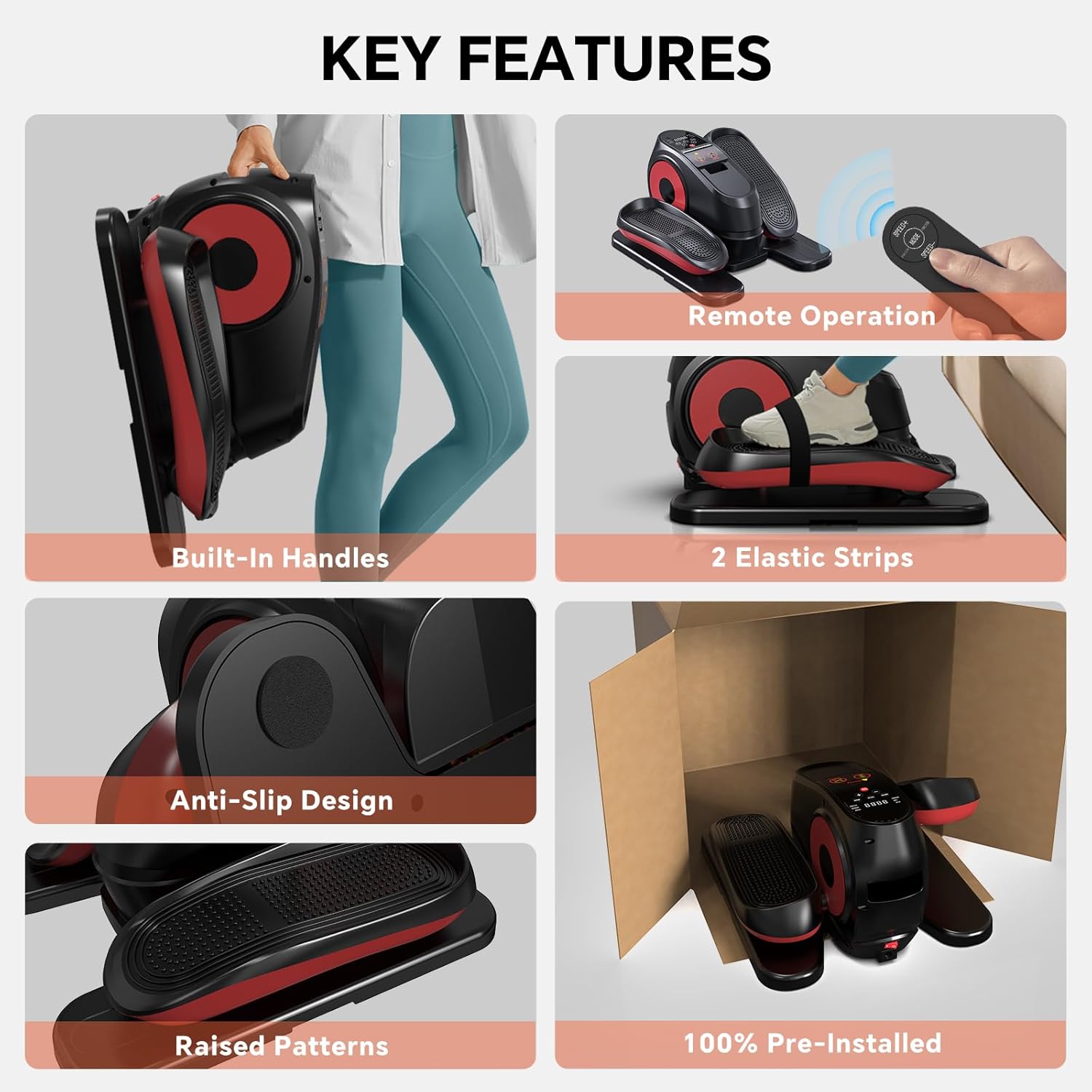
Image: The remote control for the elliptical machine.
6.4. Exercise Modes
The machine offers two primary exercise modes:
- HA (Manual) Mode: Allows you to manually select from 16 speed levels (16-105 RPM) and change direction using the buttons on the machine or the remote.
- Auto Mode (P1-P16): Features 16 preset programs that automatically adjust speed and direction every 2 minutes for a varied workout.

Image: Digital display showing HA (Manual) and Auto (P1-P16) modes.
6.5. Using the Elastic Strips
The included elastic strips can be attached to the machine to incorporate upper body exercises while seated.
6.6. Usage Scenarios

Image: Examples of the elliptical machine being used for post-surgery, sedentary lifestyles, and by seniors.
Video: Demonstration of the USLIM Under Desk Elliptical Machine's features and usage, including remote control operation and direction changes.
7. Maintenance
Regular maintenance ensures the longevity and optimal performance of your elliptical machine.
- Cleaning: Wipe the machine with a soft, damp cloth after each use. Avoid abrasive cleaners or solvents.
- Storage: Store the machine in a cool, dry place away from direct sunlight when not in use.
- Inspection: Periodically check for any loose parts or unusual noises. If any issues are found, contact customer support.
8. Troubleshooting
If you encounter any issues, refer to the following common problems and solutions:
| Problem | Possible Cause | Solution |
|---|---|---|
| Machine does not power on. | Power cord not properly connected or power outlet issue. | Ensure the power cord is securely plugged into both the machine and a working electrical outlet. Check the power switch on the machine. |
| Pedals are not moving. | Machine is paused or speed is set to zero. | Press the START/STOP button. Increase the speed using the +/- buttons. |
| Remote control is not working. | Batteries are low or depleted; remote is out of range. | Replace the batteries in the remote control. Ensure the remote is pointed towards the machine's sensor. |
| Unusual noise during operation. | Loose components or obstruction. | Stop the machine and inspect for any loose parts or foreign objects. If the noise persists, contact customer support. |
9. Specifications
| Feature | Detail |
|---|---|
| Model Name | ET806 |
| Brand | USLIM |
| Product Dimensions (D x W x H) | 16.1"D x 15"W x 9.3"H |
| Material | Plastic |
| Resistance Mechanism | Magnetic |
| Speed Settings | 16 (16-105 RPM) |
| Preset Programs | 16 |
| Maximum Stride Length | 6.3 Inches |
| Maximum Weight Recommendation | 500 Pounds |
10. Warranty and Support
The USLIM ET806 Under Desk Elliptical Machine comes with a 12-month repair guarantee. USLIM is committed to providing worry-free protection, courteous customer service, and reliable telephone support.
If you have any questions or require assistance, please contact USLIM customer service through the platform where you purchased the product. They will offer a satisfactory solution.