
Introduction
This manual provides detailed instructions for the installation, operation, maintenance, and troubleshooting of your Auxbeam 2.2FT RGB LED Whip Lights. These lights feature Bluetooth APP and RF remote control, 16 million colors, brake and turn signal functionality, and a durable, waterproof design. Please read this manual thoroughly before installation and use to ensure proper function and longevity of the product.

Image: Auxbeam 2.2FT RGB LED Whip Lights showcasing multiple color options.
Setup and Installation
The Auxbeam RGB LED Whip Lights are designed for DC12V systems and offer a plug-and-play installation. Ensure your vehicle's power system is compatible before proceeding.
Package Contents
Verify that all components are present in the package:
- 2 x RGB LED Whip Lights
- 2 x Quick Release Bases
- 1 x Bluetooth Controller
- 1 x COOL MOTOR Manual (for APP)
- 1 x RF Remote
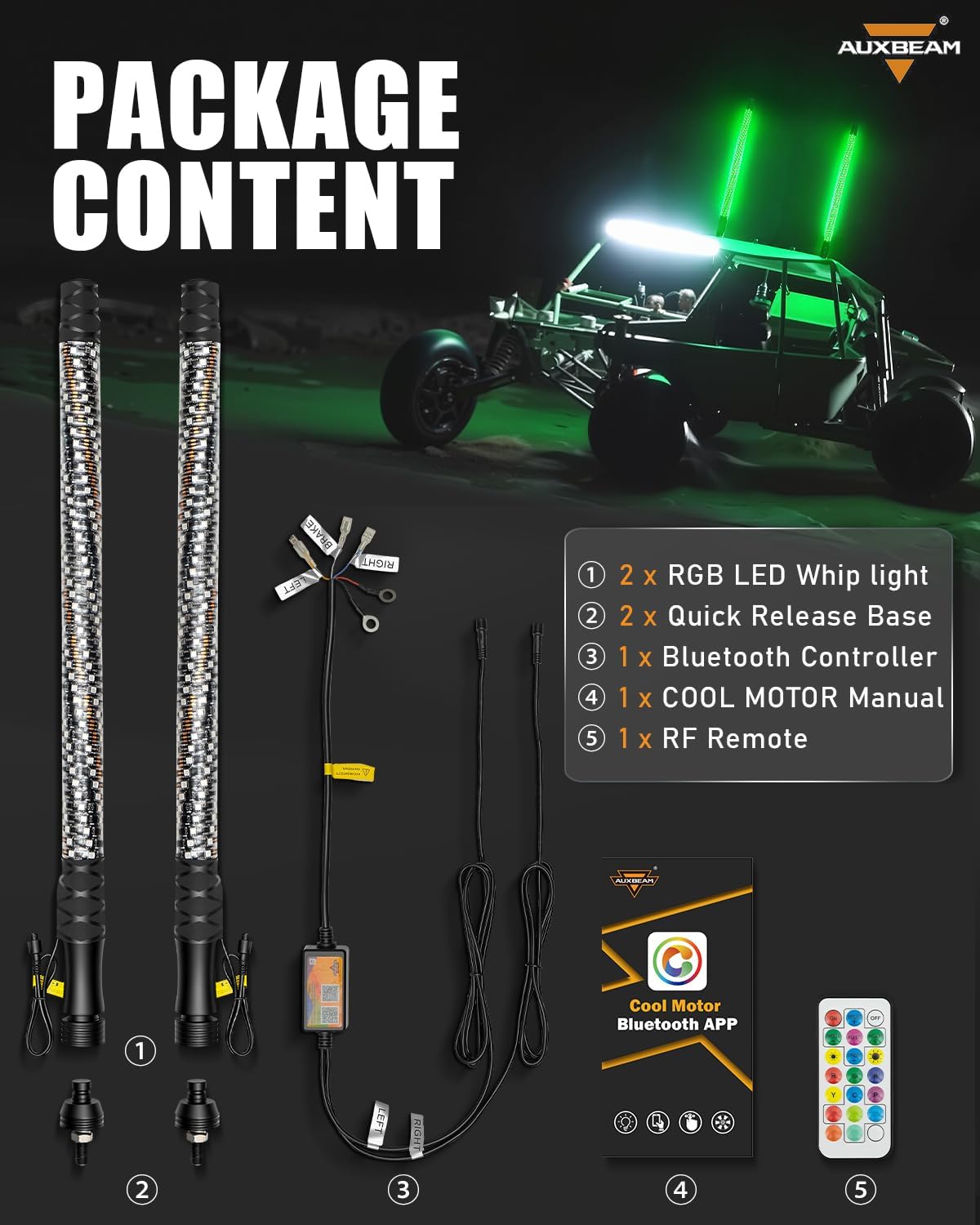
Image: Contents of the Auxbeam 2.2FT RGB LED Whip Lights package, including whip lights, quick release bases, Bluetooth controller, manual, and RF remote.
Mounting the Whip Lights
- Identify a suitable mounting location on your vehicle (ATV, UTV, RZR, SXS, boat, RV, offroad vehicle, car, truck, or SUV) that provides clear visibility and is secure.
- Install the quick-release base securely to the chosen location. Ensure it is tightened to prevent movement during operation.
- Attach the RGB LED whip light to the quick-release base. The quick-connect couplers facilitate easy attachment and removal.

Image: Close-up of the quick-release base, showing how the whip light attaches and detaches for convenience.
Wiring Instructions
The wiring is clearly labeled for straightforward connection:
- Power Connection: Connect the main power wire to a DC12V power source.
- Brake Light: Connect the designated wire to your vehicle's brake light circuit. This will cause the whip lights to illuminate red when braking.
- Turn Signal (Left): Connect the designated wire to your vehicle's left turn signal circuit. The whip light will flash amber for left turns.
- Turn Signal (Right): Connect the designated wire to your vehicle's right turn signal circuit. The whip light will flash amber for right turns.
Ensure all connections are secure and properly insulated to prevent short circuits and water damage.

Image: Illustration of the wiring harness, clearly labeling connections for brake, left turn, and right turn signals, demonstrating the safety features.
Operating Instructions
Your Auxbeam LED Whip Lights can be controlled via a Bluetooth mobile application or the included RF remote control.
Bluetooth APP Control (Cool Motor App)
- Download the "Cool Motor" Bluetooth App from your smartphone's app store.
- Ensure Bluetooth is enabled on your smartphone.
- Open the Cool Motor App and follow the on-screen instructions to pair with your Auxbeam whip lights.
- Once connected, you can access various features:
- Color Adjustment: Choose from 16 million RGB colors.
- Lighting Mode Adjustment: Select from 180 dynamic lighting modes.
- Music Mode: Sync lights to music beats.
- Voice Mode: Lights react to voice pitch and rhythm.
- Group Management: Control multiple compatible Auxbeam lights simultaneously.

Image: A smartphone screen showing the 'Cool Motor' Bluetooth app for light control, alongside the physical RF remote, illustrating dual control methods.
RF Remote Control
The included RF remote provides convenient control over basic functions:
- ON/OFF: Power the lights on or off.
- Mode Selection: Cycle through various lighting modes.
- Speed Adjustment: Increase or decrease the speed of dynamic modes.
- Brightness Adjustment: Increase or decrease light intensity.
- Color Presets: Select from pre-programmed static colors.

Image: Detailed view of the RF remote control, highlighting buttons for power, mode, speed, brightness, and color selection.
Maintenance
The Auxbeam LED Whip Lights are built with heavy-duty construction and an IP67 waterproof and dustproof rating, designed to withstand various environmental conditions. Regular maintenance will ensure optimal performance and longevity.
- Cleaning: Periodically clean the whip lights with a soft, damp cloth to remove dirt, mud, or debris. Avoid abrasive cleaners or high-pressure washes directly on the LED strips.
- Connection Check: Regularly inspect all wiring connections for tightness and signs of corrosion or damage. Ensure waterproof seals are intact.
- Mounting Security: Verify that the quick-release bases are securely mounted and the whip lights are firmly attached before each use, especially after off-road activities.
- Storage: When not in use for extended periods, store the whip lights in a clean, dry environment. The quick-release feature allows for easy removal and storage.

Image: Auxbeam whip lights demonstrating their IP67 waterproof capability in various challenging weather conditions, including rain, snow, fog, and dust.
Troubleshooting
If you encounter issues with your Auxbeam LED Whip Lights, refer to the following troubleshooting guide:
| Problem | Possible Cause | Solution |
|---|---|---|
| Lights do not turn on. | No power, loose connection, faulty wiring, or blown fuse. | Check power source (DC12V), inspect all wiring connections, ensure fuse is intact, and verify the remote/app is sending an ON signal. |
| Lights are not responding to remote/app. | Remote battery low, app not connected, interference, or controller issue. | Replace remote battery. Ensure Bluetooth is on and the app is paired. Move closer to the controller to reduce interference. Restart the app and cycle power to the lights. |
| Brake/Turn signals not working. | Incorrect wiring to vehicle's signal circuits. | Double-check the wiring connections to the vehicle's brake and turn signal circuits as per the installation instructions. |
| Partial sections of the whip light are not illuminating. | Damage to LED strip or internal wiring. | This may indicate internal damage. Contact customer support for assistance. |
| App is unavailable in my region. | Geographical restrictions or app store availability issues. | Ensure your app store region is correctly set. If the issue persists, contact Auxbeam customer support for alternative solutions or updates on app availability. |
Specifications
| Feature | Detail |
|---|---|
| Model Number | QPAB010356 |
| Item Dimensions (L x W x H) | 28.54 x 7.68 x 2.56 inches |
| Total Length (Each Whip) | 2.2FT (approximately 67 cm) |
| LED Type | 5050 SMD RGB LED |
| Number of LEDs per unit | 216 |
| Color Options | 16 Million RGB Colors |
| Control Methods | Bluetooth APP (Cool Motor) & RF Remote Control |
| Dynamic Lighting Modes | 180+ |
| Special Features | Brake Light, Turn Signal Light, Music Mode, Voice Mode, Group Management |
| Voltage | DC12V |
| Water Resistance Level | IP67 Waterproof and Dustproof |
| Material Type | Aluminum (base) |
| Fit Type | Universal Fit (ATV, UTV, SXS, Boat, RV, Offroad, Car, Truck, SUV) |

Image: Visual representation of key specifications, including the 2.2ft length, 216 SMD RGB LEDs, and the quick-release aluminum base.
Warranty and Support
Auxbeam provides a 1-year limited warranty for these LED whip lights. This warranty covers manufacturing defects and ensures product reliability under normal use conditions.
- For warranty claims, please retain your proof of purchase.
- For technical support, troubleshooting assistance beyond this manual, or to inquire about warranty service, please contact Auxbeam customer service directly.
- Contact information can typically be found on the Auxbeam official website or through your purchase platform.