Introduction
This manual provides comprehensive instructions for the safe and efficient use of your TOZO NC20 Active Noise Cancelling Wireless Earbuds. Please read this manual thoroughly before using the product and retain it for future reference.

Image: TOZO NC20 Wireless Earbuds and their charging case, displaying battery levels.
What's in the Box
- TOZO NC20 Wireless Earbuds
- Wireless Charging Case
- 6 pairs of Eartips (various sizes)
- USB-C (A to C) cable (20cm)
- User Manual
Setup and Getting Started
1. Initial Charge
Before first use, fully charge the earbuds and the charging case. The case features an LED power display to indicate battery levels for both earbuds and the case itself.
Image: The TOZO NC20 charging case being charged wirelessly on a pad and via a USB-C cable.
2. Pairing with a Device
- Open the charging case. The earbuds will automatically enter pairing mode.
- On your device (smartphone, tablet, laptop), enable Bluetooth.
- Select "TOZO NC20" from the list of available Bluetooth devices to connect.

Image: TOZO NC20 earbuds placed next to a smartphone and laptop, illustrating dual-device connectivity.
3. TOZO App Installation
Download the official TOZO App from your device's app store. The app allows for custom EQ settings, noise control adjustments, spatial audio effects, and other advanced features.

Image: Multiple smartphone screens displaying the TOZO App interface with options for EQ, ANC, and community features.
Operating Instructions
Touch Controls
The earbuds feature smart touch controls for various functions. These controls can be customized via the TOZO App.

Image: A detailed diagram illustrating the touch control functions for the TOZO NC20 earbuds, including play/pause, track skipping, call management, voice assistant, and ANC mode switching.
Active Noise Cancellation (ANC) Modes
The TOZO NC20 offers Adaptive Hybrid ANC, which adjusts in real-time to your surroundings, blocking up to 99% of noise. You can switch between different noise control modes:
- Noise Cancellation: Blocks external noise for focused listening.
- Transparency Mode: Allows ambient sounds to pass through, keeping you aware of your surroundings.
- Adaptive Mode: Automatically adjusts noise cancellation based on your environment.
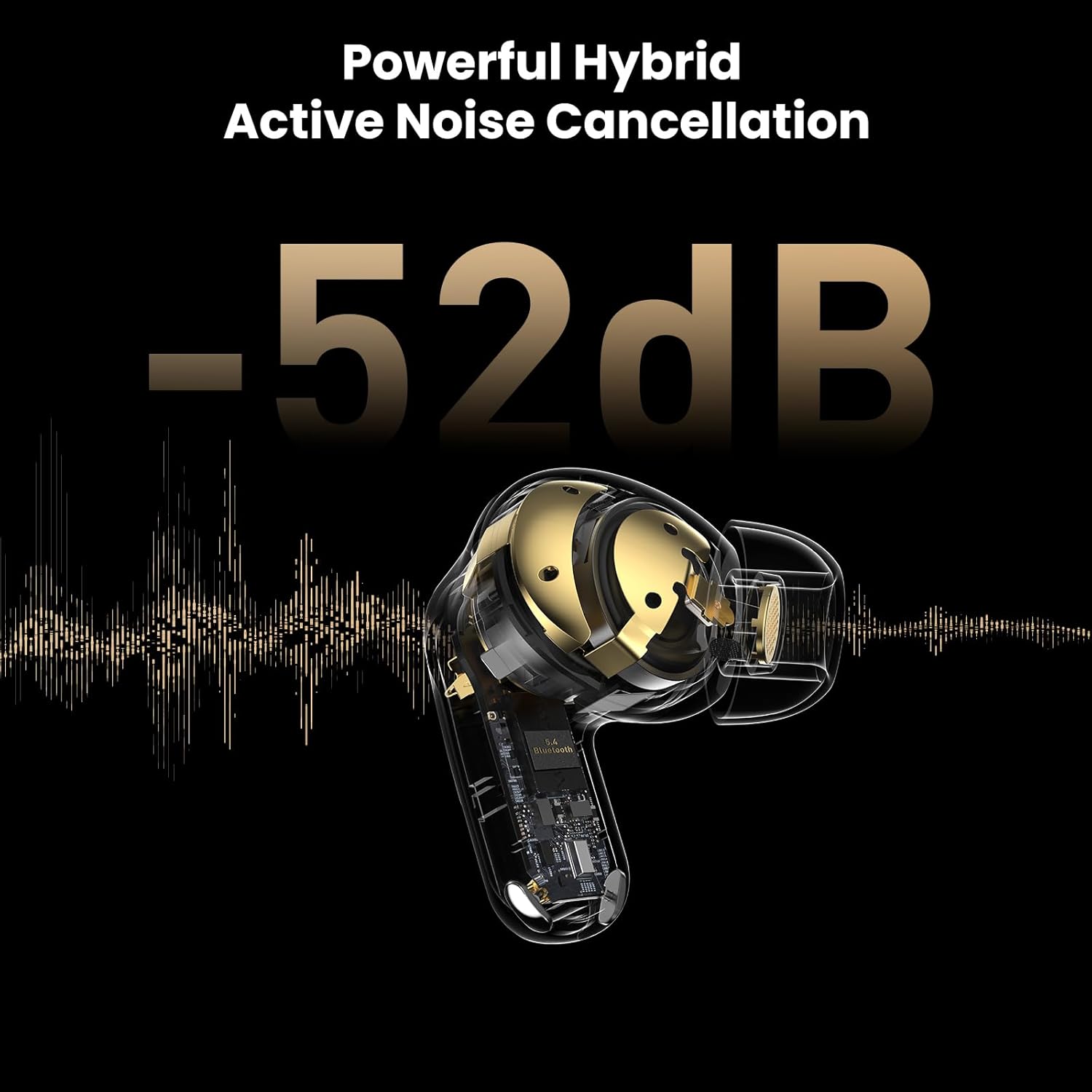
Image: A graphic depicting the powerful hybrid active noise cancellation of the TOZO NC20, indicating a reduction of -52dB.
Spatial Audio
Experience an immersive 3D soundscape with spatial audio effects, bringing movies, games, and music to life. This feature can be enabled via the TOZO App.
Wearing Detection
Smart sensors detect when you are wearing the earbuds. Music automatically plays when worn and pauses when removed. This feature can be enabled or disabled in the TOZO App.

Image: A woman demonstrating the in-ear detection feature, showing music pausing when an earbud is removed from her ear.
Dual Device Seamless Switching
The earbuds can connect to two devices simultaneously (e.g., phone and laptop) and automatically switch between them, ensuring you don't miss calls or audio cues.
App Features
The TOZO App provides extensive customization and control over your NC20 earbuds:
- Custom EQ: Personalize your sound with 32 preset EQ settings or create your own.
- AI Features: Access meeting recording, real-time translation, simultaneous interpretation, and AI chat.
- Water Drainage: Activate a 30-second drainage function to remove moisture from the earbuds.
- Find My Earbuds: Locate misplaced earbuds by making them beep.
Image: A screenshot of the TOZO App's 'Find My Earbuds' feature, showing an icon of musical notes and a 'Ring' button to locate misplaced earbuds.
Image: An icon from the TOZO App representing the water drainage feature for the earbuds.
Charging and Battery Life
The TOZO NC20 earbuds offer extended playback time and flexible charging options:
- Playback Time: Up to 16.5 hours per charge, with a total of 80 hours using the charging case (ANC off). With ANC on, you get 12.5 hours per charge and 63 hours with the case.
- Charging Time: Approximately 1.5 hours for a full charge.
- Charging Options: The case supports both wired (USB-C) and wireless charging.
- LED Power Display: The built-in LED display on the charging case shows the remaining battery percentage for both earbuds and the case.

Image: The TOZO NC20 earbuds and charging case, highlighting the impressive 80 hours of total playtime.
Maintenance and Care
- Water Resistance: The earbuds are IPX8 waterproof, making them suitable for intense workouts, heavy rain, and accidental spills.
- Cleaning: Regularly clean the earbuds and charging case with a soft, dry cloth.
- Water Drainage: Use the water drainage function in the TOZO App after exposure to water to prevent moisture retention.
Troubleshooting
If you encounter any issues with your TOZO NC20 earbuds, please try the following:
- Ensure both earbuds and the charging case are fully charged.
- Verify that Bluetooth is enabled on your device and the earbuds are properly paired.
- Reset the earbuds by placing them in the charging case, closing the lid, and then reopening it.
- Consult the TOZO App for specific troubleshooting guides or to perform a firmware update.
Specifications
| Feature | Detail |
|---|---|
| Model Name | NC20 |
| Noise Control | Active Noise Cancellation, Adaptive Noise Cancellation, Hybrid Noise Cancellation |
| Connectivity Technology | Wireless (Bluetooth 5.4) |
| Bluetooth Range | 20 Meters |
| Audio Driver Type | DLC Driver (12mm) |
| Frequency Response | 12 Hz - 40 kHz |
| Battery Life | 80 Hours (with charging case, ANC off) |
| Charging Time | 1.5 Hours |
| Water Resistance Level | IPX8 |
| Control Type | Touch/APP Control |
| Special Features | Microphone Included, Multipoint Pairing, Wireless Charging, LDAC Hi-Res Audio |
Official Product Videos
TOZO NC20 Active Noise Cancelling Wireless Earbuds
Video: An official product video showcasing the features and design of the TOZO NC20 Active Noise Cancelling Wireless Earbuds.
TOZO NC20 Pro Active Noise Cancelling Wireless Earbuds
Video: An official product video highlighting the advanced features of the TOZO NC20 Pro Active Noise Cancelling Wireless Earbuds.
Warranty and Support
For warranty information, technical support, or customer service, please refer to the contact details provided in the included User Manual or visit the official TOZO website.
TOZO offers 7x24 Live Chat Support and Customer Support Email for assistance.


