1. Introduction
Thank you for choosing the Wpsoert CA-TZ04-2 Dehumidifier. This manual provides essential information for the safe and efficient operation, maintenance, and troubleshooting of your appliance. Please read it thoroughly before use and retain it for future reference.
This dehumidifier is designed to effectively control humidity in spaces up to 3000 sq. ft., removing up to 35 pints of moisture per day. It features multiple operating modes, smart humidity control, and convenient drainage options to create a comfortable environment in your home, office, or garage.
2. Safety Instructions
To reduce the risk of fire, electric shock, or injury, always follow these basic precautions:
- Ensure the power supply matches the voltage specified on the rating label.
- Do not operate the dehumidifier with a damaged cord or plug.
- Always plug into a grounded outlet.
- Do not block air inlets or outlets. Maintain at least 20 cm (8 inches) clearance around the unit.
- Do not use the appliance near water or in excessively wet areas.
- Unplug the unit before cleaning or performing any maintenance.
- Keep children away from the appliance. The child lock feature should be utilized.
- Do not attempt to repair or modify the unit yourself. Contact qualified service personnel.
- Empty the water tank regularly or ensure continuous drainage is properly set up.
3. Product Overview
3.1 Components
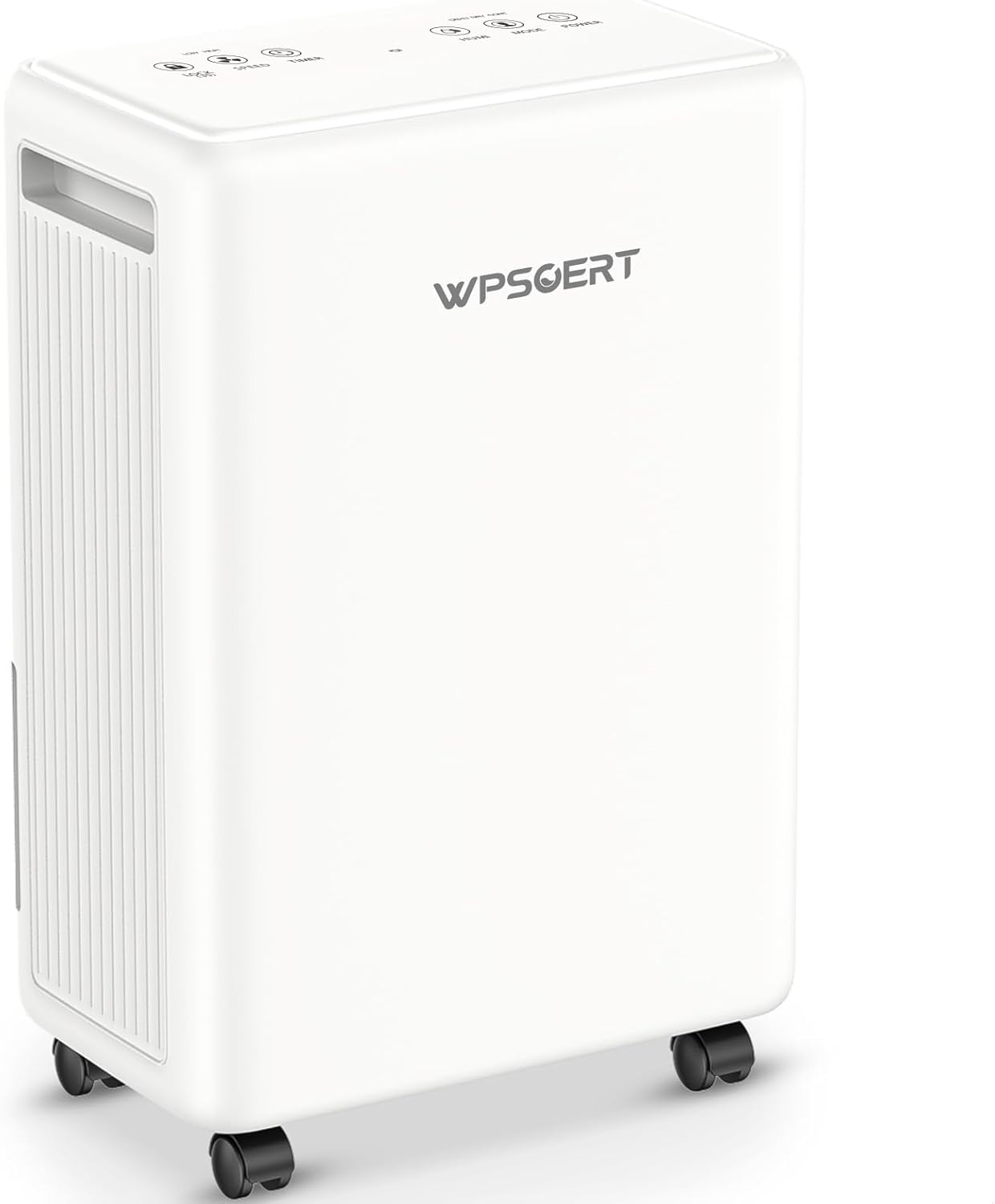
Figure 1: Wpsoert CA-TZ04-2 Dehumidifier. A white rectangular Wpsoert dehumidifier with a control panel on top, air vents on the side, and four caster wheels at the base.
The Wpsoert CA-TZ04-2 Dehumidifier features a compact design with integrated handles and 360° silent universal wheels for easy portability. Key components include:
- Control Panel: Smart touch panel located on the top for precise control.
- Air Inlet/Outlet: For drawing in humid air and expelling dry air.
- Water Tank: Removable 0.52-gallon (2L) capacity tank with a handle.
- Drain Port: Located at the back for continuous drainage.
- Washable Filter: Located behind the air inlet for air purification.
- Caster Wheels: Four 360° rotating wheels for easy movement.
3.2 Control Panel Functions
The smart touch panel allows you to manage all dehumidifier functions:
- Power Button: Turns the unit on or off.
- Mode Button: Cycles through DEHU (Dehumidify), DRY (Dryer), and CONT (Continuous) modes.
- Humidity Setting Buttons: Adjusts the desired humidity level (30% to 80% RH).
- Timer Button: Sets the 24-hour timer for automatic on/off operation.
- Fan Speed Button: Adjusts fan speed (if applicable, product description mentions 2 speeds).
- Child Lock Button: Activates/deactivates the child lock feature.
- Display Screen: Shows current humidity, set humidity, or timer settings.
4. Setup
- Unpacking: Carefully remove the dehumidifier from its packaging. Retain packaging for future storage or transport.
- Placement: Place the unit on a level surface in the desired location. Ensure there is at least 20 cm (8 inches) of clear space around all sides for proper airflow. Avoid placing it against walls or furniture that could obstruct air circulation.
- Power Connection: Plug the power cord into a grounded electrical outlet. Ensure the outlet voltage matches the unit's requirements.
- Drainage Option: Decide whether to use the water tank or continuous drainage.
- Water Tank: Ensure the water tank is correctly inserted into the unit.
- Continuous Drainage: If using continuous drainage, connect the provided 1.4M drain hose to the drain port on the back of the unit. Route the hose downwards to a suitable drain (e.g., floor drain, sink) ensuring there are no kinks or blockages. A standard garden hose can also be used if a longer hose is required.
5. Operation
5.1 Power On/Off
Press the Power button on the control panel to turn the dehumidifier on or off.
5.2 Operating Modes
Press the Mode button to cycle through the available modes:
- DEHU (Dehumidify) Mode: In this mode, you can set your desired humidity level between 30% and 80% Relative Humidity (RH). The unit will automatically start and stop to maintain the set humidity.
- DRY (Dryer) Mode: This mode is designed for efficient clothes drying. The unit operates continuously at a high fan speed to quickly reduce humidity.
- CONT (Continuous) Mode: The dehumidifier runs continuously at a high fan speed, aiming to reduce indoor humidity to approximately 30% RH. This mode is suitable for very humid environments requiring rapid moisture removal.
5.3 Setting Humidity Level (DEHU Mode Only)
While in DEHU mode, use the humidity setting buttons (usually Up/Down arrows) to adjust the target humidity level from 30% to 80% RH. The unit will operate until the ambient humidity reaches the set level, then cycle off, restarting when humidity rises again.
5.4 Timer Function
The 24-hour timer allows you to schedule the dehumidifier to turn on or off automatically:
- To Set Auto-Off: With the unit running, press the Timer button. Use the humidity setting buttons to select the desired number of hours (1-24) after which the unit will turn off.
- To Set Auto-On: With the unit off, press the Timer button. Use the humidity setting buttons to select the desired number of hours (1-24) after which the unit will turn on.
To cancel the timer, press the Timer button again until "00" or "OFF" is displayed, or simply turn the unit off and on.
5.5 Child Lock
To prevent accidental changes to settings, press and hold the Child Lock button (or a combination of buttons as indicated on the control panel) for a few seconds to activate or deactivate the child lock. An indicator light will typically confirm activation.
5.6 Automatic Features
- Auto Shut-Off (Full Tank): When the 0.52-gallon (2L) water tank is full, the unit will automatically shut off, and a "Full" indicator light will flash. Empty the tank to resume operation.
- Auto Defrost: The unit is equipped with an automatic defrost function to prevent ice buildup on the evaporator coils, ensuring reliable performance even in colder environments like basements.
- Auto-Restart Memory: In case of a power outage, the unit will automatically restart with the last settings once power is restored.
6. Drainage Options
6.1 Manual Drainage (Water Tank)
- When the water tank is full, the dehumidifier will stop operating, and the "Full" indicator will illuminate.
- Carefully pull out the water tank from the unit using its integrated handle.
- Empty the collected water into a sink or drain.
- Reinsert the empty water tank firmly into the unit. The dehumidifier will resume operation automatically.
6.2 Continuous Drainage
For extended operation without needing to empty the water tank, use the continuous drainage option:
- Locate the drain port on the back of the dehumidifier.
- Connect the provided 1.4-meter drain hose to the drain port. Ensure a secure connection to prevent leaks.
- Route the other end of the hose to a suitable floor drain, sink, or larger container. Ensure the hose is sloped downwards to allow gravity to drain the water effectively. Avoid kinks or obstructions in the hose.
- The dehumidifier will now continuously drain water, bypassing the internal water tank.
Note: If the included hose is not long enough, a standard garden hose can be used as a replacement.
7. Maintenance
Regular maintenance ensures optimal performance and extends the lifespan of your dehumidifier.
7.1 Cleaning the Air Filter
The washable air filter should be cleaned every two weeks or more frequently depending on usage and air quality.
- Turn off the dehumidifier and unplug it from the power outlet.
- Locate the air filter (typically behind the air inlet grille). Gently remove it.
- Wash the filter with warm, soapy water. Rinse thoroughly.
- Allow the filter to air dry completely before reinserting it into the unit. Do not use a dryer or direct heat.
- Reinsert the dry filter and plug the unit back in.
7.2 Cleaning the Unit Exterior
Wipe the exterior of the dehumidifier with a soft, damp cloth. Do not use harsh chemicals, abrasives, or solvents, as these can damage the surface.
7.3 Water Tank Cleaning
Clean the water tank periodically to prevent mold and mildew growth. Use a mild detergent and warm water, then rinse thoroughly. Ensure the tank is completely dry before reinserting.
8. Troubleshooting
Before contacting customer support, refer to the following troubleshooting guide for common issues:
| Problem | Possible Cause | Solution |
|---|---|---|
| Dehumidifier does not turn on. | No power; Power cord not plugged in; Water tank full or not properly inserted. | Check power outlet; Ensure cord is securely plugged in; Empty and reinsert water tank correctly. |
| No water collected or insufficient dehumidification. | Humidity setting too high; Air filter clogged; Room temperature too low; Air inlets/outlets blocked; Room size too large. | Lower the humidity setting; Clean the air filter; Ensure room temperature is above 5°C (41°F); Clear obstructions; Ensure unit is appropriate for room size. |
| Unit is noisy. | Unit not on a level surface; Air filter clogged; Internal components loose. | Place on a firm, level surface; Clean the air filter; If noise persists, contact support. |
| "Full" indicator light is on, but tank is not full. | Water tank not properly seated; Float switch malfunction. | Remove and firmly reinsert the water tank; If issue persists, contact support. |
| Continuous drainage not working. | Drain hose kinked or blocked; Hose not sloped downwards; Drain port not securely connected. | Check and clear hose for kinks/blockages; Ensure hose has a continuous downward slope; Reconnect hose securely. |
9. Specifications
| Feature | Detail |
|---|---|
| Brand | Wpsoert |
| Model Number | CA-TZ04-2 |
| Dehumidification Capacity | 35 Pints/Day (at 95°F, 90%RH) |
| Coverage Area | Up to 3000 Sq.Ft |
| Water Tank Capacity | 0.52 Gallons (2 Liters) |
| Power/Wattage | 230 watts |
| Product Dimensions (L x W x H) | 16.5 x 27 x 41 cm |
| Item Weight | 8.46 kg |
| Humidity Setting Range | 30% - 80% RH |
| Operating Modes | DEHU, DRY, CONT |
| Special Features | Continuous Drainage, Auto Shut-Off, Auto Defrost, 24H Timer, Child Lock, Power Off Memory, Washable Filter, Digital Display, Silent Operation |
10. Warranty and Support
Wpsoert products are manufactured to high-quality standards. For warranty information, technical support, or service inquiries, please refer to the warranty card included with your purchase or visit the official Wpsoert website. Please have your model number (CA-TZ04-2) and purchase date ready when contacting support.
For further assistance, you may also contact the retailer where the product was purchased.