
1. Important Safety Instructions
Please read this manual carefully before using the LEFANT M330Pro Robot Vacuum and Mop and keep it for future reference. Failure to follow these instructions may result in electric shock, fire, or serious injury.
- This appliance can be used by children aged 8 years and above and persons with reduced physical, sensory or mental capabilities or lack of experience and knowledge if they have been given supervision or instruction concerning use of the appliance in a safe way and understand the hazards involved.
- Children should be supervised to ensure that they do not play with the appliance.
- Cleaning and user maintenance shall not be made by children without supervision.
- Do not use the robot in wet environments or near water.
- Ensure the charging base is placed on a level surface against a wall, with adequate clear space around it.
- Remove any loose cables, small objects, or fragile items from the floor before operation to prevent entanglement or damage.
- Do not allow the robot to pick up large objects, liquids, or burning/smoking materials.
- Use only the original power adapter and charging base provided with the robot.
- Turn off the robot and unplug the charging base before performing any maintenance or cleaning.
2. Product Overview
The LEFANT M330Pro is a versatile 3-in-1 robot vacuum and mop designed for efficient cleaning of various floor types, including carpets and hard floors. It features powerful suction, intelligent navigation, and smart control options.
Key Features:
- 3-in-1 Cleaning: Combines vacuuming, sweeping, and mopping functions.
- 5000Pa Suction Power: Strong suction for dirt, crumbs, and pet hair.
- Brushless Design: Reduces hair tangles, simplifying maintenance.
- dToF Laser Navigation: 360° precise mapping and intelligent path planning.
- PSD Obstacle Avoidance: 190° detection to avoid furniture, cables, and objects.
- Automatic Carpet Recognition: Adjusts cleaning mode and suction power on carpets.
- Multi-level Mapping: Supports mapping for up to 3 floors.
- Extended Runtime: Up to 150 minutes, covering up to 150 square meters.
- Automatic Recharging: Returns to base when battery is low and resumes cleaning.
- 200ml Water Tank: Provides consistent water distribution for mopping.
- 450ml Dustbin: Large capacity reduces frequency of emptying.
- Smart Control: Via Lefant App, compatible with Alexa, Google Assistant, and Apple Watch.
Product Components:
Familiarize yourself with the main parts of your LEFANT M330Pro robot vacuum.

Image: The LEFANT M330Pro robot vacuum demonstrating its 3-in-1 cleaning capabilities (sweeping, vacuuming, mopping) with a 200ml water tank and 99% cleaning efficiency indicated.
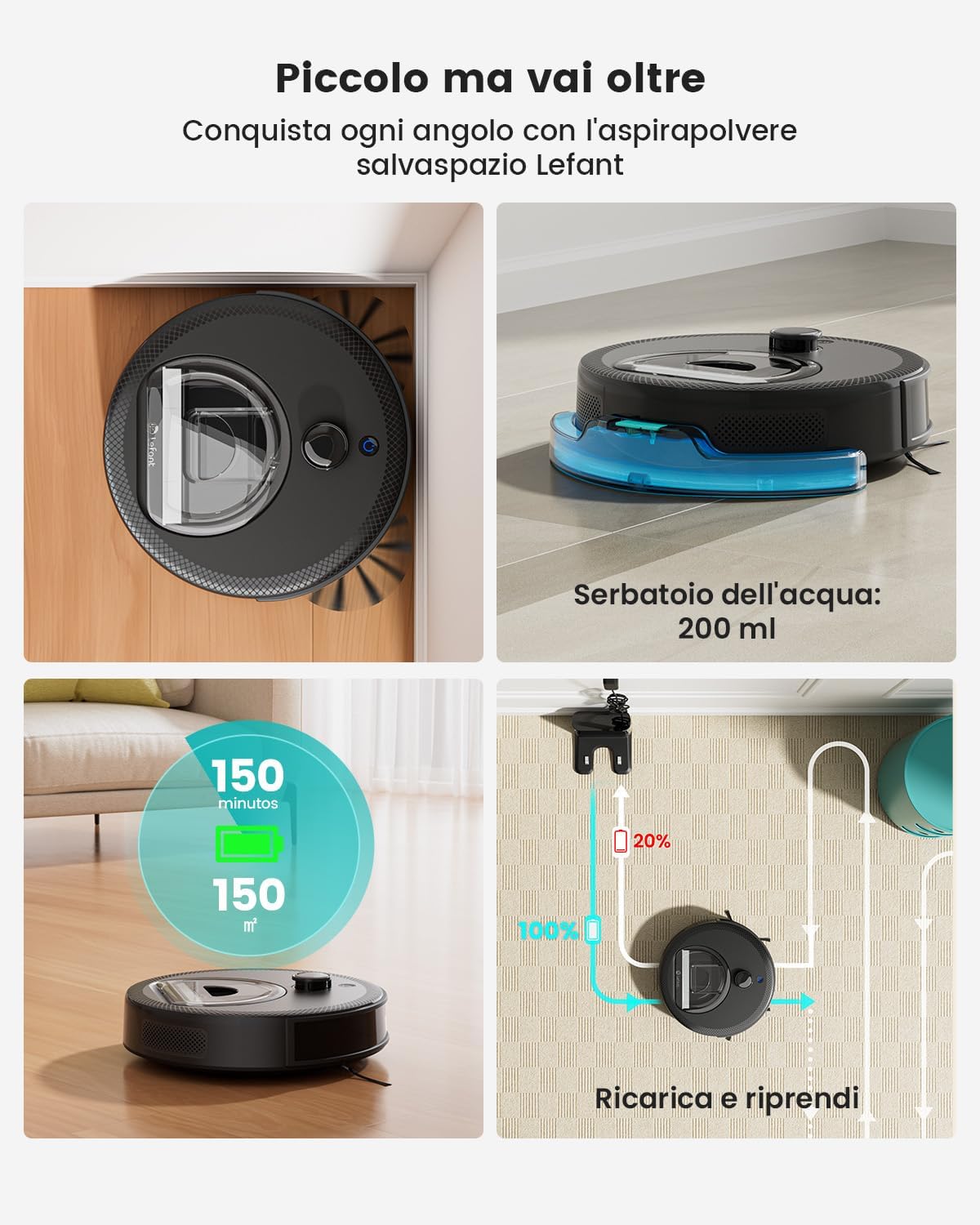
Image: A visual representation of the LEFANT M330Pro's features, including its 200ml water tank, 150 minutes of runtime covering 150 square meters, and automatic recharge and resume function.

Image: The compact design of the LEFANT M330Pro allows it to clean effectively under beds, tables, and sofas, reaching difficult areas.
3. Setup
3.1 Unpacking
Carefully remove the robot vacuum, charging base, power adapter, and all accessories from the packaging. Remove any protective films or packing materials from the robot and charging base.
3.2 Charging Base Placement
- Place the charging base against a wall on a hard, level surface.
- Ensure there is at least 0.5 meters (1.6 feet) of clear space on both sides of the charging base and 1.5 meters (4.9 feet) in front of it.
- Keep the area clear of obstacles, such as power cords, rugs, or furniture, that could block the robot's path to the charging base.
- Plug the power adapter into the charging base and then into a wall outlet.
3.3 Initial Charge
Place the robot onto the charging base, ensuring the charging contacts align. The robot will begin charging automatically. For first-time use, fully charge the robot for at least 6 hours.
3.4 App Connection and Smart Home Integration
To unlock the full potential of your M330Pro, download the Lefant App on your smartphone. The app allows for advanced control, scheduling, and monitoring.
- Download the "Lefant" app from the App Store (iOS) or Google Play Store (Android).
- Register an account and log in.
- Follow the in-app instructions to add your M330Pro robot. Ensure your phone is connected to a 2.4GHz or 5GHz Wi-Fi network during setup.
- Once connected, you can link your robot to voice assistants like Amazon Alexa or Google Assistant through their respective apps for voice control.
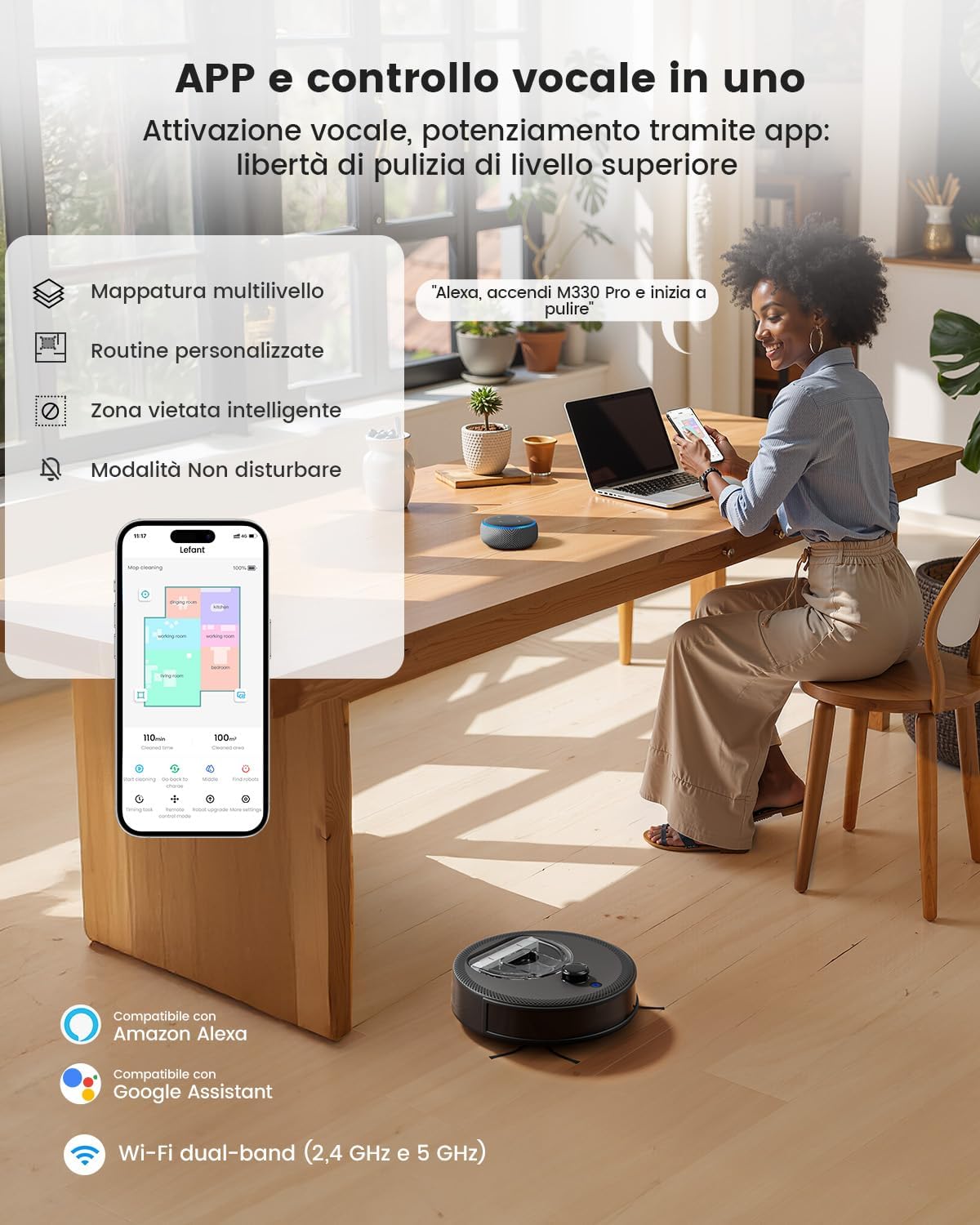
Image: The Lefant App interface showing multi-level mapping, custom routines, intelligent no-go zones, and Do Not Disturb mode. The robot is compatible with Amazon Alexa and Google Assistant, supporting dual-band Wi-Fi (2.4 GHz and 5 GHz).
4. Operating Instructions
4.1 Starting and Stopping Cleaning
- Start: Press the power button on the robot or use the "Start Cleaning" option in the Lefant App. The robot will begin cleaning in automatic mode.
- Pause: Press the power button again or use the "Pause" option in the app to temporarily stop cleaning.
- Return to Charging Base: Press the home button on the robot or select "Recharge" in the app.
4.2 Cleaning Modes
Select different cleaning modes via the Lefant App to suit your needs:
- Automatic Cleaning: The robot intelligently maps and cleans your entire home.
- Spot Cleaning: Cleans a specific area with concentrated suction.
- Room Cleaning: Select specific rooms to clean from your mapped layout.
- Manual Control: Use the app's directional controls to guide the robot.
4.3 Carpet Recognition and Surface Adaptation
The M330Pro automatically detects carpets and adjusts its cleaning mode and suction power for optimal performance. It increases suction on carpets for deeper cleaning and maintains balanced operation on hard floors.

Image: The robot intelligently adapts to surfaces, detecting carpets and boosting power for deeper cleaning, while maintaining standard operation on hard floors.
4.4 Mopping Function
Attach the mop cloth and fill the 200ml water tank with clean water. The robot will distribute water consistently for effective mopping on hard surfaces. Do not use the mopping function on carpets.
4.5 Advanced Mapping and Navigation
The dToF laser navigation system creates precise maps of your home, allowing for efficient cleaning paths and advanced features.
- Customizable Maps: View and edit your home's map in the Lefant App.
- Multi-level Mapping: The robot can store maps for up to 3 different floors.
- Custom Routines: Set specific cleaning schedules and areas for different times.
- No-Go Zones: Define areas the robot should avoid, such as pet bowls or fragile items.

Image: The dToF navigation system enables precise laser mapping for hands-free cleaning, supporting custom routines and multi-level mapping for up to 3 floors.

Image: The Lefant M330Pro allows users to define custom no-go zones on the map, ensuring the robot cleans exactly where desired and avoids specific areas like pet feeding stations.
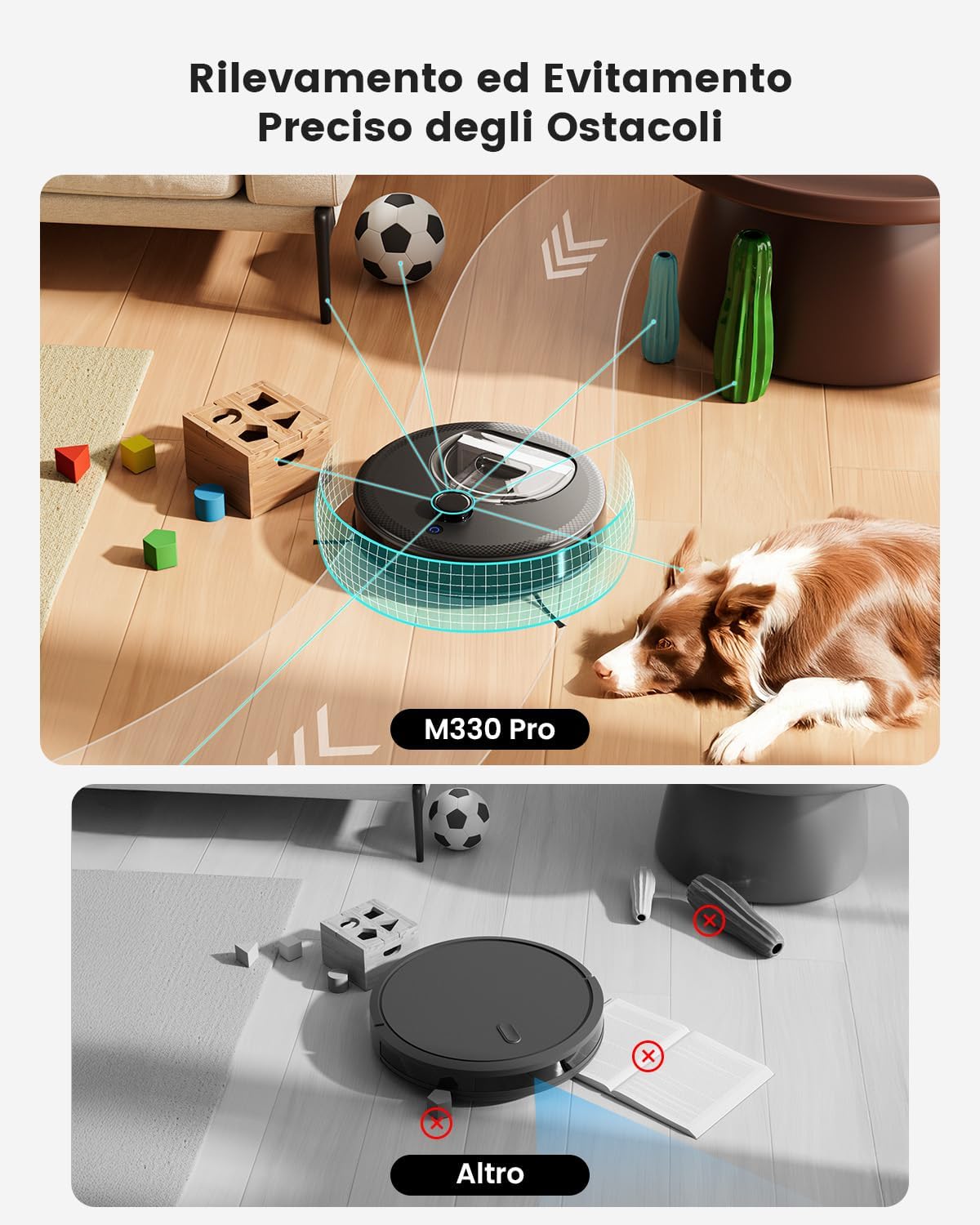
Image: The M330Pro features precise obstacle detection and avoidance, using its PSD system to navigate around objects like toys, cables, and furniture, preventing collisions and ensuring smooth operation.
5. Maintenance
Regular maintenance ensures optimal performance and extends the lifespan of your LEFANT M330Pro. Always turn off the robot and unplug the charging base before performing maintenance.
5.1 Emptying the Dustbin
The 450ml dustbin should be emptied after each cleaning cycle or when full.
- Open the top cover of the robot.
- Remove the dustbin by pulling it upwards.
- Open the dustbin lid and empty its contents into a trash can.
- Clean the filter inside the dustbin with the provided cleaning tool or a small brush.
- Rinse the dustbin with water if necessary (ensure it is completely dry before reinserting).
- Reinsert the dustbin and close the top cover.

Image: The LEFANT M330Pro features a transparent 450ml dustbin, allowing easy visual inspection of collected debris and less frequent emptying compared to smaller dustbins.
5.2 Cleaning the Mop Cloth and Water Tank
- After each mopping session, remove the mop cloth from the water tank.
- Rinse the mop cloth thoroughly with water and allow it to air dry completely before reuse.
- Empty any remaining water from the water tank and rinse it. Allow it to air dry.
5.3 Cleaning Sensors and Charging Contacts
Wipe the following components with a clean, dry cloth:
- Cliff Sensors: Located on the bottom of the robot.
- Charging Contacts: On the bottom of the robot and on the charging base.
- dToF Laser Sensor: On the top of the robot.
- PSD Obstacle Avoidance Sensors: On the front bumper of the robot.
5.4 Side Brush Maintenance
Inspect the side brushes regularly for tangled hair or debris. Use scissors to cut away any tangled hair and pull out debris. Replace worn-out side brushes as needed.
6. Troubleshooting
If you encounter issues with your LEFANT M330Pro, refer to the following common problems and solutions:
| Problem | Possible Cause | Solution |
|---|---|---|
| Robot does not turn on. | Low battery; power switch off. | Charge the robot fully; ensure the main power switch is ON. |
| Robot cannot return to charging base. | Charging base obstructed; robot too far from base. | Clear obstacles around the charging base; manually place the robot closer to the base. |
| Cleaning performance is poor. | Dustbin full; filters clogged; side brushes tangled. | Empty dustbin; clean/replace filters; clean side brushes. |
| Robot gets stuck frequently. | Loose cables, small objects, or high thresholds. | Clear the cleaning area; use No-Go Zones in the app. |
| App connection issues. | Incorrect Wi-Fi password; robot not in pairing mode; router issues. | Verify Wi-Fi password; reset robot's Wi-Fi; restart router; ensure 2.4GHz/5GHz network is used. |
If the problem persists, please contact LEFANT customer support for assistance.
7. Specifications
| Feature | Detail |
|---|---|
| Brand | LEFANT |
| Model Name | M330 Pro |
| Suction Power | Up to 5000Pa |
| Navigation Type | dToF Laser Navigation (360°) |
| Obstacle Avoidance | PSD (190°) |
| Battery Runtime | Up to 150 minutes |
| Coverage Area | Up to 150 square meters per charge |
| Dustbin Capacity | 450 ml |
| Water Tank Capacity | 200 ml |
| Connectivity | Wi-Fi 2.4G/5G, App Control, Alexa, Google Assistant, Apple Watch |
| Recommended Surfaces | Hard floor, Carpet, Parquet, Tiles |
| Color | Black |
8. Warranty and Support
LEFANT provides a limited warranty for the M330Pro Robot Vacuum and Mop. Please refer to the warranty card included in your product packaging for specific terms and conditions, including warranty duration and coverage.
For technical support, troubleshooting assistance, or warranty claims, please contact LEFANT customer service. You can find contact information on the official LEFANT website or through the Lefant App.
Online Resources: For additional support, FAQs, and video tutorials, visit the official LEFANT website: www.lefant.com


