
Introduction
Thank you for choosing the KNQZE Shiatsu Foot Massager with Heat (Model KF10). This device is designed to provide a relaxing and therapeutic foot massage experience, featuring advanced 3D arch support, deep-kneading shiatsu nodes, customizable air compression, and soothing heat. Please read this manual thoroughly before use to ensure safe and effective operation.
Safety Information
Important: Please read all safety warnings before operating this device.
- May cause burns if used for extended periods at high heat settings.
- Avoid use if you have a blood clotting disorder, deep vein thrombosis, or are pregnant.
- Do not use on broken skin or open wounds.
- Keep away from water.
- Unplug the massager when not in use.
- Always follow the instructions in this user manual.
Setup
- Unpack the Device: Carefully remove the foot massager and all accessories from the packaging. Ensure all components are present and undamaged.
- Placement: Place the massager on a flat, stable surface. Ensure there is enough space around the device for proper ventilation.
- Power Connection: Plug the power adapter into the massager's power port, then into a standard electrical outlet.
- Adjust Tilt Stand (Optional): For enhanced comfort, locate the hidden tilt stand at the bottom of the massager. Pull it out to elevate the device to a 9.3° angle. This provides an ergonomic position for your feet.
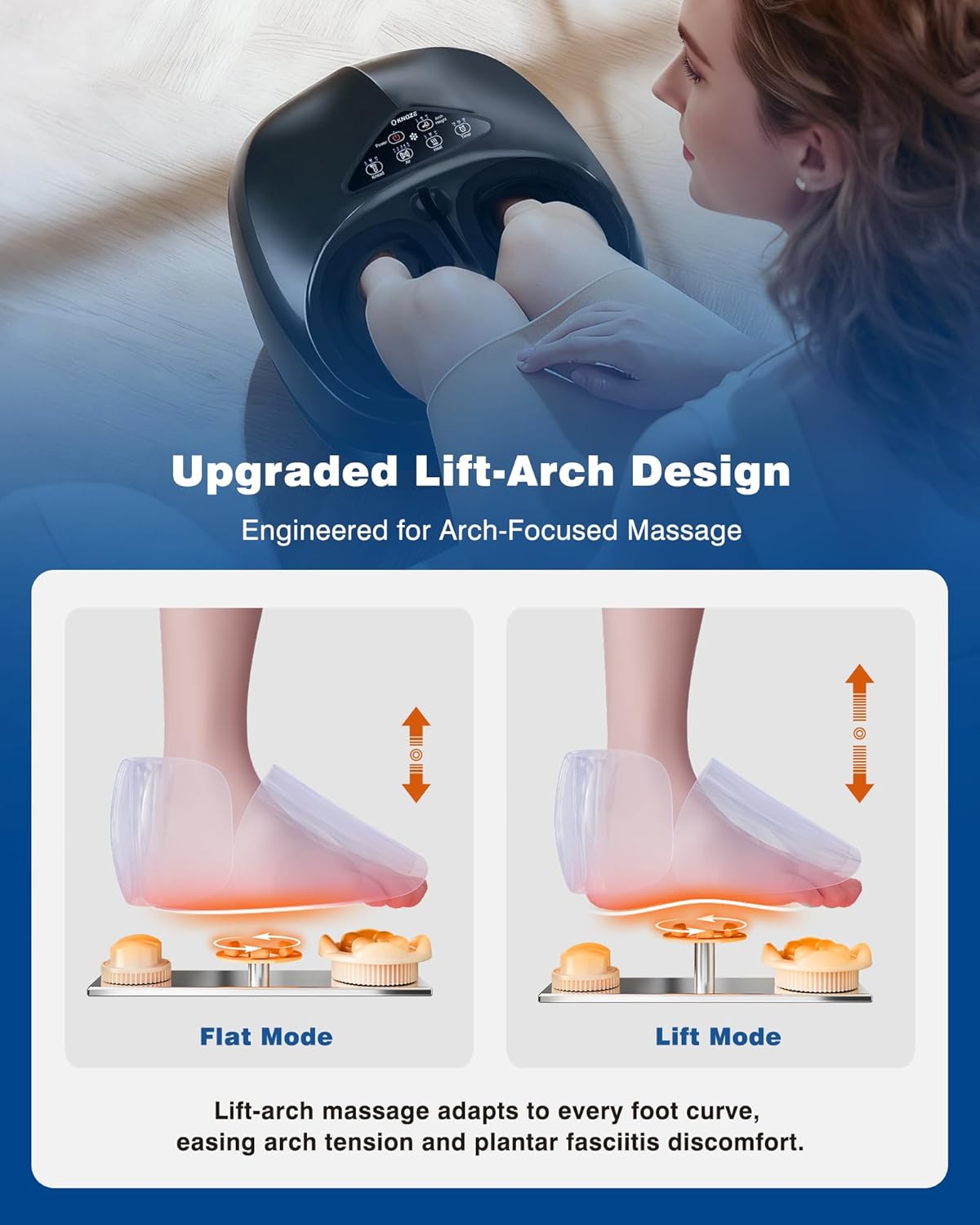
Image: KNQZE Foot Massager in use, side view. Shows the massager with feet inserted, illustrating typical usage.

Image: KNQZE Foot Massager side view. Highlights the sleek design and compact form factor.
Operating Instructions
The KNQZE Foot Massager can be operated using the control panel on the device or the included remote control.
Basic Usage Steps:
- Power On: Press the Power button on the control panel or remote to turn on the device.
- Insert Feet: Place your feet comfortably into the footbeds. Ensure your feet are fully supported within the massager.
- Adjust Arch Height: Use the "Arch Height" button (L/M/H/OFF) to select your preferred arch support level (Low, Medium, High, or Off). This feature adapts to various foot arch types for targeted relief.
- Select Kneading Intensity: Press the "Knead" button (L/M/H/OFF) to choose from 3 intensity levels for the deep-kneading shiatsu massage.
- Adjust Air Compression: Use the "Air" button (1-5 Levels/OFF) to set the desired air compression intensity. There are 5 levels available.
- Activate Heat Function: Press the "Heat" button (L/M/H/OFF) to turn on the soothing heat function. Choose from 3 adjustable heat levels.
- Set Timer: Use the "Timer" button to select a massage duration of 15, 20, or 30 minutes. The device will automatically shut off after the selected time.
- Relax: Enjoy your personalized foot massage.
- Power Off: Press the Power button again to turn off the device when finished.
Remote Control:
The included remote control allows for convenient adjustment of all settings without bending down. It features dedicated buttons for Power, Knead, Air, Heat, Timer, and Arch Height. A built-in holder on the massager provides secure storage for the remote.

Image: Remote Control close-up. Displays the buttons for various massage settings.

Image: Arch Lift Mechanism Diagram. Illustrates how the 3D arch support adjusts for different foot types.

Image: Heat Function Diagram. Shows the heat distribution within the foot massager.
Maintenance
Cleaning:
- Removable Foot Covers: The foot covers are removable and washable. Unzip and remove them for cleaning. Hand wash or machine wash on a gentle cycle with mild detergent. Air dry completely before reattaching.
- Device Surface: Wipe the exterior surface of the massager with a soft, damp cloth. Do not use abrasive cleaners or immerse the device in water.
Storage:
- Unplug the massager when not in use.
- Store the device in a cool, dry place, away from direct sunlight and moisture.
- The compact design allows for easy storage under furniture or in a closet.
- Ensure the remote control is securely stored in its built-in holder to prevent loss.
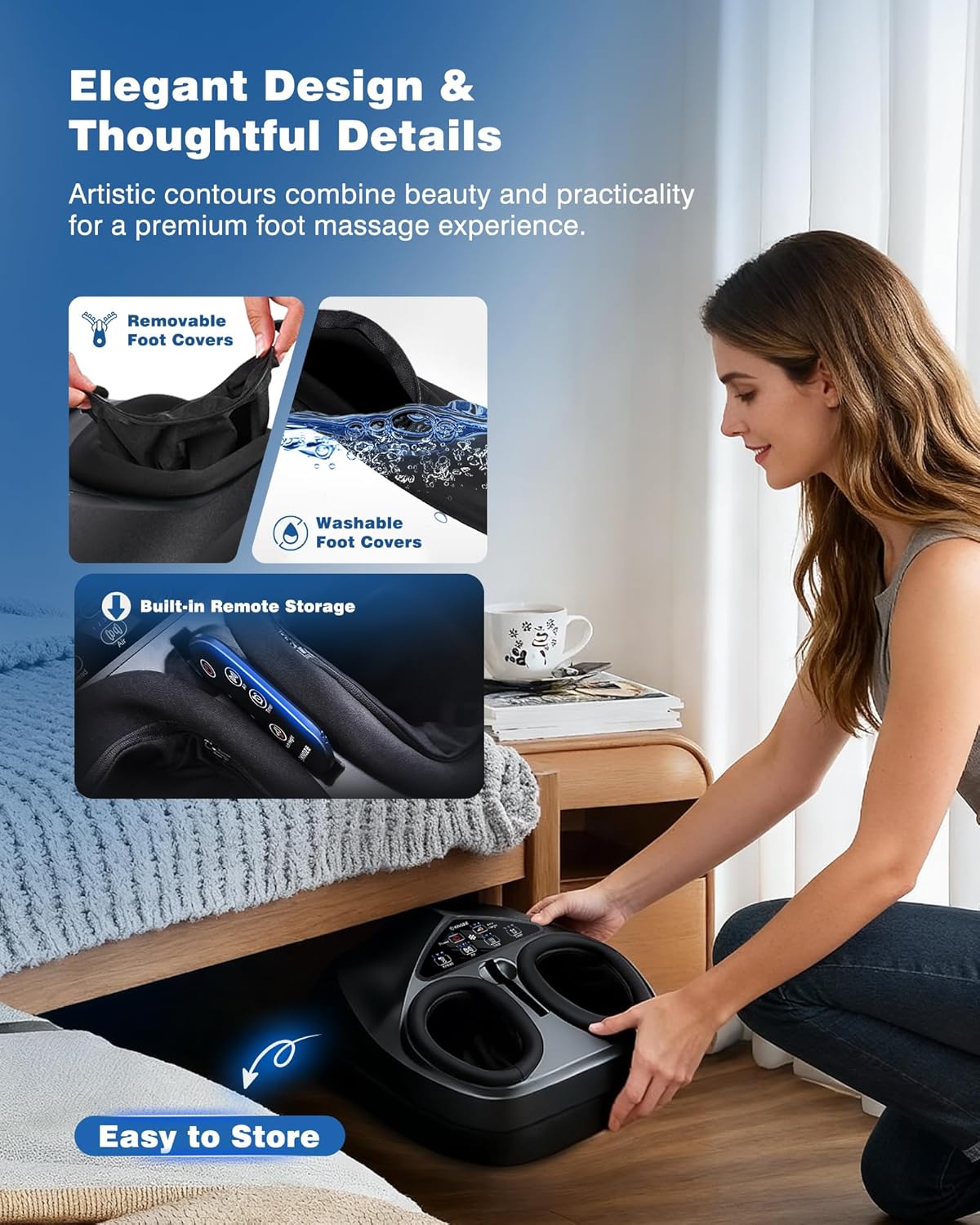
Image: Removable Foot Covers. Shows how the foot covers can be detached for cleaning.
Troubleshooting
- Device not powering on: Ensure the power cord is securely plugged into both the massager and a working electrical outlet.
- No massage function: Check if the specific massage modes (Knead, Air, Heat) are activated on the control panel or remote. Ensure the timer is set.
- Weak massage intensity: Adjust the intensity levels for kneading and air compression to a higher setting.
- No heat: Verify that the heat function is turned on and set to a desired level. Allow a few minutes for the heat to become noticeable.
- Remote control not working: Ensure there are no obstructions between the remote and the massager. Check the remote's battery if applicable (this model uses a wired remote, so this point is less relevant but good general advice).
If problems persist, please contact customer support for assistance.
Specifications
| Feature | Detail |
|---|---|
| Model Number | KF10 |
| Product Dimensions (L x W x H) | 14.96 x 12.6 x 6.69 inches |
| Item Weight | 8.1 pounds |
| Power Source | Corded Electric |
| Massager Form | Foot Massager Machine |
| Massage Therapy Technique | Compression, Kneading, Rolling, Shiatsu |
| Product Benefits | Fatigue Relief, Pain Relief, Plantar Fasciitis Relief, Sleep Improvement, Soothing Heat |
| Other Special Features | Auto Shut-Off, Heat, Remote Control, Timer, Adjustable Arch-Lift |
| Max Foot Size | Men's Size 14 |

Image: Product Dimensions. Illustrates the length, width, and height of the foot massager.
Warranty & Support
The KNQZE Shiatsu Foot Massager (Model KF10) comes with a 2-year replacement warranty. This warranty covers manufacturing defects and ensures peace of mind for your purchase.
For any questions, concerns, or warranty claims, please contact KNQZE customer support. Our friendly customer support team is available to assist you.
Contact Information: Please refer to the contact details provided on the product packaging or the official KNQZE website for the most up-to-date support information.

