
1. Introduction
Thank you for choosing the SWAREY Portable Power Station S1000 and 100W Solar Panel. This comprehensive user manual provides essential information for the safe and efficient operation, maintenance, and troubleshooting of your new power solution. Please read this manual thoroughly before using the product and retain it for future reference.
The SWAREY S1000 is a versatile 725 Wh portable power station designed to provide reliable power for various devices, featuring 1000W (peak 1500W) AC outputs, multiple USB ports, and DC outputs. Paired with the 100W foldable solar panel, it offers an eco-friendly charging solution for outdoor activities, camping, travel, and emergency backup.
2. Important Safety Instructions
Failure to follow these safety instructions may result in fire, electric shock, or other injury or damage.
- Do not disassemble, repair, or modify the unit or the solar panel. Incorrect reassembly may cause fire or electric shock.
- Do not expose the unit to fire or high temperatures (above 60°C/140°F).
- Do not use or store the unit in a bathroom or in an area exposed to water or rain.
- Do not use the unit in an environment with strong static electricity or strong magnetic fields.
- Do not use the unit if the power cord is damaged or broken.
- Do not use the unit if it is damaged or has been dropped.
- Keep the unit out of reach of children and pets.
- Ensure proper ventilation during use. Do not block ventilation openings.
- Dispose of the product according to local regulations. Do not dispose of with household waste.
3. Package Contents
Please check that all the following items are included in your package:
- 1 x SWAREY S1000 Portable Power Station (725 Wh)
- 1 x SWAREY 100W Foldable Solar Panel
- 1 x AC Power Adapter
- 1 x AC Power Cable
- 1 x Car Charging Cable
- 1 x DC to MC4 Cable
- 1 x XT60 to 5-in-1 Cable (Anderson/MC4/DC5521/DC7450/DC7909)
- 1 x Carry Bag (for solar panel)
- 2 x User Manual (for power station and solar panel)
4. Product Overview
4.1 SWAREY S1000 Portable Power Station
The SWAREY S1000 is a high-capacity portable power station designed for various applications, from outdoor adventures to emergency home backup. It features multiple output ports to power a wide range of electronic devices.
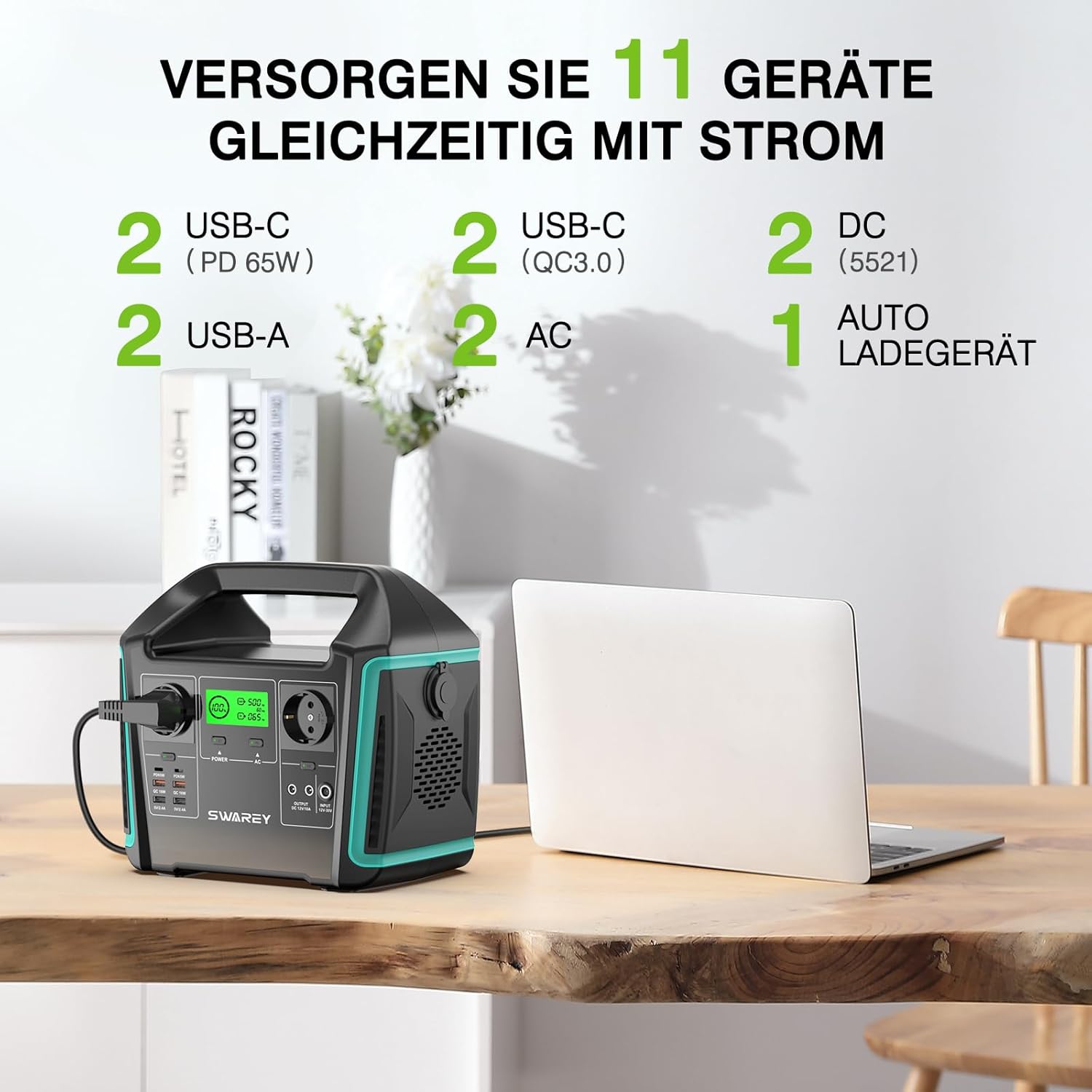
Image: The SWAREY S1000 Portable Power Station displaying its array of output ports, including USB-C, USB-A, AC, DC, and a car charger port. The display shows battery level and output status.
- Capacity: 725 Wh (3.6 V/201.6 Ah, 21.6 V/33.6 Ah)
- AC Outputs: 2 x 1000 W (Peak 1500 W) Pure Sine Wave
- USB-C Ports: 2 x PD 65 W
- USB-A Ports: 2
- USB QC 3.0 Ports: 2
- DC Outputs: 2
- Car Cigarette Lighter Output: 1

Image: The SWAREY S1000 Power Station positioned outdoors near a tent, illustrating its capability to power devices like tablets, drones, laptops, kettles, and mixers with estimated usage durations.
4.2 SWAREY 100W Foldable Solar Panel
The 100W solar panel is designed to efficiently charge your SWAREY power station using sunlight. Its foldable design ensures portability, and the integrated sun direction finder helps optimize charging efficiency.
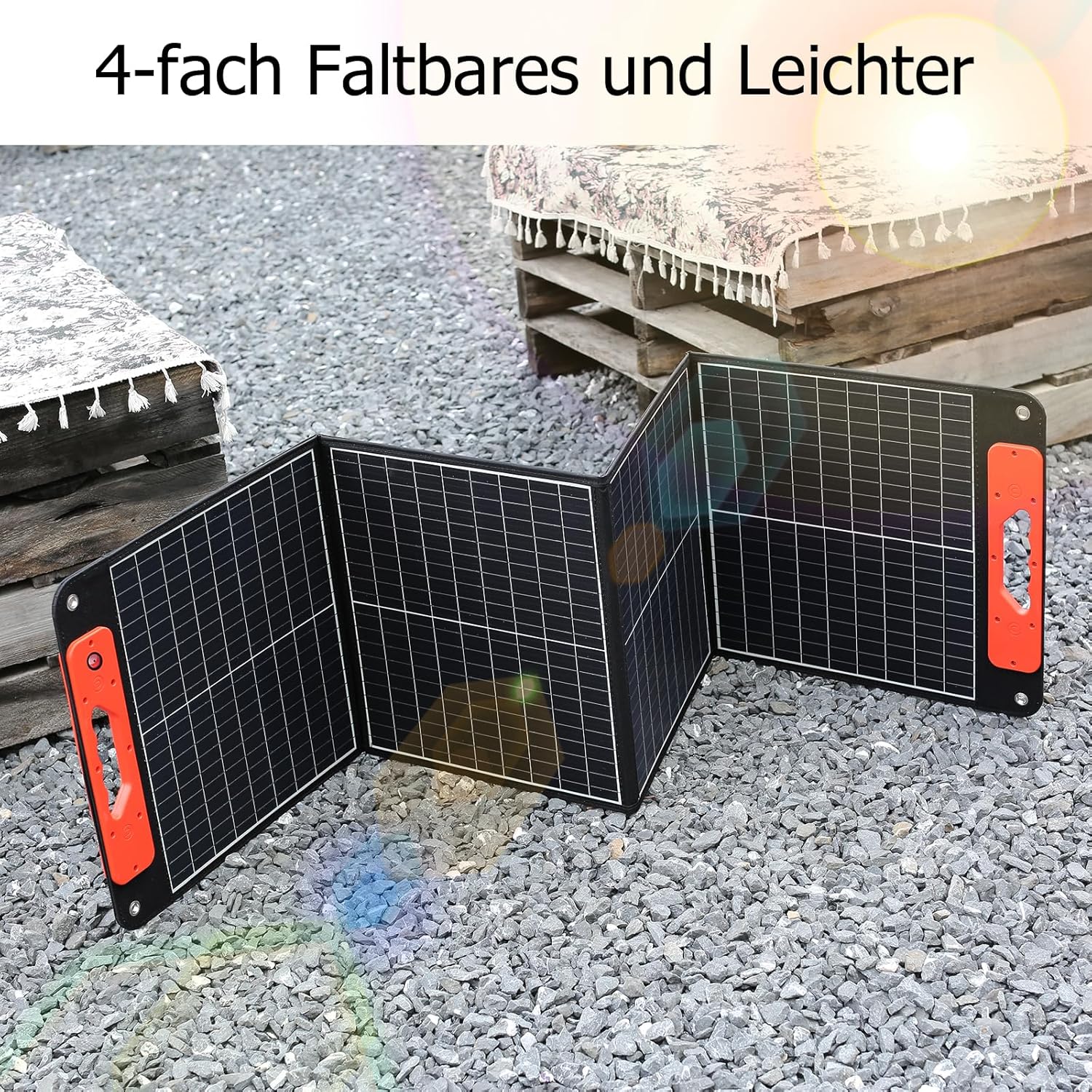
Image: The SWAREY 100W foldable solar panel fully unfolded on a gravel surface, demonstrating its compact and portable design.
- Power Output: 100 W
- Integrated Ports: 1 x USB QC3.0 18 W, 1 x USB-C PD 60 W
- Compatibility: Includes XT60 to 5-in-1 cable for wide compatibility with various power stations (Anderson/MC4/DC5521/DC7450/DC7909).
- Special Feature: Sun direction finder for optimal angle adjustment.

Image: A detailed view of the SWAREY solar panel's output hub, showing the DC (XT60), QC 3.0, and Type-C (PD 60W) ports with their respective voltage and current ratings.

Image: The SWAREY 100W foldable solar panel shown in both folded and unfolded states, highlighting its compact dimensions for easy transport and setup.

Image: An illustration showcasing the different connector types compatible with the SWAREY solar panel, such as XT60, Anderson, MC4, and various DC plug sizes, highlighting its broad compatibility with power stations.
5. Setup
5.1 Initial Charging of the Power Station
Before first use, it is recommended to fully charge the SWAREY S1000 Power Station. You can charge it using the included AC adapter, car charger, or solar panel.
- AC Charging: Connect the AC power adapter to the power station's input port and then plug the AC power cable into a wall outlet.
- Car Charging: Use the car charging cable to connect the power station to your vehicle's 12V cigarette lighter socket.
- Solar Charging: Connect the solar panel to the power station using the appropriate cable (e.g., DC to MC4 cable or XT60 to 5-in-1 cable).
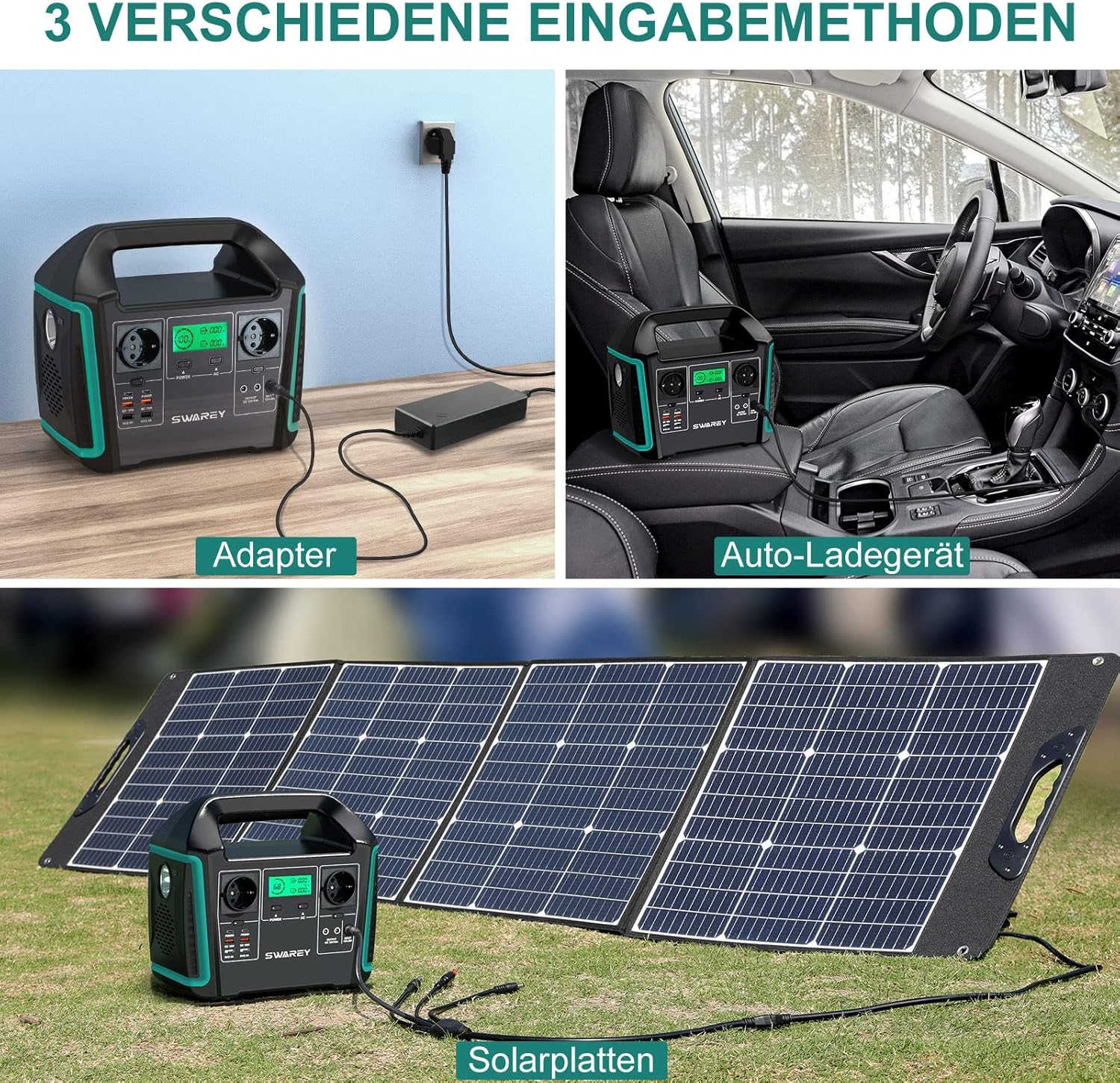
Image: A visual guide demonstrating the three primary charging methods for the SWAREY S1000 Power Station: using the AC adapter from a wall outlet, connecting to a car's cigarette lighter, and charging via solar panels.
5.2 Setting Up the Solar Panel for Optimal Charging
To maximize solar charging efficiency, position the solar panel directly towards the sun.
- Unfold the solar panel completely and place it in direct sunlight.
- Utilize the integrated sun direction finder located above the handle. Adjust the panel's angle until the shadow of the small black dot is centered within the circle. This indicates the optimal angle for maximum sunlight absorption.

Image: A close-up view of the solar panel's sun direction finder, illustrating how to achieve optimal solar charging by aligning the shadow of the black dot within the central circle.
6. Operating Instructions
6.1 Powering On/Off the Power Station
Press and hold the main power button for a few seconds to turn the power station on or off. The LCD display will illuminate, showing the battery level and output status.
6.2 Using AC Outputs
Press the AC power button to activate the AC outlets. Plug your devices into the 1000W AC ports. Ensure your devices do not exceed the maximum 1000W continuous output (1500W peak).
6.3 Using USB Outputs
The USB ports (USB-C PD 65W, USB-A, USB QC 3.0) are typically active when the power station is on. Simply plug your USB-powered devices into the appropriate port.
6.4 Using DC Outputs and Car Port
Press the DC power button to activate the DC 5521 ports and the car cigarette lighter port. Connect your 12V DC devices as needed.
6.5 Charging Devices Directly from Solar Panel
The 100W solar panel also features direct output ports (USB QC3.0 18W, USB-C PD 60W) allowing you to charge smaller devices directly from the solar panel when sunlight is available, without needing to connect to the power station.
7. Maintenance
7.1 Cleaning
- Wipe the power station and solar panel with a dry, soft cloth.
- Do not use abrasive cleaners or solvents.
- Keep the ventilation openings clear of dust and debris.
7.2 Storage
- Store the unit in a cool, dry place, away from direct sunlight and extreme temperatures.
- For long-term storage, charge the power station to approximately 50-80% every 3-6 months to prolong battery life.
- Avoid storing the unit in a fully discharged state for extended periods.
8. Troubleshooting
8.1 Power Station Not Turning On
- Ensure the battery is not completely depleted. Try charging the unit.
- Press and hold the power button firmly for a few seconds.
8.2 Devices Not Charging from Power Station
- Check if the specific output port (AC, DC, USB) is activated.
- Verify that the device's power consumption does not exceed the port's or the power station's maximum output.
- Ensure cables are securely connected.
- If using AC, check if the device requires more than 1000W (continuous) or 1500W (peak).
8.3 Solar Panel Not Charging Efficiently
- Ensure the solar panel is in direct sunlight and not shaded.
- Adjust the panel's angle using the sun direction finder for optimal alignment.
- Clean the surface of the solar panel if it is dirty.
- Check all cable connections between the solar panel and the power station.
9. Specifications
| Feature | Detail |
|---|---|
| Brand | SWAREY |
| Model Name | S1000+BS-100 |
| Power Station Capacity | 725 Wh (3.6 V/201.6 Ah, 21.6 V/33.6 Ah) |
| AC Output (Continuous) | 1000 W |
| AC Output (Peak) | 1500 W |
| USB-C Output | 2 x PD 65 W |
| USB-A Output | 2 Ports |
| USB QC 3.0 Output | 2 Ports |
| DC Output | 2 Ports |
| Car Cigarette Lighter Output | 1 Port |
| Solar Panel Power | 100 W |
| Solar Panel USB QC3.0 Output | 18 W |
| Solar Panel USB-C PD Output | 60 W |
| Product Dimensions (L x W x H) | 11.02" x 6.5" x 9.65" |
| Power Source | Battery Powered |
| Special Feature | Automatic Shut Down |
| Recommended Uses | Camping, Outdoors, Travel, Fishing, Motorhome |
10. Warranty & Support
SWAREY products come with a standard manufacturer's warranty. For detailed warranty information, please refer to the warranty card included in your package or visit the official SWAREY website.
If you encounter any issues or have questions regarding your SWAREY Portable Power Station S1000 or 100W Solar Panel, please contact SWAREY customer support. Have your model number (S1000+BS-100) and purchase details ready for faster service.
SWAREY Customer Support:
- Please refer to your product packaging or the official SWAREY website for the most current contact information.


