
1. Introduction
Thank you for choosing the Heiman Connected Smoke Detector system. This system provides advanced fire safety for your home by combining certified smoke detection with smart home connectivity. This manual will guide you through the installation, operation, and maintenance of your new smoke detectors and gateway.
1.1 Safety Information
- Read all instructions carefully before installation and use.
- Do not paint the smoke detector. Paint can clog the sensing chambers and prevent the detector from operating correctly.
- Do not disassemble the smoke detector or gateway. There are no user-serviceable parts inside.
- Test the smoke detectors regularly as described in this manual.
- This device is designed to detect smoke. It cannot prevent fires.
- Ensure proper placement to avoid false alarms from cooking fumes or steam.
1.2 Package Contents
The Heiman Connected Smoke Detector system includes the following components:
- 3 x HEIMAN Wireless Smoke Detectors (HM2SA-1W-T)
- 1 x Wi-Fi Gateway / Base Station (WS3GW-R)
- 3 x Magnetic Mounts for the Detectors
- 3 x Mounting Kits (screws and wall plugs)
- 1 x USB Cable for the Gateway (Note: USB power adapter not included; compatible with any standard USB adapter)
- 1 x User Manual (this document)
2. Product Overview
The Heiman Connected Smoke Detector system consists of interconnected smoke detectors and a central Wi-Fi gateway. The gateway facilitates communication between the detectors and your smartphone via the Heiman Home Security app.
2.1 Smoke Detector (HM2SA-1W-T)
This is the primary detection unit. It features a 10-year built-in battery and an 85 dB alarm. It communicates with the gateway via a stable 868 MHz radio frequency.
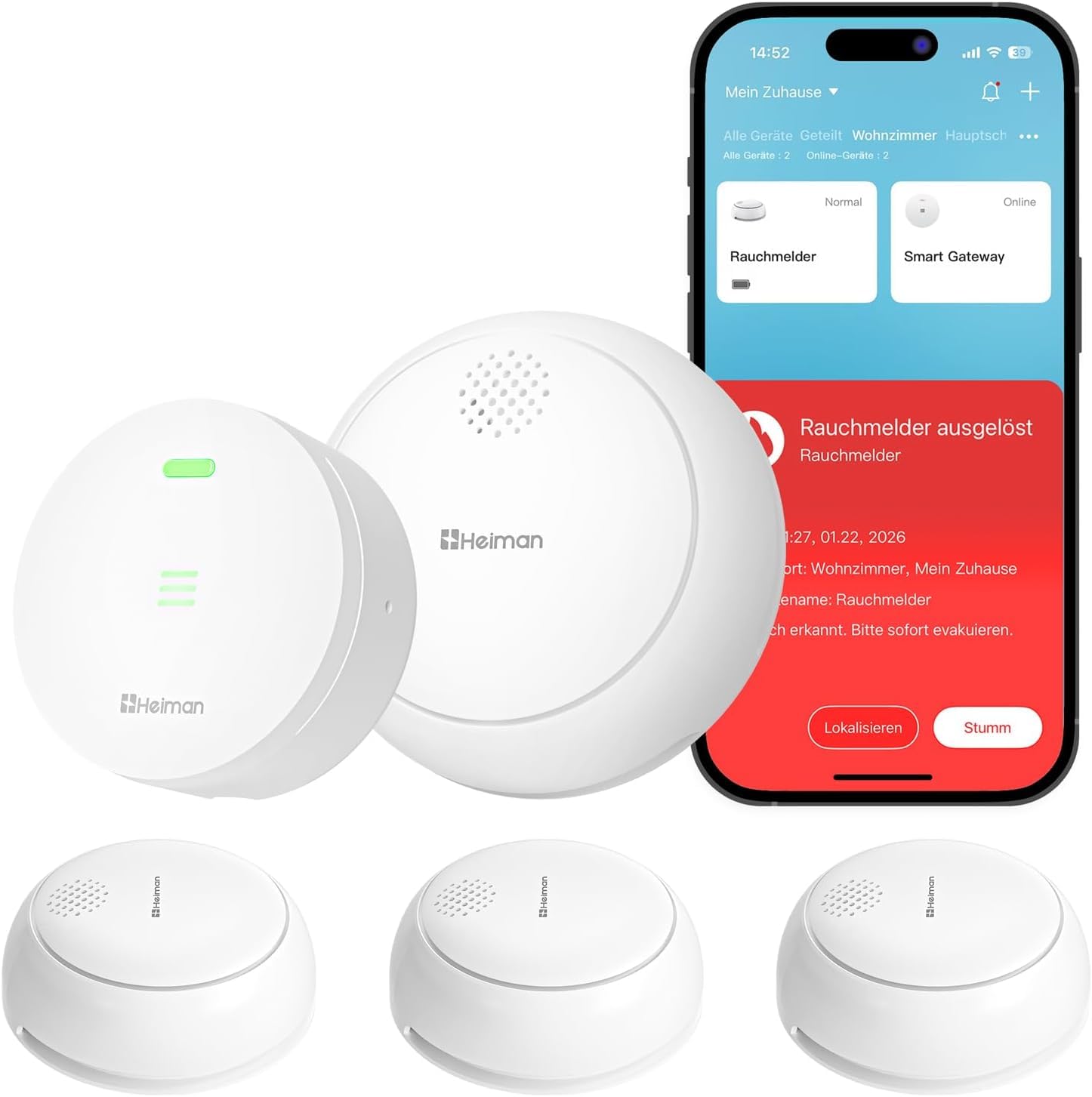
Image 1: Heiman HM2SA-1W-T Smoke Detector. This image shows the compact, white smoke detector with a central button and LED indicator.
- Alarm Button/Silence Button: Press to test the detector or silence a false alarm.
- LED Indicator: Provides visual status (e.g., normal operation, alarm, low battery).
- Sounder: Emits the 85 dB alarm sound.
- Magnetic Mount Compatibility: Allows for drill-free installation.
2.2 Wi-Fi Gateway (WS3GW-R)
The gateway acts as the central hub, connecting your smoke detectors to your home Wi-Fi network and enabling app control and notifications.
- USB Power Port: For connecting the USB cable and power adapter (not included).
- Status LED: Indicates gateway status (e.g., power, network connection).
- Pairing Button: Used for pairing with smoke detectors and Wi-Fi.
3. Setup and Installation
3.1 Gateway Setup
- Power On: Connect the provided USB cable to the gateway's USB port and plug it into a standard 5V USB power adapter (not included). The status LED will light up.
- Download App: Download the "Heiman Home Security" app from your smartphone's app store (iOS or Android).
- Register/Login: Open the app and create a new account or log in if you already have one.
- Add Gateway: In the app, follow the instructions to add a new device. Select the gateway model (WS3GW-R).
- Connect to Wi-Fi: The app will guide you through connecting the gateway to your 2.4 GHz Wi-Fi network. Ensure your phone is connected to the same 2.4 GHz network during setup. Note: 5 GHz Wi-Fi networks are not supported.
- Confirmation: Once successfully connected, the gateway's status LED will indicate a stable connection (refer to app or gateway manual for specific LED patterns).
3.2 Smoke Detector Installation
Proper placement of smoke detectors is crucial for effective fire safety. Install detectors in all sleeping areas, hallways leading to sleeping areas, and on every level of your home, including the basement.
- Activate Detector: Before mounting, remove the protective film from the battery compartment (if present) or press the test button for a few seconds until the detector beeps, indicating it's active.
- Choose Location:
- Mount on the ceiling, at least 10 cm (4 inches) from any wall.
- If wall mounting, place the top of the detector between 10-30 cm (4-12 inches) from the ceiling.
- Avoid placing near air vents, fans, or in "dead air" spaces (e.g., corners of rooms).
- Keep away from kitchens and bathrooms to minimize false alarms from cooking fumes or steam.
- Magnetic Mounting (Drill-Free):
- Clean the ceiling surface where the detector will be mounted.
- Peel off the protective backing from the magnetic mount.
- Firmly press the magnetic mount onto the chosen ceiling location for at least 30 seconds.
- Align the smoke detector with the magnetic mount and attach it. The magnets will hold it securely in place.
Alternatively, use the provided screws and wall plugs for traditional mounting if preferred.
- Pair with Gateway:
- Open the Heiman Home Security app.
- Navigate to the gateway's device page.
- Select "Add Sub-device" or similar option.
- Follow the app's instructions to put the gateway into pairing mode (usually by pressing its pairing button).
- Press the test/silence button on the smoke detector three times quickly. The detector's LED will flash, indicating pairing mode.
- The app will confirm successful pairing. Repeat for all smoke detectors.
4. Operating Instructions
4.1 Alarm Functionality
- Smoke Detection: When smoke is detected, the smoke detector will emit a loud 85 dB alarm sound and its LED indicator will flash rapidly.
- Interconnected Alarm: If one smoke detector in the system detects smoke, all other connected smoke detectors will also sound their alarms simultaneously, ensuring everyone in the house is alerted quickly.
- App Notifications: You will receive an immediate push notification on your smartphone via the Heiman Home Security app, even if you are away from home.
4.2 Silence/Hush Function
In case of a false alarm (e.g., from cooking fumes or steam), you can temporarily silence the alarm:
- Via Device Button: Press the large central button on the smoke detector. The alarm will silence for a short period (typically 5-10 minutes) before resetting.
- Via App: Use the Heiman Home Security app to silence the alarm remotely.
Important: Never ignore an alarm. Only use the silence function when you are certain there is no real fire.
4.3 App Control and Features
- Real-time Notifications: Receive instant alerts on your smartphone for smoke detection or low battery status.
- Device Status: View the current status of all connected smoke detectors and the gateway within the app.
- Battery Level: Monitor the battery level of each smoke detector.
- Night Mode: The app allows you to enable a "night mode" for the smoke detectors, which can disable the flashing LED indicator during nighttime hours to avoid disturbance, while maintaining full alarm functionality.
4.4 Testing the Detector
Test your smoke detectors weekly to ensure they are functioning correctly.
- Press and hold the test/silence button on each smoke detector for a few seconds.
- The detector will emit a series of loud beeps, and its LED will flash.
- All interconnected detectors should also sound their alarms.
- Release the button. The alarm should stop.
- If the detector does not alarm or the sound is weak, refer to the Troubleshooting section.
5. Maintenance
5.1 Cleaning
Dust and debris can affect the performance of your smoke detector. Clean your detectors at least once a month.
- Gently vacuum the exterior of the detector using a soft brush attachment.
- Wipe the surface with a clean, damp cloth. Do not use cleaning sprays or solvents.
- Ensure no dust or insects enter the sensing chamber.
5.2 Battery
The Heiman HM2SA-1W-T smoke detector features a built-in lithium battery designed to last for 10 years. This battery is not replaceable by the user.
- When the battery is nearing the end of its life, the detector will emit a low battery warning (a chirp every 30-60 seconds) and send a notification to your app.
- Replace the entire smoke detector unit after 10 years or when the low battery warning persists.
5.3 Regular Checks
- Perform weekly tests as described in Section 4.4.
- Visually inspect detectors monthly for any damage or obstructions.
6. Troubleshooting
If you encounter issues with your Heiman Connected Smoke Detector system, refer to the following table for common problems and solutions.
| Problem | Possible Cause | Solution |
|---|---|---|
| Detector chirps every 30-60 seconds. | Low battery. | The built-in battery is nearing its end of life. Replace the entire smoke detector unit. |
| Detector sounds false alarm frequently. | Located too close to kitchen, bathroom, or dusty area. | Relocate the detector further away from sources of steam, cooking fumes, or excessive dust. Clean the detector. |
| Detector does not respond to test button. | Detector not activated or faulty. | Ensure the detector is activated (press test button until it beeps). If still unresponsive, the unit may be faulty and needs replacement. |
| Gateway cannot connect to Wi-Fi. | Incorrect Wi-Fi password, 5 GHz network, or weak signal. | Ensure correct 2.4 GHz Wi-Fi password. Move gateway closer to router. Restart router and gateway. |
| Smoke detectors not communicating with gateway. | Pairing failed or out of range. | Re-attempt pairing process (Section 3.2). Ensure detectors are within range of the gateway. Check gateway's internet connection. |
7. Specifications
| Feature | Detail |
|---|---|
| Model Number (Smoke Detector) | HM2SA-1W-T |
| Model Number (Gateway) | WS3GW-R |
| Smoke Detector Dimensions | 86 x 86 x 34.5 mm |
| Smoke Detector Weight | 93.8 g |
| Gateway Dimensions | 64 x 64 x 30 mm |
| Gateway Weight | 70.6 g |
| Power Source (Smoke Detector) | Built-in 10-year Lithium Battery |
| Power Source (Gateway) | USB (5V, adapter not included) |
| Alarm Sound Level | 85 dB at 3 meters |
| Wireless Connectivity | Gateway: Wi-Fi 2.4 GHz; Detectors: 868 MHz RF to Gateway |
| Certifications | EN 14604, Q-Label |
| Operating Temperature | 0°C to 40°C (32°F to 104°F) |
| Operating Humidity | ≤95% RH (non-condensing) |
8. Warranty and Support
8.1 Warranty Information
Heiman products are manufactured to high-quality standards. This product comes with a standard manufacturer's warranty against defects in materials and workmanship. Please refer to the warranty card included in your package or visit the official Heiman website for detailed warranty terms and conditions specific to your region.
The 10-year battery life refers to the expected operational lifespan of the smoke detector under normal conditions.
8.2 Customer Support
If you have any questions, require technical assistance, or need to report a problem that is not covered in the troubleshooting section, please contact Heiman customer support.
- Online Support: Visit the official Heiman website for FAQs, support resources, and contact forms.
- Email Support: Refer to your product packaging or the Heiman website for the appropriate support email address.
- Phone Support: Check the Heiman website for regional phone support numbers.
When contacting support, please have your product model number (HM2SA-1W-T) and purchase information ready.


