
Introduction
Thank you for choosing the VATOS Laser Tag 4-Player Set. This set provides an immersive and interactive laser tag experience with 360-degree sensors and real-time data display. This manual will guide you through the setup, operation, and maintenance of your laser tag set to ensure a fun and safe experience for all players.

Image: The VATOS Laser Tag set supports multiplayer games, allowing up to four players to engage in interactive battles.
Safety Information
WARNING: Toy inside, not suitable for children under 3 years old due to small parts. This product uses eye-safe infrared technology; no visible laser beams are emitted.
What's in the Box
- 4 x Laser Tag Guns
- 4 x Vests
- 4 x Back Receivers
- 2 x 4-in-1 USB Charging Cables
- 4 x Data Cables
Setup
1. Initial Power On and Pairing
- Ensure all laser tag blasters and vests are fully charged (refer to the 'Charging' section).
- Turn on each blaster and its corresponding vest by pressing the power switch (long press for 2 seconds on the vest).
- Pull the trigger on each blaster. The blasters and vests will instantly pair and be ready for play.
2. Wearing the Gear
The vests feature adjustable elastic straps to ensure a comfortable fit for various body sizes. Connect the back receiver to the vest using the provided data cable.
Video: This video demonstrates how to correctly wear the vest and connect the back receiver for optimal gameplay.
3. Adjusting Lives and Team Selection
- After pairing the vest and gun, locate the buttons on the back of the vest.
- Use these buttons to adjust the number of lives for the player.
- Select your team color directly on the vest's LCD screen. Available team colors are typically Red, Blue, Green, and White. Only different teams can shoot each other.
Operating Instructions
1. Understanding the Display
The blasters and vests feature easy-to-read LCD screens that display real-time data, including hits, health, and team scores. This allows players to monitor their status at a glance without relying solely on audio cues.

Image: The 2.4GHz system provides real-time data display on both the blaster and vest LCD screens.
2. Target Zones and Infrared Technology
The VATOS Laser Tag system features three target zones for comprehensive combat: the chest, back, and blaster. The advanced 2.4GHz system ensures accurate tracking of hits. The system uses completely eye-safe infrared technology, meaning there are no visible beams, making it safe for all ages.

Image: The 360-degree combat system includes target sensors on the vest, back receiver, and blaster for an immersive experience.
Video: This video highlights the rechargeable feature and the 360-degree target system of the laser tag set.
3. Blaster and Vest Functions
Each blaster and vest has specific functions for gameplay:

Image: Detailed diagram of the laser tag gun functions, including weapon mode switch, mute/reset button, and life points display.
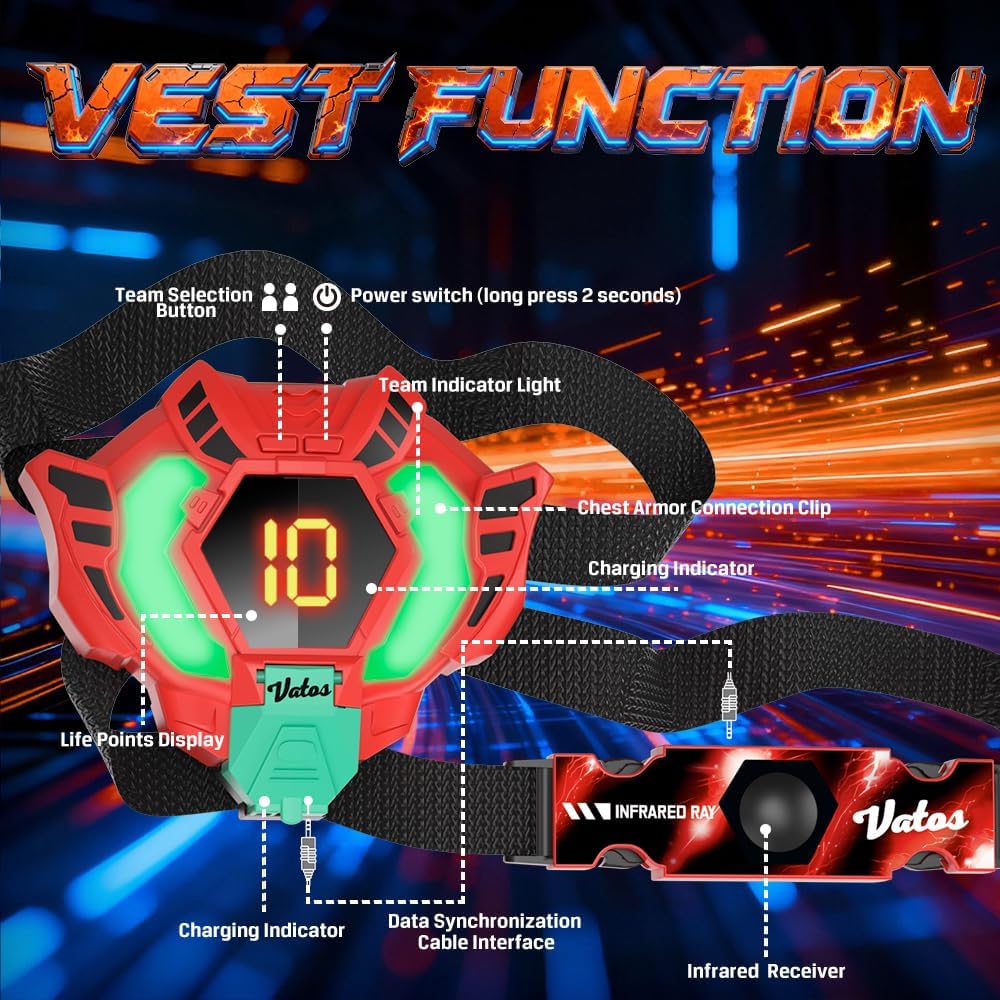
Image: Detailed diagram of the vest functions, showing the team selection button, power switch, team indicator light, and charging indicators.
Game Modes
The blasters offer four realistic weapon modes, each with unique characteristics:
- Pistol: Single shot.
- Shotgun: Multiple bullets per shot.
- Submachine Gun: Rapid fire.
- Machine Gun: Sustained rapid fire.
Use the gun type switch button on the blaster to cycle through these modes. The set also includes a stealth mode for strategic play.
Charging
The laser tag blasters and vests are fully rechargeable. Use the included 4-in-1 USB charging cables to charge all four units simultaneously. A single charge provides power for extended gameplay sessions.

Image: The 4-in-1 charging hub allows convenient simultaneous charging of all blasters and vests. A USB charging adapter (DC 5V-2A/3A) is recommended but not included.
Maintenance
To ensure the longevity of your VATOS Laser Tag set, follow these maintenance guidelines:
- Wipe down the blasters and vests with a dry, soft cloth after each use.
- Avoid exposing the units to extreme temperatures or direct sunlight for prolonged periods.
- Store the set in a dry place when not in use.
- Do not immerse the electronic components in water.
Troubleshooting
If you encounter any issues with your VATOS Laser Tag set, consider the following:
- Units not pairing: Ensure both the blaster and vest are powered on and fully charged. Try turning them off and on again. Make sure they are within close proximity during initial pairing.
- Incorrect life count: Refer to the 'Adjusting Lives and Team Selection' section in Setup to correctly set the number of lives using the buttons on the back of the vest.
- Reduced range or responsiveness: Check for any obstructions between the blaster and the target zones. Ensure the units are fully charged.
- No power: Verify that the charging cables are securely connected and the power adapter (not included) is functioning correctly.
Specifications
| Brand | VATOS |
| Model Number | BB5806B |
| Age Range | 6 years and up |
| Number of Players | 4 |
| Material Type | Plastic |
| Power Source | Internal rechargeable battery |
| Operation Mode | Manual |
| Usage Environment | Indoor, Outdoor |
| Color | Red, Blue, Orange, Green |
| Item Weight | 1 kg |
| Item Dimensions | 4.72 x 1.38 x 7.87 inches |
| Educational Objective | Creative thinking, Logical reasoning, Teamwork |

Image: Product dimensions for the blasters and vests are provided for reference.
Customer Support
For any questions, concerns, or assistance with your VATOS Laser Tag set, please contact the seller, XIAOMA ONLINE US, through the platform where you made your purchase. They will be able to provide further support and guidance.


