
1. Introduction
Thank you for choosing the EUQQ NewYYK-Q63 True Wireless Earbuds. These sport headphones are designed to provide a superior audio experience with advanced features for your active lifestyle. Please read this manual carefully before use to ensure optimal performance and longevity of your device.
What's in the Box:
- YYK-Q63 Wireless Bluetooth Earbuds (L/R)
- 3 * Ear Caps (S/M/L)
- Wireless Charging Case
- Charging Cable
- User Manual

Image: All components included in the EUQQ NewYYK-Q63 True Wireless Earbuds package.
2. Product Overview
Earbud Features:
- Flexible Ear Hooks: For a secure and comfortable fit during activities.
- Multi-function Button: Control playback, calls, and voice assistant.
- Volume Controls: Dedicated buttons for adjusting volume.
- LED Indicator: Shows power and connection status.
- Microphone: Built-in for clear calls.

Image: Detailed view of an earbud highlighting its design and control buttons.
Charging Case Features:
- Dual LED Display: Shows battery percentage for the case and individual earbuds.
- USB-C Charging Port: For fast and convenient charging.
- Compact Design: Easy to carry and store.
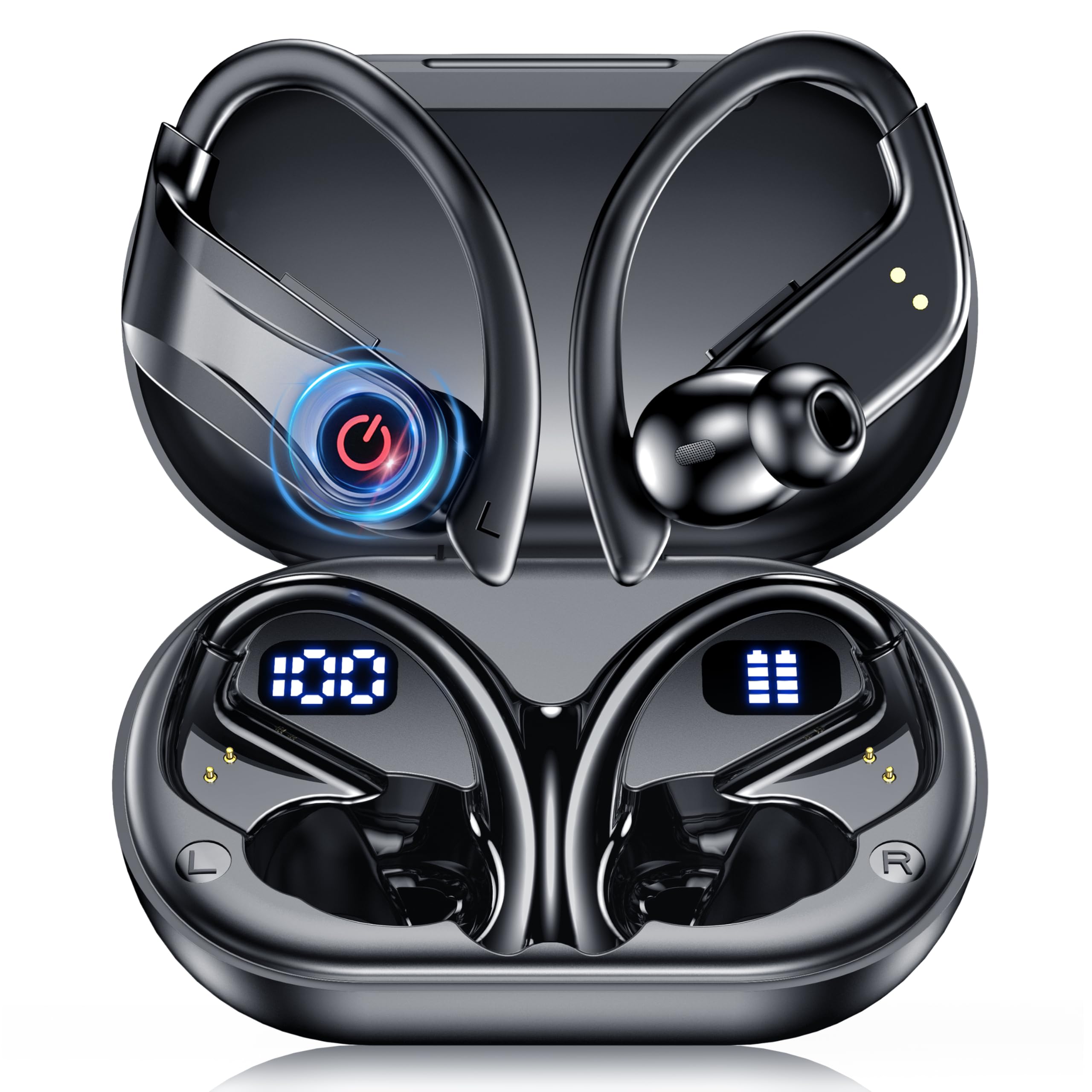
Image: The charging case with earbuds, displaying battery levels on the LED screen.
3. Setup
3.1 Charging the Earbuds and Case:
- Place the earbuds into the charging case. Ensure they are correctly seated to initiate charging.
- Connect the USB-C charging cable to the port on the charging case and to a power source.
- The dual LED display on the case will show the charging status of both the case and the earbuds.
- A full charge for the earbuds takes approximately 1 hour, providing up to 14 hours of playtime. The charging case extends total playtime to up to 120 hours.

Image: Overview of the earbud and charging case battery life and charging times.
3.2 Pairing with Your Device:
- Open the charging case. The earbuds will automatically enter pairing mode, indicated by a flashing red and blue light on the earbuds.
- On your device (smartphone, tablet, laptop), enable Bluetooth.
- Search for available Bluetooth devices and select "YYK-Q63" from the list.
- Once connected, the LED indicator on the earbuds will stop flashing.
- The earbuds feature advanced Bluetooth 6.1 chip for faster pairing and stable connectivity up to 49 feet.

Image: Visual guide to the quick and stable Bluetooth pairing process.
3.3 Video Guide: Product Overview and Pairing
Video: A short video demonstrating the EUQQ YYK-Q63 Wireless Bluetooth V6.1 Earbuds, including unboxing and initial setup steps.
Video: A detailed review of the Cool Q63-1 Bluetooth V6.1 Earbuds, covering features and usage.
4. Operating Instructions
4.1 Button Controls:
The earbuds feature intuitive button controls for easy management of your audio and calls:
- Power On/Off: Press and hold the power button for 3-5 seconds.
- Play/Pause: Single press the multi-function button.
- Volume Up/Down: Use the dedicated volume buttons on the side of the earbud.
- Next Track: Double press the right earbud's multi-function button.
- Previous Track: Double press the left earbud's multi-function button.
- Answer/End Call: Single press the multi-function button during an incoming call or active call.
- Reject Call: Press and hold the multi-function button during an incoming call.
- Activate Voice Assistant: Triple press the multi-function button.

Image: Overview of all button controls for music and call management.
4.2 Noise Cancellation:
The earbuds feature Environmental Noise Cancellation (ENC) and CVC 8.0 dual noise-canceling technology. This reduces background noise by 80% for crystal-clear calls and immersive sound enjoyment, making them ideal for workouts or commutes.

Image: Demonstration of Environmental Noise Cancellation for clear calls.
5. Wearing the Earbuds
For optimal sound quality and comfort, ensure a proper fit:
- Select Ear Tips: Choose the S, M, or L ear caps that best fit your ear canal for a secure seal and immersive sound.
- Position the Earphones: Align the earbud with your ear canal.
- Adjust for Comfort: Gently twist the earbud 15-30 degrees until the ear hook locks behind your ear, ensuring a stable, pressure-free fit.

Image: Step-by-step guide for wearing the earbuds securely.
5.1 Video Guide: Wearing Earbuds During Exercise
Video: Demonstration of wearing the YYK-Q63 Wireless Earbuds during exercise, showcasing their secure fit.
6. Maintenance
6.1 Water Resistance:
The EUQQ NewYYK-Q63 earbuds are IPX7 waterproof and sweat-resistant. This means they can resist sweat, rain, and full immersion up to 1 meter for 30 minutes. They are suitable for intense gym sessions, walks in the rain, night runs, or outdoor adventures. Note: While water-resistant, they are not designed for swimming or prolonged submersion.

Image: Illustration of the earbuds' IPX7 water and sweat resistance.
6.2 Cleaning and Storage:
- Regularly clean the ear tips and charging contacts with a soft, dry cloth to prevent debris buildup.
- Store the earbuds in their charging case when not in use to protect them and keep them charged.
- Avoid exposing the earbuds to extreme temperatures or direct sunlight for extended periods.
7. Troubleshooting
If you encounter any issues with your earbuds, try the following steps:
- No Sound: Ensure the earbuds are charged and properly paired with your device. Check the volume levels on both the earbuds and your device.
- Cannot Pair: Make sure Bluetooth is enabled on your device and the earbuds are in pairing mode. Try turning Bluetooth off and on again on your device. If issues persist, reset the earbuds (refer to the full user manual for specific reset instructions).
- Charging Issues: Verify that the charging cable is securely connected and the power source is working. Clean the charging contacts on both the earbuds and the case.
- Uncomfortable Fit: Experiment with the different sized ear caps (S/M/L) included in the package to find the most comfortable and secure fit for your ears.
For more detailed troubleshooting or persistent issues, please refer to the comprehensive user manual included in your package or contact EUQQ Customer Service.
8. Specifications
| Feature | Detail |
|---|---|
| Model Name | NewYYK-Q63 |
| Bluetooth Version | 6.1 |
| Bluetooth Range | 49 Feet |
| Audio Driver Size | 16.2 Millimeters |
| Noise Control | Environmental Noise Cancellation (ENC), CVC 8.0 |
| Battery Life (Earbuds) | Up to 14 Hours |
| Total Battery Life (with Case) | Up to 120 Hours |
| Charging Time | 1 Hour |
| Water Resistance Level | IPX7 (Waterproof & Sweatproof) |
| Control Type | Button Control |
| Material | Plastic |
| Item Weight | 2.88 ounces |
| Product Dimensions | 1.3 x 0.7 x 0.6 inches |
9. Warranty and Support
9.1 365-Day Service Guarantee:
We guarantee 100% satisfaction during the warranty period at no cost to you. If the product has quality defects, we will replace it or provide a full refund. This covers:
- Missing Components?
- Performance Failure?
- External Damage Found?
- Further Assistance Needed?

Image: Details of the 365-Day Service Guarantee.
9.2 24 Hours Online Customer Service:
If you experience any of the following, please contact our EUQQ Customer Service Team directly:
- Product not delivered on time?
- Not satisfied with the product?
- Problems during use?
- Can't return an item through Amazon?
- Was Amazon Customer Service unable to resolve your issue?
- Explore alternative solutions.

Image: Information on contacting EUQQ's 24-hour online customer service.
10. Safety Information
Please read these safety instructions carefully before using your earbuds:
- Avoid listening at high volume levels for extended periods to prevent hearing damage.
- Do not use the earbuds in situations where you need to hear your surroundings, such as driving or walking in traffic.
- Keep the earbuds and charging case away from extreme temperatures, humidity, and corrosive materials.
- Do not attempt to disassemble or modify the product. This will void the warranty.
- Dispose of the product and batteries responsibly according to local regulations.