Introduction
Thank you for choosing the Jaojcoe W02B Wireless Cat Water Fountain. This manual provides essential information for the safe and efficient operation, maintenance, and troubleshooting of your new pet water dispenser. Please read these instructions thoroughly before use and retain them for future reference.
Safety Instructions
- Ensure the fountain is placed on a stable, level surface to prevent tipping.
- Do not immerse the main unit (battery compartment/pump housing) in water. Only the water tank and stainless steel tray are designed for water contact.
- Use only the original charging cable and adapter (if provided) for charging the built-in battery.
- Keep out of reach of children. This product is intended for pet use only.
- Unplug the fountain before cleaning or performing any maintenance.
- Do not operate the fountain without water in the tank.
- Regularly inspect the power cord (if used for continuous mode) for damage. Discontinue use if damaged.
- Dispose of used filters according to local regulations.
Package Contents
- Jaojcoe W02B Wireless Cat Water Fountain Main Unit
- Stainless Steel Tray
- Water Tank (3.5L / 118oz capacity)
- Filter Element (pre-installed or separate)
- Filter Sponge (pre-installed or separate)
- USB Charging Cable
- User Manual (this document)
Product Diagram
Familiarize yourself with the components of your Jaojcoe W02B water fountain.
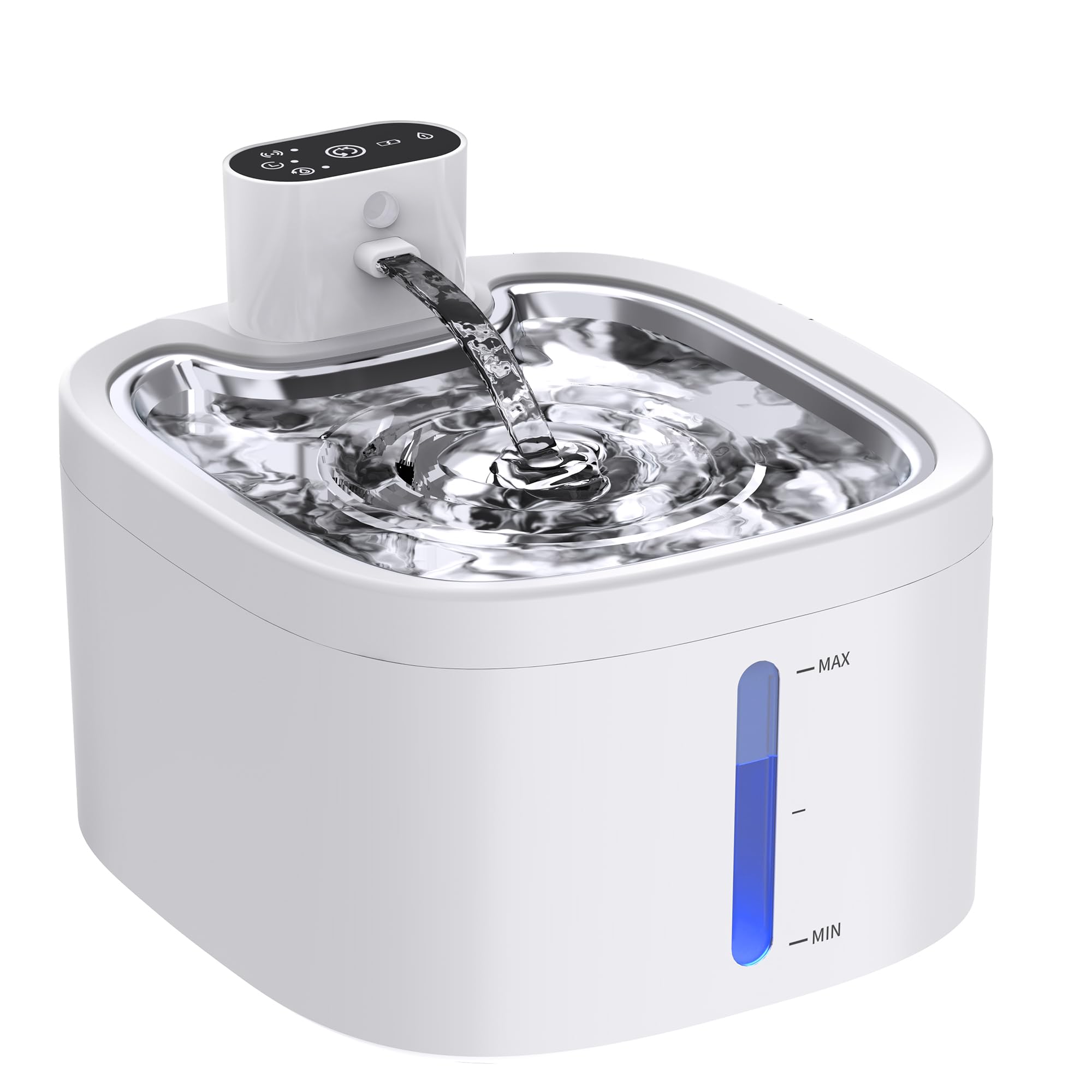
Image: Assembled Jaojcoe W02B Wireless Cat Water Fountain. This image shows the complete unit with the main body, water tank, and stainless steel tray.
- Stainless Steel Drinking Tray
- Filter Element Housing
- Water Outlet Spout
- Motion Sensor Window
- Water Tank (3.5L)
- Main Unit (contains pump and battery)
- Mode Indicator Lights / Button
- Charging Port (USB-C, typically)
Setup
1. Initial Charging
Before first use, fully charge the fountain's built-in 4000mAh battery.
- Connect the USB charging cable to the charging port on the main unit.
- Plug the other end into a compatible USB power adapter (not included) or a USB port.
- The indicator light will show charging status (e.g., red for charging, green for fully charged).
- A full charge may take several hours.
2. Assembly
- Rinse Components: Thoroughly rinse the water tank, stainless steel tray, and filter housing with clean water. Do not use soap on the filter.
- Install Filter: Place the filter sponge into its designated slot, then insert the 4-layer filter element into the filter housing. Ensure it is seated correctly.
- Assemble Pump Unit: Place the main unit (with pump) into the water tank, ensuring the water inlet aligns properly.
- Attach Tray: Place the stainless steel drinking tray on top of the water tank, ensuring it fits securely over the water outlet spout.
Image: Disassembled Jaojcoe W02B Wireless Cat Water Fountain showing individual components. This image illustrates the water tank, main unit with pump, filter housing, filter, and stainless steel tray separated for assembly.
Operating Instructions
1. Filling the Water Tank
- Remove the stainless steel tray.
- Fill the water tank with clean tap water up to the MAX fill line. Do not overfill.
- Replace the stainless steel tray securely.
2. Smart Water Modes
The fountain offers three operating modes. Press the mode button on the main unit to cycle through them.
- Sensor Mode: The fountain activates for 12 seconds when a pet is detected within 4-6 feet by the motion sensor. This mode conserves battery life and provides fresh water on demand.
- Timer Mode: The fountain activates for 12 seconds every 15 minutes. This mode balances water freshness with battery conservation, offering up to 60-80 days of operation on a full charge.
- Continuous Mode: The fountain provides a continuous flow of water 24/7. This mode requires the fountain to be plugged into a power source via the USB cable. It is ideal for pets who prefer constant running water.
Note: Battery life estimates are based on typical usage in Timer Mode. Actual battery life may vary based on usage frequency and environmental factors.
3. Motion Sensor Functionality
In Sensor Mode, the integrated motion sensor detects your pet's presence. Ensure the sensor window is clear of obstructions for optimal performance. The detection range is approximately 4-6 feet.
Maintenance
Regular cleaning and filter replacement are crucial for maintaining water quality and extending the life of your fountain.
1. Cleaning the Fountain
- Frequency: Clean the fountain at least once a week, or more frequently if multiple pets use it or if the water appears dirty.
- Disassembly: Unplug the fountain (if applicable) and disassemble all components: stainless steel tray, water tank, filter housing, filter element, and main unit.
- Washing: Wash the stainless steel tray, water tank, and filter housing with mild soap and water. Rinse thoroughly to remove all soap residue. Do not use abrasive cleaners.
- Main Unit: Wipe the exterior of the main unit (containing the pump and battery) with a damp cloth. Do not immerse the main unit in water.
- Reassembly: Reassemble all components once they are clean and dry.
2. Filter Replacement
The 4-layer filtration system includes activated carbon, ion-exchange resin, and non-woven fabric to purify water. Replace the filter element regularly.
- Frequency: Replace the filter element every 2-4 weeks, depending on the number of pets and water quality.
- Procedure:
- Remove the stainless steel tray and filter housing.
- Discard the old filter element.
- Rinse the new filter element under running water for several minutes to remove any loose carbon dust.
- Place the rinsed new filter element into the filter housing.
- Reassemble the fountain.
Image: Diagram illustrating the filter replacement process for the Jaojcoe W02B fountain. This image would typically show the location of the filter and how to remove and insert a new one.
3. Pump Maintenance
The pump sponge prevents hair and debris from entering the pump. Clean the pump and sponge regularly.
- Frequency: Clean the pump sponge weekly. Disassemble the pump for cleaning monthly.
- Procedure:
- Remove the main unit from the water tank.
- Remove the pump sponge and rinse it thoroughly.
- Carefully open the pump cover (refer to product diagram for specific pump type) and remove the impeller.
- Clean the impeller and the inside of the pump housing with a small brush to remove any accumulated debris or mineral deposits.
- Reassemble the pump, ensuring the impeller is correctly seated, and replace the pump sponge.
Troubleshooting
| Problem | Possible Cause | Solution |
|---|---|---|
| Fountain not dispensing water. |
|
|
| Fountain is noisy. |
|
|
| Motion sensor not activating. |
|
|
| Water tastes or smells bad. |
|
|
Specifications
- Model: W02B
- Brand: Jaojcoe
- Capacity: 3.5 Liters (118 oz)
- Material: Acrylonitrile Butadiene Styrene (ABS), Stainless Steel Tray
- Power Source: Battery Powered (Built-in 4000mAh Lithium-Ion) / USB-C (for Continuous Mode)
- Voltage: 5V
- Noise Level: ≤30dB
- Motion Sensor Range: 4-6 feet
- Product Dimensions: 19.8L x 19.8W x 16H Centimetres
Warranty and Support
Jaojcoe is committed to providing high-quality products. For warranty information, technical support, or customer service inquiries, please refer to the contact information provided on the product packaging or the official Jaojcoe website. Please have your model number (W02B) and purchase date available when contacting support.
Note: Specific warranty terms may vary by region and retailer.