1. Introduction
This instruction manual provides essential information for the proper installation, operation, and maintenance of your YHNNH S.T.CS2560P739 TV Motherboard. Please read this manual thoroughly before attempting any installation or repair to ensure safe and correct usage. Retain this manual for future reference.
2. Safety Information
Working with electronic components requires caution. Adhere to the following safety guidelines:
- Disconnect Power: Always ensure the television is completely disconnected from the power source before beginning any work.
- Electrostatic Discharge (ESD) Precautions: Wear an anti-static wrist strap and work on an anti-static mat to prevent damage to sensitive electronic components from static electricity.
- Professional Installation Recommended: If you are not experienced with TV repair or electronic component installation, it is highly recommended to seek assistance from a qualified technician.
- Handle with Care: Avoid touching the integrated circuits (ICs) and other sensitive components directly. Hold the motherboard by its edges.
- Ventilation: Ensure adequate ventilation around the TV once the motherboard is installed to prevent overheating.
3. Package Contents
Verify that all items are present and in good condition upon opening the package:
- 1 x YHNNH S.T.CS2560P739 TV Motherboard
- (No other accessories are typically included with a replacement motherboard unless specified by the seller.)
4. Product Overview
The YHNNH S.T.CS2560P739 is a replacement TV motherboard designed for specific television models. It integrates the main processing unit, memory, and various input/output interfaces necessary for the television's functionality.

Figure 4.1: This image displays a close-up of the motherboard, clearly showing the model number S.T.CS2560P739 printed on the circuit board. This number is crucial for identification and compatibility.
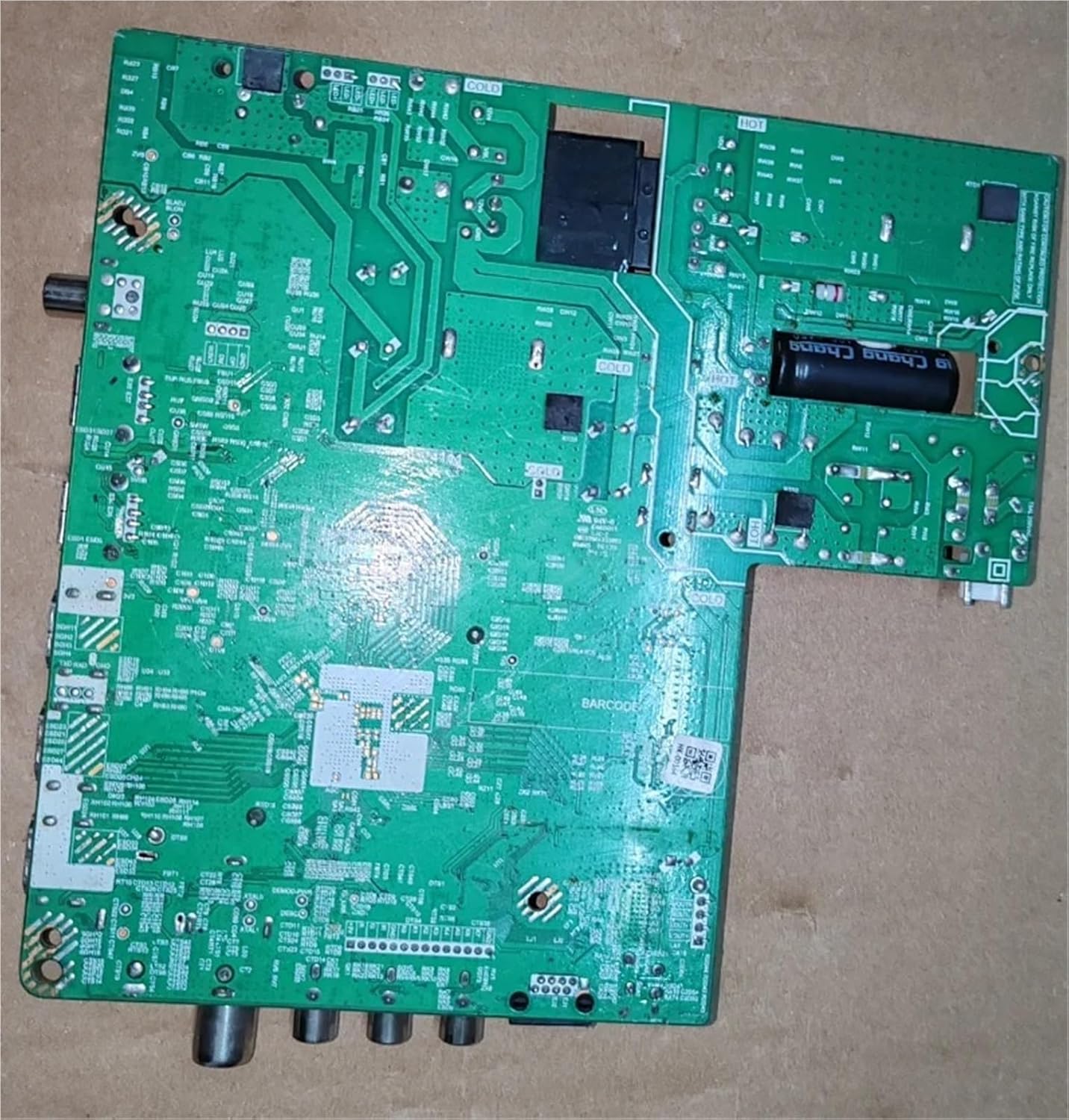
Figure 4.2: This image provides a full view of the back of the S.T.CS2560P739 TV Motherboard, illustrating the layout of components, solder points, and various input/output connectors at the bottom edge.

Figure 4.3: A detailed shot of the motherboard highlighting the S.T.CS2560P739 model number and an additional identifier, 7C8274D5E8DA, which may be a serial number or a specific board revision ID. This information is important for technical support and verification.
5. Setup and Installation
5.1 Pre-installation Checks
- Compatibility: Ensure this motherboard model (S.T.CS2560P739) is compatible with your specific TV model. Refer to your TV's service manual or manufacturer's specifications.
- Tools Required: Gather necessary tools such as screwdrivers (Phillips, flathead), anti-static wrist strap, anti-static mat, and possibly plastic prying tools.
- Work Area: Prepare a clean, well-lit, and static-free work surface.
5.2 Installation Steps
- Power Disconnection: Unplug the TV from the wall outlet and disconnect all external cables (HDMI, antenna, etc.).
- Access the TV Back Panel: Carefully remove the back cover of your television. This usually involves unscrewing several screws around the perimeter.
- Locate and Remove Old Motherboard: Identify the existing motherboard. Disconnect all cables connected to it (power, display, speakers, control panel, etc.). Note the orientation and connection points for reassembly. Unscrew the motherboard from the TV chassis.
- Install New Motherboard: Carefully place the new YHNNH S.T.CS2560P739 motherboard into position, aligning it with the screw holes and external ports. Secure it with the screws removed earlier.
- Reconnect Cables: Reconnect all cables to their corresponding ports on the new motherboard. Ensure all connections are firm and correctly oriented. Double-check all connections before proceeding.
- Reassemble TV: Replace the TV's back cover and secure it with screws.
- Initial Power-Up: Reconnect the TV to the power outlet and any necessary external devices. Power on the TV.
6. Operating Instructions
After successful installation, the TV should power on and function as expected. The operating instructions for the TV itself remain unchanged, as the motherboard is a replacement component. If the TV does not power on or display an image, refer to the Troubleshooting section.
- First Boot: The TV may take slightly longer to boot up for the first time after a motherboard replacement as it initializes new hardware.
- Firmware/Software: In some cases, a new motherboard might require a firmware update or initial setup through the TV's service menu. Consult your TV's specific service manual for such procedures if issues arise.
7. Maintenance
The YHNNH S.T.CS2560P739 TV Motherboard is designed for long-term reliability and typically requires minimal maintenance. However, following these guidelines can help prolong its lifespan:
- Dust Removal: Periodically clean the interior of your TV to prevent dust buildup on the motherboard, which can lead to overheating. Use compressed air or a soft brush. Ensure the TV is unplugged before cleaning.
- Ventilation: Ensure the TV's ventilation openings are not blocked to allow for proper airflow and heat dissipation.
- Avoid Liquids: Keep liquids away from the television to prevent accidental spills that could damage the motherboard.
- Power Surges: Consider using a surge protector for your TV to protect the motherboard from electrical spikes.
8. Troubleshooting
If you encounter issues after installing the motherboard, refer to the following common problems and solutions:
8.1 Common Issues
- No Power: The TV does not turn on.
- No Display/Black Screen: The TV turns on, but there is no image.
- No Audio: The TV has a display but no sound.
- Incorrect Image/Colors: Distorted picture or unusual color display.
- Input/Output Malfunction: Specific HDMI, USB, or other ports are not working.
8.2 Diagnostic Steps
- Check All Connections: Ensure all cables (power, display, input, etc.) are securely connected to the motherboard and other TV components.
- Verify Power Supply: Confirm that the TV is receiving power from the wall outlet and that the internal power supply unit (PSU) is functioning correctly.
- External Devices: If the issue is with a specific input, test with a different external device or cable.
- Reset TV: Disconnect the TV from power for a few minutes, then plug it back in. This can sometimes resolve minor glitches.
- Consult TV Service Manual: For complex issues, refer to the original TV's service manual for specific diagnostic procedures and error codes.
- Professional Assistance: If troubleshooting steps do not resolve the issue, contact a qualified technician for further diagnosis and repair.
9. Specifications
| Feature | Specification |
|---|---|
| Brand | YHNNH |
| Model | S.T.CS2560P739 |
| Item Weight | 50 g |
| Parcel Dimensions | 1 x 1 x 1 cm |
| ASIN | B0FVV58H6S |
| Date First Available | Oct. 12 2025 |
10. Warranty Information
This YHNNH S.T.CS2560P739 TV Motherboard is typically covered by a manufacturer's warranty against defects in materials and workmanship. The specific terms and duration of the warranty may vary. Please refer to the seller's or manufacturer's warranty policy at the time of purchase for detailed information. Keep your proof of purchase for warranty claims.
11. Customer Support
For technical assistance, warranty claims, or further inquiries regarding your YHNNH S.T.CS2560P739 TV Motherboard, please contact the seller or the manufacturer directly. Provide your product model number (S.T.CS2560P739) and any relevant purchase details to expedite support.


