
1. Introduction
Thank you for choosing the S-Link IP-G11N 10000mAh Power Bank. This manual provides essential information for the safe and efficient use of your portable charging device. Please read these instructions carefully before use and retain them for future reference.
2. Safety Information
- Do not disassemble, open, or attempt to repair the power bank.
- Keep the power bank away from water, moisture, and extreme temperatures (both high and low).
- Avoid dropping, hitting, or subjecting the power bank to strong impacts.
- Do not expose the power bank to fire or direct sunlight for prolonged periods.
- Use only certified charging cables and adapters.
- Keep out of reach of children.
- Dispose of the power bank responsibly according to local regulations.
3. Package Contents
Verify that all items are present in your package:
- S-Link IP-G11N 10000mAh Power Bank
- USB-A to Type-C Charging Cable

Image: Retail packaging of the S-Link IP-G11N Power Bank, highlighting its 10000mAh capacity, dual output, and compatibility.
4. Product Overview
The S-Link IP-G11N Power Bank features multiple ports for versatile charging and recharging, along with LED indicators to show battery status.
Ports and Indicators:
- Micro USB Input Port: For recharging the power bank.
- Type-C Input/Output Port: For recharging the power bank or charging compatible devices.
- USB-A Output Ports (x2): For charging external devices.
- Power Button: To check battery level or initiate charging.
- LED Indicators: Four small LED lights indicate the remaining battery capacity. Each light typically represents 25% of the charge.

Image: Top view of the power bank, clearly showing the Micro USB input, Type-C input/output, and two USB-A output ports.

Image: Angled view of the power bank, highlighting the four LED battery level indicators.
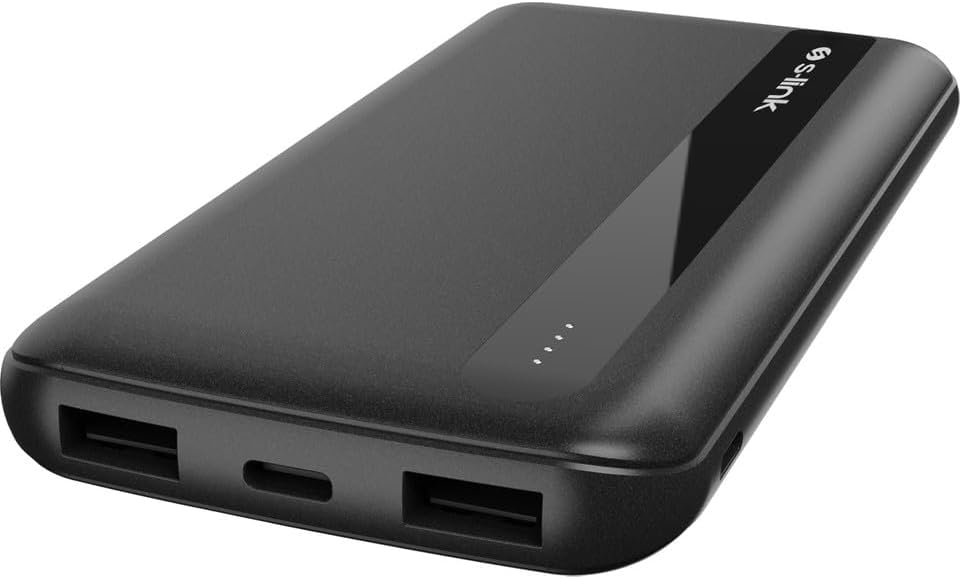
Image: Side view of the power bank, illustrating the location of the power button.
5. Setup: Initial Charging
Before using your S-Link IP-G11N Power Bank for the first time, it is recommended to fully charge it.
- Connect the provided USB-A to Type-C cable (or a Micro USB cable) to the corresponding input port on the power bank.
- Connect the other end of the cable to a USB power adapter (not included) or a computer's USB port.
- The LED indicators will light up, showing the charging progress. All four LEDs will be solid when the power bank is fully charged.
6. Operating Instructions
6.1. Charging External Devices
- Connect your device's charging cable to one of the USB-A output ports or the Type-C output port on the power bank.
- Connect the other end of the cable to your device.
- The power bank will automatically begin charging your device. If not, press the power button once to initiate charging.
- The LED indicators will show the remaining battery level of the power bank during charging.
- Note on Multiple Devices: When charging two devices simultaneously, the total output current is limited to 2 Amperes. This may result in slower charging for each device compared to charging a single device.
6.2. Recharging the Power Bank
To recharge the power bank, follow these steps:
- Use a Micro USB cable or a Type-C cable.
- Connect one end of the cable to the Micro USB input port or the Type-C input port on the power bank.
- Connect the other end of the cable to a suitable USB power source (e.g., wall adapter, computer USB port).
- The LED indicators will flash to show the charging status. Once fully charged, all four LEDs will remain solid.
7. Maintenance
- Clean the power bank with a soft, dry cloth. Do not use liquid cleaners or aerosols.
- Store the power bank in a cool, dry place when not in use.
- To prolong battery life, fully charge the power bank at least once every three months if it's not used regularly.
8. Troubleshooting
- Power bank not charging: Ensure the charging cable is securely connected to both the power bank and the power source. Try a different cable or power adapter.
- Device not charging from power bank: Ensure the power bank has sufficient charge. Press the power button to activate charging. Try a different output port or charging cable.
- Slow charging: Check if your device's charging cable is compatible. If charging multiple devices, note that the total output current is shared, which may reduce individual charging speeds.
- LED indicators not working: If the power bank is completely depleted, the LEDs may not light up immediately. Charge it for a few minutes before checking again. If the issue persists, contact support.
9. Specifications
| Model | IP-G11N |
| Battery Capacity | 10000mAh |
| Micro USB Input | 5V/2A |
| Type-C Input | 5V/2A |
| USB-A Output 1 & 2 | 5V/2A (each) |
| Type-C Output | 5V/2A |
| Total Output | 5V/2A (Max, when multiple devices are connected) |
| Dimensions | 136 x 71 x 15.5 mm |
| Weight | Approximately 220 grams |

Image: Rear view of the power bank, displaying printed technical specifications and certifications.
10. Warranty and Support
For warranty information or technical support, please refer to the official S-Link website or contact your retailer. Keep your proof of purchase for warranty claims.