
1. Introduction
This manual provides detailed instructions for the installation, operation, and maintenance of your Flydew 6-Wheel Tire Pressure Monitoring System (TPMS), Model T18. This system is designed to enhance driving safety by continuously monitoring the tire pressure and temperature of 6-wheel RVs, trailers, and heavy-duty trucks. Please read this manual thoroughly before using the product to ensure proper function and longevity.

The Flydew TPMS is compatible with a range of 6-wheel vehicles, including Class A RVs, Dually Pickups, Overland Campers, Fifth-Wheel Trailers, and Heavy-Haul Trucks.
2. Product Features
- 4-inch LCD Display: Designed for 6-wheel RVs, trailers, and heavy-duty trucks, our Tire Pressure Monitoring System (TPMS) features a large 4-inch LCD display. It provides clear and easy-to-read pressure and temperature data, even in bright sunlight or dark nights, reducing distracted driving risks.
- 6 Sensors with 0.3-second Real-time Response: Equipped with 6 dedicated sensors, this TPMS tracks tire pressure and temperature in real-time with an accuracy of ±0.1 bar/±2 PSI. Any anomaly (e.g., sudden pressure drop) triggers instant alerts within 0.3 seconds, keeping you ahead of potential tire issues.
- 5 Monitoring Modes for Comprehensive Protection: Our TPMS covers 5 key monitoring modes: real-time pressure tracking, high-pressure alert (9.8 bar/142 PSI), low-pressure alert (1.8 bar/26 PSI), high-temperature warning (over 92 °C), and rapid leak detection. It also alerts you when the monitor or sensors have low battery. Ideal for 6-wheel RVs, trailers, and heavy-duty trucks.
- Energy-Saving & Dual Charging: This TPMS combines dual energy-saving technology with dual charging. The monitor automatically turns off after 3 minutes of inactivity, and sensors enter power-saving mode (updating every 8 minutes when stable). Both instantly return to real-time mode if anomalies occur. Charge via solar power during the day or Type-C at night/cloudy days, perfect for long trips.

The 4-inch LCD display offers superior clarity for monitoring tire conditions compared to smaller screens.
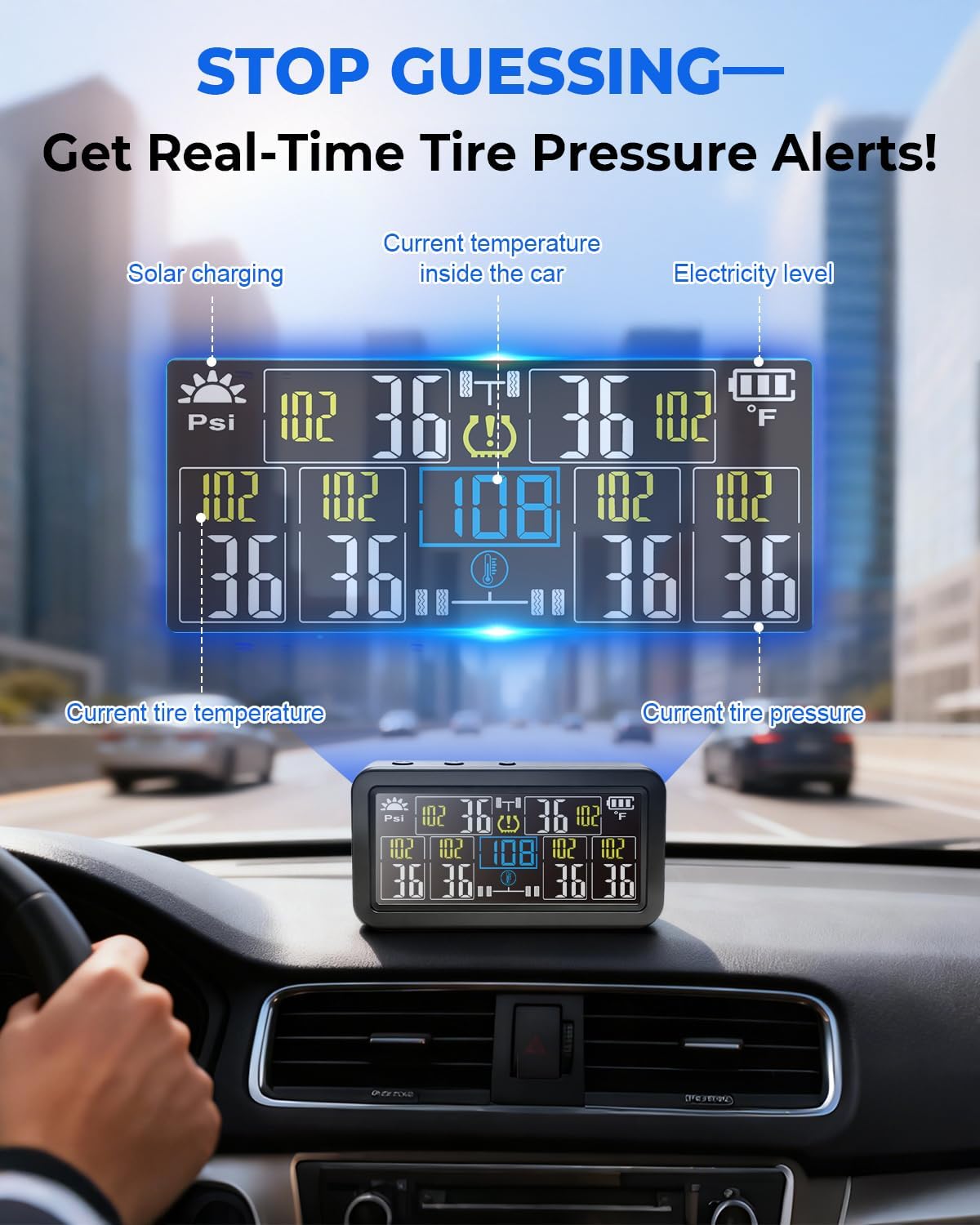
The system provides real-time tire pressure and temperature alerts, along with charging and battery status.

The 5 monitoring modes ensure comprehensive tire protection and alert you to various potential issues.

The TPMS supports both solar power and Type-C USB charging for continuous operation.
3. Setup and Installation
This TPMS kit includes 6 external sensors. The installation process is straightforward and can be completed in 5 steps:
- Power On Monitor: Press and hold the power button on the monitor for 3 seconds to turn it on.
- Attach Hexagonal Nuts: Screw the hexagonal nuts onto the 6 valve stems of your tires. Do not tighten them fully yet.
- Mount Sensors: Mount the sensors onto the valve stems in the specified order: LF (Left Front) → RF (Right Front) → MF (Middle Front, if applicable) → MR (Middle Rear, if applicable) → LR (Left Rear) → RR (Right Rear). Ensure each sensor is placed on its corresponding tire.
- Tighten Nuts: Once all sensors are in place, tighten the hexagonal nuts clockwise against the sensors to secure them and create a tight seal.
- Leak Test: Perform a soapy water test around each sensor and valve stem to ensure there are no air leaks. The hexagonal nuts are crucial for preventing the sensor from loosening at high speeds, reinforcing airtight seals, and protecting the valve stems.
4. Operating Instructions
Once installed, the Flydew TPMS continuously monitors your tires and provides alerts based on its 5 operational modes:
- Real-time Pressure Tracking: The display shows the current pressure for all 6 tires.
- High-Pressure Alert: An alarm will sound if any tire pressure exceeds 9.8 bar (142 PSI).
- Low-Pressure Alert: An alarm will sound if any tire pressure drops below 1.8 bar (26 PSI).
- High-Temperature Warning: An alarm will sound if any tire temperature exceeds 92 °C.
- Rapid Leak Detection: The system will detect and alert you to sudden, rapid air loss from a tire.
- Low Battery Warning: The monitor will indicate when its own battery or any sensor's battery is low, prompting you to recharge or replace.
The monitor will automatically enter an energy-saving mode after 3 minutes of inactivity. Sensors also switch to power-saving mode, sending updates every 8 minutes when pressure is stable. Both the monitor and sensors will instantly return to real-time monitoring if any anomalies are detected.
5. Maintenance
To ensure optimal performance and longevity of your Flydew TPMS, follow these maintenance guidelines:
- Charging: The monitor can be charged via its integrated solar panel during the day. For nighttime or cloudy conditions, use the provided Type-C USB cable to charge the unit. Ensure the monitor is adequately charged, especially before long trips.
- Sensor Battery: The sensors are designed for long battery life. If a low battery alert for a sensor appears, the sensor battery may need replacement. Refer to the product packaging or contact support for sensor battery replacement instructions.
- Cleaning: Keep the monitor screen and sensors clean from dirt and debris. Use a soft, dry cloth for cleaning. Avoid harsh chemicals or abrasive materials.
- Storage: If storing the vehicle for an extended period, ensure the monitor is fully charged and stored in a cool, dry place.
6. Troubleshooting
If you encounter issues with your Flydew TPMS, consider the following common solutions:
- No Display/Monitor Not Turning On:
- Ensure the monitor is fully charged using either solar power or the Type-C USB cable.
- Press and hold the power button for at least 3 seconds.
- No Sensor Readings:
- Verify that the sensors are correctly installed and tightened on the valve stems.
- Check for any air leaks around the sensor and valve stem.
- Ensure the sensor batteries are not low.
- If a specific sensor is not reporting, try re-pairing it according to the instructions in the full product manual (if available) or contact customer support.
- Inaccurate Readings:
- Ensure sensors are securely attached and there are no leaks.
- Compare readings with a reliable manual tire gauge. If discrepancies persist, contact support.
- False Alarms:
- Check the set alarm thresholds for high/low pressure and high temperature. Adjust if necessary.
- Ensure the tires are inflated to the correct pressure for your vehicle type.
For more complex issues or if troubleshooting steps do not resolve the problem, please refer to the complete product manual or contact Flydew customer support.

The Flydew TPMS provides continuous monitoring for a stress-free driving experience.
7. Specifications
| Feature | Detail |
|---|---|
| Brand | Flydew |
| Model Number | T18 |
| Display Size | 4-inch LCD |
| Number of Sensors | 6 External Sensors |
| Pressure Accuracy | ±0.1 bar / ±2 PSI |
| High Pressure Alert Threshold | 9.8 bar (142 PSI) |
| Low Pressure Alert Threshold | 1.8 bar (26 PSI) |
| High Temperature Warning Threshold | Over 92 °C |
| Response Time | 0.3 seconds for anomaly detection |
| Charging Options | Solar Power, Type-C USB |
| Product Weight | 290 g |
| Package Dimensions | 16 x 13.41 x 5.41 cm |
| ASIN | B0FVT5GQTM |
8. Warranty and Support
Specific warranty information for the Flydew 6-Wheel TPMS, Model T18, is not provided in this document. Please refer to the product packaging, the official Flydew website, or your point of purchase for detailed warranty terms and conditions.
For technical support, troubleshooting assistance beyond what is covered in this manual, or inquiries regarding parts and service, please contact Flydew customer support through the contact information provided with your product or on the manufacturer's official website.