
Introduction
This manual provides detailed instructions for the installation, operation, and maintenance of your NCLTHS S31D Waterproof Fingerprint Access Control Kit. This advanced 4-in-1 security system offers multiple access methods including fingerprint, password, RFID card, and remote control, ensuring flexible and robust security for various applications.
Package Contents
Verify that all components listed below are included in your package:
- 1 x 600lb Electromagnetic Lock
- 1 x IP68 Waterproof Access Control Keypad
- 1 x AC110V to DC12V Power Supply
- 1 x Exit Button (Stainless Steel Switch)
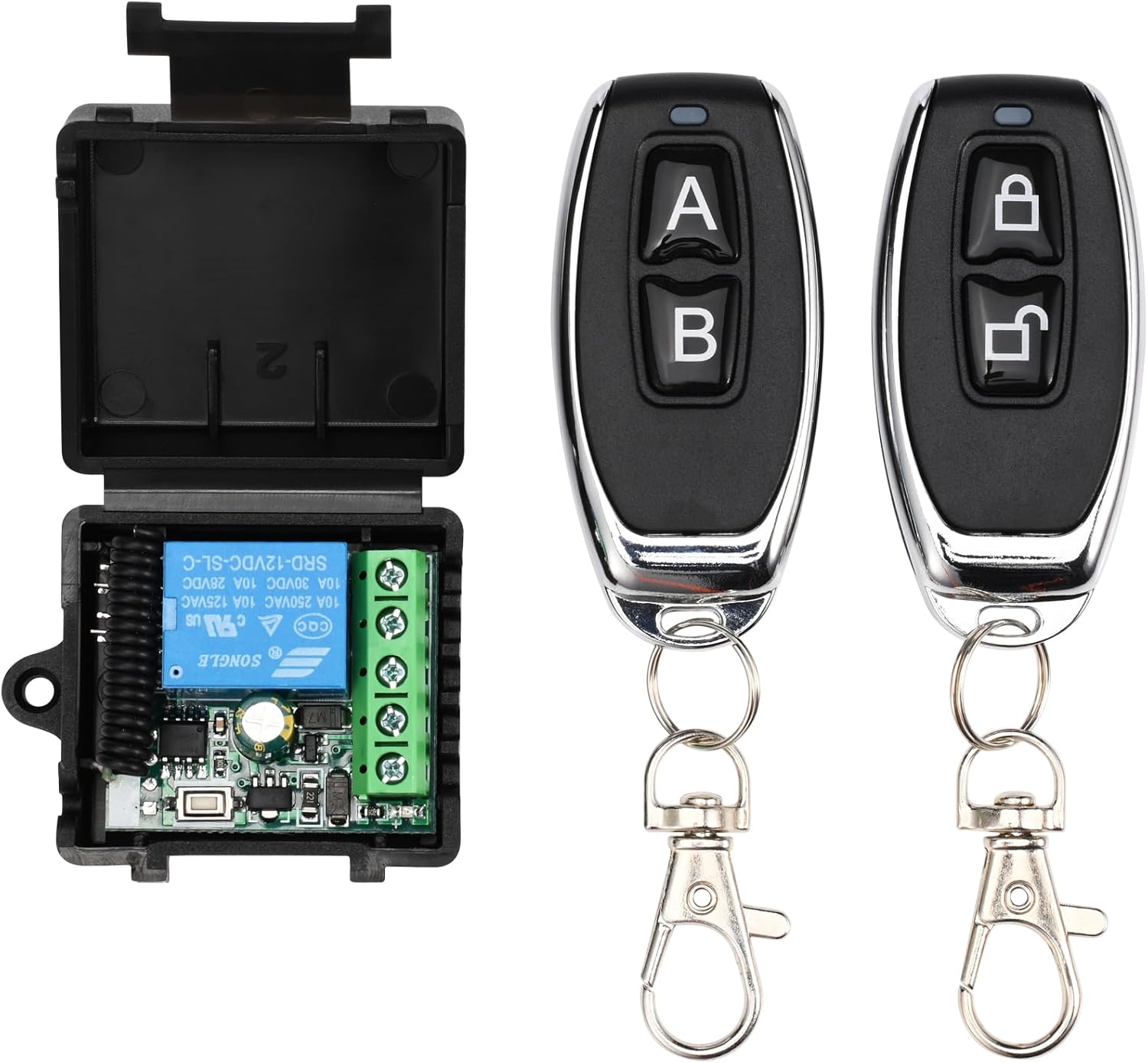
- 1 x Remote Control Receiver
- 2 x Remote Controls
- 5 x RFID ID Cards
- 1 x Doorbell
- 1 x English Instruction Manual (This document)

Setup and Installation
Proper installation is crucial for the optimal performance and security of your access control system. It is recommended that installation be performed by a qualified technician.
Component Overview
Electromagnetic Lock
The 600lb holding force magnetic lock provides strong security. It operates in NC (Normally Closed) mode, meaning it locks when powered and unlocks automatically during a power outage for emergency exit (fail-safe).

IP68 Waterproof Access Control Keypad
This durable metal keypad is IP68 rated, suitable for both indoor and outdoor environments. It supports fingerprint, password, and RFID card access.

Power Supply
The included power supply converts AC110V-240V to DC12V (4A) to power the system. Ensure proper wiring to avoid damage.

Remote Control System
The remote control receiver and two remote controls allow for convenient wireless unlocking.
Exit Button
A stainless steel exit button provides a simple way to exit from the secured area.

Doorbell
The doorbell unit connects to the keypad for visitor notification.

Wiring Diagram
Refer to the following diagram for correct wiring connections. Ensure all power is disconnected before wiring.

Caution:
The wiring diagram provided in the physical manual may vary. Always cross-reference with the most up-to-date instructions or consult a professional if unsure. Ensure sufficient wire length for your installation, as included wires may not cover long distances.
Operating Instructions
Initial Setup and Programming
Before first use, you will need to program administrator and user credentials. Refer to the specific programming section in your physical manual for detailed steps on adding fingerprints, passwords, and RFID cards.
Unlocking Methods
Fingerprint Access
Place your registered finger firmly on the fingerprint sensor on the keypad. The lock will disengage upon successful recognition.
Password Access
Enter your registered password on the keypad, followed by the '#' key. The lock will disengage upon successful entry.
RFID Card Access
Present your registered RFID card to the card reader area on the keypad. The lock will disengage upon successful reading.
Remote Control Access
Press the unlock button on the remote control fob. The lock will disengage. Ensure you are within range of the remote receiver.
Exit Button
From the inside, press the exit button to disengage the lock and open the door.
Maintenance
- Cleaning: Wipe the keypad and magnetic lock surfaces with a soft, damp cloth. Avoid abrasive cleaners or solvents.
- Weather Protection: The keypad is IP68 rated for outdoor use, but regular inspection for debris or water ingress around seals is recommended, especially in harsh weather conditions.
- Cable Inspection: Periodically check all wiring connections for signs of wear, damage, or loose connections.
- Power Supply: Ensure the power supply unit is in a well-ventilated area and free from obstructions.
Troubleshooting
- Lock does not engage/disengage:
- Check all power connections to the magnetic lock and power supply.
- Verify the power supply is receiving input power and providing DC12V output.
- Ensure the magnetic lock and armature plate are properly aligned and free of obstructions.
- In NC (fail-safe) mode, a power outage will unlock the door. Restore power if this is the case.
- Keypad not responding:
- Check power connection to the keypad.
- Ensure the keypad is securely mounted and its internal connections are intact.
- Fingerprints/Cards/Passwords not recognized:
- Ensure the fingerprint sensor is clean and your finger is placed correctly.
- Verify the RFID card is presented correctly to the reader.
- Double-check the entered password.
- If fingerprints were lost after a power cycle, they may need to be re-registered.
- Remote control not working:
- Check the battery in the remote control.
- Ensure the remote receiver is powered and correctly wired.
- Verify the remote control is paired with the receiver.
- Doorbell not ringing:
- Check wiring between the keypad and the doorbell unit.
- Ensure the doorbell unit is receiving power.
Note:
Some users have reported that fingerprint data may be lost after a power cycle, requiring re-registration. RFID cards and codes typically retain their programming.
Specifications
| Feature | Detail |
|---|---|
| Brand | NCLTHS |
| Model | S31D |
| Access Methods | Fingerprint, Password, RFID Card, Remote Control |
| Magnetic Lock Holding Force | 600 pounds |
| Magnetic Lock Mode | NC (Normally Closed) / Fail-Safe |
| Keypad Ingress Protection | IP68 (Waterproof Metal Keypad) |
| Power Input | AC110V-240V |
| Power Output | DC12V (4A) |
| Connectivity | Wired |
| Product Dimensions (LxWxH) | 27.9 x 22.9 x 10.2 cm (11 x 9 x 4 inches) |
| Product Weight | 6 pounds |
| Mounting Type | Screw-in |
| GTIN/UPC | 716841010763 |
Warranty and Support
For warranty information and technical support, please refer to the documentation included with your product or contact NCLTHS customer service. Keep your purchase receipt for warranty claims.