
HYPERGEAR Mag Vac Magnetic Phone Mount (Model 16348)
Contents
HyperGear Mag Vac Magnetic Phone Mount User Manual
Brand: HYPERGEAR | Model: Mag Vac Magnetic Phone Mount (Model 16348)
Introduction
The HyperGear Mag Vac Magnetic Phone Mount provides a hands-free solution for securing your smartphone on various smooth, flat surfaces. Featuring a powerful suction cup base and a compact, foldable design, this mount allows for flexible placement in your car, office, kitchen, or bathroom. It offers MagSafe compatibility and includes an adapter for non-MagSafe devices, ensuring universal use.
What's in the Box
Your HyperGear Mag Vac Magnetic Phone Mount package includes the following items:
- HyperGear Mag Vac Magnetic Phone Mount
- Adhesive-backed adapter plate (for non-MagSafe devices)
- Transparent protective sticker (for use with adapter plate)
Setup Instructions
Follow these steps to properly set up and install your HyperGear Mag Vac Magnetic Phone Mount:
Preparing Your Device for Magnetic Attachment
If your phone or phone case is not MagSafe compatible, use the included adapter plate:
- Clean the back of your phone or phone case thoroughly.
- Apply the transparent protective sticker to the desired area on the back of your device or case. This helps protect the surface.
- Peel the adhesive backing from the adapter plate.
- Carefully center and firmly press the adapter plate onto the transparent protective sticker (or directly onto your non-MagSafe case). Apply pressure for a few seconds to ensure a strong bond.
- Allow the adhesive to cure for at least 30 minutes before attaching to the mount.
Note: MagSafe compatible iPhones (iPhone 12 and newer) and MagSafe cases do not require the adapter plate.

Image: Demonstration of the mount's universal compatibility with MagSafe iPhones and Android devices using the included adapter ring.
Mounting the Device
- Choose a Surface: Select a smooth, flat, and clean surface for mounting. Ensure it is free of dust, dirt, and moisture.
- Clean the Suction Cup: For optimal adhesion, wipe the suction cup clean with a damp cloth and let it air dry completely.
- Attach the Mount:
- Place the suction cup base firmly onto the desired clean, smooth surface.
- Press down on the mount and twist the dial on the base clockwise until it locks to engage the powerful vacuum suction.
- Attach Your Phone: Once the mount is securely attached, hold your phone (MagSafe compatible or with adapter plate) near the magnetic head. The strong N52 magnets will automatically snap your phone into place.
- To Remove the Mount: Twist the dial counter-clockwise to release the vacuum seal, then gently lift the mount from the surface.

Image: Quick installation guide showing how to clean the surface, remove the plastic liner from the suction cup, and secure the mount by twisting the dial clockwise.

Image: Visual guide on how to attach and release the mount using the twist mechanism, highlighting its strong suction and portable design.
Operating Instructions
Adjusting the Mount
The HyperGear Mag Vac features an adjustable telescopic design and a reinforced metal hinge, allowing you to achieve the perfect height and viewing angle.
- Tilt and Extend: Gently tilt and extend the arm of the mount to position your phone as desired. The hinge maintains stability at any angle.
- Rotate: The magnetic head allows for easy rotation of your phone between portrait and landscape orientations.
- Folding for Travel: The mount can fold down significantly (up to 65% smaller) for convenient portability.

Image: Illustration of the mount's adjustable arm, demonstrating its telescopic extension and wide range of tilt for optimal viewing angles.
Using the Magnetic Grip
The integrated N52 magnets provide a strong and secure hold for your device.
- Simply bring your MagSafe-compatible phone or a phone with the adapter plate close to the mount's head.
- The magnets will automatically align and secure your phone.
- To remove, gently pull your phone away from the magnetic head.

Image: A smartphone magnetically attached to the mount, illustrating the secure and effortless snap-on mounting feature.
Versatile Placement
The powerful suction cup allows for mounting on various smooth, flat surfaces.
- Home/Office: Mount on desks, kitchen counters, mirrors, or glass surfaces for hands-free calls, streaming, or tutorials.
- Vehicle: Securely attach to your car's dashboard display screen or windshield for navigation and hands-free communication.

Image: Examples of the phone mount being used in a kitchen, office, and car, demonstrating its versatility for hands-free operation.

Image: Visual demonstration of the mount's compatibility with various smooth and flat surfaces like tables, mirrors, glass, and counters.
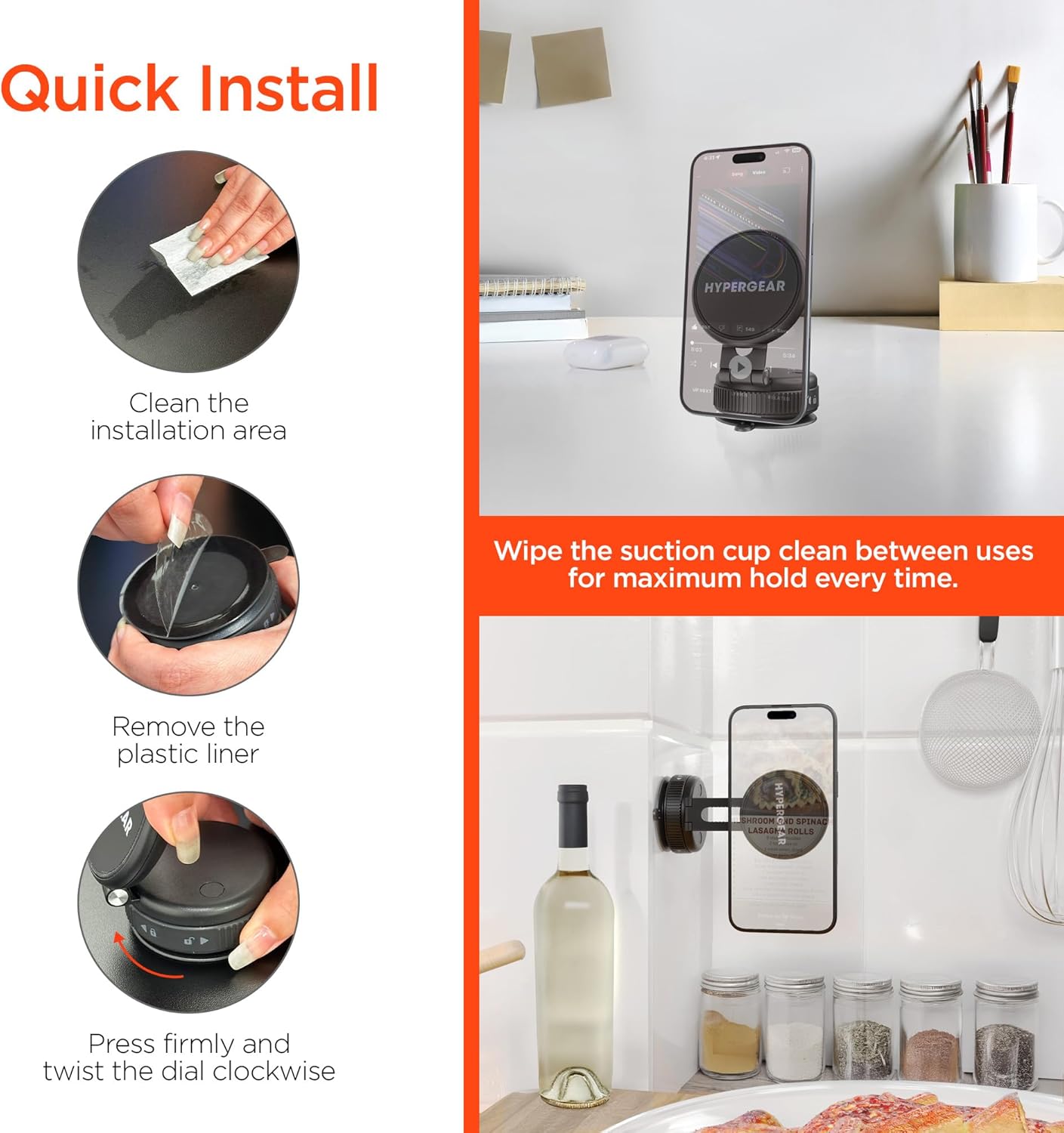
Image: The phone mount installed in a car, showing placement on both the dashboard screen and the windshield for navigation. Includes a note about incompatibility with textured or curved dashboard surfaces.
Maintenance
To ensure optimal performance and maximum suction power, regular maintenance of the suction cup is recommended:
- Clean the Suction Cup: Between uses, or if you notice reduced suction, wipe the suction cup with a damp, lint-free cloth to remove any dust or debris. Allow it to air dry completely before re-mounting.
- Storage: When not in use for extended periods, store the mount in a clean, dry place.
Troubleshooting
- Problem: The suction cup does not hold firmly.
- Solution 1: Ensure the mounting surface is perfectly smooth, clean, and dry. Textured, porous, or curved surfaces are not compatible with the suction cup.
- Solution 2: Clean the suction cup thoroughly with a damp cloth and let it dry before re-applying.
- Solution 3: Make sure the dial on the base is twisted fully clockwise to engage the vacuum lock.
- Problem: Phone does not attach magnetically.
- Solution 1: Verify your phone or case is MagSafe compatible.
- Solution 2: If not MagSafe compatible, ensure the adhesive adapter plate is correctly applied to the back of your phone or case.
- Solution 3: Check for any obstructions between the phone and the magnetic head.
Specifications
| Brand | HYPERGEAR |
| Model Name | Mag Vac Magnetic Phone Mount |
| Model Number | 16348 |
| UPC | 633755163487 |
| Material | Plastic |
| Item Weight | 163 g |
| Product Dimensions (L x W x H) | 16.51 x 3.56 x 13.97 cm |
| Special Features | Magnetic snap-on grip, 65% smaller foldable design for travel, MagSafe compatible, Powerful suction cup |
| Compatible Devices | Mobile Phones (Apple iPhone 12 and newer MagSafe models, Android phones and older iPhones with adapter plate) |
Warranty and Support
Specific warranty information for the HyperGear Mag Vac Magnetic Phone Mount is not provided in this document. Please refer to the official HyperGear website or your purchase documentation for detailed warranty terms and conditions.
For technical support, product inquiries, or assistance with troubleshooting, please contact HyperGear customer service through their official website or the contact information provided with your product packaging.
Ask a question about this manual
Ask about setup, troubleshooting, compatibility, parts, safety, or missing instructions. Manuals+ will review the question and use this page’s manual context to help answer it.