1. Introduction
This manual provides essential information for the proper installation, operation, and maintenance of your mGYDY 865C E-Bike LCD Color Display. The 865C display is designed to enhance your electric biking experience by providing real-time data and intuitive controls. It features a clear color screen, IP65 waterproofing, and a convenient Type-C charging port.
Please read this manual thoroughly before using the product to ensure optimal performance and safety.
2. Safety Information
- Always ensure the display is securely mounted before riding.
- Do not attempt to open or modify the display unit. Unauthorized modifications can void the warranty and pose safety risks.
- While the display is IP65 waterproof, avoid submerging it in water or exposing it to high-pressure water jets.
- Keep the display screen clean and free from obstructions to ensure clear visibility of riding data.
- If any malfunction occurs, discontinue use and consult the troubleshooting section or contact support.
3. Package Contents
The package for the mGYDY 865C E-Bike LCD Color Display typically includes:
- 1 x 865C E-Bike LCD Color Display Unit
Note: Other products or components not listed above are not included.
4. Compatibility and Installation
4.1. Compatibility
The mGYDY 865C display is a triangular CAN version display specifically designed for Bafang brand mid-drive motors. It is compatible with the following Bafang mid-drive motor models:
- M200, M300, M400, M500, M600, M820, M420, M410, M510, M560, M620
- Newer versions of G340, G320, and M315 motor models
Important: This display is exclusively for Bafang brand mid-drive motors and utilizes the UART protocol. It is not compatible with Bafang front-wheel drive or rear-wheel drive hub motors.

This image presents two perspectives of the mGYDY 865C E-Bike LCD Color Display. The top right corner of one display shows the 'UART' logo, indicating the communication protocol. The other view shows the display from an angle, emphasizing its compact design and the integrated handlebar controller.
4.2. Installation
The 865C display features a 5-pin female connector for straightforward installation. Follow these general steps:
- Ensure your e-bike's power is turned off before beginning installation.
- Mount the display securely on your handlebar in a position that allows for clear visibility and easy access to the controls.
- Connect the 5-pin female connector from the display to the corresponding male connector on your Bafang mid-drive motor system. Ensure the connection is firm and secure.
- Route the cables neatly and secure them to prevent interference with moving parts or damage during riding.

This image displays the mGYDY 865C E-Bike LCD Color Display along with its 5-pin female connector, which is essential for connecting to compatible Bafang mid-drive motors. The handlebar controller is also visible.
5. Operating Instructions
5.1. Display Overview
The 865C LCD color display provides comprehensive real-time riding data. Key information typically displayed includes:
- Current Speed: Displays your speed in KM/H or MPH.
- Battery Level: Indicates the remaining battery charge.
- Assist Level: Shows the current pedal assist level (0-5).
- Output Power (W): Displays the motor's current power output.
- Trip Distance: Records the distance traveled for the current ride.
- Total Distance (Odometer): Records the total distance traveled by the e-bike.
- Remaining Range: Estimates the distance you can travel based on current battery and assist level.
- Energy Consumption (CALORIES): Tracks estimated calorie burn.
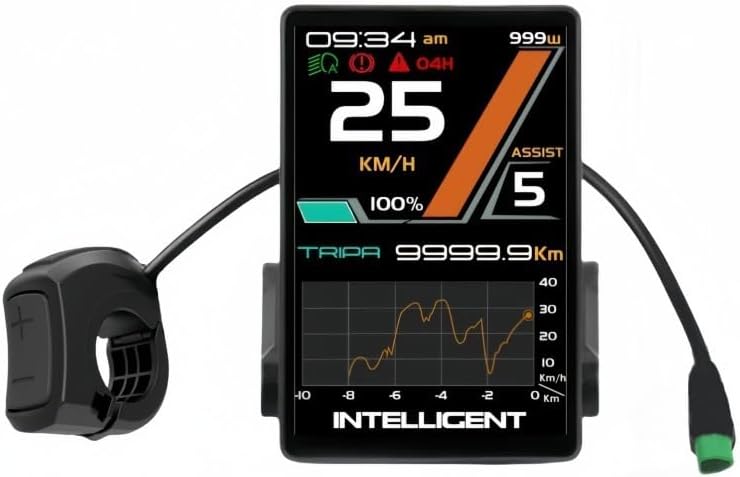
This image shows the mGYDY 865C E-Bike LCD Color Display mounted on a handlebar, displaying key riding data such as current speed (25 KM/H), battery level (100%), assist level (5), and power output (999W). A graph of historical data is also visible. The integrated handlebar controller is on the left.
5.2. Controls and Navigation
The display is operated via an intuitive handlebar controller. Specific button functions may vary slightly, but generally include:
- Power Button: Turns the display and e-bike system on/off.
- Up/Down Buttons (+/-): Adjusts pedal assist levels (typically 0-5). These buttons may also be used to navigate menus.
- Mode/Set Button: Cycles through different display modes (e.g., trip distance, odometer, average speed) or enters settings menus.
5.3. Adjusting Assist Levels
The 865C display offers five support levels to control the motor's assistance. Use the + and - buttons on the handlebar controller to increase or decrease the assist level. Level 0 typically provides no motor assistance, while Level 5 provides maximum assistance.
5.4. Type-C Fast Charging Function
The 865C display is equipped with a Type-C port that supports 15W fast charging. This allows you to charge compatible external devices, such as smartphones, directly from your e-bike's battery via the display.
- Locate the Type-C port on the side of the display unit.
- Connect your device using a compatible Type-C cable.
- Ensure the e-bike system is powered on for charging to commence.

This image highlights the Type-C charging port located on the side of the mGYDY 865C E-Bike LCD Color Display. An arrow indicates its use for charging external devices, such as a smartphone, demonstrating the 15W fast charging capability.
6. Maintenance
- Cleaning: Wipe the display screen and body with a soft, damp cloth. Avoid using abrasive cleaners or solvents that could damage the surface.
- Water Resistance: The display has an IP65 protection rating, meaning it is protected against dust ingress and low-pressure water jets from any direction. However, it is not designed for submersion.
- Storage: When not in use for extended periods, store the e-bike and display in a dry, temperate environment, away from direct sunlight and extreme temperatures.
- Cable Inspection: Periodically check all cables and connectors for signs of wear, damage, or loose connections.
7. Troubleshooting
If you encounter issues with your 865C display, refer to the following common problems and solutions:
- Display does not turn on:
- Check if the e-bike battery is charged and properly connected.
- Ensure all display cables are securely connected to the motor system.
- Verify the power button on the display or e-bike system is functioning.
- Incorrect speed or distance readings:
- Confirm that the wheel size setting in the display's menu (if applicable) matches your e-bike's wheel size.
- Check the speed sensor and magnet for proper alignment and cleanliness.
- Display shows an error code:
- Refer to your Bafang motor manual for specific error code interpretations.
- Often, error codes indicate issues with motor, battery, or sensor connections. Recheck all connections.
- Type-C charging not working:
- Ensure the e-bike system is powered on.
- Verify that the Type-C cable and the device being charged are compatible and functioning correctly.
If the issue persists after attempting these solutions, please contact your dealer or a qualified e-bike technician for assistance.
8. Specifications
| Feature | Specification |
|---|---|
| Model Name | 865C ebike display |
| Brand | mGYDY |
| Material | ABS |
| Color | Black |
| Compatibility | Bafang Mid-Drive Motors (CAN version, UART protocol) |
| Connector Type | 5-pin Female |
| Waterproof Rating | IP65 |
| Charging Port | Type-C, 15W Fast Charging |
| Display Type | LCD Color Display |
| Dimensions (Approx.) | 12 x 10 x 8 cm |
| Weight (Approx.) | 300g |
9. Warranty and Support
9.1. Warranty Information
The mGYDY 865C E-Bike LCD Color Display comes with a 1-Year Manufacturer Warranty. This warranty covers defects in materials and workmanship under normal use. Please retain your proof of purchase for warranty claims.
The warranty does not cover damage resulting from improper installation, misuse, accidents, unauthorized modifications, or normal wear and tear.
9.2. Customer Support
For technical assistance, warranty claims, or further inquiries, please contact your original point of purchase or refer to the manufacturer's official support channels.


