
1. Introduction
Thank you for choosing the LEFANT M3 Max Robot Vacuum and Mop. This device is designed to provide efficient and automated cleaning for your home, combining powerful vacuuming with advanced mopping capabilities. Featuring dToF laser navigation, multi-floor mapping, a self-emptying and mop-washing station, and smart obstacle avoidance, the M3 Max offers a comprehensive cleaning solution. Please read this manual thoroughly before use to ensure proper operation and maintenance.
Official product overview video for the LEFANT M3 Max Robot Vacuum and Mop, showcasing its features and design.
2. Safety Instructions
- Read all instructions before operating the appliance.
- Do not allow children to play with the robot. Supervise children and pets when the robot is operating.
- Use only the manufacturer-recommended power adapter and charging station.
- Ensure the robot is turned off and unplugged before cleaning or performing maintenance.
- Do not use the robot on wet surfaces or in environments with standing water.
- Remove any loose cables, small objects, or fragile items from the cleaning path to prevent entanglement or damage.
- Do not operate the robot in areas with open flames or explosive materials.
- Store the robot and charging station indoors in a cool, dry place.
3. Package Contents
Verify that all items are included in your package:

An image displaying the LEFANT M3 Max robot, its all-in-one station, power cable, dust bags, side brushes, mop supports, washable mops, HEPA filters, cleaning detergent, cleaning tool, and user manual.
- LEFANT M3 Max Robot Vacuum and Mop
- All-in-One Self-Emptying and Mop Washing Station
- Power Cable (x1)
- Dust Bags (x2)
- Side Brushes (x2)
- Mop Supports (x2)
- Washable Mop Pads (x4)
- HEPA Filters (x2)
- Cleaning Detergent (x1)
- Cleaning Tool (x1)
- User Manual (x1)
4. Product Overview
Robot Components

Top view of the LEFANT M3 Max robot vacuum, showing its sleek design and central LiDAR sensor.
The LEFANT M3 Max features a compact, circular design with a top-mounted LiDAR sensor for navigation. It includes side brushes, a main V-shaped roller brush, and dual rotating mop pads on the underside. The front bumper houses multiple PSD sensors for obstacle detection.
All-in-One Station

The all-in-one station for the LEFANT M3 Max, illustrating its self-emptying dustbin, hot water mop washing, and air-drying capabilities.
The accompanying all-in-one station handles automatic dustbin emptying into a 3.2L bag, 45°C hot water mop washing, and natural air drying for the mop pads. It also stores clean and dirty water in separate 2.5L tanks.
5. Setup
5.1 Charging Station Placement
Place the all-in-one station against a wall in an open area, ensuring at least 0.5 meters of clear space on both sides and 1.5 meters in front. Avoid placing it near stairs or in high-traffic areas. Plug the power cable into the station and a wall outlet.
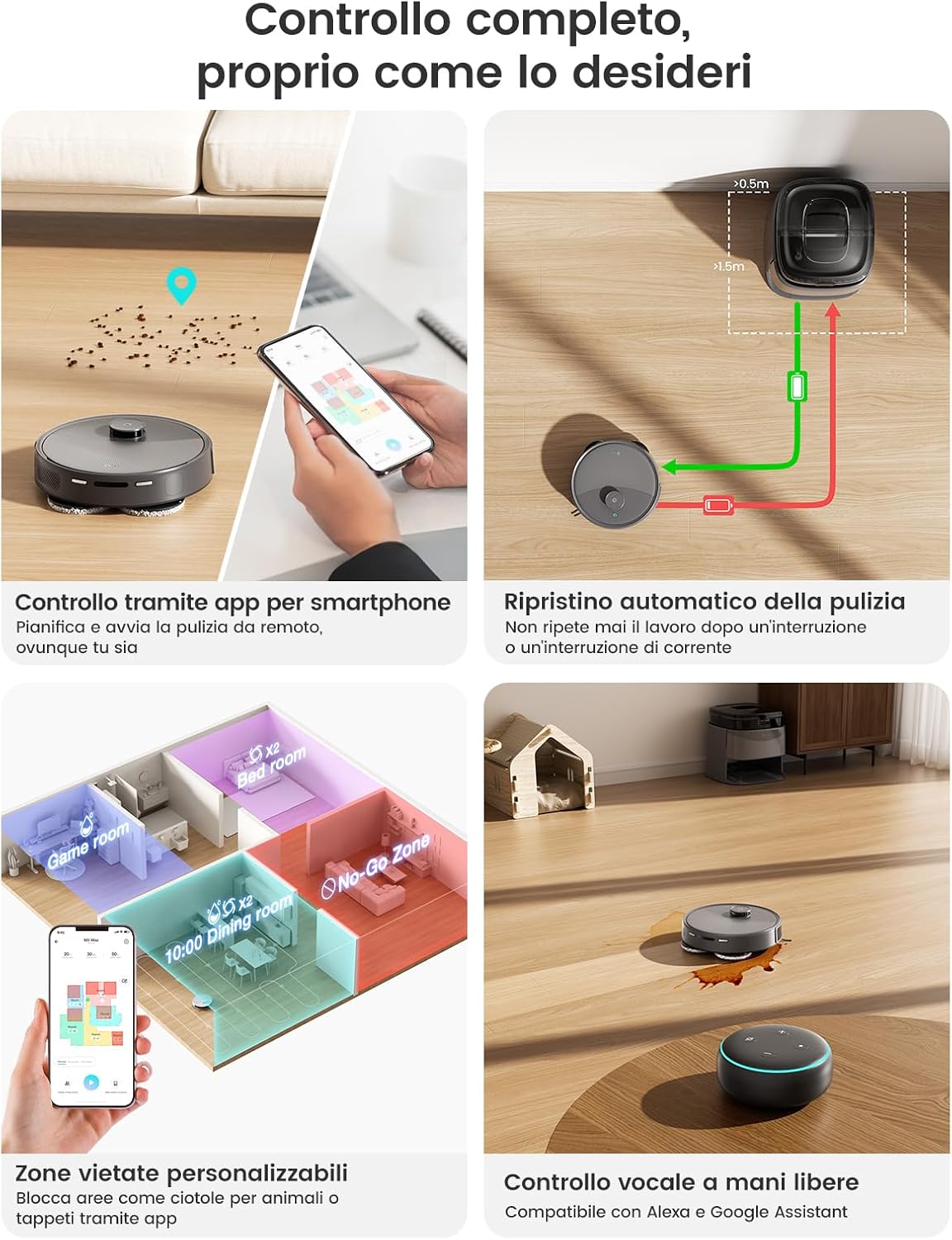
An image showing the robot returning to its charging station, with recommended clear space around the station.
5.2 Initial Charging
Place the robot onto the charging station. Ensure the charging contacts on the robot align with those on the station. The robot will automatically begin charging. For first-time use, fully charge the robot before its initial cleaning cycle.
5.3 App Connection (Lefant App)
To unlock all smart features, connect your LEFANT M3 Max to the Lefant App:
- Download the 'Lefant' app from your smartphone's app store.
- Open the app and add your M3 Max robot vacuum.
- Connect to a 2.4G/5G Wi-Fi network.
- Power on the robot vacuum by pressing the power button.
- Press and hold the start button for 6 seconds.
- Select 'M3 Max' in the app and wait for the robot to pair correctly.

A visual guide showing the steps to connect the LEFANT M3 Max robot to the Lefant mobile application.
5.4 Voice Assistant Connection (Alexa/Google Assistant)
Integrate your robot with voice assistants for hands-free control:
- Open the Lefant App, go to 'Mine' > 'Third-party voice service'.
- Register your voice account and password.
- Open the Alexa App (or Google Home App), go to 'More' > 'Skills & Games'.
- Search for 'Smart Life'.
- Enable the skill.
- Select your region and enter your voice account and password.
- Wait for the connection to complete.

A visual guide demonstrating the steps to connect the LEFANT M3 Max robot to Amazon Alexa.
5.5 Apple Watch Control
Control your robot directly from your Apple Watch:
- Download the Lefant app on your phone and the Lefant Watch app on your Apple Watch.
- Pair the Watch app to your Apple Watch.
- Select the Lefant app on your Apple Watch.
- You must click on the Lefant app on your phone and log in.
- Once logged in, connect your robot.
- Return to your Apple Watch, from which you can now control your robot.
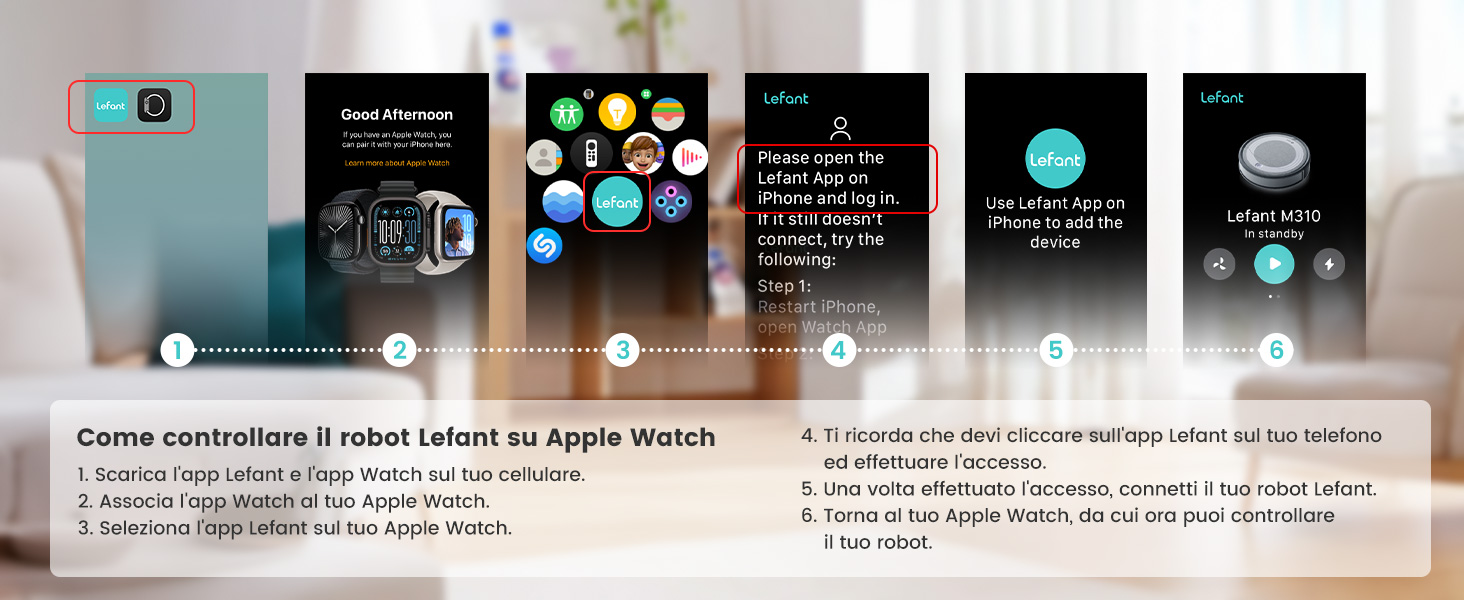
A visual guide illustrating how to control the LEFANT M3 Max robot using an Apple Watch.
6. Operating Instructions
6.1 Cleaning Modes
The LEFANT M3 Max offers various cleaning modes accessible via the Lefant App:
- Auto Clean: The robot intelligently maps and cleans your entire home.
- Spot Clean: Directs the robot to clean a specific area with concentrated effort.
- Zone Clean: Define custom zones in the app for targeted cleaning.
- Edge Clean: Cleans along walls and furniture edges.
- Mop Only: Activates only the mopping function.
- Vacuum Only: Activates only the vacuuming function.

The Lefant app interface showing various cleaning modes and customization options for the M3 Max.
6.2 Scheduling and Zone Management
Use the Lefant App to set cleaning schedules, define no-go zones, and customize cleaning preferences for each room.
- Multi-Floor Mapping: The robot can store up to 3 different floor maps, ideal for multi-level homes.
- No-Go Zones: Draw virtual boundaries to prevent the robot from entering specific areas or disturbing pet bowls.
- Room-by-Room Customization: Adjust suction power and water flow for individual rooms.

An illustration of the LEFANT M3 Max's multi-level mapping capability, showing different floor plans.

An image demonstrating the smart forbidden zones feature, allowing users to define areas the robot should avoid.
6.3 Carpet Detection and Mop Lifting
The M3 Max automatically detects carpets. When a carpet is detected, the robot will:
- Automatically lift its mop pads by 9mm to prevent wetting the carpet.
- Increase suction power for deeper carpet cleaning.
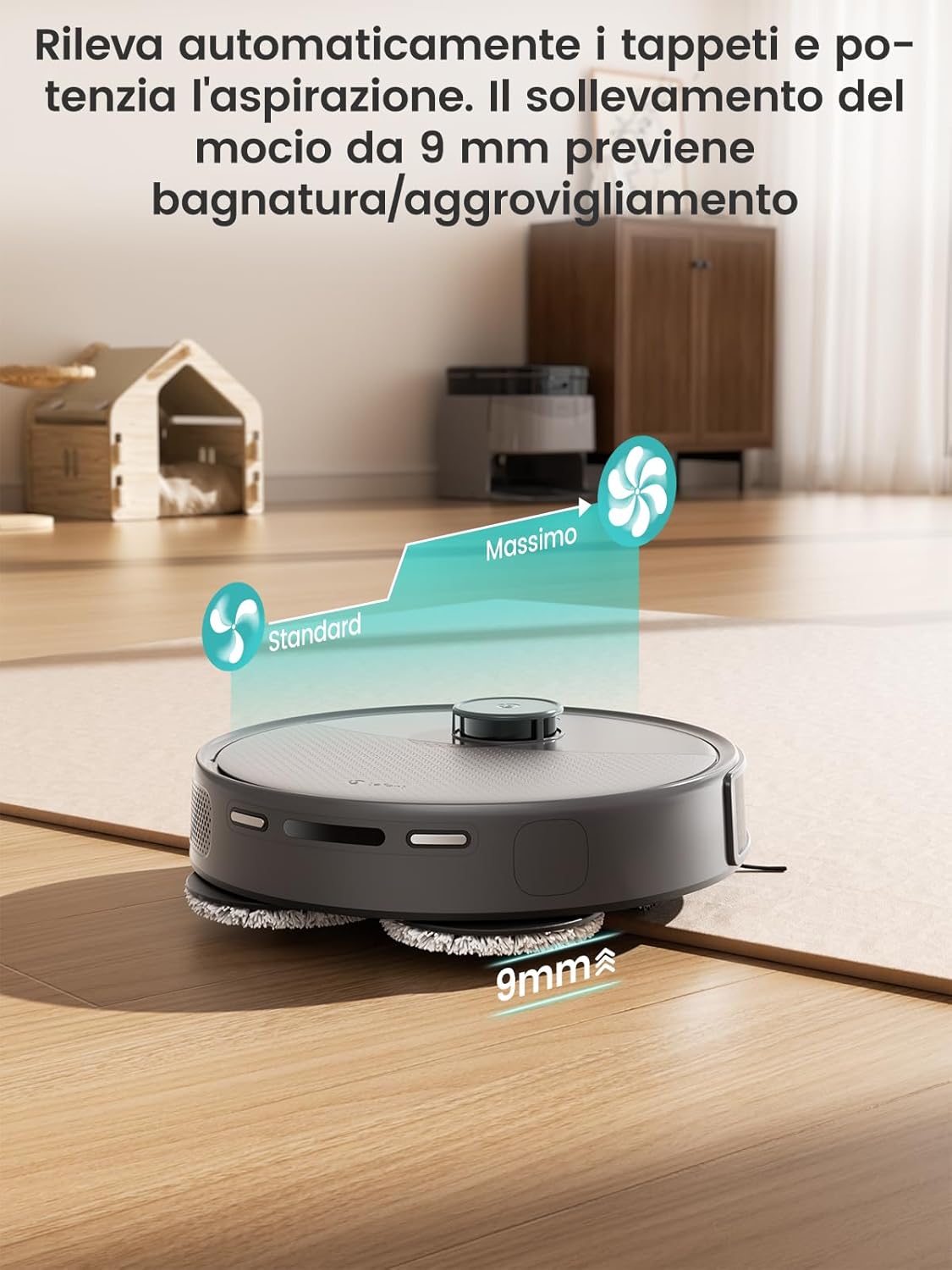
The LEFANT M3 Max robot demonstrating its automatic mop lifting and suction boost feature when transitioning from hard floor to carpet.
7. Maintenance
Regular maintenance ensures optimal performance and extends the lifespan of your LEFANT M3 Max.
7.1 Self-Emptying Station
The 3.2L dust bag in the self-emptying station typically requires replacement every 8 weeks, depending on usage and environment. The app will notify you when the bag is full.
7.2 Mop Cleaning and Drying
The station automatically washes the mop pads with 45°C hot water and then dries them with natural air to prevent odors and bacterial growth. The mop base is removable for easy manual cleaning if needed.

An image illustrating the self-cleaning system of the LEFANT M3 Max station, showing the removable mop base for manual cleaning.
7.3 Dustbin and Filter Cleaning
Although the station self-empties, periodically check and clean the robot's internal dustbin and HEPA filter to maintain suction efficiency. Tap out debris from the filter and rinse if necessary (allow to air dry completely before reinserting).
7.4 Brush Cleaning
Regularly remove hair and debris from the main V-shaped roller brush and side brushes. The anti-tangle design helps, but manual cleaning is still recommended.

A detailed view of the LEFANT M3 Max's V-shaped roller brush with dual anti-tangle combs, designed to prevent hair entanglement.
7.5 Sensor Cleaning
Wipe the LiDAR sensor, PSD obstacle avoidance sensors, and cliff sensors with a clean, dry cloth to ensure accurate navigation and obstacle detection.
8. Troubleshooting
| Problem | Possible Cause | Solution |
|---|---|---|
| Robot does not turn on | Low battery; Power button not pressed; Robot stuck. | Charge the robot; Press and hold power button; Clear any obstructions. |
| Robot cannot connect to Wi-Fi | Incorrect Wi-Fi password; Router too far; 5Ghz network selected (if not supported). | Verify password; Move robot closer to router; Ensure 2.4Ghz network is used. |
| Poor suction performance | Full dustbin; Clogged filter; Blocked brushes. | Empty dustbin; Clean/replace filter; Clean brushes. |
| Mop not cleaning effectively | Dirty mop pads; Water tank empty; Detergent dispenser empty. | Clean/replace mop pads; Refill water tank; Refill detergent. |
| Robot gets stuck frequently | Obstacles in path; Dirty sensors; Loose cables. | Clear area; Clean sensors; Secure cables. Use no-go zones. |
| Station not self-emptying | Dust bag full; Suction port blocked; Station lid not closed properly. | Replace dust bag; Clear blockages; Ensure lid is secure. |
9. Specifications
| Feature | Specification |
|---|---|
| Brand | LEFANT |
| Model | M3 Max |
| Suction Power | 20000 Pa |
| Navigation Type | Laser dToF 360° |
| Obstacle Avoidance | 190° PSD Sensors, FreeMove Technology |
| Mop Type | Dual Rotating Mops (200 RPM) |
| Mop Lift Height | 9 mm (Automatic) |
| All-in-One Station Features | Self-Emptying (3.2L dust bag), 45°C Hot Water Mop Wash, Air Drying |
| Clean Water Tank Capacity | 2.5 Liters |
| Dirty Water Tank Capacity | 2.5 Liters |
| Battery Capacity | 5200 mAh |
| Runtime | Up to 210 minutes |
| Coverage Area | Up to 220 m² |
| Noise Level | 55 Decibels |
| Connectivity | WiFi 2.4G/5G |
| Compatible Devices | Amazon Echo, Google Home, Lefant App |
| Dimensions (Robot) | 32 x 32 x 9.7 cm |
| Weight (Robot) | 9.7 kg |
| Recommended Surfaces | Hard floor, Carpet, Parquet, Tiles |
10. Warranty Information
The LEFANT M3 Max Robot Vacuum and Mop comes with a standard manufacturer's warranty. Please refer to the warranty card included in your package or visit the official LEFANT website for detailed information regarding warranty terms, conditions, and duration. Keep your proof of purchase for warranty claims.
11. Customer Support
For technical assistance, troubleshooting, or any questions regarding your LEFANT M3 Max, please contact LEFANT customer support. You can find contact information on the official LEFANT website or through the Lefant App. Our support team is available to help you with any issues you may encounter.


