
1. Introduction
Thank you for choosing DONGFXK Motorized Blackout Roller Shades. These shades are designed to provide privacy, light control, and energy efficiency through automated operation. This manual provides detailed instructions for installation, operation, and maintenance to ensure optimal performance and longevity of your product.
The DONGFXK Motorized Blackout Roller Shades feature a solar charging option, a multi-layered fabric for blackout and cooling, and smart control capabilities. Please read this manual thoroughly before installation and use.

Image 1.1: DONGFXK Motorized Blackout Roller Shades installed in a window bay. The image shows two grey roller shades, one with a visible solar panel attached to the top rail, and both partially lowered over windows. Cushions are visible on a window seat below.
2. Product Features
- Solar Charging & Cover Plate: Equipped with a complimentary solar panel for continuous charging, reducing the need for external power supply. An integrated cover plate provides a seamless and attractive appearance.
- Upgraded Blackout Fabric: Features a four-layer fabric composition designed to refract sunlight, reduce room temperature, and provide 100% light opacity for a comfortable sleeping environment. The fabric includes a cooling layer, UV protection layer, opaque layer, and upgraded textured fabric.
- Smart & Group Control: Supports control via a 15-channel remote control (up to 15 shades) and a smart hub (up to 30 shades) for voice and app control. The hub is sold separately.

Image 2.1: Diagram illustrating the four-layer fabric composition of the blackout shades. Layers include a cooling layer with silver ion, a UV protection layer, a 100% opaque layer, and an upgraded textured fabric. Arrows indicate heat reflection and temperature reduction from 103°F to 83°F.

Image 2.2: A motorized blackout shade with a solar panel visible at the top. Icons below highlight key benefits: privacy protection (blocking view from outside), environment friendly (powered by solar, no need to charge batteries), and budget friendly (electric shade at the price of a manual curtain).
3. Setup and Installation
3.1 Mounting Options
Proper measurement is crucial for correct installation. Please refer to the diagrams below for guidance.
Inside Mount
- The window depth must be at least 2.5 inches (2½").
- Measure the width of the window frame at three points (top, middle, bottom). Select the smallest measurement as the shade width.
- Measure the height of the window frame at three points (left, middle, right). Select the largest measurement as the shade height.
- The actual blind's size will be the ordered size.
Outside Mount
- For outside mount, add 4 inches to both the window width and height measurements to determine the required shade size.
- This method helps eliminate light gaps on the sides for full blackout coverage.
- The actual width of the blinds should be the maximum window size plus 4 inches.

Image 3.1: Detailed diagrams illustrating how to measure for both inside and outside mount installations. The inside mount diagram shows measuring window width and height, emphasizing a minimum 2.5-inch depth. The outside mount diagram shows adding 4 inches to both width and height for optimal coverage.
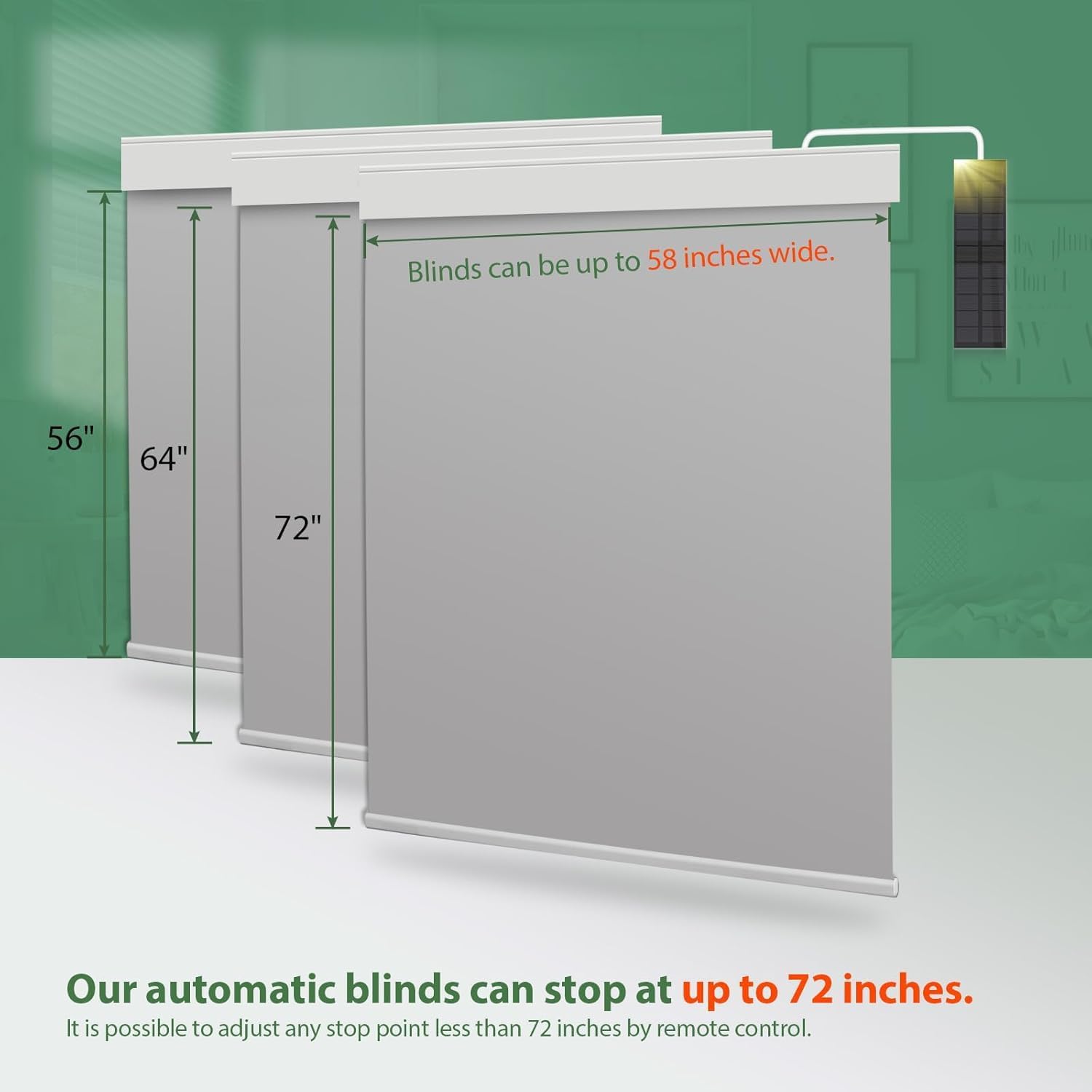
Image 3.2: An illustration showing the maximum dimensions for the automatic blinds. Blinds can be up to 58 inches wide and can stop at up to 72 inches in height. Adjustable stop points less than 72 inches are possible via remote control.
3.2 Solar Panel Connection
The motorized blinds come with a complimentary solar panel. It is recommended to keep the solar panel plugged into the smart roller shades at all times to ensure continuous power supply. This eliminates the need for frequent battery replacements.
Alternatively, the blinds can be charged using an external power supply with a 1A charger.
4. Operating Instructions
4.1 Remote Control
The 15-channel remote control allows you to manage up to 15 motorized blinds simultaneously. Each channel can be programmed to control a single shade or a group of shades. Refer to the remote control's specific instructions for pairing and programming.
4.2 Smart Control (Optional Hub Required)
For advanced smart controls, including voice and app integration, a DONGFXK smart hub (smart bridge) is required. The hub can control up to 30 automatic blackout shades. The hub is available separately from DONGFXK. Once connected, you can integrate your shades with compatible smart home systems.
4.3 Adjusting Shade Height
The smart shades can be freely adjusted to any height between 0 and 72 inches. Use the remote control or smart app to set desired upper and lower limits, or to move the shade to any intermediate position.

Image 4.1: An illustration showing the optional remote control and smart hub. The remote control can manage up to 15 shades, while the hub can control up to 30 shades and enables smart home integration.
5. Maintenance
5.1 Fabric Care
Due to the unique properties of the fabric, wrinkles may form during transportation. To remove wrinkles, you can gently iron the fabric for a brief moment (one second) upon receiving the blinds, or allow them to hang for approximately one week, and the wrinkles should naturally dissipate.
For general cleaning, gently wipe the fabric with a soft, damp cloth. Avoid harsh chemicals or abrasive cleaners.
6. Troubleshooting
If you encounter any issues with your DONGFXK Motorized Blackout Roller Shades, please consider the following common solutions:
- Shade Not Responding: Check if the solar panel is properly connected and receiving light, or if the internal battery requires charging via the 1A external charger. Ensure the remote control batteries are functional.
- Remote Control Issues: Verify that the remote is paired correctly with the shades. If controlling multiple shades, ensure the correct channel is selected.
- Inconsistent Movement: Check for any obstructions in the shade's path. Ensure the mounting brackets are securely fastened and level.
- Smart Control Connectivity: If using a smart hub, ensure it is powered on, connected to your network, and properly paired with the shades and your smart home app.
For persistent issues, please contact DONGFXK customer support.
7. Specifications
| Attribute | Value |
|---|---|
| Brand | DONGFXK |
| Colour | Rb-gray-rechargeable |
| Material | Polyester |
| Special Features | Eco-Friendly, Solar Charging |
| Item Weight | 3.65 kg |
| Product Dimensions | 182.9L x 139.7W Centimetres (Approx. 55" W x 72" H) |
| Room Type | Bedroom (Suitable for various rooms) |
| Operation Mode | Automatic |
| Included Components | Batteries included, Shade included, Solar Panel |
| ASIN | B0FVLH19FL |
8. Warranty and Support
For warranty information and customer support, please refer to the product packaging or contact DONGFXK directly through their official website or the retailer where the product was purchased. Please have your product model and ASIN (B0FVLH19FL) available when contacting support.
