
Introduction
Thank you for choosing the LITTOAK BS01 Powered Subwoofer. This manual provides essential information for setting up, operating, and maintaining your subwoofer to ensure optimal performance and longevity. The BS01 is designed to deliver rich, deep bass, enhancing your movie, music, and gaming experiences with advanced audio technology and dynamic visual effects.
What's Included
Please check the package contents to ensure all items are present:
- LITTOAK BS01 Powered Subwoofer
- Power Cable
- Audio Cable
- Quick Start Guide (this manual)

Image: The LITTOAK BS01 Powered Subwoofer with its power cable, audio cable, and quick start guide.
Product Features
- 6.5-Inch Subwoofer with DSP & Class-D Amp: Advanced DSP technology and a Class-D amplifier drive the 6.5-inch woofer, delivering 60W RMS / 100W peak power for rich, deep bass, elevating movie, music, and gaming immersion.
- Low Pass Dial & 40Hz Frequency Response: The low pass dial allows frequency response down to 40Hz, enabling the subwoofer to focus on low frequencies and perfectly complement your main speakers' mid and high-range performance.
- Automatic Standby for Energy Savings: An automatic standby function helps conserve electricity by powering the subwoofer down when not in use, reducing unnecessary energy consumption.
- 3D Tunnel Light & 6 LED Effects for Visual Vibe: Built-in 3D Tunnel Light and 6 LED effects add visual appeal, enhancing the immersive atmosphere for your gaming, movie, and music sessions.
- Robust Build & Low Distortion MDF Cabinet: A low distortion MDF cabinet and robust build quality ensure durability and reliable long-term home audio performance.
- Compact 10”x12” Design with Sleek Gray Finish: The compact size (10”D x 10”W x 12”H) and sleek gray finish allow the subwoofer to blend smoothly into any home audio or home theater space, providing powerful bass without occupying excessive room.
Setup
Follow these steps to connect your LITTOAK BS01 Powered Subwoofer to your audio system:
- Placement: Position the subwoofer in your desired location. Consider placing it near your main speakers or in a corner for enhanced bass response.
- Power Connection: Connect the supplied power cable to the subwoofer's power input and then to a wall outlet.
- Audio Connection (Line In): If your audio source (e.g., soundbar, receiver, TV) has an AUX OUT port, use the supplied 3.5mm-RCA audio cable. Connect the 3.5mm end to your device's AUX OUT and the RCA ends (red/white) to the LINE IN ports on the subwoofer.
- Audio Connection (LFE In): If your audio source has a dedicated SUB OUT or LFE OUT port, use a subwoofer cable (not supplied). Connect one end to your device's SUB OUT/LFE OUT and the other end to the LFE IN port on the subwoofer.
- Power On: Flip the power switch on the back of the subwoofer to the 'ON' position.
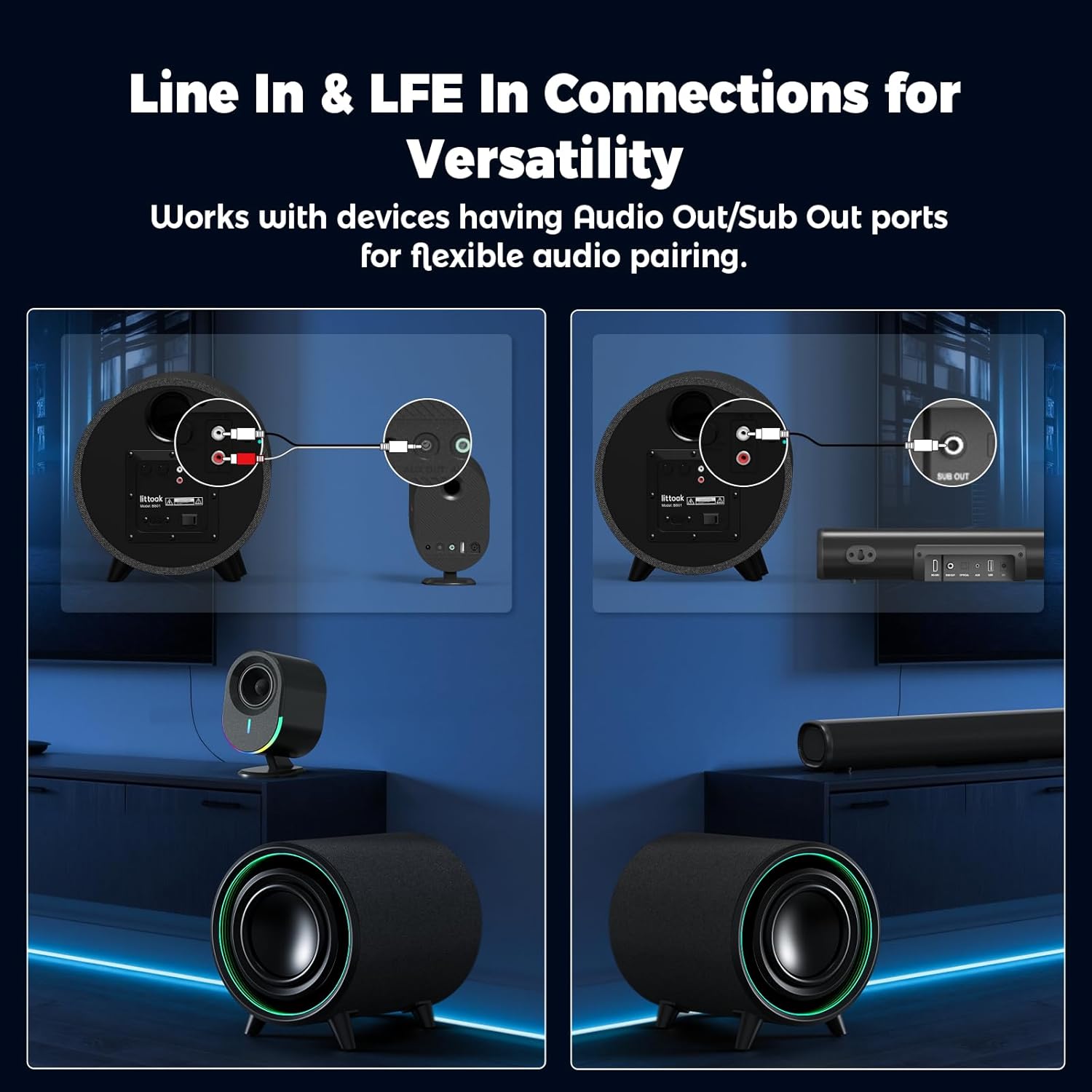
Image: Connection options for the LITTOAK BS01 subwoofer, illustrating Line In and LFE In setups.
Video: A visual guide demonstrating the setup and connection process for the LITTOAK BS01 Powered Subwoofer with 3D Tunnel Light.
Operating Instructions
Once connected, you can adjust the subwoofer's settings for optimal audio performance:
- Volume Control: Use the 'VOLUME' dial on the back panel to adjust the overall bass level. Start with a low setting and gradually increase it to your preference.
- Low Pass Dial: The 'LOW PASS' dial (40Hz-250Hz) allows you to set the upper frequency limit for the subwoofer. Adjust this to blend the subwoofer's output seamlessly with your main speakers. A common starting point is around 80-100Hz.
- Phase Switch: The 'PHASE' switch (0°/180°) helps ensure that the subwoofer's sound waves are in sync with your main speakers. Experiment with both settings to find the one that produces the most impactful and coherent bass.
- Automatic Standby: The subwoofer features an auto on/off function. It will automatically enter standby mode after 15 minutes of inactivity and wake up instantly when an audio signal is detected. This feature helps save energy.
- 3D Tunnel Light & LED Effects: The subwoofer includes a 3D Tunnel Light with 6 LED effects (Red, Blue, Purple, Green, Yellow, Breathing). These visual effects enhance the ambiance of your listening environment. Refer to the quick start guide for specific controls to cycle through or disable these effects.

Image: The LITTOAK BS01 subwoofer demonstrating its automatic standby feature for energy efficiency.

Image: The LITTOAK BS01 subwoofer with its dynamic 3D Tunnel Light and multiple LED color options.
Maintenance
To ensure the longevity and optimal performance of your subwoofer, follow these maintenance guidelines:
- Cleaning: Use a soft, dry cloth to clean the exterior of the subwoofer. Avoid using abrasive cleaners, waxes, or solvents.
- Ventilation: Ensure adequate airflow around the subwoofer. Do not block any ventilation openings.
- Environment: Keep the subwoofer away from direct sunlight, heat sources, and excessive moisture.
- Handling: Handle the subwoofer with care. Avoid dropping it or subjecting it to strong impacts.
Troubleshooting
If you encounter any issues with your LITTOAK BS01 Powered Subwoofer, refer to the following common troubleshooting tips:
- No Sound:
- Ensure the subwoofer is powered on and the power cable is securely connected.
- Check all audio connections (LINE IN or LFE IN) to ensure they are secure and correctly plugged into the appropriate ports on both the subwoofer and your audio source.
- Verify that the volume on the subwoofer and your audio source is turned up.
- Confirm that your audio source is outputting sound.
- Distorted Sound:
- Reduce the volume on both the subwoofer and your audio source.
- Adjust the 'LOW PASS' dial to a lower frequency.
- Check for any loose connections or damaged cables.
- Weak Bass:
- Increase the volume on the subwoofer.
- Adjust the 'LOW PASS' dial to a higher frequency.
- Try changing the 'PHASE' switch setting (0° or 180°).
- Experiment with different placement locations for the subwoofer.
- LED Lights Not Working:
- Ensure the subwoofer is powered on.
- Check the quick start guide for specific instructions on controlling the LED effects.
Specifications
| Feature | Specification |
|---|---|
| Brand | LITTOAK |
| Model Name | BS01 |
| Speaker Type | Subwoofer |
| Subwoofer Diameter | 6.5 Inches |
| Speaker Maximum Output Power | 100 Watts (Peak) |
| Frequency Response | 40 Hz (down to) |
| Signal-to-Noise Ratio | 85 dB |
| Connectivity Technology | Wired (LFE IN, LINE IN) |
| Special Features | Auto on/off, Bass Boost, Dynamics RGB LED Lights, LED Light |
| Compatible Devices | Bookshelf Speakers, Receiver, Soundbar |
| Product Dimensions | 12"D x 10"W x 10"H |
| Item Weight | 11.58 pounds |
| Material | Acrylonitrile Butadiene Styrene (ABS), Glass, Wood |
| Color | Black |
| Water Resistance Level | Not Water Resistant |
Warranty & Support
For warranty information, please refer to the documentation included with your purchase or visit the official LITTOAK website. If you require technical assistance or have questions not covered in this manual, please contact LITTOAK customer support through their official channels.
Online resources and FAQs may also be available on the LITTOAK brand store page: LITTOAK Store