
1. Introduction
Thank you for choosing the NuvoMed Cordless Heat Therapy Hand Massager. This device is designed to provide targeted relief for cramped, sore hands, promote blood circulation, and enhance overall hand mobility. It utilizes acupressure compression massage combined with optional heat therapy to soothe pain and discomfort. Please read this manual thoroughly before use to ensure safe and effective operation.
2. Important Safety Instructions
WARNING: To reduce the risk of electric shock, burns, fire, or injury, always follow these basic safety precautions:
- Read all instructions before using this appliance.
- Do not use while sleeping or drowsy.
- Do not use on infants, invalids, or on a sleeping or unconscious person.
- Do not use on insensitive skin or on a person with poor blood circulation.
- Never use pins or other metallic fasteners with this appliance.
- Never operate if the appliance has a damaged cord or plug, if it is not working properly, if it has been dropped or damaged, or dropped into water.
- Keep the cord away from heated surfaces.
- Do not use outdoors.
- Do not operate where aerosol (spray) products are being used or where oxygen is being administered.
- To disconnect, turn all controls to the OFF position, then remove the plug from the outlet.
- Use this appliance only for its intended use as described in this manual. Do not use attachments not recommended by the manufacturer.
- Never drop or insert any object into any opening.
- Do not attempt to repair the appliance. There are no user-serviceable parts.
- Consult your doctor before using if you have any medical conditions, including but not limited to: pregnancy, pacemaker, diabetes, heart disease, or any other health concerns.
- Discontinue use if you experience pain or discomfort.
3. Product Overview
3.1 Components
The NuvoMed Hand Massager features an ergonomic design for comfortable use. Key components include the hand insertion chamber, control panel, and charging port.
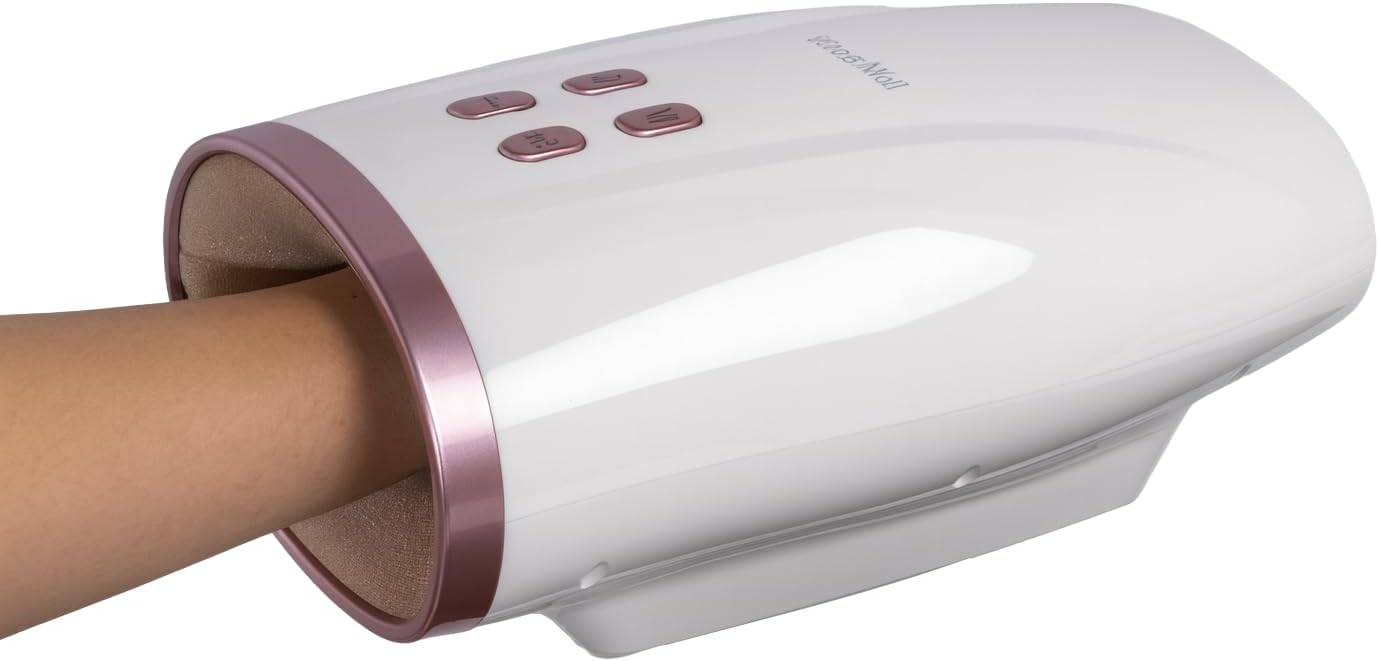
Figure 1: The NuvoMed Cordless Heat Therapy Hand Massager with a hand inserted into the massage chamber. The device is white with rose gold accents and features control buttons on the top surface.

Figure 2: A close-up view of the interior of the hand massager's chamber, showing the soft, textured lining designed for comfort and effective massage.
3.2 Control Panel
The control panel is located on the top surface of the massager and consists of several buttons for easy operation.

Figure 3: Front view of the NuvoMed Hand Massager, highlighting the control buttons and the included USB charging cable. The buttons are labeled with icons for power, mode, heat, and intensity.
- Power Button (⏻): Turns the device ON/OFF.
- Mode Button (M): Cycles through different massage modes (e.g., gentle, soothing, strong).
- Heat Button (♨): Activates or deactivates the heat therapy function.
- Intensity Button (⇵): Adjusts the intensity of the compression massage.
4. Setup
4.1 Charging the Device
The NuvoMed Hand Massager is equipped with a built-in 2000mAh rechargeable battery. Before first use, fully charge the device.
- Locate the USB charging port on the device.
- Connect the provided USB charging cable to the massager and to a compatible USB power adapter (not included) or computer USB port.
- The charging indicator light will illuminate (e.g., red) to show that the device is charging.
- Once fully charged, the indicator light will change (e.g., turn green or turn off). A full charge typically takes approximately 2-3 hours.
- Disconnect the charging cable once charging is complete.
Note: Do not operate the massager while it is charging.
5. Operating Instructions
5.1 Getting Started
- Ensure the device is fully charged.
- Sit in a comfortable position.
- Gently insert your hand into the massage chamber, ensuring your palm and fingers are comfortably positioned. The open-ended design accommodates various hand sizes.
5.2 Powering On/Off
- Press and hold the Power Button (⏻) for a few seconds to turn the massager ON.
- Press and hold the Power Button (⏻) again for a few seconds to turn the massager OFF.
5.3 Selecting Massage Mode
- After powering on, press the Mode Button (M) to cycle through the available massage modes. Each press will switch to a different mode, indicated by a change in the massage pattern or an indicator light.
- Experiment with different modes to find the one that best suits your preference.
5.4 Adjusting Intensity
- Press the Intensity Button (⇵) to adjust the compression intensity.
- Multiple intensity levels are available. Start with the lowest setting and gradually increase to a comfortable level.
5.5 Activating Heat Therapy
- Press the Heat Button (♨) to turn the heat function ON. An indicator light will typically illuminate.
- Press the Heat Button (♨) again to turn the heat function OFF.
- The heat function can be used independently or in conjunction with any massage mode.
5.6 Session Duration
The massager may have an automatic shut-off timer, typically set for 15-20 minutes, to prevent overuse. If not, it is recommended to limit each session to 15-20 minutes.
6. Maintenance and Care
6.1 Cleaning
- Always ensure the device is turned OFF and unplugged before cleaning.
- Wipe the exterior of the massager with a soft, slightly damp cloth.
- Do not use abrasive cleaners, solvents, or harsh chemicals.
- Do not immerse the device in water or any other liquid.
6.2 Storage
- Store the massager in a cool, dry place, away from direct sunlight and extreme temperatures.
- Keep out of reach of children.
7. Troubleshooting
| Problem | Possible Cause | Solution |
|---|---|---|
| Device does not turn on. | Battery is depleted. | Charge the device fully using the provided USB cable. |
| No compression massage. | Incorrect mode selected or intensity too low. | Press the Mode button to cycle through modes. Increase intensity using the Intensity button. |
| Heat function not working. | Heat function not activated. | Press the Heat button to activate. Allow a few minutes for the heat to become noticeable. |
| Device stops unexpectedly. | Automatic shut-off timer activated or low battery. | Recharge the device. If fully charged, wait a few minutes before restarting. |
If the problem persists after attempting the above solutions, please contact customer support.
8. Specifications

Figure 4: The underside of the NuvoMed Hand Massager, displaying the product label with model number, power specifications, and battery information.
- Model Number: EHM-4/0114
- Product Dimensions: 10 x 6.3 x 4.3 inches
- Weight: 2.53 Pounds
- Power Source: Battery Powered
- Battery: Rechargeable 2000mAh
- Material: Plastic
- Color: White
- Manufacturer: NuvōMed
9. Warranty and Support
This product is manufactured by NuvōMed. For warranty information, technical support, or service inquiries, please refer to the warranty card included with your purchase or contact the manufacturer directly through their official website or customer service channels.
Please retain your proof of purchase for warranty claims.


