
Miritz K809
Miritz K809 Mini Wireless Keyboard with Touchpad User Manual
Model: K809 | Brand: Miritz
Introduction
The Miritz K809 Mini Wireless Keyboard with Touchpad is a compact input device designed for versatile use across multiple platforms. It features dual-mode connectivity (Bluetooth 5.2 and 2.4GHz wireless), an integrated touchpad, and RGB backlighting. This manual provides instructions for setup, operation, and maintenance to ensure optimal performance.
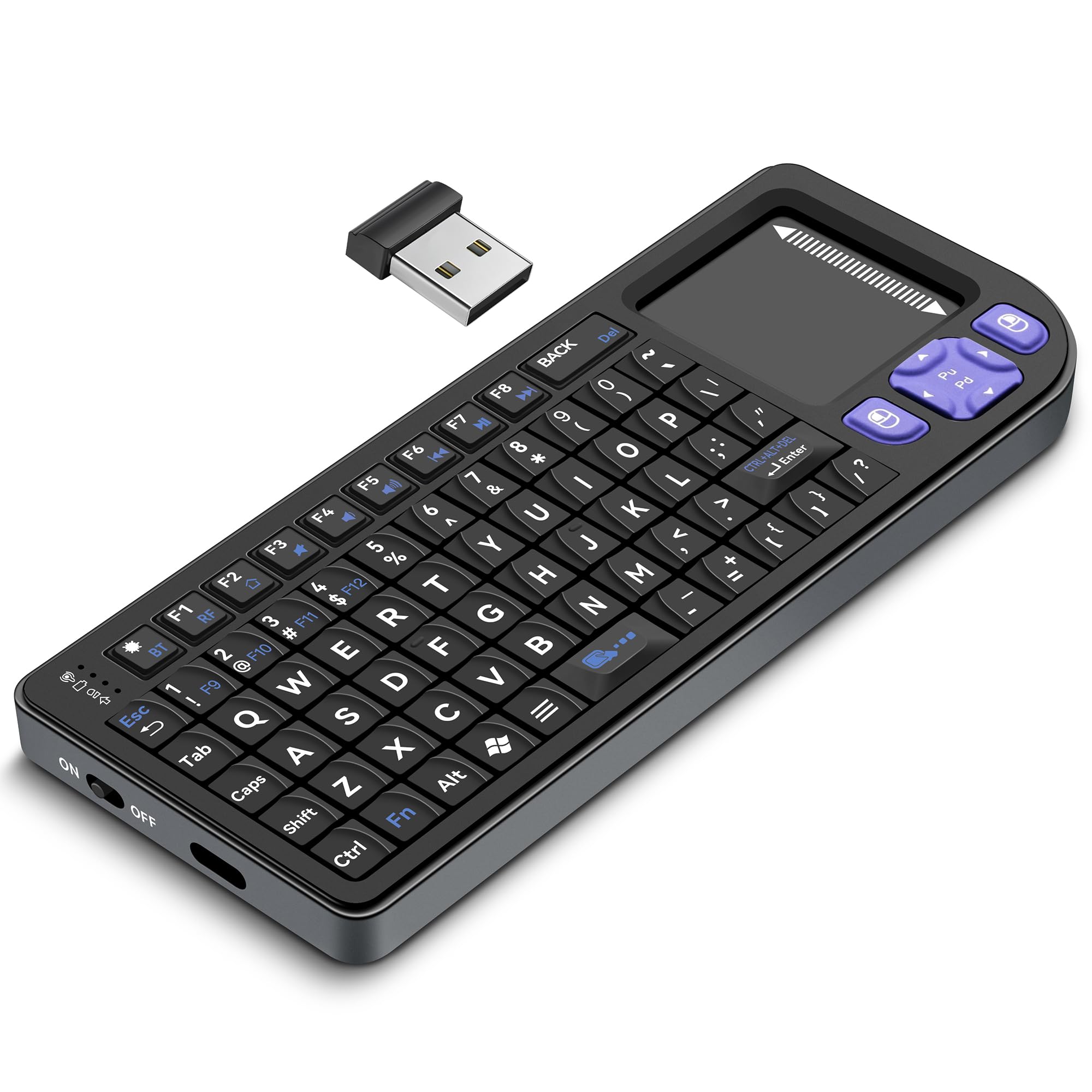
Image: The Miritz K809 Mini Wireless Keyboard with Touchpad, showcasing its compact design.
Package Contents
Verify that all items are present in the package:
- Miritz K809 Mini Wireless Keyboard
- USB Receiver (for 2.4GHz connection)
- USB-C Charging Cable
- User Manual (this document)
Setup
1. Powering On/Off
Locate the power switch on the side of the keyboard. Slide the switch to the "ON" position to power on the device. Slide it to "OFF" when not in use to conserve battery. The keyboard also features an auto sleep/wake function to save power during periods of inactivity.
2. Charging the Keyboard
The keyboard is powered by a built-in 1000mAh lithium-ion battery. To charge:
- Connect the provided USB-C cable to the charging port on the keyboard.
- Connect the other end of the USB-C cable to a USB power source (e.g., computer USB port, USB wall adapter).
- The charging indicator light will illuminate. A full charge typically takes 2-3 hours.

Image: The Miritz K809 Mini Wireless Keyboard connected via USB-C for charging.
3. 2.4GHz Wireless Connection
For devices without Bluetooth or for a direct plug-and-play connection:
- Locate the USB receiver, typically stored in a compartment on the keyboard itself.
- Insert the USB receiver into an available USB port on your device (PC, Laptop, Smart TV, etc.).
- Turn on the keyboard. It should automatically connect to the receiver.
- To switch to 2.4GHz mode if already in Bluetooth mode, press Fn + RF.

Image: Illustration of inserting the 2.4GHz USB receiver into a device for connection.
4. Bluetooth 5.2 Connection
For devices with Bluetooth capability (e.g., iPad, Mac, smartphones):
- Ensure the keyboard is powered on.
- Press Fn + BT to switch the keyboard to Bluetooth mode. The Bluetooth indicator light will flash, indicating it's in pairing mode.
- On your device, go to Bluetooth settings and search for new devices.
- Select "Miritz K809" (or similar) from the list of available devices to pair.
- Once paired, the indicator light on the keyboard will stop flashing.

Image: Diagram showing how to switch between Bluetooth (Fn+BT) and 2.4GHz (Fn+RF) modes on the keyboard.
Operating Instructions
1. Keyboard Functions
The keyboard features a standard QWERTY layout with additional function keys. Use the Fn key in combination with other keys to access secondary functions (e.g., media controls, F-keys).
- Fn + F1-F8: Access various multimedia and system functions.
- Fn + Spacebar: Adjust backlight brightness or turn off/on.
- Fn + RGB key: Cycle through RGB backlight colors.
2. Touchpad Functions
The integrated touchpad supports multi-touch gestures:
- Single Finger Tap: Left-click.
- Two Finger Tap: Right-click.
- Two Finger Drag: Scroll vertically.
- Dedicated Scroll Bar: Located on the right side of the touchpad for vertical scrolling.
Video: A demonstration of the mini keyboard with touchpad, highlighting its compact size and functionality.
3. RGB Backlighting
The keyboard features customizable RGB backlighting for improved visibility in low-light conditions:
- Press the RGB key (often marked with a light bulb icon) to cycle through different backlight colors.
- Use Fn + Spacebar to adjust the brightness levels or turn the backlight off/on.

Image: The Miritz K809 Mini Wireless Keyboard displaying its multi-color RGB backlighting options.
Compatibility
The Miritz K809 Mini Wireless Keyboard is compatible with a wide range of operating systems and devices:
- Operating Systems: Windows, macOS, Linux, iOS, Android.
- Devices: PCs, Laptops, Tablets, Smartphones, Android-based TV boxes, Smart TVs, HTPCs, Gaming Consoles (e.g., Steam Deck, X-Box).

Image: Visual representation of the keyboard's compatibility with various devices and operating systems.
Maintenance
To ensure the longevity and optimal performance of your Miritz K809 Mini Wireless Keyboard:
- Cleaning: Use a soft, dry cloth to wipe the surface of the keyboard. For stubborn dirt, a slightly damp cloth can be used, ensuring no moisture enters the device. Avoid harsh chemicals or abrasive materials.
- Storage: Store the keyboard in a cool, dry place away from direct sunlight and extreme temperatures.
- Handling: Avoid dropping the keyboard or subjecting it to strong impacts.
Troubleshooting
| Problem | Possible Cause | Solution |
|---|---|---|
| Keyboard not responding | Low battery; Keyboard off; Incorrect connection mode; Out of range. | Charge the keyboard; Turn on the keyboard; Ensure correct mode (Fn+BT for Bluetooth, Fn+RF for 2.4GHz); Move closer to the device (within 10m). |
| Bluetooth pairing fails | Keyboard not in pairing mode; Device Bluetooth off; Interference. | Press Fn+BT to enter pairing mode; Enable Bluetooth on your device; Try pairing in a different location. |
| 2.4GHz connection issues | USB receiver not properly inserted; Driver issues (rare). | Ensure USB receiver is fully inserted; Try a different USB port; Restart the device. |
| Touchpad not working | Touchpad disabled (if applicable); Software glitch. | Check if there's a function key to enable/disable touchpad (refer to keyboard layout); Restart the keyboard and device. |
| Backlight not working/changing | Backlight off; Low battery. | Press Fn+Spacebar to adjust brightness/toggle; Charge the keyboard. |
Specifications
- Model: K809
- Brand: Miritz
- Connectivity: Bluetooth 5.2, 2.4GHz Wireless
- Dimensions (L x W x H): 5.94" x 2.32" x 0.48" (15.09 cm x 5.89 cm x 1.22 cm)
- Weight: 0.09 kg (approximately 3.17 oz)
- Battery: 1000mAh Lithium-ion (Rechargeable via USB-C)
- Keyboard Layout: QWERTY
- Number of Keys: 74
- Special Features: Integrated Touchpad, RGB Backlit Keys, Lightweight, Portable, Auto Sleep/Wake
- Material: Acrylonitrile Butadiene Styrene, Aluminum Frame
- Operating Range: Up to 33 ft (10 m)
Warranty and Support
Miritz offers a customer-friendly return policy:
- 30-Day Return/Replacement: For any quality-related issues.
- 7-Day No-Hassle Return: For any reason.
For support or to initiate a return, please contact Miritz customer service. Refer to the product packaging or the official Miritz website for contact details.
Ask a question about this manual
Ask about setup, troubleshooting, compatibility, parts, safety, or missing instructions. Manuals+ will review the question and use this page’s manual context to help answer it.